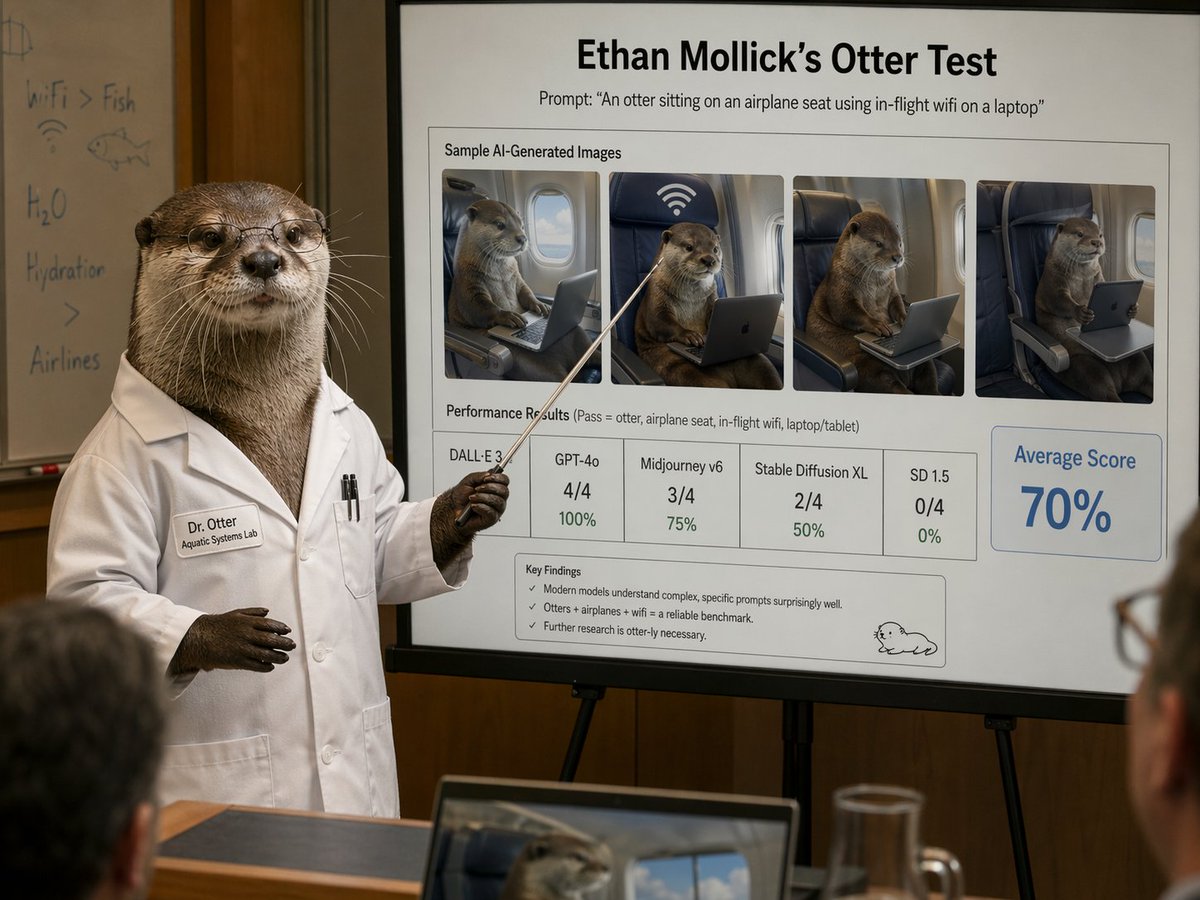
สไลด์นำเสนอของนักวิทยาศาสตร์เกี่ยวกับนาก
ภาพฉากการประชุมเชิงล้อเลียนที่สมจริง แสดงให้เห็นนากในชุดเสื้อคลุมห้องทดลองกำลังนำเสนอสไลด์มาตรฐานที่ขัดเกลาอย่างดีเกี่ยวกับภาพนากที่สร้างขึ้นโดยปัญญาประดิษฐ์ เหมาะสำหรับใช้ในงานเสียดสี โพสต์บนโซเชียลมีเดีย หรือการสาธิต AI ในสไตล์บทความ
นี่คือตัวอย่างข้อความแจ้งเตือน GPT Image 2 สำหรับ กราฟิกและโปสเตอร์ ใช้ข้อความแจ้งเตือนที่พร้อมใช้งานด้านล่างเพื่อสร้างภาพที่คล้ายกัน และตรวจสอบการอ้างอิง Awesome GPT Image 2 Prompts รวมถึงสิทธิ์ในการใช้งานเชิงพาณิชย์ก่อนนำไปใช้ซ้ำ
ต้องการชุดข้อความแจ้งเตือนทั้งหมดหรือไม่? ใช้... กราฟิกและโปสเตอร์ ศูนย์รวมหัวข้อสำหรับตัวอย่างที่เกี่ยวข้องเพิ่มเติม หรือเปิดดูได้เลย GPT Image 2 แคตตาล็อกพร้อมท์ สำหรับดัชนีตัวอย่างฉบับเต็ม โครงสร้างที่นำกลับมาใช้ใหม่ได้ และการอ้างอิงแหล่งที่มา
Free 1K preview
Generate one preview image instantly, no sign-up required.
2639/4000
พรอมป์
ข้อความแจ้งเตือนพร้อมสำหรับการคัดลอก
A photorealistic humorous academic presentation in a conference room: an anthropomorphic otter scientist stands at the left side of the frame wearing a crisp white lab coat and holding a thin pointing stick toward a large presentation board on an easel. The otter is upright like a human, with realistic brown fur, dark paws, and a professional posture. The lab coat has a stitched name tag reading "Dr. Otter" and a smaller line reading "Aquatic Systems Lab," plus two pens in the chest pocket. Show every face clearly with natural, detailed facial features. Behind the otter is a whiteboard with faint handwritten notes and doodles, including "WiFi > Fish," "H2O," "Hydration," a fish sketch, and a wifi symbol. The main focus is a large clean presentation slide with sharp readable text and polished corporate-academic layout. At the top, a bold title reads "{argument name="headline text" default="Ethan Mollick’s Otter Test"}" and beneath it a subtitle reads "Prompt: \"{argument name="prompt text" default="An otter sitting on an airplane seat using in-flight wifi on a laptop"}\"". Below that is a boxed section titled "Sample AI-Generated Images" containing exactly 4 side-by-side sample images of a realistic otter seated in an airplane seat using a laptop or tablet, each framed like model outputs, with one showing a large wifi symbol above the seat. Beneath the images is a section labeled "Performance Results (Pass = otter, airplane seat, in-flight wifi, laptop/tablet)" with exactly 5 score boxes: "DALL·E 3" with no visible numeric score, "GPT-4o" with "4/4" and "100%", "Midjourney v6" with "3/4" and "75%", "Stable Diffusion XL" with "2/4" and "50%", and "SD 1.5" with "0/4" and "0%". On the right side is a large highlighted box reading "Average Score" and "{argument name="average score" default="70%"}" in large blue type. At the bottom of the slide is a "Key Findings" box with exactly 3 bullet points: "Modern models understand complex, specific prompts surprisingly well.", "Otters + airplanes + wifi = a reliable benchmark.", and "Further research is otter-ly necessary." A small simple cartoon otter doodle appears in the lower-right corner of the slide. The room is warmly lit with wood-paneled walls, shallow depth of field, and a few blurred audience members in the foreground, including a laptop at the bottom edge showing an otter image on its screen and a glass pitcher on a table. Style: ultra-realistic editorial photography, deadpan scientific satire, believable conference presentation, high detail, natural indoor lighting, professional lens compression, readable slide typography, polished yet absurd.ตัวแปรพร้อมท์
ตัวอย่างค่าอาร์กิวเมนต์ที่แก้ไขได้ซึ่งพบในข้อความแจ้งเตือน พร้อมค่าเริ่มต้น
ตัวแปร
headline text
ค่าเริ่มต้น
Ethan Mollick’s Otter Test
ตัวแปร
prompt text
ค่าเริ่มต้น
An otter sitting on an airplane seat using in-flight wifi on a laptop
ตัวแปร
average score
ค่าเริ่มต้น
70%
Best for
- - กราฟิกและโปสเตอร์ visual exploration
- - Image generation and reference-image edits
- - Reusable briefs that keep source attribution visible
Change these parts
- - Subject, product, character, or scene
- - Aspect ratio, camera, lighting, and background
- - Brand, text, color, and output constraints
Recommended model and settings
- - Model: gpt-image-2
- - Input mode: ข้อความเป็นรูปภาพ
- - Aspect ratio: source
- - Commercial status: review original source
How to use this prompt
- 1. Copy the prompt and preserve its structure for the first test.
- 2. Replace the subject, context, and publishing channel.
- 3. Change one camera, lighting, or style variable per iteration.
- 4. Inspect the output, source, text, and rights before reuse.
Limitations, source, and reuse cautions
- - Generated output is an editable draft, not factual, legal, or rights evidence.
- - Review the linked source, people, brands, logos, text, and third-party media before commercial use.
นำเข้าจาก Awesome GPT Image 2 Prompts จำเป็นต้องระบุแหล่งที่มา สถานะการใช้งานเชิงพาณิชย์คือ allowed โปรดตรวจสอบสิทธิ์แหล่งที่มาก่อนใช้งานแบบเสียค่าใช้จ่าย
กรณีเพิ่มเติมในหมวดหมู่นี้
จัดลำดับความสำคัญตามหมวดหมู่ ความเข้ากันได้กับโหมดการป้อนข้อมูล คุณภาพ และความเสี่ยงที่ต่ำกว่า

Transparent Earbuds on Stone Pedestal
ข้อความเป็นรูปภาพ

Manga Desert Radio Telescope Road Trip
ข้อความเป็นรูปภาพ

Female Clown Cyborg Portrait
ข้อความเป็นรูปภาพ

Imperial Research Bunker on Volcanic Planet
ข้อความเป็นรูปภาพ

Greyscale Puzzle Portrait with Color Accent
ข้อความเป็นรูปภาพ

Pink Hijab Mirror Selfie Portrait
ข้อความเป็นรูปภาพ
หมายเหตุเกี่ยวกับการนำกลับมาใช้ใหม่และแหล่งที่มา
ใช้ข้อความแจ้งเตือนนี้อย่างปลอดภัยหลังจากดูตัวอย่างกรณีแล้ว
- 1.คัดลอกข้อความแจ้งเตือน หรือเปิดโดยตรงใน Dovoo โดยใช้ปุ่มสร้างข้อความ
- 2.ปรับตัวแปร อัตราส่วนภาพ และภาพอ้างอิงให้เหมาะสมกับกรณีการใช้งานของคุณ
- 3.ก่อนเผยแพร่หรือใช้งานโดยเสียค่าใช้จ่าย โปรดตรวจสอบสิทธิ์ในแหล่งที่มา ข้อกำหนดการอ้างอิง และความเสี่ยงด้านแบรนด์หรือภาพลักษณ์