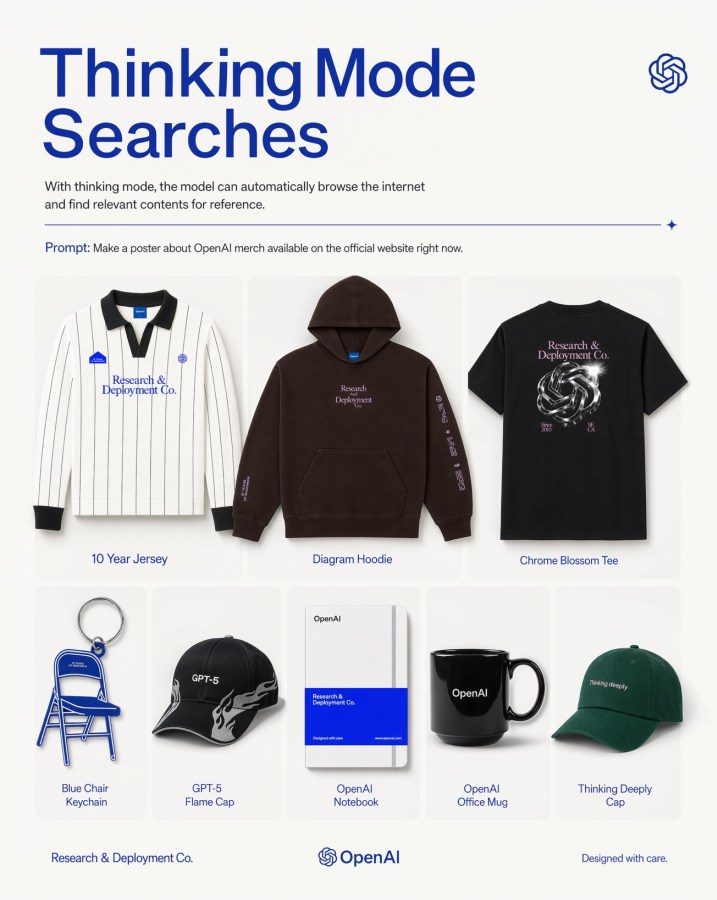
ตารางโปสเตอร์สินค้า OpenAI
โปสเตอร์โฆษณาแบบร่วมสมัยที่แสดงสินค้า 8 รายการภายใต้ธีม OpenAI ในรูปแบบตารางสินค้าที่เรียบง่าย เหมาะสำหรับการโปรโมทแบรนด์เทคโนโลยีหรือใช้เป็นภาพประกอบการตลาดบนโซเชียลมีเดีย
นี่คือตัวอย่างข้อความแจ้งเตือน GPT Image 2 สำหรับ ผลิตภัณฑ์และเชิงพาณิชย์ ใช้ข้อความแจ้งเตือนที่พร้อมใช้งานด้านล่างเพื่อสร้างภาพที่คล้ายกัน และตรวจสอบการอ้างอิง Awesome GPT Image 2 Prompts รวมถึงสิทธิ์ในการใช้งานเชิงพาณิชย์ก่อนนำไปใช้ซ้ำ
ต้องการชุดข้อความแจ้งเตือนทั้งหมดหรือไม่? ใช้... ผลิตภัณฑ์และเชิงพาณิชย์ ศูนย์รวมหัวข้อสำหรับตัวอย่างที่เกี่ยวข้องเพิ่มเติม หรือเปิดดูได้เลย GPT Image 2 แคตตาล็อกพร้อมท์ สำหรับดัชนีตัวอย่างฉบับเต็ม โครงสร้างที่นำกลับมาใช้ใหม่ได้ และการอ้างอิงแหล่งที่มา
Free 1K preview
Generate one preview image instantly, no sign-up required.
2414/4000
พรอมป์
ข้อความแจ้งเตือนพร้อมสำหรับการคัดลอก
A clean, minimalist promotional poster on an off-white background in a modern tech-brand style. At the top left, a very large bold sans-serif headline in deep cobalt blue reads {argument name="headline text" default="Thinking Mode Searches"} split across two lines. Beneath it, a smaller gray explanatory sentence says that with thinking mode, the model can automatically browse the internet and find relevant contents for reference. At the top right, place a small blue OpenAI knot logo. Below the intro text, add a thin horizontal blue divider line ending with a tiny sparkle icon on the right. Under that, include a prompt line in small text with the word “Prompt:” in blue followed by the sentence {argument name="prompt text" default="Make a poster about OpenAI merch available on the official website right now."}. The main body is a centered 3-by-2 product grid with 8 total merchandise items shown as clean catalog cutouts with soft shadows inside rounded pale cards. Top row has 3 larger products: 1) a white long-sleeve striped rugby-style jersey with black collar and cuffs, small blue patches, and blue chest text “Research & Deployment Co.”, labeled “10 Year Jersey”; 2) a dark brown pullover hoodie with front pocket, small centered chest text “Research Deployment Co.” and sleeve print, labeled “Diagram Hoodie”; 3) a black T-shirt viewed from the back with a metallic knot graphic and pale pink text “Research & Deployment Co.”, labeled “Chrome Blossom Tee”. Bottom row has 5 smaller products: 4) a blue folding chair keychain shaped like a chair, labeled “Blue Chair Keychain”; 5) a black baseball cap with white flame graphics and “GPT-5” on the front, labeled “GPT-5 Flame Cap”; 6) a white notebook with a bold blue lower band and minimal OpenAI branding, labeled “OpenAI Notebook”; 7) a glossy black mug with “OpenAI” in white, labeled “OpenAI Office Mug”; 8) a dark green baseball cap with small white text “Thinking deeply”, labeled “Thinking Deeply Cap”. Keep all item labels centered below each product in small blue sans-serif text. Along the bottom footer, place “Research & Deployment Co.” on the left, the OpenAI knot logo plus wordmark centered, and “Designed with care.” on the right. Use a balanced editorial layout, lots of whitespace, premium product-ad poster aesthetics, subtle shadows, crisp studio lighting, and a restrained palette of off-white, blue, black, brown, and green.ตัวแปรพร้อมท์
ตัวอย่างค่าอาร์กิวเมนต์ที่แก้ไขได้ซึ่งพบในข้อความแจ้งเตือน พร้อมค่าเริ่มต้น
ตัวแปร
headline text
ค่าเริ่มต้น
Thinking Mode Searches
ตัวแปร
prompt text
ค่าเริ่มต้น
Make a poster about OpenAI merch available on the official website right now.
Best for
- - ผลิตภัณฑ์และเชิงพาณิชย์ visual exploration
- - Image generation and reference-image edits
- - Reusable briefs that keep source attribution visible
Change these parts
- - Subject, product, character, or scene
- - Aspect ratio, camera, lighting, and background
- - Brand, text, color, and output constraints
Recommended model and settings
- - Model: gpt-image-2
- - Input mode: ข้อความเป็นรูปภาพ
- - Aspect ratio: source
- - Commercial status: review original source
How to use this prompt
- 1. Copy the prompt and preserve its structure for the first test.
- 2. Replace the subject, context, and publishing channel.
- 3. Change one camera, lighting, or style variable per iteration.
- 4. Inspect the output, source, text, and rights before reuse.
Limitations, source, and reuse cautions
- - Generated output is an editable draft, not factual, legal, or rights evidence.
- - Review the linked source, people, brands, logos, text, and third-party media before commercial use.
นำเข้าจาก Awesome GPT Image 2 Prompts จำเป็นต้องระบุแหล่งที่มา สถานะการใช้งานเชิงพาณิชย์คือ allowed โปรดตรวจสอบสิทธิ์แหล่งที่มาก่อนใช้งานแบบเสียค่าใช้จ่าย
กรณีเพิ่มเติมในหมวดหมู่นี้
จัดลำดับความสำคัญตามหมวดหมู่ ความเข้ากันได้กับโหมดการป้อนข้อมูล คุณภาพ และความเสี่ยงที่ต่ำกว่า

Transparent Earbuds on Stone Pedestal
ข้อความเป็นรูปภาพ

Manga Desert Radio Telescope Road Trip
ข้อความเป็นรูปภาพ

Female Clown Cyborg Portrait
ข้อความเป็นรูปภาพ

Wet Transparent Earbud Macro
ข้อความเป็นรูปภาพ

Imperial Research Bunker on Volcanic Planet
ข้อความเป็นรูปภาพ

Overhead Pepperoni Pizza Photo
ข้อความเป็นรูปภาพ
หมายเหตุเกี่ยวกับการนำกลับมาใช้ใหม่และแหล่งที่มา
ใช้ข้อความแจ้งเตือนนี้อย่างปลอดภัยหลังจากดูตัวอย่างกรณีแล้ว
- 1.คัดลอกข้อความแจ้งเตือน หรือเปิดโดยตรงใน Dovoo โดยใช้ปุ่มสร้างข้อความ
- 2.ปรับตัวแปร อัตราส่วนภาพ และภาพอ้างอิงให้เหมาะสมกับกรณีการใช้งานของคุณ
- 3.ก่อนเผยแพร่หรือใช้งานโดยเสียค่าใช้จ่าย โปรดตรวจสอบสิทธิ์ในแหล่งที่มา ข้อกำหนดการอ้างอิง และความเสี่ยงด้านแบรนด์หรือภาพลักษณ์