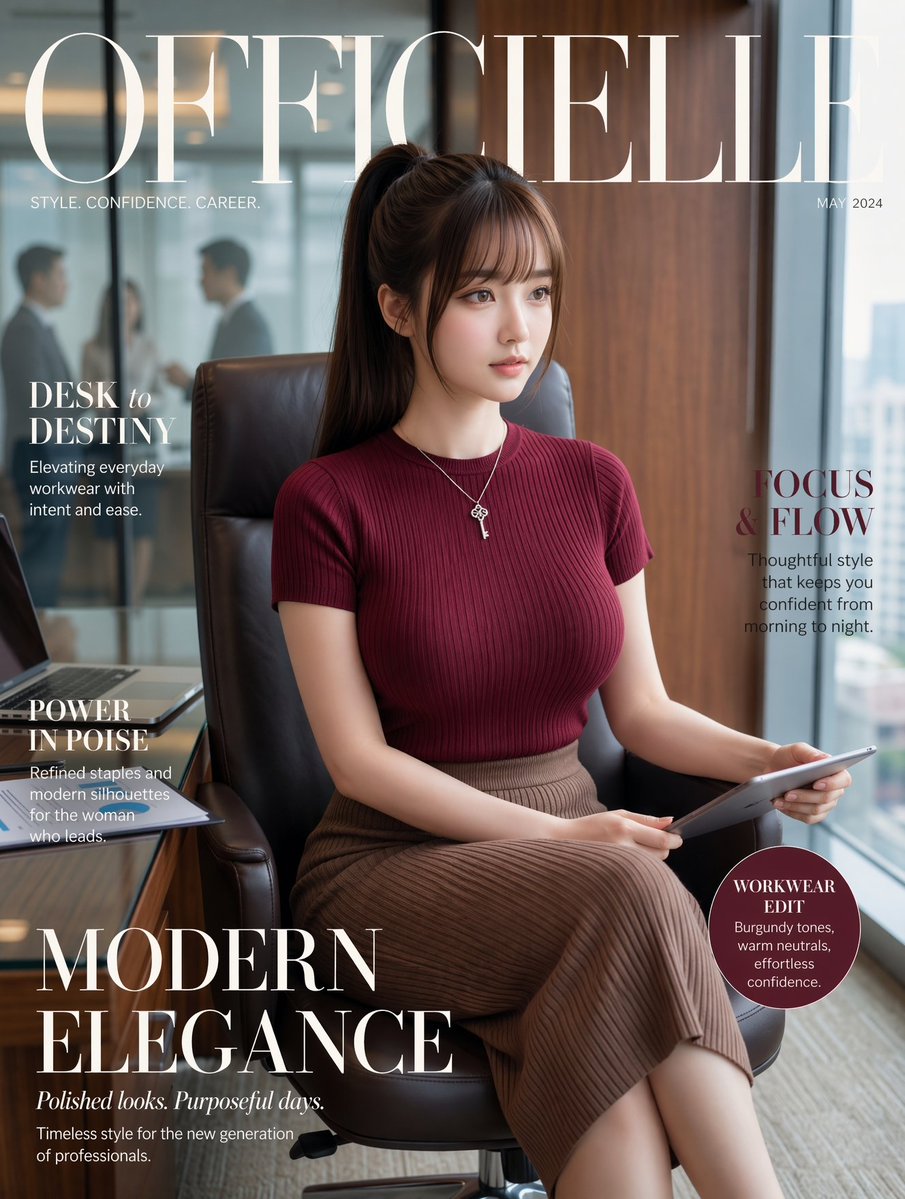
ปกนิตยสารแฟชั่นสำหรับที่ทำงาน
คำสั่งนี้จะสร้างภาพถ่ายบุคคลแบบมืออาชีพสำหรับปกนิตยสาร โดยเป็นภาพของนักธุรกิจหญิงที่มีสไตล์ในสำนักงานที่ทันสมัย เหมาะอย่างยิ่งสำหรับภาพประกอบแคมเปญแฟชั่น การสร้างแบรนด์ และชุดทำงาน
นี่คือตัวอย่างข้อความแจ้งเตือน GPT Image 2 สำหรับ แฟชั่นและความงาม ใช้ข้อความแจ้งเตือนที่พร้อมใช้งานด้านล่างเพื่อสร้างภาพที่คล้ายกัน และตรวจสอบการอ้างอิง Awesome GPT Image 2 Prompts รวมถึงสิทธิ์ในการใช้งานเชิงพาณิชย์ก่อนนำไปใช้ซ้ำ
Free 1K preview
Generate one preview image instantly, no sign-up required.
Free text preview doesn’t preserve reference-image consistency.
พรอมป์
ข้อความแจ้งเตือนพร้อมสำหรับการคัดลอก
Luxury fashion magazine cover, vertical portrait, featuring a poised young professional woman seated in a black leather office chair in a modern high-rise office. She has {argument name="hair color" default="dark brown"} hair styled in a sleek high ponytail with soft side bangs, and wears a fitted ribbed short-sleeve knit top in {argument name="top color" default="deep burgundy"}, a high-waisted pleated midi skirt in taupe-brown, and a delicate silver necklace with small key-like layered pendants. She sits with legs crossed, holding a slim tablet across her lap, looking calm, composed, and quietly powerful. The setting is a polished executive office with a wooden wall panel on the right, floor-to-ceiling glass behind her, a blurred meeting scene with 2 indistinct businesspeople visible through the glass on the left, and a desk edge in the lower left corner with an open laptop and stacked documents. Soft natural daylight, refined editorial styling, realistic fashion photography, warm neutral tones, subtle background blur, premium magazine aesthetic. Overlay elegant magazine typography: giant serif masthead reading {argument name="magazine title" default="OFFICIELLE"} across the top in ivory white, small subtitle below the left side reading "STYLE. CONFIDENCE. CAREER.", date at top right reading {argument name="cover date" default="MAY 2024"}. Add 5 cover lines total: left upper "DESK to DESTINY" with smaller subtext "Elevating everyday workwear with intent and ease.", left middle "POWER IN POISE" with smaller subtext "Refined staples and modern silhouettes for the woman who leads.", right middle "FOCUS & FLOW" with smaller subtext "Thoughtful style that keeps you confident from morning to night.", large bottom-left headline "MODERN ELEGANCE" with italic subheading "Polished looks. Purposeful days." and small text "Timeless style for the new generation of professionals.", and a circular badge at lower right containing "WORKWEAR EDIT" and smaller text "Burgundy tones, warm neutrals, effortless confidence." Clean balanced layout, upscale women’s fashion magazine cover, confident office-as-runway mood, highly realistic, sophisticated, cinematic softness.ตัวแปรพร้อมท์
ตัวอย่างค่าอาร์กิวเมนต์ที่แก้ไขได้ซึ่งพบในข้อความแจ้งเตือน พร้อมค่าเริ่มต้น
Best for
- - แฟชั่นและความงาม visual exploration
- - Image generation and reference-image edits
- - Reusable briefs that keep source attribution visible
Change these parts
- - Subject, product, character, or scene
- - Aspect ratio, camera, lighting, and background
- - Brand, text, color, and output constraints
Recommended model and settings
- - Model: gpt-image-2
- - Input mode: รูปภาพเป็นรูปภาพ
- - Aspect ratio: source
- - Commercial status: review original source
How to use this prompt
- 1. Copy the prompt and preserve its structure for the first test.
- 2. Replace the subject, context, and publishing channel.
- 3. Change one camera, lighting, or style variable per iteration.
- 4. Inspect the output, source, text, and rights before reuse.
Limitations, source, and reuse cautions
- - Generated output is an editable draft, not factual, legal, or rights evidence.
- - Review the linked source, people, brands, logos, text, and third-party media before commercial use.
กรณีเพิ่มเติมในหมวดหมู่นี้
จัดลำดับความสำคัญตามหมวดหมู่ ความเข้ากันได้กับโหมดการป้อนข้อมูล คุณภาพ และความเสี่ยงที่ต่ำกว่า






หมายเหตุเกี่ยวกับการนำกลับมาใช้ใหม่และแหล่งที่มา
ใช้ข้อความแจ้งเตือนนี้อย่างปลอดภัยหลังจากดูตัวอย่างกรณีแล้ว
- 1.คัดลอกข้อความแจ้งเตือน หรือเปิดโดยตรงใน Dovoo โดยใช้ปุ่มสร้างข้อความ
- 2.ปรับตัวแปร อัตราส่วนภาพ และภาพอ้างอิงให้เหมาะสมกับกรณีการใช้งานของคุณ
- 3.ก่อนเผยแพร่หรือใช้งานโดยเสียค่าใช้จ่าย โปรดตรวจสอบสิทธิ์ในแหล่งที่มา ข้อกำหนดการอ้างอิง และความเสี่ยงด้านแบรนด์หรือภาพลักษณ์