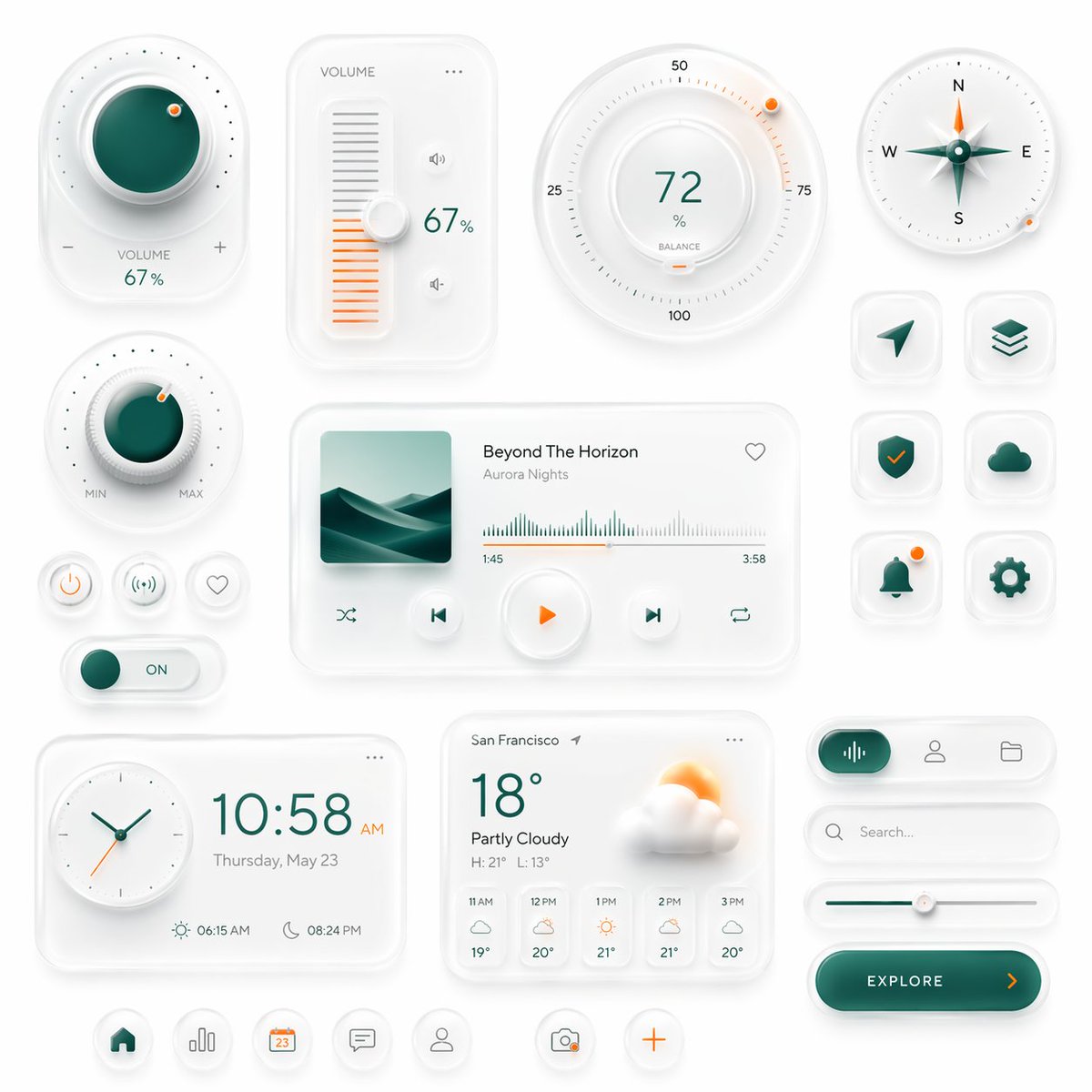
ชุด UI อัจฉริยะแบบ Neumorphic
แผงอินเทอร์เฟซแบบนิวโมฟิกที่ได้รับการออกแบบอย่างประณีต โดดเด่นด้วยปุ่มควบคุมอัจฉริยะ วิดเจ็ตสื่อ ข้อมูลสภาพอากาศ และไอคอนแอป เหมาะอย่างยิ่งสำหรับการสร้างภาพแนวคิดแดชบอร์ดหรือ UI มือถือระดับพรีเมียม
นี่คือตัวอย่างข้อความแจ้งเตือน GPT Image 2 สำหรับ กราฟิกและโปสเตอร์ ใช้ข้อความแจ้งเตือนที่พร้อมใช้งานด้านล่างเพื่อสร้างภาพที่คล้ายกัน และตรวจสอบการอ้างอิง Awesome GPT Image 2 Prompts รวมถึงสิทธิ์ในการใช้งานเชิงพาณิชย์ก่อนนำไปใช้ซ้ำ
ต้องการชุดข้อความแจ้งเตือนทั้งหมดหรือไม่? ใช้... กราฟิกและโปสเตอร์ ศูนย์รวมหัวข้อสำหรับตัวอย่างที่เกี่ยวข้องเพิ่มเติม หรือเปิดดูได้เลย GPT Image 2 แคตตาล็อกพร้อมท์ สำหรับดัชนีตัวอย่างฉบับเต็ม โครงสร้างที่นำกลับมาใช้ใหม่ได้ และการอ้างอิงแหล่งที่มา
Free 1K preview
Generate one preview image instantly, no sign-up required.
3629/4000
พรอมป์
ข้อความแจ้งเตือนพร้อมสำหรับการคัดลอก
Create a premium neumorphic smart-home and media control UI kit on a clean light gray background, arranged as a balanced dashboard-style composition of floating rounded cards and circular controls with soft extruded shadows, subtle inner highlights, frosted white surfaces, and elegant teal-and-orange accents. The overall style is minimalist, futuristic, tactile, and highly polished, like a high-end mobile interface concept. Include exactly 18 discrete UI modules and icons: 1 large circular volume knob card in the upper left with a glossy deep teal center, dotted perimeter, plus and minus symbols, and the text “VOLUME 67%”; 1 vertical volume slider card with the label “VOLUME”, a white knob, orange level bars, small speaker icons, and “67%”; 1 large circular balance dial at the top center-right with numeric markings 25, 50, 75, 100, the central value “72%”, the label “BALANCE”, and a small orange indicator dot; 1 circular compass widget in the upper right with N, E, S, W labels, a metallic teal compass needle, and a small orange accent dot on the rim; 1 smaller circular min-max knob on the left middle with a teal center, textured white dial edge, orange indicator dot, and “MIN” and “MAX” labels; 3 small circular utility buttons beneath it in one row, showing a power symbol, a connectivity or wireless symbol, and a heart outline; 1 horizontal toggle switch below those buttons with a teal knob and the text “ON”; 1 large media player card in the center with a square album cover showing abstract layered teal dunes or waves, the track title “Beyond The Horizon”, the artist name “Aurora Nights”, a heart icon in the top right, a waveform progress display, timestamps “1:45” and “3:58”, and 4 playback controls along the bottom row: shuffle, previous, central orange play button, next, and repeat; 6 rounded-square app icons in two columns on the right side, arranged in 3 rows, showing exactly these symbols: paper plane arrow, stacked layers, shield with check mark, cloud, bell with a small orange notification dot, and gear; 1 rectangular clock card at the bottom left with a circular analog clock face, large digital time “10:58 AM”, the date line “Thursday, May 23”, and sunrise/sunset times “06:15 AM” and “08:24 PM”; 1 weather card at the bottom center with the location “San Francisco”, current temperature “18°”, condition “Partly Cloudy”, high/low “H: 21° L: 13°”, a large sun-behind-cloud illustration, and a 5-column hourly forecast labeled “11 AM”, “12 PM”, “1 PM”, “2 PM”, “3 PM”; 1 pill-shaped tab selector at the lower right with 3 tabs, where the left tab is active in teal with an audio waveform icon, and the other 2 tabs show a user icon and a folder icon; 1 search bar directly beneath it with a magnifying glass and placeholder text “Search...” ; 1 horizontal slider below the search bar with a teal progress line and a white knob; 1 large rounded CTA button at the bottom right reading “{argument name="button text" default="EXPLORE"}” with a right-facing orange arrow; and 5 circular bottom navigation icons centered along the bottom edge, showing home, bar chart, calendar with “23”, chat bubble, and user profile, plus 2 floating action buttons beside them: a camera icon and an orange plus sign. Use a restrained palette with white and very light gray surfaces, deep teal-green gradients for active states, and warm orange for highlights and notifications. Emphasize depth through soft ambient shadows, subtle bevels, glossy reflections, and realistic material rendering. Keep the layout spacious, symmetric but not rigid, and suitable for a luxury mobile app concept presentation.ตัวแปรพร้อมท์
ตัวอย่างค่าอาร์กิวเมนต์ที่แก้ไขได้ซึ่งพบในข้อความแจ้งเตือน พร้อมค่าเริ่มต้น
ตัวแปร
button text
ค่าเริ่มต้น
EXPLORE
Best for
- - กราฟิกและโปสเตอร์ visual exploration
- - Image generation and reference-image edits
- - Reusable briefs that keep source attribution visible
Change these parts
- - Subject, product, character, or scene
- - Aspect ratio, camera, lighting, and background
- - Brand, text, color, and output constraints
Recommended model and settings
- - Model: gpt-image-2
- - Input mode: ข้อความเป็นรูปภาพ
- - Aspect ratio: source
- - Commercial status: review original source
How to use this prompt
- 1. Copy the prompt and preserve its structure for the first test.
- 2. Replace the subject, context, and publishing channel.
- 3. Change one camera, lighting, or style variable per iteration.
- 4. Inspect the output, source, text, and rights before reuse.
Limitations, source, and reuse cautions
- - Generated output is an editable draft, not factual, legal, or rights evidence.
- - Review the linked source, people, brands, logos, text, and third-party media before commercial use.
นำเข้าจาก Awesome GPT Image 2 Prompts จำเป็นต้องระบุแหล่งที่มา สถานะการใช้งานเชิงพาณิชย์คือ allowed โปรดตรวจสอบสิทธิ์แหล่งที่มาก่อนใช้งานแบบเสียค่าใช้จ่าย
กรณีเพิ่มเติมในหมวดหมู่นี้
จัดลำดับความสำคัญตามหมวดหมู่ ความเข้ากันได้กับโหมดการป้อนข้อมูล คุณภาพ และความเสี่ยงที่ต่ำกว่า

Transparent Earbuds on Stone Pedestal
ข้อความเป็นรูปภาพ

Manga Desert Radio Telescope Road Trip
ข้อความเป็นรูปภาพ

Female Clown Cyborg Portrait
ข้อความเป็นรูปภาพ

Imperial Research Bunker on Volcanic Planet
ข้อความเป็นรูปภาพ

Greyscale Puzzle Portrait with Color Accent
ข้อความเป็นรูปภาพ

Surreal 3D Chess Match Artwork
ข้อความเป็นรูปภาพ
หมายเหตุเกี่ยวกับการนำกลับมาใช้ใหม่และแหล่งที่มา
ใช้ข้อความแจ้งเตือนนี้อย่างปลอดภัยหลังจากดูตัวอย่างกรณีแล้ว
- 1.คัดลอกข้อความแจ้งเตือน หรือเปิดโดยตรงใน Dovoo โดยใช้ปุ่มสร้างข้อความ
- 2.ปรับตัวแปร อัตราส่วนภาพ และภาพอ้างอิงให้เหมาะสมกับกรณีการใช้งานของคุณ
- 3.ก่อนเผยแพร่หรือใช้งานโดยเสียค่าใช้จ่าย โปรดตรวจสอบสิทธิ์ในแหล่งที่มา ข้อกำหนดการอ้างอิง และความเสี่ยงด้านแบรนด์หรือภาพลักษณ์