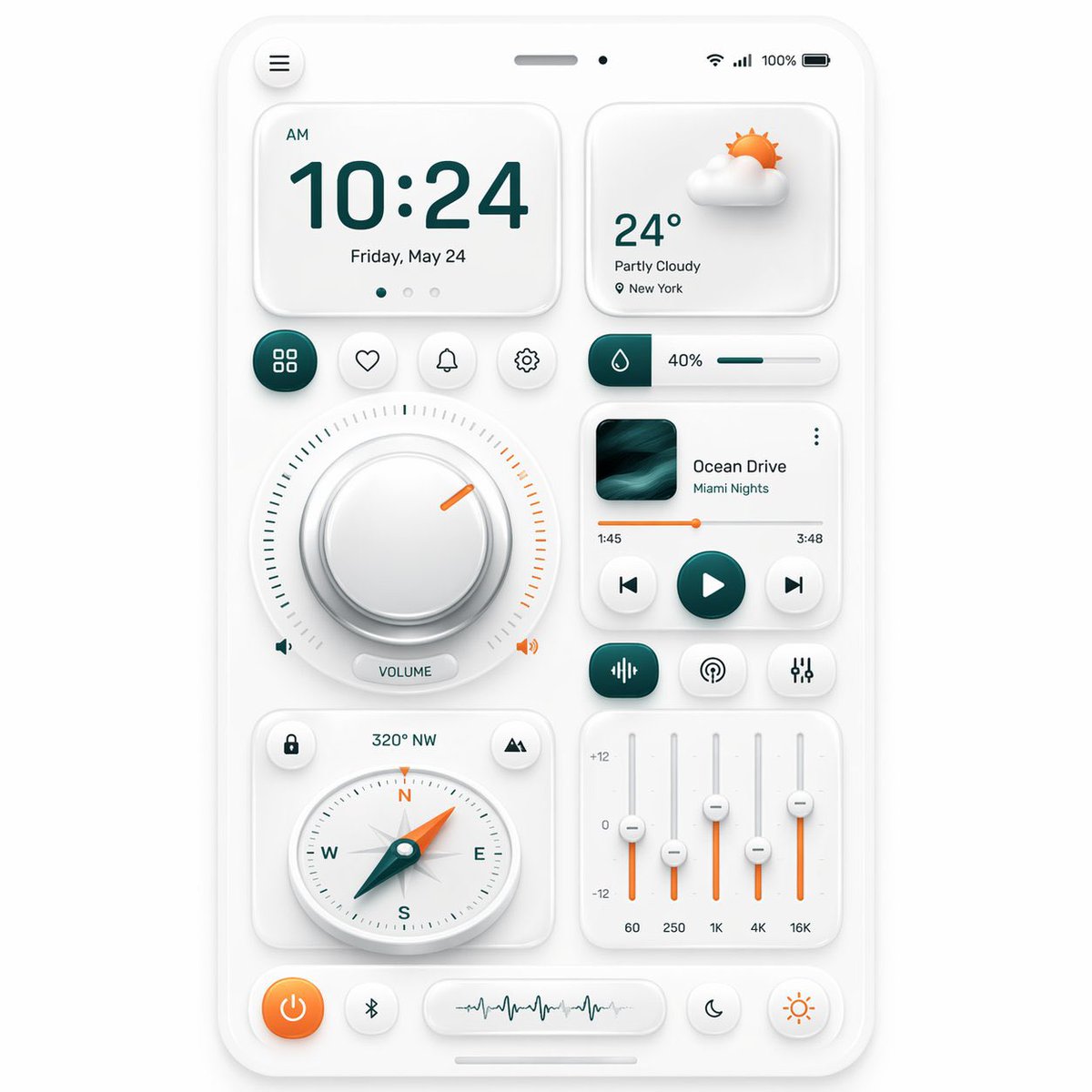
ส่วนติดต่อผู้ใช้แดชบอร์ดมือถือแบบ Neumorphic
คำสั่งนี้จะสร้างแผงควบคุมแบบนิวโมฟิกที่ดูสวยงามเหมือนสมาร์ทโฟน พร้อมวิดเจ็ตมากมาย เหมาะสำหรับงานศิลปะแนวคิด UI แรงบันดาลใจในการออกแบบ และการนำเสนอแบบจำลองแอป
นี่คือตัวอย่างข้อความแจ้งเตือน GPT Image 2 สำหรับ แรงบันดาลใจอื่นๆ ใช้ข้อความแจ้งเตือนที่พร้อมใช้งานด้านล่างเพื่อสร้างภาพที่คล้ายกัน และตรวจสอบการอ้างอิง Awesome GPT Image 2 Prompts รวมถึงสิทธิ์ในการใช้งานเชิงพาณิชย์ก่อนนำไปใช้ซ้ำ
ต้องการชุดข้อความแจ้งเตือนทั้งหมดหรือไม่? ใช้... แรงบันดาลใจอื่นๆ ศูนย์รวมหัวข้อสำหรับตัวอย่างที่เกี่ยวข้องเพิ่มเติม หรือเปิดดูได้เลย GPT Image 2 แคตตาล็อกพร้อมท์ สำหรับดัชนีตัวอย่างฉบับเต็ม โครงสร้างที่นำกลับมาใช้ใหม่ได้ และการอ้างอิงแหล่งที่มา
Free 1K preview
Generate one preview image instantly, no sign-up required.
3961/4000
พรอมป์
ข้อความแจ้งเตือนพร้อมสำหรับการคัดลอก
{
  "type": "neumorphic mobile dashboard UI showcase",
  "style": {
    "theme": "clean soft neumorphism",
    "background": "light warm gray",
    "primary color": "deep teal",
    "accent color": "orange",
    "material": "matte white plastic cards with subtle inner and outer shadows, rounded corners, soft highlights",
    "rendering": "high-resolution polished 3D UI mockup, front view, centered composition"
  },
  "device": {
    "kind": "smartphone screen mockup",
    "frame": "thin white rounded bezel",
    "status bar": {
      "count": 5,
      "items": [
        "hamburger menu button at top left",
        "speaker slot at top center",
        "small front camera dot",
        "wireless signal icons at top right",
        "100% battery indicator"
      ]
    }
  },
  "layout": {
    "sections": [
      {
        "title": "clock card",
        "position": "top left",
        "count": 4,
        "labels": [
          "AM",
          "10:24",
          "Friday, May 24",
          "3 page indicator dots"
        ]
      },
      {
        "title": "weather card",
        "position": "top right",
        "count": 4,
        "labels": [
          "partly cloudy 3D sun-and-cloud icon",
          "24°",
          "Partly Cloudy",
          "New York"
        ]
      },
      {
        "title": "shortcut buttons row",
        "position": "upper middle left",
        "count": 4,
        "labels": [
          "grid/apps",
          "heart/favorite",
          "bell/notifications",
          "settings"
        ]
      },
      {
        "title": "humidity slider",
        "position": "upper middle right",
        "count": 3,
        "labels": [
          "droplet icon block",
          "40%",
          "horizontal progress bar"
        ]
      },
      {
        "title": "volume dial module",
        "position": "center left",
        "count": 5,
        "labels": [
          "large circular knob",
          "surrounding tick marks",
          "orange indicator notch",
          "left speaker icon",
          "VOLUME pill label and right speaker icon"
        ]
      },
      {
        "title": "music player card",
        "position": "center right",
        "count": 8,
        "labels": [
          "album artwork",
          "Ocean Drive",
          "Miami Nights",
          "three-dot menu",
          "1:45",
          "3:48",
          "orange progress bar",
          "previous play next controls"
        ]
      },
      {
        "title": "audio control row",
        "position": "below music player",
        "count": 3,
        "labels": [
          "equalizer/wave icon button",
          "broadcast/podcast icon button",
          "sliders/settings icon button"
        ]
      },
      {
        "title": "compass card",
        "position": "lower left",
        "count": 5,
        "labels": [
          "lock icon button",
          "320° NW",
          "mountain/location icon button",
          "round compass dial with N E S W",
          "teal needle with orange tip"
        ]
      },
      {
        "title": "equalizer card",
        "position": "lower right",
        "count": 8,
        "labels": [
          "+12",
          "0",
          "-12",
          "60",
          "250",
          "1K",
          "4K",
          "16K"
        ]
      },
      {
        "title": "bottom dock",
        "position": "bottom",
        "count": 4,
        "labels": [
          "orange power button",
          "Bluetooth button",
          "waveform display capsule",
          "two circular mode buttons: moon and sun"
        ]
      }
    ],
    "centerpiece": "a balanced grid of neumorphic widgets arranged on one smartphone dashboard"
  },
  "composition": {
    "spacing": "even margins and generous padding",
    "perspective": "straight-on",
    "shadow behavior": "very soft ambient shadows for a tactile embossed look",
    "iconography": "minimal line icons with teal and orange highlights"
  }
}
Best for
- - แรงบันดาลใจอื่นๆ visual exploration
- - Image generation and reference-image edits
- - Reusable briefs that keep source attribution visible
Change these parts
- - Subject, product, character, or scene
- - Aspect ratio, camera, lighting, and background
- - Brand, text, color, and output constraints
Recommended model and settings
- - Model: gpt-image-2
- - Input mode: ข้อความเป็นรูปภาพ
- - Aspect ratio: source
- - Commercial status: review original source
How to use this prompt
- 1. Copy the prompt and preserve its structure for the first test.
- 2. Replace the subject, context, and publishing channel.
- 3. Change one camera, lighting, or style variable per iteration.
- 4. Inspect the output, source, text, and rights before reuse.
Limitations, source, and reuse cautions
- - Generated output is an editable draft, not factual, legal, or rights evidence.
- - Review the linked source, people, brands, logos, text, and third-party media before commercial use.
นำเข้าจาก Awesome GPT Image 2 Prompts จำเป็นต้องระบุแหล่งที่มา สถานะการใช้งานเชิงพาณิชย์คือ allowed โปรดตรวจสอบสิทธิ์แหล่งที่มาก่อนใช้งานแบบเสียค่าใช้จ่าย
กรณีเพิ่มเติมในหมวดหมู่นี้
จัดลำดับความสำคัญตามหมวดหมู่ ความเข้ากันได้กับโหมดการป้อนข้อมูล คุณภาพ และความเสี่ยงที่ต่ำกว่า

Transparent Earbuds on Stone Pedestal
ข้อความเป็นรูปภาพ

Manga Desert Radio Telescope Road Trip
ข้อความเป็นรูปภาพ

Female Clown Cyborg Portrait
ข้อความเป็นรูปภาพ

Imperial Research Bunker on Volcanic Planet
ข้อความเป็นรูปภาพ

Android Quantum Lab Workstation
ข้อความเป็นรูปภาพ

Greyscale Puzzle Portrait with Color Accent
ข้อความเป็นรูปภาพ
หมายเหตุเกี่ยวกับการนำกลับมาใช้ใหม่และแหล่งที่มา
ใช้ข้อความแจ้งเตือนนี้อย่างปลอดภัยหลังจากดูตัวอย่างกรณีแล้ว
- 1.คัดลอกข้อความแจ้งเตือน หรือเปิดโดยตรงใน Dovoo โดยใช้ปุ่มสร้างข้อความ
- 2.ปรับตัวแปร อัตราส่วนภาพ และภาพอ้างอิงให้เหมาะสมกับกรณีการใช้งานของคุณ
- 3.ก่อนเผยแพร่หรือใช้งานโดยเสียค่าใช้จ่าย โปรดตรวจสอบสิทธิ์ในแหล่งที่มา ข้อกำหนดการอ้างอิง และความเสี่ยงด้านแบรนด์หรือภาพลักษณ์