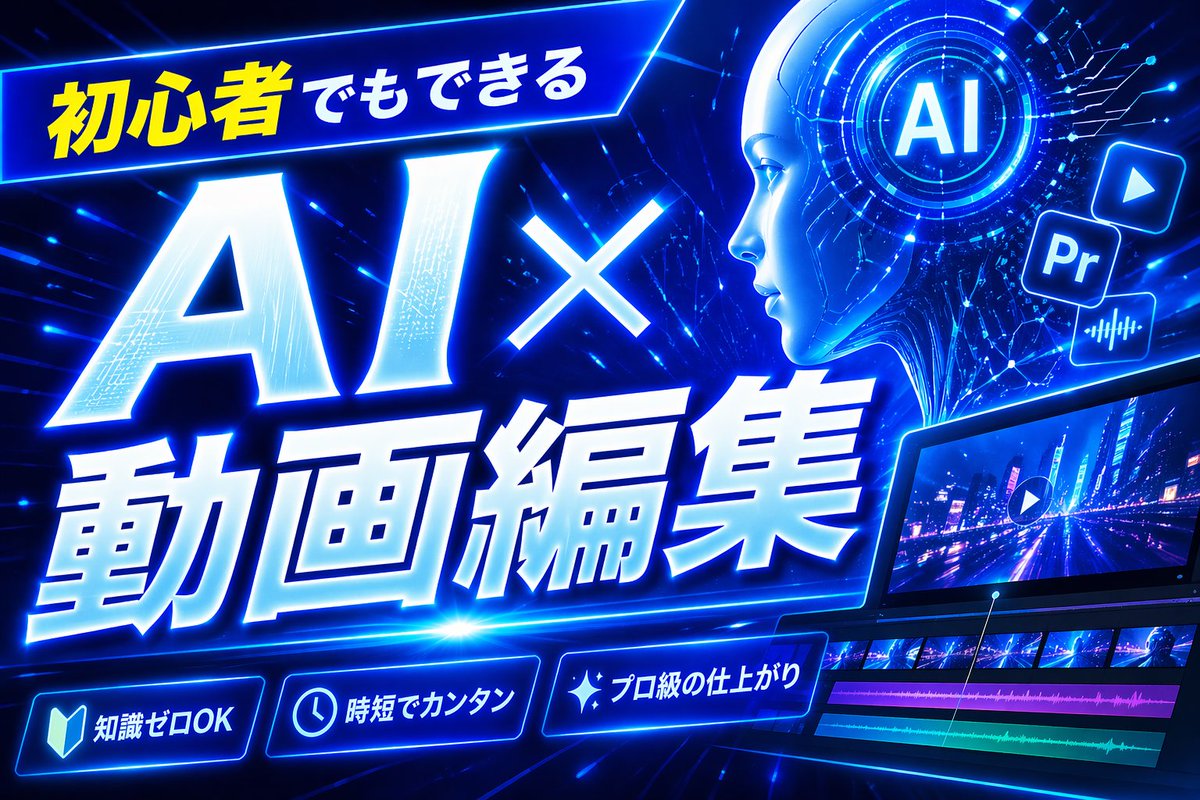
ภาพขนาดย่อสำหรับการตัดต่อวิดีโอด้วย AI สีฟ้านีออน
ภาพขนาดย่อ YouTube สไตล์ญี่ปุ่นล้ำสมัยที่โดดเด่นสะดุดตา เหมาะสำหรับวิดีโอสอนการตัดต่อวิดีโอด้วย AI โดยเฉพาะอย่างยิ่งสำหรับเนื้อหาด้านเทคโนโลยีและการสร้างคอนเทนต์สำหรับผู้เริ่มต้น
นี่คือตัวอย่างข้อความแจ้งเตือน GPT Image 2 สำหรับ กราฟิกและโปสเตอร์ ใช้ข้อความแจ้งเตือนที่พร้อมใช้งานด้านล่างเพื่อสร้างภาพที่คล้ายกัน และตรวจสอบการอ้างอิง Awesome GPT Image 2 Prompts รวมถึงสิทธิ์ในการใช้งานเชิงพาณิชย์ก่อนนำไปใช้ซ้ำ
Free 1K preview
Generate one preview image instantly, no sign-up required.
Free text preview doesn’t preserve reference-image consistency.
พรอมป์
ข้อความแจ้งเตือนพร้อมสำหรับการคัดลอก
Create a bold Japanese YouTube thumbnail for the theme {argument name="headline text" default="初心者でもできる AI×動画編集"}, in a futuristic neon-blue cyberpunk style. Use a wide 16:9 composition with a dark electric-blue background filled with glowing circuit lines, digital streaks, lens flares, and high-energy motion. Place a slanted glowing banner in the upper left containing the Japanese text {argument name="top banner text" default="初心者でもできる"}, with the first part in bright yellow and the rest in white. Make the main headline dominate the left and center: gigantic white glowing text “AI×” above even larger white glowing text “動画編集”, with thick blue neon outer glow, slight italic forward motion, beveled 3D shading, and dramatic perspective. In the upper right, add a circular holographic interface with the letters {argument name="ai badge text" default="AI"} in the center, surrounded by concentric rings and tiny HUD marks. Near it, include exactly 3 floating app-style icons: a play button icon, a square “Pr” icon, and an audio waveform icon, all glowing blue. Across the lower right, show a sleek angled video editing monitor displaying a neon city night road scene with a play symbol overlay; beneath the preview, include a timeline with exactly 4 visible tracks: 2 rows of video thumbnails and 2 colored audio bars, one magenta and one cyan-green. Along the bottom, add exactly 3 glowing rounded feature badges with icons and Japanese text: a book icon with “知識ゼロOK”, a clock icon with “時短でカンタン”, and a sparkle icon with “プロ級の仕上がり”. Add a tall solid blue vertical rectangle near the top center-right as a placeholder block. Overall design should feel dynamic, high-contrast, polished, techy, and optimized for maximum click-through as a modern AI and video-editing tutorial thumbnail.ตัวแปรพร้อมท์
ตัวอย่างค่าอาร์กิวเมนต์ที่แก้ไขได้ซึ่งพบในข้อความแจ้งเตือน พร้อมค่าเริ่มต้น
Best for
- - กราฟิกและโปสเตอร์ visual exploration
- - Image generation and reference-image edits
- - Reusable briefs that keep source attribution visible
Change these parts
- - Subject, product, character, or scene
- - Aspect ratio, camera, lighting, and background
- - Brand, text, color, and output constraints
Recommended model and settings
- - Model: gpt-image-2
- - Input mode: รูปภาพเป็นรูปภาพ
- - Aspect ratio: source
- - Commercial status: review original source
How to use this prompt
- 1. Copy the prompt and preserve its structure for the first test.
- 2. Replace the subject, context, and publishing channel.
- 3. Change one camera, lighting, or style variable per iteration.
- 4. Inspect the output, source, text, and rights before reuse.
Limitations, source, and reuse cautions
- - Generated output is an editable draft, not factual, legal, or rights evidence.
- - Review the linked source, people, brands, logos, text, and third-party media before commercial use.
กรณีเพิ่มเติมในหมวดหมู่นี้
จัดลำดับความสำคัญตามหมวดหมู่ ความเข้ากันได้กับโหมดการป้อนข้อมูล คุณภาพ และความเสี่ยงที่ต่ำกว่า






หมายเหตุเกี่ยวกับการนำกลับมาใช้ใหม่และแหล่งที่มา
ใช้ข้อความแจ้งเตือนนี้อย่างปลอดภัยหลังจากดูตัวอย่างกรณีแล้ว
- 1.คัดลอกข้อความแจ้งเตือน หรือเปิดโดยตรงใน Dovoo โดยใช้ปุ่มสร้างข้อความ
- 2.ปรับตัวแปร อัตราส่วนภาพ และภาพอ้างอิงให้เหมาะสมกับกรณีการใช้งานของคุณ
- 3.ก่อนเผยแพร่หรือใช้งานโดยเสียค่าใช้จ่าย โปรดตรวจสอบสิทธิ์ในแหล่งที่มา ข้อกำหนดการอ้างอิง และความเสี่ยงด้านแบรนด์หรือภาพลักษณ์