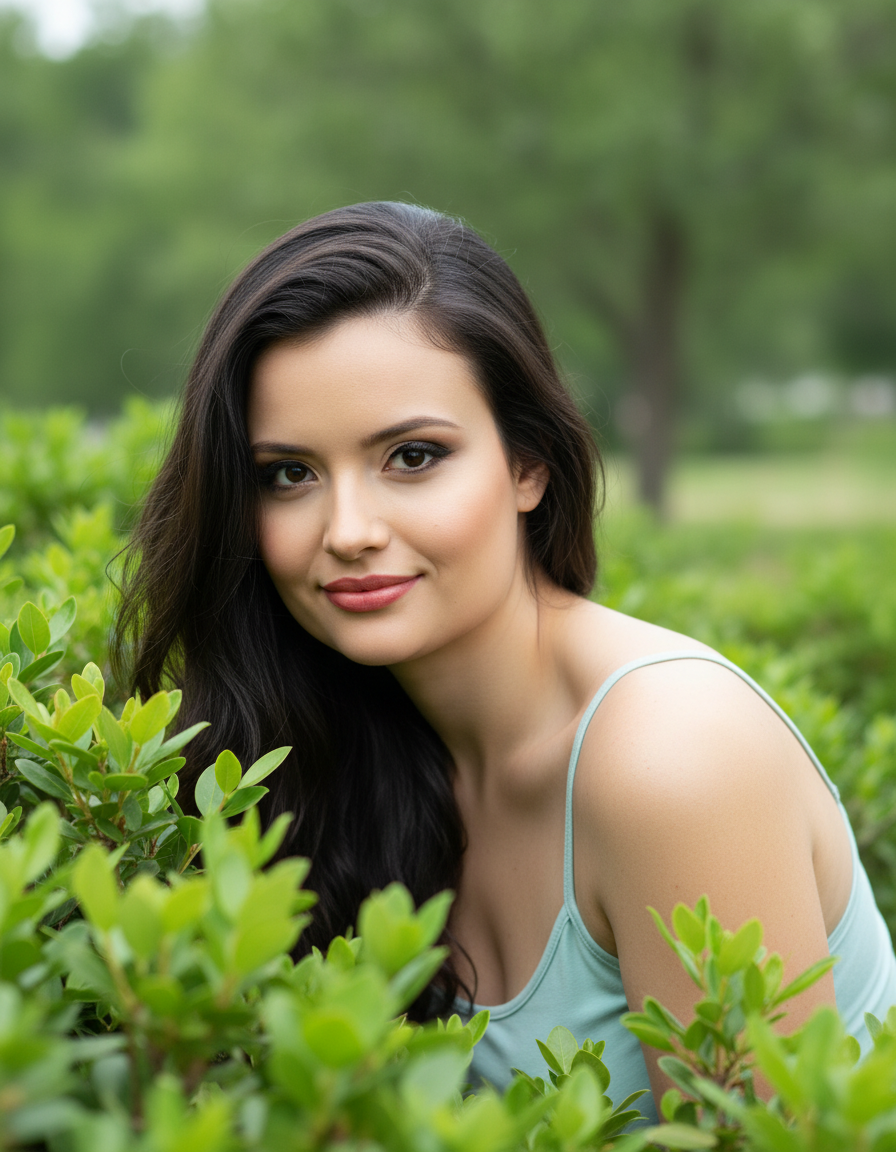
Nature's Gaze
ภาพประกอบ Nano Banana Pro จากคลังภาพ Awesome Nano Banana Pro Prompts พร้อมภาพตัวอย่างและหมายเหตุสำหรับการนำไปใช้ซ้ำ
นี่คือตัวอย่างข้อความแจ้งเตือน Nano Banana Pro สำหรับ ภาพเหมือนและตัวละคร ใช้ข้อความแจ้งเตือนที่พร้อมใช้งานด้านล่างเพื่อสร้างภาพที่คล้ายกัน และตรวจสอบการอ้างอิง Awesome Nano Banana Pro Prompts รวมถึงสิทธิ์ในการใช้งานเชิงพาณิชย์ก่อนนำไปใช้ซ้ำ
ต้องการชุดข้อความแจ้งเตือนทั้งหมดหรือไม่? ใช้... ภาพเหมือนและตัวละคร ศูนย์รวมหัวข้อสำหรับตัวอย่างที่เกี่ยวข้องเพิ่มเติม หรือเปิดดูได้เลย Nano Banana Pro แคตตาล็อกพร้อมท์ สำหรับดัชนีตัวอย่างฉบับเต็ม โครงสร้างที่นำกลับมาใช้ใหม่ได้ และการอ้างอิงแหล่งที่มา
พรอมป์
ข้อความแจ้งเตือนพร้อมสำหรับการคัดลอก
A natural, captivating close-up portrait captured outdoors amidst the foliage. The female figure is partially hidden by a bush or plant with dense, green leaves in the foreground, creating a sense of intimacy and discovery. She leans out of the foliage, looking directly at the camera with a sweet, curious, and captivating expression.

She wears a blouse or tank top in a soft shade of light blue or aqua green, which complements the color of the foliage.

Her hair is long, brown, and wavy, with a healthy shine, falling over one shoulder and framing her face. Her makeup is natural, but accentuates her eyes with earthy tones and thick lashes.

The background is a green environment, composed of more foliage or trees, gently blurred, keeping the focus on the subject. The lighting is natural and soft, typical of an overcast day or light filtered through trees, creating a gentle glow on her face and highlighting the textures of her skin and hair.

Camera Settings: Captured with a prime portrait lens (e.g., 85mm f/1.8 or 100mm f/2.8 macro for detail) on a full-frame camera for flattering compression and pronounced bokeh. Aperture set between f/1.8 and f/2.8 to create a very shallow depth of field, isolating the subject's face from the leafy foreground and green background. ISO 100-200 for maximum image quality in natural light. Shutter speed of 1/250s to 1/500s to ensure sharpness. The lighting is exclusively natural, taking advantage of the soft, diffuse light of a dim or cloudy outdoor environment.

Instructions for the "nano banana":

"Please use the user's reference image to capture and apply all of their facial features, facial structure, eye color, skin tone, style, and hair color with maximum fidelity. The goal is to create a version of the user in this natural portrait. The attire (light blue top), the pose peeking through the foliage, the captivating expression, the soft natural lighting, and the blurred green background should be generated as described, creating a perfect fusion between the user's identity and the image's aesthetic."
Best for
- - ภาพเหมือนและตัวละคร visual exploration
- - Image generation and reference-image edits
- - Reusable briefs that keep source attribution visible
Change these parts
- - Subject, product, character, or scene
- - Aspect ratio, camera, lighting, and background
- - Brand, text, color, and output constraints
Recommended model and settings
- - Model: nano-banana-pro
- - Input mode: รูปภาพเป็นรูปภาพ
- - Aspect ratio: square
- - Commercial status: restricted
How to use this prompt
- 1. Copy the prompt and preserve its structure for the first test.
- 2. Replace the subject, context, and publishing channel.
- 3. Change one camera, lighting, or style variable per iteration.
- 4. Inspect the output, source, text, and rights before reuse.
Limitations, source, and reuse cautions
- - Generated output is an editable draft, not factual, legal, or rights evidence.
- - Review the linked source, people, brands, logos, text, and third-party media before commercial use.
นำเข้าจาก Awesome Nano Banana Pro Prompts จำเป็นต้องระบุแหล่งที่มา สถานะการใช้งานเชิงพาณิชย์คือ restricted โปรดตรวจสอบสิทธิ์แหล่งที่มาก่อนใช้งานแบบเสียค่าใช้จ่าย
กรณีเพิ่มเติมในหมวดหมู่นี้
จัดลำดับความสำคัญตามหมวดหมู่ ความเข้ากันได้กับโหมดการป้อนข้อมูล คุณภาพ และความเสี่ยงที่ต่ำกว่า

หมายเหตุเกี่ยวกับการนำกลับมาใช้ใหม่และแหล่งที่มา
ใช้ข้อความแจ้งเตือนนี้อย่างปลอดภัยหลังจากดูตัวอย่างกรณีแล้ว
- 1.คัดลอกข้อความแจ้งเตือน หรือเปิดโดยตรงใน Dovoo โดยใช้ปุ่มสร้างข้อความ
- 2.ปรับตัวแปร อัตราส่วนภาพ และภาพอ้างอิงให้เหมาะสมกับกรณีการใช้งานของคุณ
- 3.ก่อนเผยแพร่หรือใช้งานโดยเสียค่าใช้จ่าย โปรดตรวจสอบสิทธิ์ในแหล่งที่มา ข้อกำหนดการอ้างอิง และความเสี่ยงด้านแบรนด์หรือภาพลักษณ์