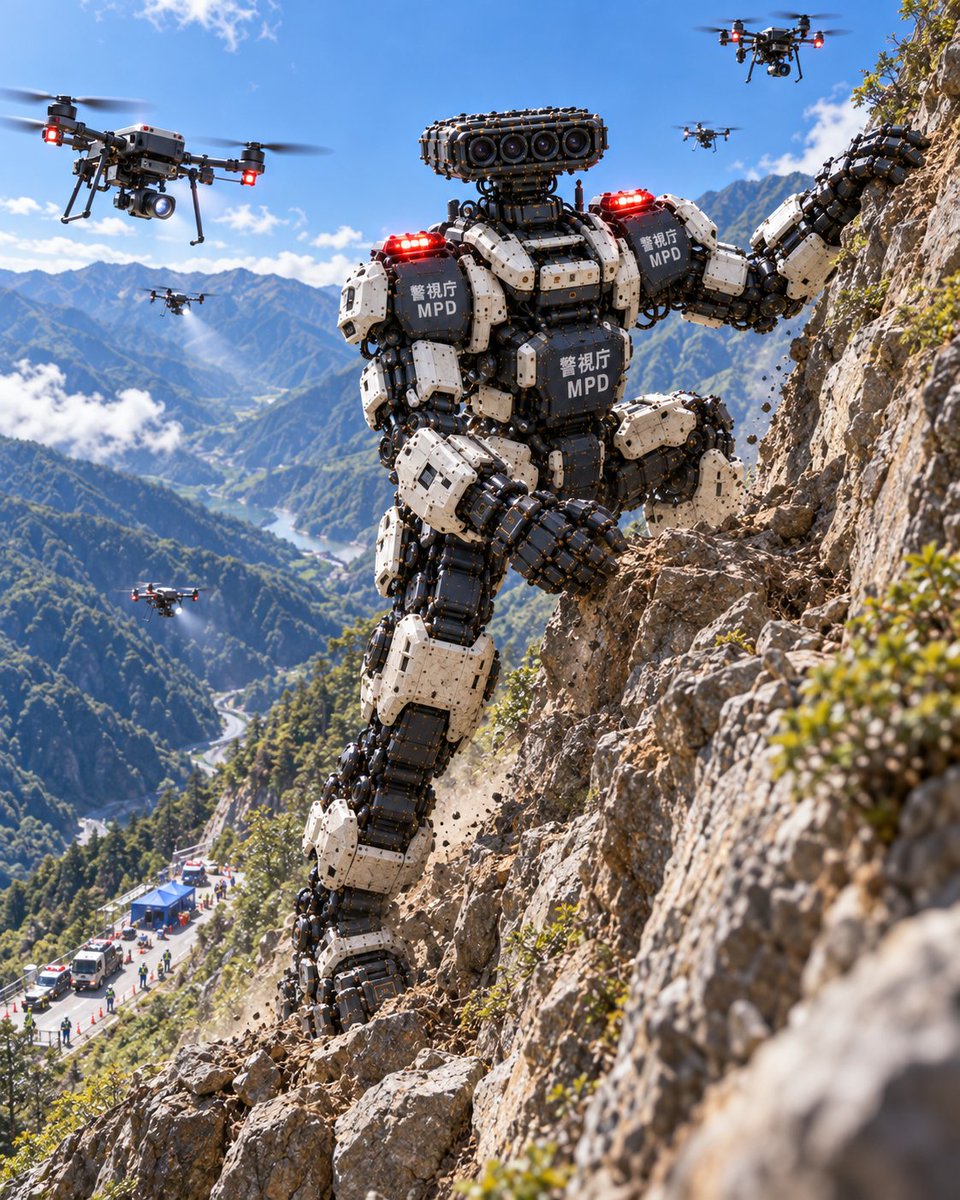
MPD Heavy Rescue Robot Climbing Mountain
A realistic depiction of a giant Metropolitan Police Department rescue robot scaling a cliff during a mountain training exercise, accompanied by support drones.
นี่คือตัวอย่างข้อความแจ้งเตือน GPT Image 2 สำหรับ ภาพเหมือนและตัวละคร ใช้ข้อความแจ้งเตือนที่พร้อมใช้งานด้านล่างเพื่อสร้างภาพที่คล้ายกัน และตรวจสอบการอ้างอิง Awesome GPT Image 2 Prompts รวมถึงสิทธิ์ในการใช้งานเชิงพาณิชย์ก่อนนำไปใช้ซ้ำ
ต้องการชุดข้อความแจ้งเตือนทั้งหมดหรือไม่? ใช้... ภาพเหมือนและตัวละคร ศูนย์รวมหัวข้อสำหรับตัวอย่างที่เกี่ยวข้องเพิ่มเติม หรือเปิดดูได้เลย GPT Image 2 แคตตาล็อกพร้อมท์ สำหรับดัชนีตัวอย่างฉบับเต็ม โครงสร้างที่นำกลับมาใช้ใหม่ได้ และการอ้างอิงแหล่งที่มา
Free 1K preview
Generate one preview image instantly, no sign-up required.
301/4000
พรอมป์
ข้อความแจ้งเตือนพร้อมสำหรับการคัดลอก
一个超写实的电影感广角镜头,展示了一台巨大的双足救援机器人正在攀登陡峭崎岖的山崖。该机器人由重型工业机械部件构成,具有黑白相间的分段装甲板,可见液压活塞和机械关节。在胸部和肩部装甲板上,清晰印有“警视厅”和粗体白色文字的“MPD”标识。其肩部有两盏红色警示灯发光。机器人的头部并非人类形态,而是安装在类似颈部结构上的传感器阵列,形似相机镜头组。机器人周围有四架大型四旋翼无人机在空中悬停,部分无人机喷出水雾或发射信号。背景中,远处下方可见蜿蜒穿过郁郁葱葱山谷的道路,以及应急车辆和蓝色指挥帐篷,表明这是一个活跃的救援作业现场。光线为明亮的日光,阴影锐利,强调了金属质感以及机器与自然地貌相比的巨大规模。
Best for
- - ภาพเหมือนและตัวละคร visual exploration
- - Image generation and reference-image edits
- - Reusable briefs that keep source attribution visible
Change these parts
- - Subject, product, character, or scene
- - Aspect ratio, camera, lighting, and background
- - Brand, text, color, and output constraints
Recommended model and settings
- - Model: gpt-image-2
- - Input mode: ข้อความเป็นรูปภาพ
- - Aspect ratio: source
- - Commercial status: review original source
How to use this prompt
- 1. Copy the prompt and preserve its structure for the first test.
- 2. Replace the subject, context, and publishing channel.
- 3. Change one camera, lighting, or style variable per iteration.
- 4. Inspect the output, source, text, and rights before reuse.
Limitations, source, and reuse cautions
- - Generated output is an editable draft, not factual, legal, or rights evidence.
- - Review the linked source, people, brands, logos, text, and third-party media before commercial use.
นำเข้าจาก Awesome GPT Image 2 Prompts จำเป็นต้องระบุแหล่งที่มา สถานะการใช้งานเชิงพาณิชย์คือ allowed โปรดตรวจสอบสิทธิ์แหล่งที่มาก่อนใช้งานแบบเสียค่าใช้จ่าย
กรณีเพิ่มเติมในหมวดหมู่นี้
จัดลำดับความสำคัญตามหมวดหมู่ ความเข้ากันได้กับโหมดการป้อนข้อมูล คุณภาพ และความเสี่ยงที่ต่ำกว่า


หมายเหตุเกี่ยวกับการนำกลับมาใช้ใหม่และแหล่งที่มา
ใช้ข้อความแจ้งเตือนนี้อย่างปลอดภัยหลังจากดูตัวอย่างกรณีแล้ว
- 1.คัดลอกข้อความแจ้งเตือน หรือเปิดโดยตรงใน Dovoo โดยใช้ปุ่มสร้างข้อความ
- 2.ปรับตัวแปร อัตราส่วนภาพ และภาพอ้างอิงให้เหมาะสมกับกรณีการใช้งานของคุณ
- 3.ก่อนเผยแพร่หรือใช้งานโดยเสียค่าใช้จ่าย โปรดตรวจสอบสิทธิ์ในแหล่งที่มา ข้อกำหนดการอ้างอิง และความเสี่ยงด้านแบรนด์หรือภาพลักษณ์