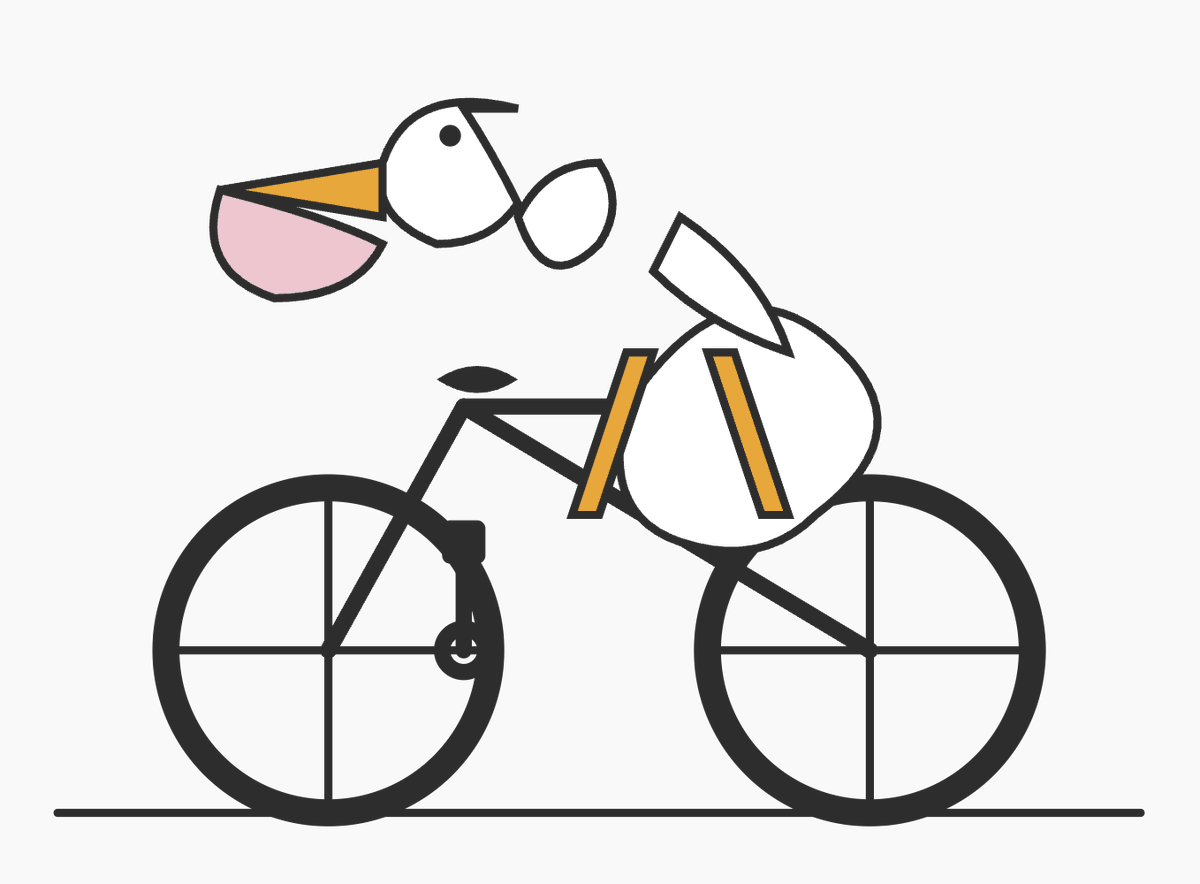
จักรยาน Minimal Pelican Riding
คำสั่งนี้จะสร้างภาพประกอบเวกเตอร์เชิงเรขาคณิตแบบเรียบง่ายของนกกระทุงบนจักรยาน ซึ่งมีประโยชน์สำหรับการทดสอบการจัดองค์ประกอบรูปทรงอย่างง่าย หรือการสร้างภาพสไตล์ไอคอนนามธรรมที่ดูสนุกสนาน
นี่คือตัวอย่างข้อความแจ้งเตือน GPT Image 2 สำหรับ กราฟิกและโปสเตอร์ ใช้ข้อความแจ้งเตือนที่พร้อมใช้งานด้านล่างเพื่อสร้างภาพที่คล้ายกัน และตรวจสอบการอ้างอิง Awesome GPT Image 2 Prompts รวมถึงสิทธิ์ในการใช้งานเชิงพาณิชย์ก่อนนำไปใช้ซ้ำ
ต้องการชุดข้อความแจ้งเตือนทั้งหมดหรือไม่? ใช้... กราฟิกและโปสเตอร์ ศูนย์รวมหัวข้อสำหรับตัวอย่างที่เกี่ยวข้องเพิ่มเติม หรือเปิดดูได้เลย GPT Image 2 แคตตาล็อกพร้อมท์ สำหรับดัชนีตัวอย่างฉบับเต็ม โครงสร้างที่นำกลับมาใช้ใหม่ได้ และการอ้างอิงแหล่งที่มา
Free 1K preview
Generate one preview image instantly, no sign-up required.
1502/4000
พรอมป์
ข้อความแจ้งเตือนพร้อมสำหรับการคัดลอก
A minimalist vector-style illustration on a flat light gray background showing a pelican riding a bicycle, drawn from simple geometric shapes with thick dark charcoal outlines. The composition is wide and centered, with the bicycle occupying the lower two-thirds of the image and the bird’s head floating slightly above and forward of the handlebars in a deliberately abstract, diagram-like way. The bicycle is a simple black road-bike silhouette in side view with exactly 2 large wheels, each with a thick outer rim and exactly 4 visible spoke lines forming a cross, a straight horizontal ground line beneath both wheels, a triangular frame, a short black saddle, and simplified crank and pedal details near the rear of the frame. The pelican is constructed from clean abstract pieces: a white rounded head with a small black circular eye, a long open beak pointing left made of 2 parts with an upper orange triangular section and a lower pale pink pouch section, a short dark curve on top of the head, a small separate white oval neck/body connector, a larger white rounded body positioned over the bike, and a single white wing-like shape angled upward over the back. Add exactly 2 orange leg shapes, long narrow rectangles leaning downward from the body toward the bicycle frame, suggesting the bird is pedaling. Keep the forms intentionally sparse and slightly surreal, like a logo test or simple code-editor doodle, with no shading, no gradients, no textures, no text, and lots of negative space.
Best for
- - กราฟิกและโปสเตอร์ visual exploration
- - Image generation and reference-image edits
- - Reusable briefs that keep source attribution visible
Change these parts
- - Subject, product, character, or scene
- - Aspect ratio, camera, lighting, and background
- - Brand, text, color, and output constraints
Recommended model and settings
- - Model: gpt-image-2
- - Input mode: ข้อความเป็นรูปภาพ
- - Aspect ratio: source
- - Commercial status: review original source
How to use this prompt
- 1. Copy the prompt and preserve its structure for the first test.
- 2. Replace the subject, context, and publishing channel.
- 3. Change one camera, lighting, or style variable per iteration.
- 4. Inspect the output, source, text, and rights before reuse.
Limitations, source, and reuse cautions
- - Generated output is an editable draft, not factual, legal, or rights evidence.
- - Review the linked source, people, brands, logos, text, and third-party media before commercial use.
นำเข้าจาก Awesome GPT Image 2 Prompts จำเป็นต้องระบุแหล่งที่มา สถานะการใช้งานเชิงพาณิชย์คือ allowed โปรดตรวจสอบสิทธิ์แหล่งที่มาก่อนใช้งานแบบเสียค่าใช้จ่าย
กรณีเพิ่มเติมในหมวดหมู่นี้
จัดลำดับความสำคัญตามหมวดหมู่ ความเข้ากันได้กับโหมดการป้อนข้อมูล คุณภาพ และความเสี่ยงที่ต่ำกว่า

Transparent Earbuds on Stone Pedestal
ข้อความเป็นรูปภาพ

Manga Desert Radio Telescope Road Trip
ข้อความเป็นรูปภาพ

Female Clown Cyborg Portrait
ข้อความเป็นรูปภาพ

Imperial Research Bunker on Volcanic Planet
ข้อความเป็นรูปภาพ

Greyscale Puzzle Portrait with Color Accent
ข้อความเป็นรูปภาพ

Pink Hijab Mirror Selfie Portrait
ข้อความเป็นรูปภาพ
หมายเหตุเกี่ยวกับการนำกลับมาใช้ใหม่และแหล่งที่มา
ใช้ข้อความแจ้งเตือนนี้อย่างปลอดภัยหลังจากดูตัวอย่างกรณีแล้ว
- 1.คัดลอกข้อความแจ้งเตือน หรือเปิดโดยตรงใน Dovoo โดยใช้ปุ่มสร้างข้อความ
- 2.ปรับตัวแปร อัตราส่วนภาพ และภาพอ้างอิงให้เหมาะสมกับกรณีการใช้งานของคุณ
- 3.ก่อนเผยแพร่หรือใช้งานโดยเสียค่าใช้จ่าย โปรดตรวจสอบสิทธิ์ในแหล่งที่มา ข้อกำหนดการอ้างอิง และความเสี่ยงด้านแบรนด์หรือภาพลักษณ์