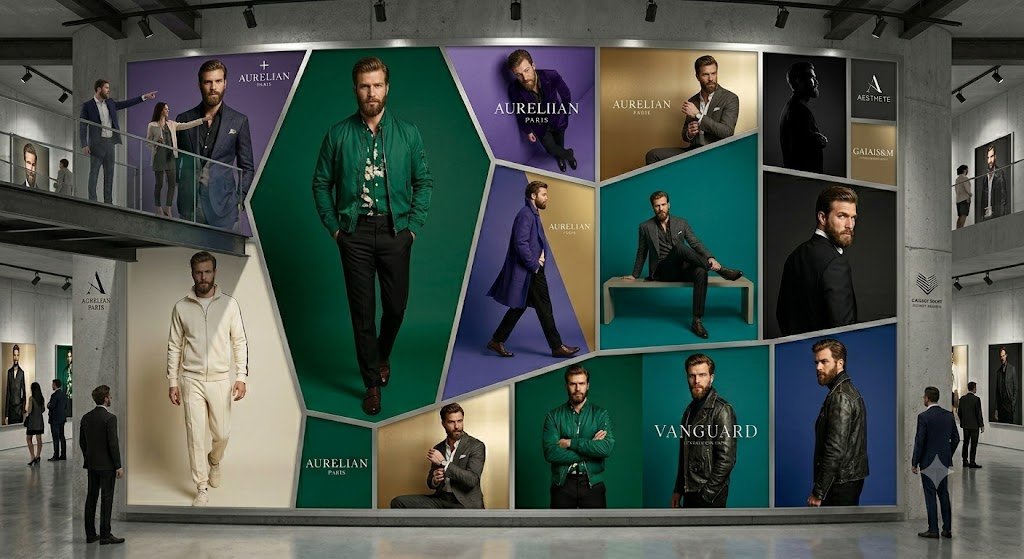
Luxury Menswear Gallery Collage
A photorealistic prompt for generating a modern gallery interior dominated by a monumental geometric luxury menswear advertising wall.
นี่คือตัวอย่างข้อความแจ้งเตือน GPT Image 2 สำหรับ การตกแต่งภายในและสถาปัตยกรรม ใช้ข้อความแจ้งเตือนที่พร้อมใช้งานด้านล่างเพื่อสร้างภาพที่คล้ายกัน และตรวจสอบการอ้างอิง Awesome GPT Image 2 Prompts รวมถึงสิทธิ์ในการใช้งานเชิงพาณิชย์ก่อนนำไปใช้ซ้ำ
ต้องการชุดข้อความแจ้งเตือนทั้งหมดหรือไม่? ใช้... การตกแต่งภายในและสถาปัตยกรรม ศูนย์รวมหัวข้อสำหรับตัวอย่างที่เกี่ยวข้องเพิ่มเติม หรือเปิดดูได้เลย GPT Image 2 แคตตาล็อกพร้อมท์ สำหรับดัชนีตัวอย่างฉบับเต็ม โครงสร้างที่นำกลับมาใช้ใหม่ได้ และการอ้างอิงแหล่งที่มา
Free 1K preview
Generate one preview image instantly, no sign-up required.
3034/4000
พรอมป์
ข้อความแจ้งเตือนพร้อมสำหรับการคัดลอก
Goal: Create a photorealistic high-end fashion exhibition interior showing an enormous wall-sized luxury menswear advertising collage inside a concrete gallery.

Canvas: Wide cinematic 16:9 image, eye-level perspective, realistic lighting, polished concrete floor with subtle reflections, industrial ceiling beams and black track lights.

Layout: A spacious modern gallery with a large central feature wall occupying most of the frame. Add upper mezzanine walkways on the left and right with glass railings, plus visitors standing and observing. The central wall is a geometric mosaic of exactly 13 fashion-ad panels separated by thick white beveled borders: 1) top-left large purple panel with a suited male model and the brand text “AURELIAN PARIS”; 2) center dominant tall emerald-green hexagonal panel with a full-body male model in a green jacket; 3) top-center purple panel with a seated male model and “AURELIAN PARIS”; 4) upper gold panel with a seated man adjusting his cuff and “AURELIAN PARIS”; 5) middle teal panel with a male model sitting on a rectangular bench; 6) upper-right black silhouette portrait panel; 7) far upper-right stacked brand panel with two small blocks, one reading “AESTHETE” and one reading “GALAISM”; 8) left lower cream panel with a man in an ivory tracksuit walking forward; 9) small lower green brand block reading “AURELIAN PARIS”; 10) lower gold panel with a man in a gray suit; 11) lower emerald panel with a man in a green jacket standing arms crossed; 12) lower teal/black panel with the large word “VANGUARD”; 13) far-right vertical blue panel with a side-profile man in a black leather jacket.

Subject details: The advertising models are adult men in upscale menswear: suits, blazers, leather jackets, knitwear, dress shoes, and one ivory athleisure outfit. Faces should be intentionally soft-blurred or featureless, while clothing and posture remain sharp. Use the main brand name {argument name="brand name" default="AURELIAN PARIS"} prominently in several panels, with a secondary headline {argument name="collection name" default="VANGUARD"} on the lower-right panel. Keep the palette elegant and editorial: emerald green, deep purple, teal, gold, cream, black, and white.

Gallery environment: Include exactly 9 visible visitors: two people on the left mezzanine, two people on the right mezzanine, one man standing near the left foreground looking at the wall, two small visitors near the left wall, and two men near the right foreground. Add smaller framed fashion posters on the side walls and minimalist brand placards on the concrete columns.

Visual style: Ultra-realistic commercial architecture visualization mixed with luxury fashion campaign photography, crisp details, soft museum lighting, premium editorial mood, no cartoon styling.

Constraints: Do not add extra readable text beyond the indicated luxury brand labels. Keep the 13-panel mosaic clear and symmetrical enough to read as a single monumental fashion installation. No watermark, no captions, no UI elements.
ตัวแปรพร้อมท์
ตัวอย่างค่าอาร์กิวเมนต์ที่แก้ไขได้ซึ่งพบในข้อความแจ้งเตือน พร้อมค่าเริ่มต้น
ตัวแปร
brand name
ค่าเริ่มต้น
AURELIAN PARIS
ตัวแปร
collection name
ค่าเริ่มต้น
VANGUARD
Best for
- - การตกแต่งภายในและสถาปัตยกรรม visual exploration
- - Image generation and reference-image edits
- - Reusable briefs that keep source attribution visible
Change these parts
- - Subject, product, character, or scene
- - Aspect ratio, camera, lighting, and background
- - Brand, text, color, and output constraints
Recommended model and settings
- - Model: gpt-image-2
- - Input mode: ข้อความเป็นรูปภาพ
- - Aspect ratio: source
- - Commercial status: review original source
How to use this prompt
- 1. Copy the prompt and preserve its structure for the first test.
- 2. Replace the subject, context, and publishing channel.
- 3. Change one camera, lighting, or style variable per iteration.
- 4. Inspect the output, source, text, and rights before reuse.
Limitations, source, and reuse cautions
- - Generated output is an editable draft, not factual, legal, or rights evidence.
- - Review the linked source, people, brands, logos, text, and third-party media before commercial use.
นำเข้าจาก Awesome GPT Image 2 Prompts จำเป็นต้องระบุแหล่งที่มา สถานะการใช้งานเชิงพาณิชย์คือ allowed โปรดตรวจสอบสิทธิ์แหล่งที่มาก่อนใช้งานแบบเสียค่าใช้จ่าย
กรณีเพิ่มเติมในหมวดหมู่นี้
จัดลำดับความสำคัญตามหมวดหมู่ ความเข้ากันได้กับโหมดการป้อนข้อมูล คุณภาพ และความเสี่ยงที่ต่ำกว่า

Transparent Earbuds on Stone Pedestal
ข้อความเป็นรูปภาพ

Manga Desert Radio Telescope Road Trip
ข้อความเป็นรูปภาพ

Female Clown Cyborg Portrait
ข้อความเป็นรูปภาพ

Imperial Research Bunker on Volcanic Planet
ข้อความเป็นรูปภาพ

Greyscale Puzzle Portrait with Color Accent
ข้อความเป็นรูปภาพ

Pink Hijab Mirror Selfie Portrait
ข้อความเป็นรูปภาพ
หมายเหตุเกี่ยวกับการนำกลับมาใช้ใหม่และแหล่งที่มา
ใช้ข้อความแจ้งเตือนนี้อย่างปลอดภัยหลังจากดูตัวอย่างกรณีแล้ว
- 1.คัดลอกข้อความแจ้งเตือน หรือเปิดโดยตรงใน Dovoo โดยใช้ปุ่มสร้างข้อความ
- 2.ปรับตัวแปร อัตราส่วนภาพ และภาพอ้างอิงให้เหมาะสมกับกรณีการใช้งานของคุณ
- 3.ก่อนเผยแพร่หรือใช้งานโดยเสียค่าใช้จ่าย โปรดตรวจสอบสิทธิ์ในแหล่งที่มา ข้อกำหนดการอ้างอิง และความเสี่ยงด้านแบรนด์หรือภาพลักษณ์