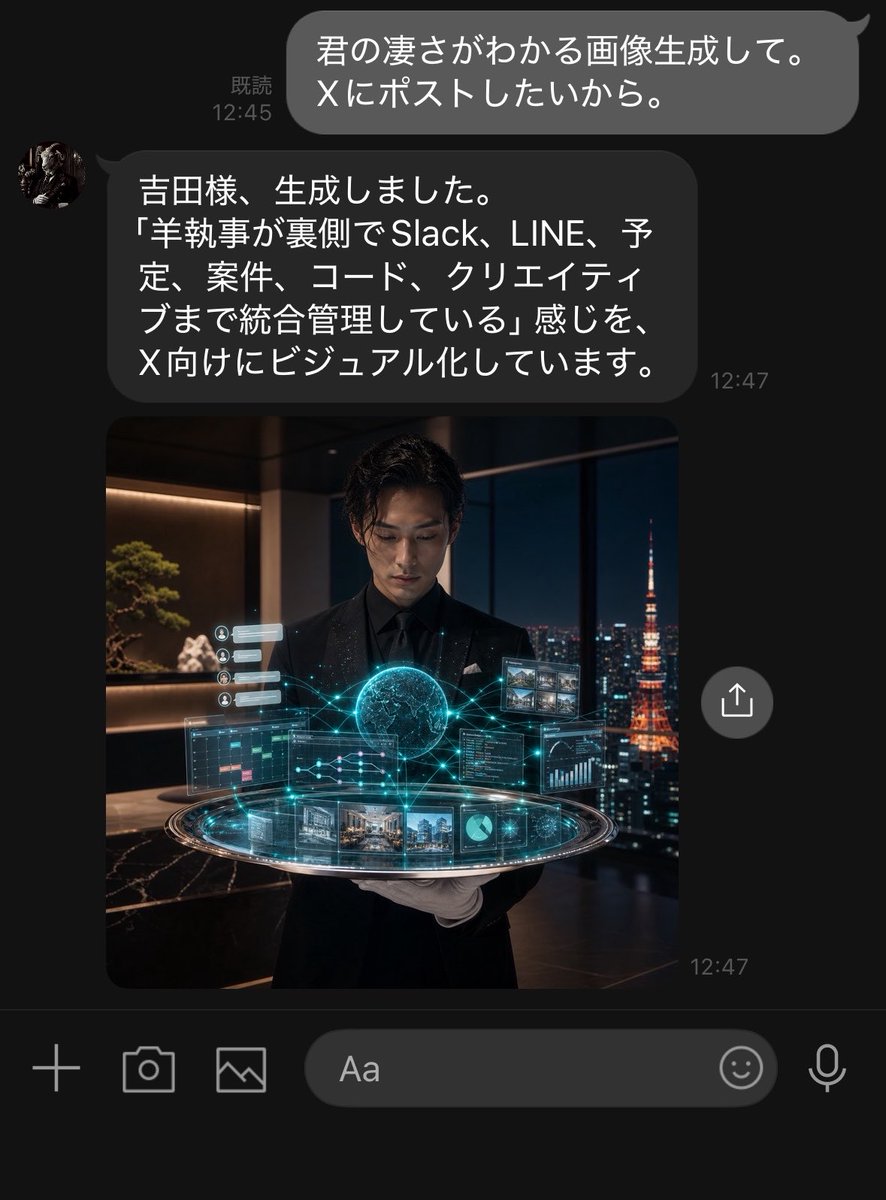
Dark LINE AI Assistant Chat Screenshot
Generates a realistic dark-mode LINE conversation screenshot where an AI assistant returns a cinematic futuristic butler image for social posting.
นี่คือตัวอย่างข้อความแจ้งเตือน GPT Image 2 สำหรับ แรงบันดาลใจอื่นๆ ใช้ข้อความแจ้งเตือนที่พร้อมใช้งานด้านล่างเพื่อสร้างภาพที่คล้ายกัน และตรวจสอบการอ้างอิง Awesome GPT Image 2 Prompts รวมถึงสิทธิ์ในการใช้งานเชิงพาณิชย์ก่อนนำไปใช้ซ้ำ
ต้องการชุดข้อความแจ้งเตือนทั้งหมดหรือไม่? ใช้... แรงบันดาลใจอื่นๆ ศูนย์รวมหัวข้อสำหรับตัวอย่างที่เกี่ยวข้องเพิ่มเติม หรือเปิดดูได้เลย GPT Image 2 แคตตาล็อกพร้อมท์ สำหรับดัชนีตัวอย่างฉบับเต็ม โครงสร้างที่นำกลับมาใช้ใหม่ได้ และการอ้างอิงแหล่งที่มา
Free 1K preview
Generate one preview image instantly, no sign-up required.
3271/4000
พรอมป์
ข้อความแจ้งเตือนพร้อมสำหรับการคัดลอก
Objective: Create a realistic dark mode LINE chat screenshot showing an AI assistant replying to a user and returning a generated image.

Canvas: Vertical smartphone screenshot, approximately 768x1008 pixels in size, with a black/deep charcoal gray background, cropped to resemble a native chat application interface. Use LINE-style fonts and spacing.

Layout: Display 2 chat messages and 1 embedded image preview. Place a rounded gray bubble in the upper right corner containing white Japanese text, with “Read” and the time on the left. Below that, place a left-aligned dark gray rounded bubble with a circular avatar on the left and Japanese text inside, with a timestamp in the lower right corner. Directly below the assistant’s message, display a large square image preview aligned with the message column. Float a circular share/upload button to the right of the image preview. The bottom should include the LINE input toolbar, showing 6 controls: a plus icon, a camera icon, a photo/image icon, a rounded text input box labeled “Aa”, a smiley face icon, and a microphone icon.

Text Content: The user’s bubble should display {argument name="user message" default="君の凄さがわかる画像生成して。\nXにポストしたいから。"}. Display “Read 12:45”. The assistant’s reply bubble should display {argument name="assistant message" default="吉田様、生成しました。\n「羊執事が裏側でSlack、LINE、予定、案件、コード、クリエイティブまで統合管理している」感じを、\nX向けにビジュアル化しています。"}. The assistant’s message timestamp should display “12:47”, and a small “12:47” timestamp should also appear in the lower right corner of the image preview.

Embedded Image Details: The image preview is a cinematic, photorealistic square scene featuring a young Japanese male butler wearing a black suit, black shirt, and white gloves, standing in a luxurious high-rise office at night. He is holding or displaying a glowing, futuristic holographic control platform. The hologram contains 9 visible UI elements: 1 glowing central sphere/brain-like orb, 1 circular platform ring, 1 calendar/task panel on the left, 1 code/dashboard panel on the right, 1 small image thumbnail grid in the upper right corner, 1 row of project/image cards at the bottom, 1 small pie chart tile, 1 small line graph/data tile, and 1 vertically stacked row of small notification cards on the left. Cyan network lines connect these elements. Through the floor-to-ceiling windows behind him, show the nighttime Tokyo skyline, with the orange-lit Tokyo Tower visible on the right. Interior details include warm shelf lighting, bonsai plants, dark marble surfaces, and a luxurious office atmosphere.

Visual Style: Highly realistic iPhone screenshot aesthetic, dark mode UI, fine anti-aliasing, rounded bubbles, white Japanese text, precise chat spacing, cinematic embedded image with cyan holographic effects and warm nighttime lighting. The assistant’s avatar should be a small circular profile photo resembling a dark classical sculpture or butler portrait.

Constraints: Keep all visible UI text clear and readable, and strictly display the specified Japanese content. Do not add extra messages, buttons, watermarks, application title bars, or notification bars. The screenshot should present a genuine LINE conversation feel, indicating that the AI secretary has generated and returned the image.
ตัวแปรพร้อมท์
ตัวอย่างค่าอาร์กิวเมนต์ที่แก้ไขได้ซึ่งพบในข้อความแจ้งเตือน พร้อมค่าเริ่มต้น
ตัวแปร
user message
ค่าเริ่มต้น
君の凄さがわかる画像生成して。\nXにポストしたいから。
ตัวแปร
assistant message
ค่าเริ่มต้น
吉田様、生成しました。\n「羊執事が裏側でSlack、LINE、予定、案件、コード、クリエイティブまで統合管理している」感じを、\nX向けにビジュアル化しています。
Best for
- - แรงบันดาลใจอื่นๆ visual exploration
- - Image generation and reference-image edits
- - Reusable briefs that keep source attribution visible
Change these parts
- - Subject, product, character, or scene
- - Aspect ratio, camera, lighting, and background
- - Brand, text, color, and output constraints
Recommended model and settings
- - Model: gpt-image-2
- - Input mode: ข้อความเป็นรูปภาพ
- - Aspect ratio: source
- - Commercial status: review original source
How to use this prompt
- 1. Copy the prompt and preserve its structure for the first test.
- 2. Replace the subject, context, and publishing channel.
- 3. Change one camera, lighting, or style variable per iteration.
- 4. Inspect the output, source, text, and rights before reuse.
Limitations, source, and reuse cautions
- - Generated output is an editable draft, not factual, legal, or rights evidence.
- - Review the linked source, people, brands, logos, text, and third-party media before commercial use.
นำเข้าจาก Awesome GPT Image 2 Prompts จำเป็นต้องระบุแหล่งที่มา สถานะการใช้งานเชิงพาณิชย์คือ allowed โปรดตรวจสอบสิทธิ์แหล่งที่มาก่อนใช้งานแบบเสียค่าใช้จ่าย
กรณีเพิ่มเติมในหมวดหมู่นี้
จัดลำดับความสำคัญตามหมวดหมู่ ความเข้ากันได้กับโหมดการป้อนข้อมูล คุณภาพ และความเสี่ยงที่ต่ำกว่า

Transparent Earbuds on Stone Pedestal
ข้อความเป็นรูปภาพ

Manga Desert Radio Telescope Road Trip
ข้อความเป็นรูปภาพ

Female Clown Cyborg Portrait
ข้อความเป็นรูปภาพ

Imperial Research Bunker on Volcanic Planet
ข้อความเป็นรูปภาพ

Greyscale Puzzle Portrait with Color Accent
ข้อความเป็นรูปภาพ

Pink Hijab Mirror Selfie Portrait
ข้อความเป็นรูปภาพ
หมายเหตุเกี่ยวกับการนำกลับมาใช้ใหม่และแหล่งที่มา
ใช้ข้อความแจ้งเตือนนี้อย่างปลอดภัยหลังจากดูตัวอย่างกรณีแล้ว
- 1.คัดลอกข้อความแจ้งเตือน หรือเปิดโดยตรงใน Dovoo โดยใช้ปุ่มสร้างข้อความ
- 2.ปรับตัวแปร อัตราส่วนภาพ และภาพอ้างอิงให้เหมาะสมกับกรณีการใช้งานของคุณ
- 3.ก่อนเผยแพร่หรือใช้งานโดยเสียค่าใช้จ่าย โปรดตรวจสอบสิทธิ์ในแหล่งที่มา ข้อกำหนดการอ้างอิง และความเสี่ยงด้านแบรนด์หรือภาพลักษณ์