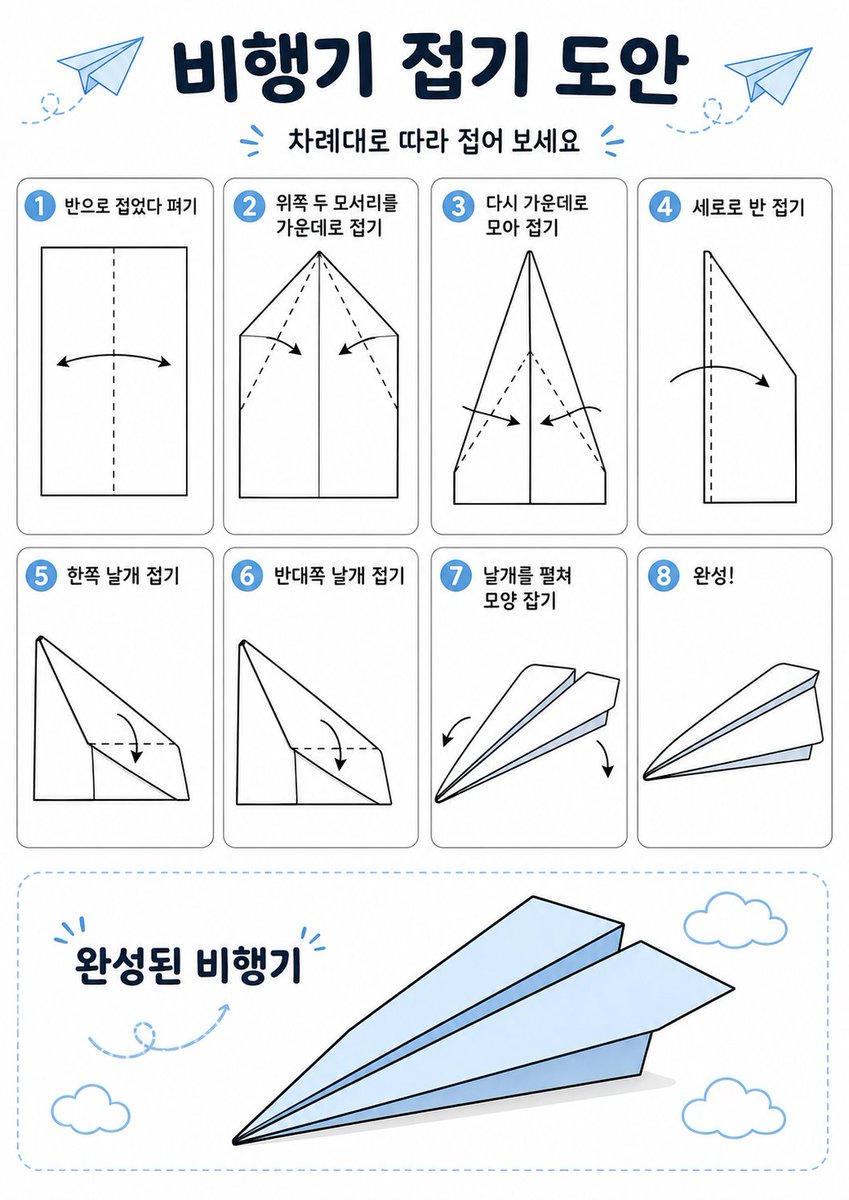
โปสเตอร์การพับเครื่องบินกระดาษแบบเกาหลี
คำสั่งนี้จะสร้างอินโฟกราฟิกคำแนะนำการพับกระดาษแบบโอริกามิภาษาเกาหลีที่เข้าใจง่าย สำหรับสอนวิธีการพับเครื่องบินกระดาษใน 8 ขั้นตอนพร้อมระบุชื่อขั้นตอนอย่างชัดเจน
นี่คือตัวอย่างข้อความแจ้งเตือน GPT Image 2 สำหรับ กราฟิกและโปสเตอร์ ใช้ข้อความแจ้งเตือนที่พร้อมใช้งานด้านล่างเพื่อสร้างภาพที่คล้ายกัน และตรวจสอบการอ้างอิง Awesome GPT Image 2 Prompts รวมถึงสิทธิ์ในการใช้งานเชิงพาณิชย์ก่อนนำไปใช้ซ้ำ
ต้องการชุดข้อความแจ้งเตือนทั้งหมดหรือไม่? ใช้... กราฟิกและโปสเตอร์ ศูนย์รวมหัวข้อสำหรับตัวอย่างที่เกี่ยวข้องเพิ่มเติม หรือเปิดดูได้เลย GPT Image 2 แคตตาล็อกพร้อมท์ สำหรับดัชนีตัวอย่างฉบับเต็ม โครงสร้างที่นำกลับมาใช้ใหม่ได้ และการอ้างอิงแหล่งที่มา
Free 1K preview
Generate one preview image instantly, no sign-up required.
3948/4000
พรอมป์
ข้อความแจ้งเตือนพร้อมสำหรับการคัดลอก
{
  "type": "origami instruction poster",
  "topic": "paper airplane folding guide",
  "language": "Korean",
  "style": {
    "overall": "clean educational infographic, simple vector line art, friendly classroom worksheet aesthetic",
    "palette": {
      "background": "white",
      "primary": "dark navy",
      "accent": "light sky blue",
      "line": "black",
      "shadow": "soft light gray"
    },
    "rendering": "flat 2D layout with crisp outlines and minimal shading"
  },
  "canvas": {
    "orientation": "portrait",
    "margin": "generous white margins"
  },
  "header": {
    "title": "{argument name=\"headline text\" default=\"비행기 접기 도안\"}",
    "subtitle": "{argument name=\"subtitle text\" default=\"차례대로 따라 접어 보세요\"}",
    "decorations": {
      "paper_airplanes": 2,
      "dashed_flight_paths": 2,
      "blue_accent_marks": 2
    }
  },
  "layout": {
    "grid": {
      "columns": 4,
      "rows": 2,
      "step_cards": 8
    },
    "sections": [
      {
        "title": "steps row 1",
        "position": "upper middle",
        "count": 4,
        "labels": [
          "1 반으로 접었다 펴기",
          "2 위쪽 두 모서리를 가운데로 접기",
          "3 다시 가운데로 모아 접기",
          "4 세로로 반 접기"
        ]
      },
      {
        "title": "steps row 2",
        "position": "middle",
        "count": 4,
        "labels": [
          "5 한쪽 날개 접기",
          "6 반대쪽 날개 접기",
          "7 날개를 펼쳐 모양 잡기",
          "8 완성!"
        ]
      },
      {
        "title": "finished airplane display",
        "position": "bottom",
        "count": 1,
        "labels": [
          "완성된 비행기"
        ]
      }
    ]
  },
  "step_cards": [
    {
      "step": 1,
      "badge": "1",
      "text": "반으로 접었다 펴기",
      "diagram": "vertical rectangle sheet with a centered vertical dashed fold line and a curved double-headed arrow indicating folding inward and reopening"
    },
    {
      "step": 2,
      "badge": "2",
      "text": "위쪽 두 모서리를 가운데로 접기",
      "diagram": "paper with pointed top, both upper corners folded to the center line, dashed diagonal guide lines, two inward arrows"
    },
    {
      "step": 3,
      "badge": "3",
      "text": "다시 가운데로 모아 접기",
      "diagram": "narrower pointed shape, side edges folded again toward the center line, dashed diagonal guides, two inward arrows near the lower middle"
    },
    {
      "step": 4,
      "badge": "4",
      "text": "세로로 반 접기",
      "diagram": "side-view folded shape with a vertical dashed center line and one large curved arrow showing the model folded in half lengthwise"
    },
    {
      "step": 5,
      "badge": "5",
      "text": "한쪽 날개 접기",
      "diagram": "triangular side-view airplane body with one wing folded downward, dashed horizontal guide near the top edge and a curved arrow"
    },
    {
      "step": 6,
      "badge": "6",
      "text": "반대쪽 날개 접기",
      "diagram": "same side-view as step 5, folding the opposite wing downward with matching dashed guide and curved arrow"
    },
    {
      "step": 7,
      "badge": "7",
      "text": "날개를 펼쳐 모양 잡기",
      "diagram": "3D paper airplane opening into shape, two curved arrows pointing downward and outward on each side"
    },
    {
      "step": 8,
      "badge": "8",
      "text": "완성!",
      "diagram": "completed paper airplane in simple perspective, light blue top faces, black outline, no arrows"
    }
  ],
  "bottom_panel": {
    "container": "large rounded rectangle with light blue dashed border",
    "label": "완성된 비행기",
    "main_object": "large completed paper airplane angled from lower left to upper right, pale blue surfaces with black outline and subtle gray shadow beneath",
    "decorations": {
      "clouds": 3,
      "swirl_arrow": 1
    }
  },
  "text_style": {
    "title": "bold rounded Korean display font in dark navy",
    "subtitle": "smaller bold Korean text",
    "step_labels": "bold black Korean text",
    "number_badges": "white numbers inside blue circles"
  }
}
ตัวแปรพร้อมท์
ตัวอย่างค่าอาร์กิวเมนต์ที่แก้ไขได้ซึ่งพบในข้อความแจ้งเตือน พร้อมค่าเริ่มต้น
ตัวแปร
headline text
ค่าเริ่มต้น
비행기 접기 도안
ตัวแปร
subtitle text
ค่าเริ่มต้น
차례대로 따라 접어 보세요
Best for
- - กราฟิกและโปสเตอร์ visual exploration
- - Image generation and reference-image edits
- - Reusable briefs that keep source attribution visible
Change these parts
- - Subject, product, character, or scene
- - Aspect ratio, camera, lighting, and background
- - Brand, text, color, and output constraints
Recommended model and settings
- - Model: gpt-image-2
- - Input mode: ข้อความเป็นรูปภาพ
- - Aspect ratio: source
- - Commercial status: review original source
How to use this prompt
- 1. Copy the prompt and preserve its structure for the first test.
- 2. Replace the subject, context, and publishing channel.
- 3. Change one camera, lighting, or style variable per iteration.
- 4. Inspect the output, source, text, and rights before reuse.
Limitations, source, and reuse cautions
- - Generated output is an editable draft, not factual, legal, or rights evidence.
- - Review the linked source, people, brands, logos, text, and third-party media before commercial use.
นำเข้าจาก Awesome GPT Image 2 Prompts จำเป็นต้องระบุแหล่งที่มา สถานะการใช้งานเชิงพาณิชย์คือ allowed โปรดตรวจสอบสิทธิ์แหล่งที่มาก่อนใช้งานแบบเสียค่าใช้จ่าย
กรณีเพิ่มเติมในหมวดหมู่นี้
จัดลำดับความสำคัญตามหมวดหมู่ ความเข้ากันได้กับโหมดการป้อนข้อมูล คุณภาพ และความเสี่ยงที่ต่ำกว่า

Transparent Earbuds on Stone Pedestal
ข้อความเป็นรูปภาพ

Manga Desert Radio Telescope Road Trip
ข้อความเป็นรูปภาพ

Female Clown Cyborg Portrait
ข้อความเป็นรูปภาพ

Imperial Research Bunker on Volcanic Planet
ข้อความเป็นรูปภาพ

Greyscale Puzzle Portrait with Color Accent
ข้อความเป็นรูปภาพ

Pink Hijab Mirror Selfie Portrait
ข้อความเป็นรูปภาพ
หมายเหตุเกี่ยวกับการนำกลับมาใช้ใหม่และแหล่งที่มา
ใช้ข้อความแจ้งเตือนนี้อย่างปลอดภัยหลังจากดูตัวอย่างกรณีแล้ว
- 1.คัดลอกข้อความแจ้งเตือน หรือเปิดโดยตรงใน Dovoo โดยใช้ปุ่มสร้างข้อความ
- 2.ปรับตัวแปร อัตราส่วนภาพ และภาพอ้างอิงให้เหมาะสมกับกรณีการใช้งานของคุณ
- 3.ก่อนเผยแพร่หรือใช้งานโดยเสียค่าใช้จ่าย โปรดตรวจสอบสิทธิ์ในแหล่งที่มา ข้อกำหนดการอ้างอิง และความเสี่ยงด้านแบรนด์หรือภาพลักษณ์