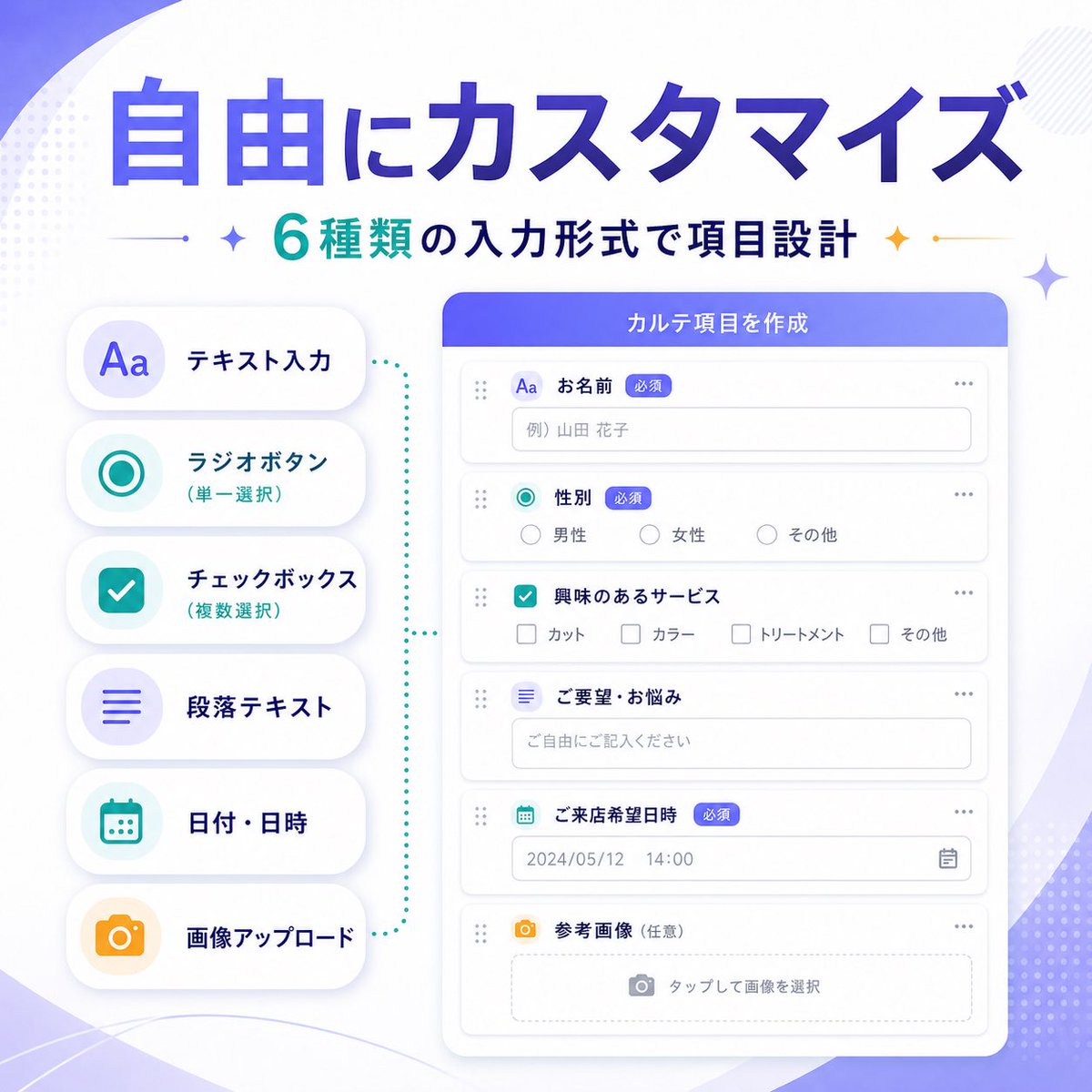
แบนเนอร์เครื่องมือสร้างแบบฟอร์ม SaaS ของญี่ปุ่น
แบนเนอร์อินโฟกราฟิกการตลาด SaaS สไตล์ญี่ปุ่นที่ออกแบบมาอย่างสวยงาม แสดงช่องป้อนข้อมูลแบบฟอร์มที่ปรับแต่งได้ 6 แบบ สำหรับใช้ในการโปรโมตการอัปเดตฟีเจอร์ผลิตภัณฑ์
นี่คือตัวอย่างข้อความแจ้งเตือน GPT Image 2 สำหรับ ผลิตภัณฑ์และเชิงพาณิชย์ ใช้ข้อความแจ้งเตือนที่พร้อมใช้งานด้านล่างเพื่อสร้างภาพที่คล้ายกัน และตรวจสอบการอ้างอิง Awesome GPT Image 2 Prompts รวมถึงสิทธิ์ในการใช้งานเชิงพาณิชย์ก่อนนำไปใช้ซ้ำ
ต้องการชุดข้อความแจ้งเตือนทั้งหมดหรือไม่? ใช้... ผลิตภัณฑ์และเชิงพาณิชย์ ศูนย์รวมหัวข้อสำหรับตัวอย่างที่เกี่ยวข้องเพิ่มเติม หรือเปิดดูได้เลย GPT Image 2 แคตตาล็อกพร้อมท์ สำหรับดัชนีตัวอย่างฉบับเต็ม โครงสร้างที่นำกลับมาใช้ใหม่ได้ และการอ้างอิงแหล่งที่มา
Free 1K preview
Generate one preview image instantly, no sign-up required.
3297/4000
พรอมป์
ข้อความแจ้งเตือนพร้อมสำหรับการคัดลอก
{
  "type": "SaaS feature update banner infographic",
  "style": "clean modern Japanese tech marketing visual, soft gradient abstract background, premium UI showcase, minimal flat illustration, rounded cards, subtle shadows, crisp typography",
  "language": "Japanese",
  "canvas": {
    "aspect_ratio": "1:1",
    "background": "white base with soft purple gradient waves, faint dotted halftone accents, light geometric sparkles in the corners"
  },
  "headline": {
    "main": "{argument name=\"headline text\" default=\"自由にカスタマイズ\"}",
    "sub": "{argument name=\"subheadline text\" default=\"6種類の入力形式で項目設計\"}",
    "main_style": "very large bold Japanese sans-serif, deep blue to violet gradient fill",
    "sub_style": "medium bold Japanese sans-serif, teal and dark navy text with small decorative sparkle icons and thin divider lines on both sides"
  },
  "layout": {
    "composition": "two-column product feature banner",
    "sections": [
      {
        "title": "input type list",
        "position": "left",
        "count": 6,
        "labels": [
          "テキスト入力",
          "ラジオボタン(単一選択)",
          "チェックボックス(複数選択)",
          "段落テキスト",
          "日付・日時",
          "画像アップロード"
        ],
        "container": "vertical stack of 6 rounded white pill cards with soft shadow",
        "icon_style": "large simple colored icons inside pale circular badges",
        "colors": [
          "purple",
          "teal",
          "teal",
          "purple",
          "teal",
          "orange"
        ]
      },
      {
        "title": "form builder UI",
        "position": "right",
        "count": 6,
        "labels": [
          "お名前",
          "Gender",
          "興味のあるサービス",
          "ご要望・お悩み",
          "ご来店希望日時",
          "Reference image (optional)"
        ],
        "container": "large rounded white application window with purple-blue header bar",
        "header_text": "{argument name=\"panel title\" default=\"カルテ項目を作成\"}",
        "field_types": [
          "single-line text input",
          "radio buttons",
          "checkbox group",
          "multiline text area",
          "date and time picker",
          "image upload dropzone"
        ]
      }
    ],
    "connector": "teal dotted bracket-like guide visually linking the left feature list to the form builder panel"
  },
  "ui_details": {
    "badges_count": 3,
    "badges": [
      "Required",
      "Required",
      "Required"
    ],
    "sample_values": {
      "name_placeholder": "Example) Yamada Hanako",
      "radio_options": [
        "Male",
        "Female",
        "その他"
      ],
      "checkbox_options": [
        "カット",
        "カラー",
        "トリートメント",
        "その他"
      ],
      "textarea_placeholder": "ご自由にご記入ください",
      "date_value": "2024/05/12",
      "time_value": "14:00",
      "upload_hint": "タップして画像を選択"
    },
    "window_controls": "minimal dots and drag handles, clean form rows with thin light gray borders"
  },
  "color_palette": {
    "primary": "violet to royal blue gradient",
    "secondary": "teal",
    "accent": "orange",
    "surface": "white",
    "text": "navy and gray"
  },
  "quality": "high-resolution polished startup marketing graphic, balanced spacing, elegant Japanese SaaS promotional banner for announcing customizable form input types"
}
ตัวแปรพร้อมท์
ตัวอย่างค่าอาร์กิวเมนต์ที่แก้ไขได้ซึ่งพบในข้อความแจ้งเตือน พร้อมค่าเริ่มต้น
ตัวแปร
headline text
ค่าเริ่มต้น
自由にカスタマイズ
ตัวแปร
subheadline text
ค่าเริ่มต้น
6種類の入力形式で項目設計
ตัวแปร
panel title
ค่าเริ่มต้น
カルテ項目を作成
Best for
- - ผลิตภัณฑ์และเชิงพาณิชย์ visual exploration
- - Image generation and reference-image edits
- - Reusable briefs that keep source attribution visible
Change these parts
- - Subject, product, character, or scene
- - Aspect ratio, camera, lighting, and background
- - Brand, text, color, and output constraints
Recommended model and settings
- - Model: gpt-image-2
- - Input mode: ข้อความเป็นรูปภาพ
- - Aspect ratio: source
- - Commercial status: review original source
How to use this prompt
- 1. Copy the prompt and preserve its structure for the first test.
- 2. Replace the subject, context, and publishing channel.
- 3. Change one camera, lighting, or style variable per iteration.
- 4. Inspect the output, source, text, and rights before reuse.
Limitations, source, and reuse cautions
- - Generated output is an editable draft, not factual, legal, or rights evidence.
- - Review the linked source, people, brands, logos, text, and third-party media before commercial use.
นำเข้าจาก Awesome GPT Image 2 Prompts จำเป็นต้องระบุแหล่งที่มา สถานะการใช้งานเชิงพาณิชย์คือ allowed โปรดตรวจสอบสิทธิ์แหล่งที่มาก่อนใช้งานแบบเสียค่าใช้จ่าย
กรณีเพิ่มเติมในหมวดหมู่นี้
จัดลำดับความสำคัญตามหมวดหมู่ ความเข้ากันได้กับโหมดการป้อนข้อมูล คุณภาพ และความเสี่ยงที่ต่ำกว่า

Transparent Earbuds on Stone Pedestal
ข้อความเป็นรูปภาพ

Manga Desert Radio Telescope Road Trip
ข้อความเป็นรูปภาพ

Female Clown Cyborg Portrait
ข้อความเป็นรูปภาพ

Wet Transparent Earbud Macro
ข้อความเป็นรูปภาพ

Imperial Research Bunker on Volcanic Planet
ข้อความเป็นรูปภาพ

Overhead Pepperoni Pizza Photo
ข้อความเป็นรูปภาพ
หมายเหตุเกี่ยวกับการนำกลับมาใช้ใหม่และแหล่งที่มา
ใช้ข้อความแจ้งเตือนนี้อย่างปลอดภัยหลังจากดูตัวอย่างกรณีแล้ว
- 1.คัดลอกข้อความแจ้งเตือน หรือเปิดโดยตรงใน Dovoo โดยใช้ปุ่มสร้างข้อความ
- 2.ปรับตัวแปร อัตราส่วนภาพ และภาพอ้างอิงให้เหมาะสมกับกรณีการใช้งานของคุณ
- 3.ก่อนเผยแพร่หรือใช้งานโดยเสียค่าใช้จ่าย โปรดตรวจสอบสิทธิ์ในแหล่งที่มา ข้อกำหนดการอ้างอิง และความเสี่ยงด้านแบรนด์หรือภาพลักษณ์