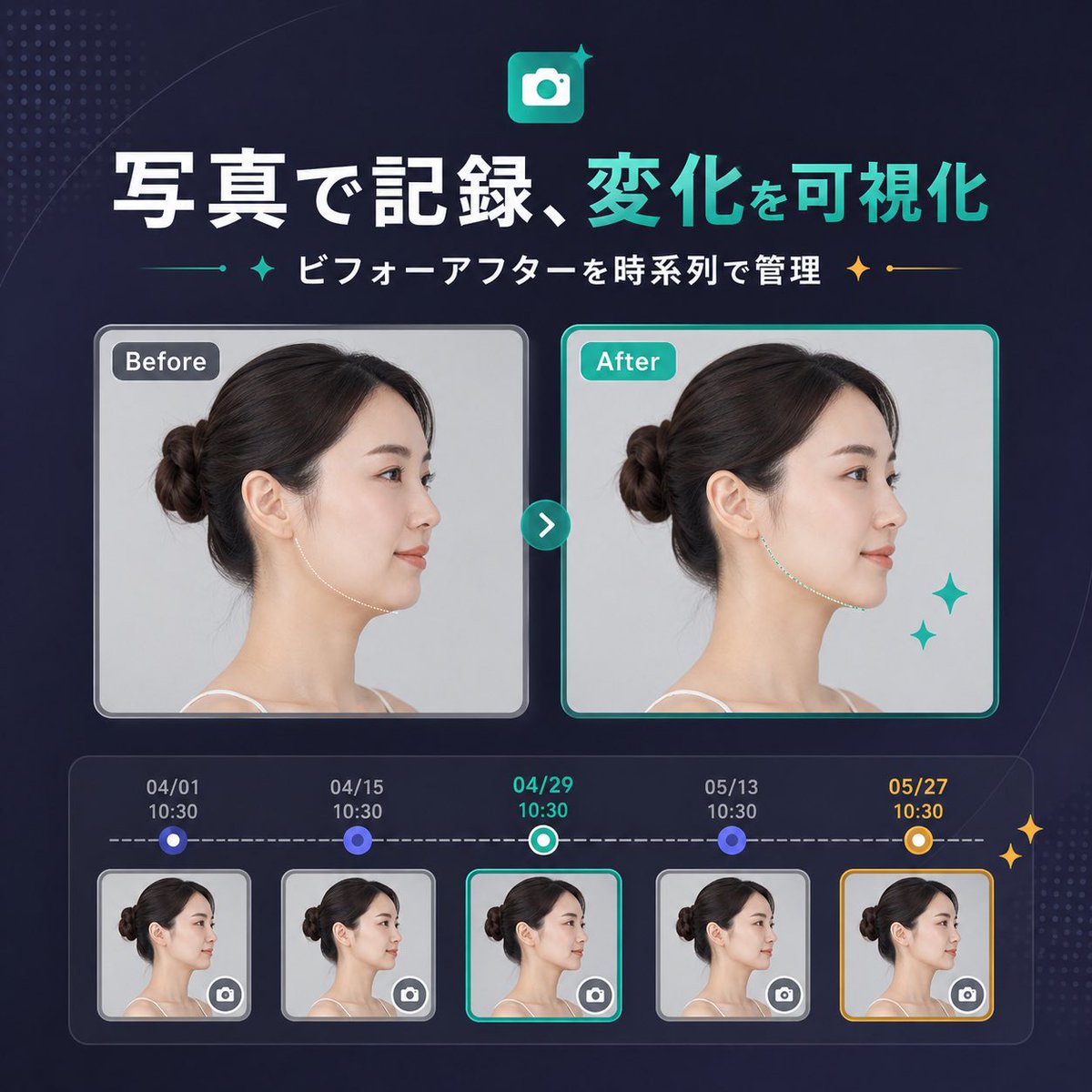
แบนเนอร์เปรียบเทียบก่อนและหลังการใช้งาน SaaS ของญี่ปุ่น
แบนเนอร์การตลาด SaaS รูปทรงสี่เหลี่ยมจัตุรัสที่ดูดีในภาษาญี่ปุ่น แสดงภาพเปรียบเทียบก่อนและหลัง พร้อมไทม์ไลน์ห้าขั้นตอน เหมาะสำหรับประกาศการอัปเดตผลิตภัณฑ์หรือหน้า Landing Page
นี่คือตัวอย่างข้อความแจ้งเตือน GPT Image 2 สำหรับ กราฟิกและโปสเตอร์ ใช้ข้อความแจ้งเตือนที่พร้อมใช้งานด้านล่างเพื่อสร้างภาพที่คล้ายกัน และตรวจสอบการอ้างอิง Awesome GPT Image 2 Prompts รวมถึงสิทธิ์ในการใช้งานเชิงพาณิชย์ก่อนนำไปใช้ซ้ำ
ข้อความแจ้งเตือนนี้ออกแบบมาสำหรับภาพอ้างอิงหลายภาพ เราจะเปิด Dovoo ด้วยข้อความแจ้งเตือนและภาพตัวอย่างที่มีอยู่ เพิ่มภาพอ้างอิงที่เหลือใน Dovoo ก่อนสร้างไฟล์
Free 1K preview
Generate one preview image instantly, no sign-up required.
Free text preview doesn’t preserve reference-image consistency.
พรอมป์
ข้อความแจ้งเตือนพร้อมสำหรับการคัดลอก
{
  "type": "SaaS feature update banner infographic",
  "style": "clean modern Japanese tech marketing, premium UI, dark navy gradient background, subtle dotted halftone texture in the top-left and bottom-right corners, soft curved line accents, glossy neon teal highlights, polished high-quality product announcement visual",
  "canvas": {
    "aspect_ratio": "1:1"
  },
  "headline": {
    "icon": "rounded square app icon with a white camera symbol on a teal gradient background, small sparkle accent",
    "title": "{argument name=\"headline text\" default=\"บันทึกด้วยภาพ เห็นการเปลี่ยนแปลงที่ชัดเจน\"}",
    "subtitle": "{argument name=\"subtitle text\" default=\"จัดการก่อนและหลังตามลำดับเวลา\"}",
    "language": "Chinese",
    "title_style": "large bold sans-serif, first phrase in white and second phrase in bright teal",
    "subtitle_style": "medium bold sans-serif in white with teal and gold sparkle-divider ornaments on both sides"
  },
  "layout": {
    "sections": [
      {
        "title": "comparison cards",
        "position": "center",
        "count": 2,
        "labels": [
          "Before",
          "After"
        ]
      },
      {
        "title": "timeline entries",
        "position": "bottom",
        "count": 5,
        "labels": [
          "04/01 10:30",
          "04/15 10:30",
          "04/29 10:30",
          "05/13 10:30",
          "05/27 10:30"
        ]
      }
    ],
    "centerpiece": "side-by-side before and after portrait cards connected by a circular teal arrow button",
    "bottom_panel": "rounded rectangular timeline module with five dated thumbnails connected by a dashed horizontal progress line"
  },
  "comparison": {
    "subject": "same adult woman in left-facing side profile with dark brown hair in a neat low bun, light skin, thin shoulder strap top, studio lighting, pale gray background",
    "privacy": "face area covered by a vertical rectangular blur block in both large cards and all five thumbnails",
    "before_card": {
      "label": "Before",
      "frame": "rounded rectangle with light gray border and soft shadow",
      "image": "neutral clinical-style portrait"
    },
    "after_card": {
      "label": "After",
      "frame": "rounded rectangle with bright teal border and soft shadow",
      "image": "similar portrait with a subtly refined jawline/neck contour to imply visible improvement",
      "decorations": "2 teal sparkle stars near the lower-right of the after card"
    },
    "connector": "small circular teal button centered between cards with a white right-pointing chevron"
  },
  "timeline": {
    "panel_style": "dark translucent rounded container with inner glow",
    "line": "white dashed horizontal line",
    "entries": [
      {
        "date": "04/01",
        "time": "10:30",
        "state": "small circular blue node above thumbnail",
        "thumbnail": "woman side-profile thumbnail with blur block and tiny camera icon button in bottom-right corner",
        "frame": "light gray rounded border"
      },
      {
        "date": "04/15",
        "time": "10:30",
        "state": "small circular blue node above thumbnail",
        "thumbnail": "woman side-profile thumbnail with blur block and tiny camera icon button in bottom-right corner",
        "frame": "light gray rounded border"
      },
      {
        "date": "04/29",
        "time": "10:30",
        "state": "current selection with teal-and-white ring node",
        "thumbnail": "woman side-profile thumbnail with blur block and tiny camera icon button in bottom-right corner",
        "frame": "bright teal rounded border"
      },
      {
        "date": "05/13",
        "time": "10:30",
        "state": "small circular blue node above thumbnail",
        "thumbnail": "woman side-profile thumbnail with blur block and tiny camera icon button in bottom-right corner",
        "frame": "light gray rounded border"
      },
      {
        "date": "05/27",
        "time": "10:30",
        "state": "highlighted milestone with gold-and-white ring node",
        "thumbnail": "woman side-profile thumbnail with blur block and tiny camera icon button in bottom-right corner",
        "frame": "gold rounded border"
      }
    ],
    "extra_decorations": "2 small gold sparkle stars on the far right edge of the timeline panel"
  },
  "color_palette": {
    "background": "deep navy to indigo gradient",
    "primary": "bright teal",
    "secondary": "white",
    "accent": "gold",
    "support": "soft gray and blue-violet"
  },
  "rendering": "crisp vector-meets-UI design with embedded realistic portrait photography, balanced spacing, centered composition, startup landing-page banner quality"}
ตัวแปรพร้อมท์
ตัวอย่างค่าอาร์กิวเมนต์ที่แก้ไขได้ซึ่งพบในข้อความแจ้งเตือน พร้อมค่าเริ่มต้น
Best for
- - กราฟิกและโปสเตอร์ visual exploration
- - Image generation and reference-image edits
- - Reusable briefs that keep source attribution visible
Change these parts
- - Subject, product, character, or scene
- - Aspect ratio, camera, lighting, and background
- - Brand, text, color, and output constraints
Recommended model and settings
- - Model: gpt-image-2
- - Input mode: แปลงภาพหลายภาพเป็นภาพเดียว
- - Aspect ratio: source
- - Commercial status: review original source
How to use this prompt
- 1. Copy the prompt and preserve its structure for the first test.
- 2. Replace the subject, context, and publishing channel.
- 3. Change one camera, lighting, or style variable per iteration.
- 4. Inspect the output, source, text, and rights before reuse.
Limitations, source, and reuse cautions
- - Generated output is an editable draft, not factual, legal, or rights evidence.
- - Review the linked source, people, brands, logos, text, and third-party media before commercial use.
กรณีเพิ่มเติมในหมวดหมู่นี้
จัดลำดับความสำคัญตามหมวดหมู่ ความเข้ากันได้กับโหมดการป้อนข้อมูล คุณภาพ และความเสี่ยงที่ต่ำกว่า






หมายเหตุเกี่ยวกับการนำกลับมาใช้ใหม่และแหล่งที่มา
ใช้ข้อความแจ้งเตือนนี้อย่างปลอดภัยหลังจากดูตัวอย่างกรณีแล้ว
- 1.คัดลอกข้อความแจ้งเตือน หรือเปิดโดยตรงใน Dovoo โดยใช้ปุ่มสร้างข้อความ
- 2.ปรับตัวแปร อัตราส่วนภาพ และภาพอ้างอิงให้เหมาะสมกับกรณีการใช้งานของคุณ
- 3.ก่อนเผยแพร่หรือใช้งานโดยเสียค่าใช้จ่าย โปรดตรวจสอบสิทธิ์ในแหล่งที่มา ข้อกำหนดการอ้างอิง และความเสี่ยงด้านแบรนด์หรือภาพลักษณ์