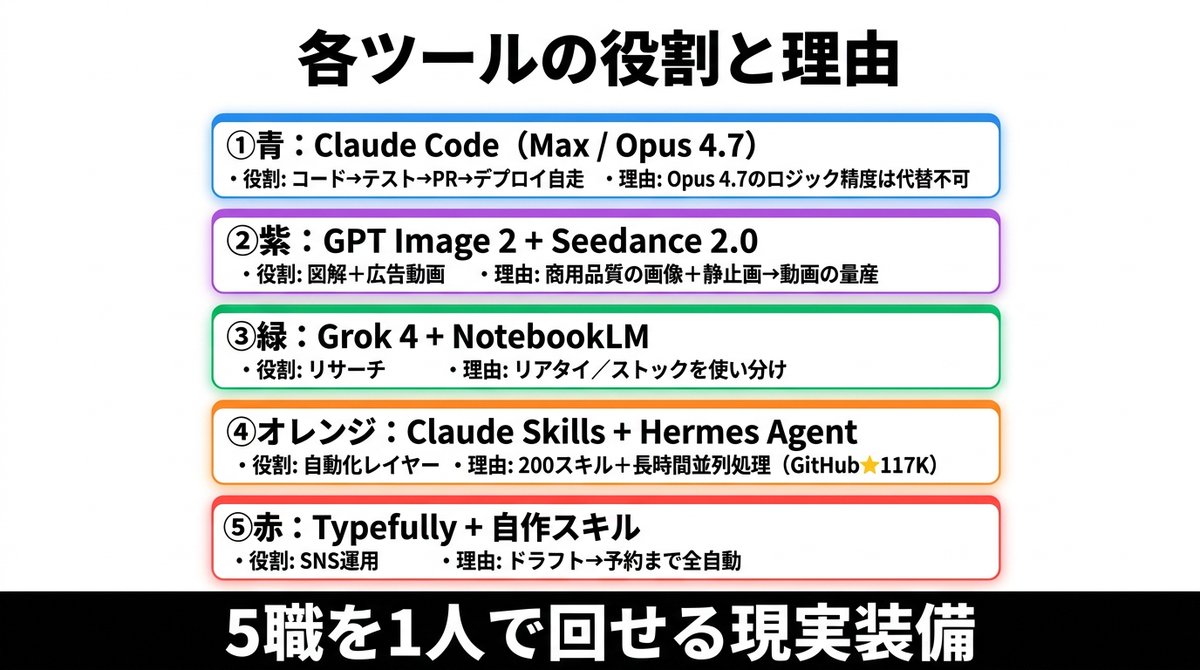
อินโฟกราฟิกเกี่ยวกับบทบาทของเครื่องมือ AI ของญี่ปุ่น
สไลด์อินโฟกราฟิกสไตล์ญี่ปุ่นที่ดูสะอาดตา แสดงชุดเครื่องมือ AI 5 ชุดที่แบ่งตามสี พร้อมบทบาทและเหตุผลในการใช้งาน เหมาะสำหรับโพสต์บนโซเชียลมีเดีย การนำเสนอ และการแสดงความคิดเห็นทางธุรกิจ
นี่คือตัวอย่างข้อความแจ้งเตือน GPT Image 2 สำหรับ กราฟิกและโปสเตอร์ ใช้ข้อความแจ้งเตือนที่พร้อมใช้งานด้านล่างเพื่อสร้างภาพที่คล้ายกัน และตรวจสอบการอ้างอิง Awesome GPT Image 2 Prompts รวมถึงสิทธิ์ในการใช้งานเชิงพาณิชย์ก่อนนำไปใช้ซ้ำ
ต้องการชุดข้อความแจ้งเตือนทั้งหมดหรือไม่? ใช้... กราฟิกและโปสเตอร์ ศูนย์รวมหัวข้อสำหรับตัวอย่างที่เกี่ยวข้องเพิ่มเติม หรือเปิดดูได้เลย GPT Image 2 แคตตาล็อกพร้อมท์ สำหรับดัชนีตัวอย่างฉบับเต็ม โครงสร้างที่นำกลับมาใช้ใหม่ได้ และการอ้างอิงแหล่งที่มา
Free 1K preview
Generate one preview image instantly, no sign-up required.
3687/4000
พรอมป์
ข้อความแจ้งเตือนพร้อมสำหรับการคัดลอก
{
  "type": "Japanese infographic poster",
  "style": "clean business presentation slide, minimalist flat design, crisp vector-like typography, white background with subtle light gray tone, centered composition, high contrast, social-media-friendly landscape layout",
  "canvas": {
    "aspect_ratio": "2:1",
    "size": "wide horizontal"
  },
  "headline": {
    "text": "{argument name=\"headline text\" default=\"แต่ละเครื่องมือมีบทบาทและเหตุผลอย่างไร\"}",
    "position": "top center",
    "font": "bold Japanese sans-serif",
    "color": "black",
    "size": "very large"
  },
  "layout": {
    "sections": [
      {
        "title": "① Blue: Claude Code (Max / Opus 4.7)",
        "position": "upper middle",
        "count": 2,
        "labels": [
          "・บทบาท: โค้ด→ทดสอบ→PR→การใช้งานด้วยตนเอง",
          "・เหตุผล: ความแม่นยำของตรรกะของ Opus 4.7 ไม่สามารถทดแทนได้"
        ],
        "container": "rounded white rectangle with blue outline, faint blue glow, soft drop shadow"
      },
      {
        "title": "② Purple: GPT Image 2 + Seedance 2.0",
        "position": "upper mid-lower",
        "count": 2,
        "labels": [
          "・บทบาท: ภาพประกอบ + วิดีโอโฆษณา",
          "・เหตุผล: การผลิตภาพคุณภาพสินค้า + ภาพนิ่ง→วิดีโอจำนวนมาก"
        ],
        "container": "rounded white rectangle with purple outline, faint purple glow, soft drop shadow"
      },
      {
        "title": "③ Green: Grok 4 + NotebookLM",
        "position": "center",
        "count": 2,
        "labels": [
          "・บทบาท: การวิจัย",
          "・เหตุผล: ใช้แบบเรียลไทม์/สต็อกสลับกัน"
        ],
        "container": "rounded white rectangle with green outline, faint green glow, soft drop shadow"
      },
      {
        "title": "④ส้ม: Claude Skills + Hermes Agent",
        "position": "lower mid-upper",
        "count": 2,
        "labels": [
          "・บทบาท: เลเยอร์อัตโนมัติ",
          "・เหตุผล: 200 ทักษะ + การประมวลผลแบบขนานระยะยาว (GitHub★117K)"
        ],
        "container": "rounded white rectangle with orange outline, faint orange glow, soft drop shadow"
      },
      {
        "title": "⑤แดง: Typefully + ทักษะที่สร้างขึ้นเอง",
        "position": "lower middle",
        "count": 2,
        "labels": [
          "・บทบาท: การดำเนินงาน SNS",
          "・เหตุผล: ร่าง→การจองทั้งหมดอัตโนมัติ"
        ],
        "container": "rounded white rectangle with red outline, faint red glow, soft drop shadow"
      }
    ],
    "section_count": 5,
    "arrangement": "five evenly spaced horizontal cards stacked vertically in the center, all same width, each with rounded corners and colored border matching the numbered color name"
  },
  "footer": {
    "text": "{argument name=\"footer text\" default=\"อุปกรณ์จริงที่สามารถจัดการ 5 งานได้ด้วยคนเดียว\"}",
    "position": "bottom full width",
    "background": "solid black bar",
    "font": "extra bold Japanese sans-serif",
    "color": "white",
    "size": "very large"
  },
  "typography": {
    "body_font": "bold Japanese sans-serif",
    "body_color": "black",
    "emphasis": "tool names in heavier bold, compact spacing, left-aligned inside each card"
  },
  "colors": {
    "card_borders": [
      "blue",
      "purple",
      "green",
      "orange",
      "red"
    ],
    "background": "white to very light gray",
    "text": "black",
    "footer_bg": "black",
    "footer_text": "white"
  },
  "customization": {
    "item_1_tool": "{argument name=\"first tool line\" default=\"Claude Code(Max / Opus 4.7)\"}",
    "item_2_tool": "{argument name=\"second tool line\" default=\"GPT Image 2 + Seedance 2.0\"}",
    "item_3_tool": "{argument name=\"third tool line\" default=\"Grok 4 + NotebookLM\"}"
  }
}
ตัวแปรพร้อมท์
ตัวอย่างค่าอาร์กิวเมนต์ที่แก้ไขได้ซึ่งพบในข้อความแจ้งเตือน พร้อมค่าเริ่มต้น
ตัวแปร
headline text
ค่าเริ่มต้น
各ツールの役割と理由
ตัวแปร
footer text
ค่าเริ่มต้น
5職を1人で回せる現実装備
ตัวแปร
first tool line
ค่าเริ่มต้น
Claude Code(Max / Opus 4.7)
ตัวแปร
second tool line
ค่าเริ่มต้น
GPT Image 2 + Seedance 2.0
ตัวแปร
third tool line
ค่าเริ่มต้น
Grok 4 + NotebookLM
Best for
- - กราฟิกและโปสเตอร์ visual exploration
- - Image generation and reference-image edits
- - Reusable briefs that keep source attribution visible
Change these parts
- - Subject, product, character, or scene
- - Aspect ratio, camera, lighting, and background
- - Brand, text, color, and output constraints
Recommended model and settings
- - Model: gpt-image-2
- - Input mode: ข้อความเป็นรูปภาพ
- - Aspect ratio: source
- - Commercial status: review original source
How to use this prompt
- 1. Copy the prompt and preserve its structure for the first test.
- 2. Replace the subject, context, and publishing channel.
- 3. Change one camera, lighting, or style variable per iteration.
- 4. Inspect the output, source, text, and rights before reuse.
Limitations, source, and reuse cautions
- - Generated output is an editable draft, not factual, legal, or rights evidence.
- - Review the linked source, people, brands, logos, text, and third-party media before commercial use.
นำเข้าจาก Awesome GPT Image 2 Prompts จำเป็นต้องระบุแหล่งที่มา สถานะการใช้งานเชิงพาณิชย์คือ allowed โปรดตรวจสอบสิทธิ์แหล่งที่มาก่อนใช้งานแบบเสียค่าใช้จ่าย
กรณีเพิ่มเติมในหมวดหมู่นี้
จัดลำดับความสำคัญตามหมวดหมู่ ความเข้ากันได้กับโหมดการป้อนข้อมูล คุณภาพ และความเสี่ยงที่ต่ำกว่า

Transparent Earbuds on Stone Pedestal
ข้อความเป็นรูปภาพ

Manga Desert Radio Telescope Road Trip
ข้อความเป็นรูปภาพ

Female Clown Cyborg Portrait
ข้อความเป็นรูปภาพ

Imperial Research Bunker on Volcanic Planet
ข้อความเป็นรูปภาพ

Greyscale Puzzle Portrait with Color Accent
ข้อความเป็นรูปภาพ

Pink Hijab Mirror Selfie Portrait
ข้อความเป็นรูปภาพ
หมายเหตุเกี่ยวกับการนำกลับมาใช้ใหม่และแหล่งที่มา
ใช้ข้อความแจ้งเตือนนี้อย่างปลอดภัยหลังจากดูตัวอย่างกรณีแล้ว
- 1.คัดลอกข้อความแจ้งเตือน หรือเปิดโดยตรงใน Dovoo โดยใช้ปุ่มสร้างข้อความ
- 2.ปรับตัวแปร อัตราส่วนภาพ และภาพอ้างอิงให้เหมาะสมกับกรณีการใช้งานของคุณ
- 3.ก่อนเผยแพร่หรือใช้งานโดยเสียค่าใช้จ่าย โปรดตรวจสอบสิทธิ์ในแหล่งที่มา ข้อกำหนดการอ้างอิง และความเสี่ยงด้านแบรนด์หรือภาพลักษณ์