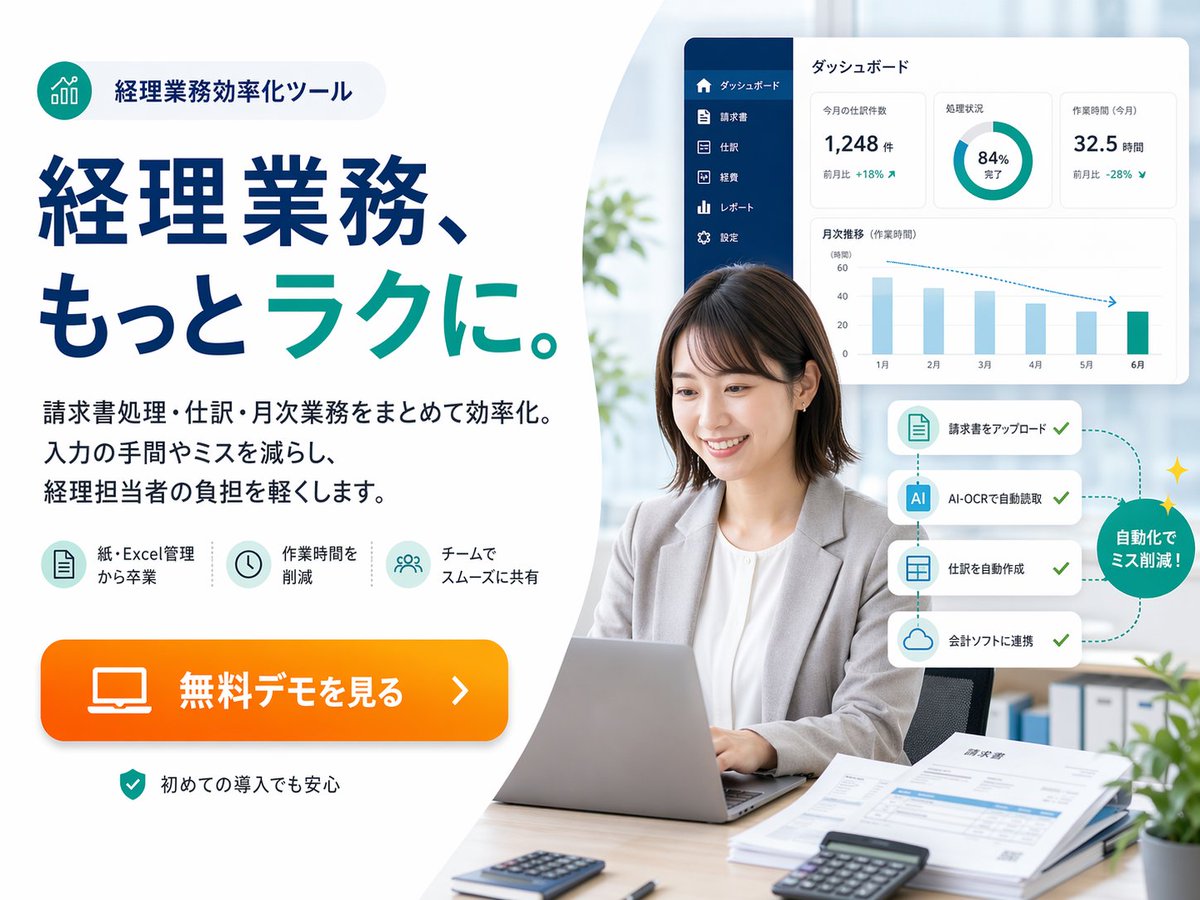
แบนเนอร์ฮีโร่ซอฟต์แวร์บัญชี SaaS ของญี่ปุ่น
แบนเนอร์ส่งเสริมการขายสไตล์ญี่ปุ่นฟินเทคที่ดูดีมีระดับ สำหรับเครื่องมือช่วยทำการบัญชีอัตโนมัติ เหมาะสำหรับหน้า Landing Page โฆษณาบนเว็บ และภาพประกอบการตลาด SaaS
นี่คือตัวอย่างข้อความแจ้งเตือน GPT Image 2 สำหรับ ผลิตภัณฑ์และเชิงพาณิชย์ ใช้ข้อความแจ้งเตือนที่พร้อมใช้งานด้านล่างเพื่อสร้างภาพที่คล้ายกัน และตรวจสอบการอ้างอิง Awesome GPT Image 2 Prompts รวมถึงสิทธิ์ในการใช้งานเชิงพาณิชย์ก่อนนำไปใช้ซ้ำ
ต้องการชุดข้อความแจ้งเตือนทั้งหมดหรือไม่? ใช้... ผลิตภัณฑ์และเชิงพาณิชย์ ศูนย์รวมหัวข้อสำหรับตัวอย่างที่เกี่ยวข้องเพิ่มเติม หรือเปิดดูได้เลย GPT Image 2 แคตตาล็อกพร้อมท์ สำหรับดัชนีตัวอย่างฉบับเต็ม โครงสร้างที่นำกลับมาใช้ใหม่ได้ และการอ้างอิงแหล่งที่มา
Free 1K preview
Generate one preview image instantly, no sign-up required.
4000/4000
พรอมป์
ข้อความแจ้งเตือนพร้อมสำหรับการคัดลอก
{
  "automation_flow": {
    "callout": "自動化でミス削減!",
    "cards": [
      "請求書をアップロード",
      "AI-OCRで自動読取",
      "仕訳を自動作成",
      "会計ソフトに連携"
    ],
    "count": 4,
    "position": "mid-right beside the subject",
    "style": "four stacked white rounded cards connected by a dotted teal path with checkmarks, ending in a green circular badge with small sparkles"
  },
  "branding": {
    "badge": {
      "icon": "teal circular icon with ascending bar chart line graphic",
      "position": "top-left",
      "shape": "rounded pill with pale gray fill",
      "text": "経理業務効率化ツール"
    },
    "palette": {
      "accent": "bright orange",
      "background": "white and very light gray",
      "primary": "deep navy blue",
      "secondary": "teal green"
    }
  },
  "canvas": {
    "aspect_ratio": "4:3",
    "background": "soft light gray to white with a large curved white shape dividing left text area and right photo area"
  },
  "environment": {
    "background_elements": {
      "count": 4,
      "items": [
        "soft daylight through large window",
        "blurred green plant near center-left background",
        "binders on shelf lower right background",
        "small potted plant in the extreme lower-right corner"
      ]
    },
    "setting": "bright contemporary office"
  },
  "features": {
    "count": 3,
    "items": [
      {
        "icon": "document sheet icon in pale teal circle",
        "label": "紙・Excel管理から卒業"
      },
      {
        "icon": "clock icon in pale teal circle",
        "label": "作業時間を削減"
      },
      {
        "icon": "team/users icon in pale teal circle",
        "label": "チームでスムーズに共有"
      }
    ]
  },
  "layout": {
    "composition": "text-heavy ad on the left, realistic workplace portrait on the right, floating software interface cards above and beside the person",
    "sections": [
      {
        "count": 5,
        "labels": [
          "badge at top",
          "large headline",
          "3-line body copy",
          "3 feature icons",
          "orange CTA button"
        ],
        "position": "left half",
        "title": "left marketing copy area"
      },
      {
        "count": 6,
        "labels": [
          "businesswoman using laptop",
          "dashboard panel",
          "4-step automation cards",
          "green circular callout",
          "desk documents and calculators",
          "blurred office background"
        ],
        "position": "right half",
        "title": "right office photo area"
      }
    ]
  },
  "rendering": "high-resolution commercial ad composite, realistic photo for the person and desk, crisp vector typography, subtle drop shadows, spacious margins, Japanese web banner aesthetics",
  "style": "clean corporate web advertisement, modern fintech branding, bright office photography blended with vector UI overlays, high trust, polished and conversion-focused",
  "subject": {
    "count": 1,
    "desk_items": {
      "count": 5,
      "items": [
        "silver laptop open in front",
        "small calculator near front left",
        "black calculator near front right",
        "stack of papers and invoices on right side",
        "pen near papers"
      ]
    },
    "face_treatment": "Show every face clearly with natural, detailed facial features",
    "person": "Japanese businesswoman in her late 20s to 30s, seated at a desk, medium short dark brown bob haircut, light gray blazer over white blouse, neutral professional expression, hands on laptop keyboard",
    "pose": "front-facing but slightly angled left, sitting upright in an office chair"
  },
  "text": {
    "body": "請求書処理・仕訳・月次業務をまとめて効率化。入力の手間やミスを減らし、経理担当者の負担を軽くします。",
    "cta": "{argument name=\"button text\" default=\"無料デモを見る\"}",
    "headline": "経理業務、もっと{argument name=\"headline emphasis\" default=\"ラク\"}に。",
    "reassurance": "初めての導入でも安心"
  },
  "type": "Japanese SaaS promotional landing-page hero banner",
  "ui_panel": {
    "position": "upper-right floating above the subject",
    "sidebar": {
      "color": "dark navy vertical sidebar",
      "count": 6,
      "labels": [
        "ダッシュボード",
        "Invoice",
        "Entry",
        "Fee",
        "レポート",
        "Settings"
      ]
    },
    "style": "white rounded rectangle card with subtle shadow",
    "title": "ダッシュボード",
    "widgets": {
      "count": 4,
      "items": [
        {
          "delta": "MoM +18%",
          "label": "今月の仕訳数",
          "type": "metric card",
          "value": "1,248 items"
        },
        {
          "label": "Processing progress",
          "type": "donut chart",
          "value": "84% Complete"
        },
        {
          "delta": "MoM -28%",
          "label": "Work Time (This Month)",
          "type": "metric card",
          "value": "32.5 Hours"
        },
        {
          "label": "Monthly Trend (Work Time)",
          "months": [
            "January",
            "February",
            "March",
            "April",
            "May",
            "June"
          ],
          "type": "bar chart"
        }
      ]
    }
  }
}
ตัวแปรพร้อมท์
ตัวอย่างค่าอาร์กิวเมนต์ที่แก้ไขได้ซึ่งพบในข้อความแจ้งเตือน พร้อมค่าเริ่มต้น
ตัวแปร
headline emphasis
ค่าเริ่มต้น
ラク
ตัวแปร
button text
ค่าเริ่มต้น
無料デモを見る
Best for
- - ผลิตภัณฑ์และเชิงพาณิชย์ visual exploration
- - Image generation and reference-image edits
- - Reusable briefs that keep source attribution visible
Change these parts
- - Subject, product, character, or scene
- - Aspect ratio, camera, lighting, and background
- - Brand, text, color, and output constraints
Recommended model and settings
- - Model: gpt-image-2
- - Input mode: ข้อความเป็นรูปภาพ
- - Aspect ratio: source
- - Commercial status: review original source
How to use this prompt
- 1. Copy the prompt and preserve its structure for the first test.
- 2. Replace the subject, context, and publishing channel.
- 3. Change one camera, lighting, or style variable per iteration.
- 4. Inspect the output, source, text, and rights before reuse.
Limitations, source, and reuse cautions
- - Generated output is an editable draft, not factual, legal, or rights evidence.
- - Review the linked source, people, brands, logos, text, and third-party media before commercial use.
นำเข้าจาก Awesome GPT Image 2 Prompts จำเป็นต้องระบุแหล่งที่มา สถานะการใช้งานเชิงพาณิชย์คือ allowed โปรดตรวจสอบสิทธิ์แหล่งที่มาก่อนใช้งานแบบเสียค่าใช้จ่าย
กรณีเพิ่มเติมในหมวดหมู่นี้
จัดลำดับความสำคัญตามหมวดหมู่ ความเข้ากันได้กับโหมดการป้อนข้อมูล คุณภาพ และความเสี่ยงที่ต่ำกว่า

Transparent Earbuds on Stone Pedestal
ข้อความเป็นรูปภาพ

Manga Desert Radio Telescope Road Trip
ข้อความเป็นรูปภาพ

Female Clown Cyborg Portrait
ข้อความเป็นรูปภาพ

Wet Transparent Earbud Macro
ข้อความเป็นรูปภาพ

Imperial Research Bunker on Volcanic Planet
ข้อความเป็นรูปภาพ

Overhead Pepperoni Pizza Photo
ข้อความเป็นรูปภาพ
หมายเหตุเกี่ยวกับการนำกลับมาใช้ใหม่และแหล่งที่มา
ใช้ข้อความแจ้งเตือนนี้อย่างปลอดภัยหลังจากดูตัวอย่างกรณีแล้ว
- 1.คัดลอกข้อความแจ้งเตือน หรือเปิดโดยตรงใน Dovoo โดยใช้ปุ่มสร้างข้อความ
- 2.ปรับตัวแปร อัตราส่วนภาพ และภาพอ้างอิงให้เหมาะสมกับกรณีการใช้งานของคุณ
- 3.ก่อนเผยแพร่หรือใช้งานโดยเสียค่าใช้จ่าย โปรดตรวจสอบสิทธิ์ในแหล่งที่มา ข้อกำหนดการอ้างอิง และความเสี่ยงด้านแบรนด์หรือภาพลักษณ์