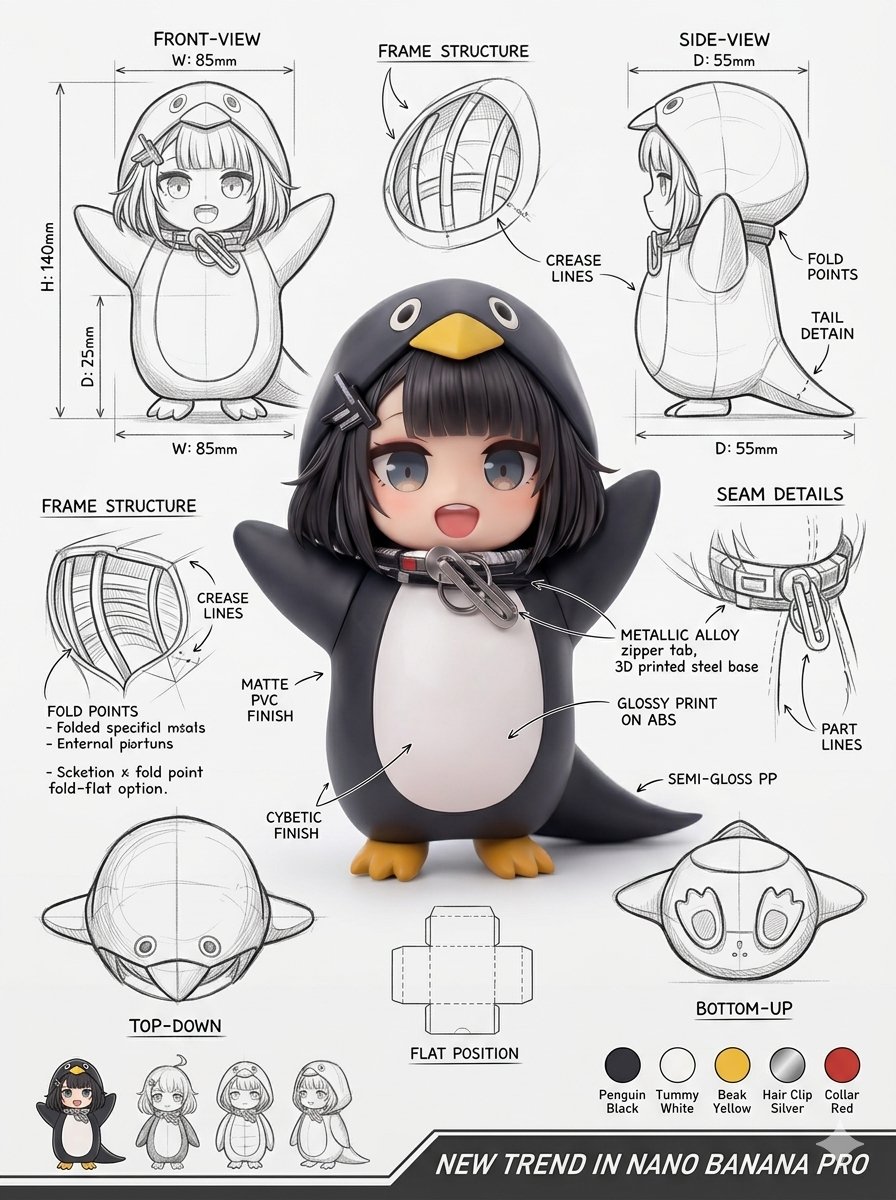
แผ่นออกแบบบรรจุภัณฑ์สำหรับอุตสาหกรรม
คำแนะนำระดับมืออาชีพสำหรับการสร้างเลย์เอาต์บรรจุภัณฑ์งานออกแบบอุตสาหกรรม รวมถึงภาพเรนเดอร์ 3 มิติ มุมมองทางเทคนิค และคำอธิบายวัสดุ
นี่คือตัวอย่างข้อความแจ้งเตือน GPT Image 2 สำหรับ ผลิตภัณฑ์และเชิงพาณิชย์ ใช้ข้อความแจ้งเตือนที่พร้อมใช้งานด้านล่างเพื่อสร้างภาพที่คล้ายกัน และตรวจสอบการอ้างอิง Awesome GPT Image 2 Prompts รวมถึงสิทธิ์ในการใช้งานเชิงพาณิชย์ก่อนนำไปใช้ซ้ำ
ต้องการชุดข้อความแจ้งเตือนทั้งหมดหรือไม่? ใช้... ผลิตภัณฑ์และเชิงพาณิชย์ ศูนย์รวมหัวข้อสำหรับตัวอย่างที่เกี่ยวข้องเพิ่มเติม หรือเปิดดูได้เลย GPT Image 2 แคตตาล็อกพร้อมท์ สำหรับดัชนีตัวอย่างฉบับเต็ม โครงสร้างที่นำกลับมาใช้ใหม่ได้ และการอ้างอิงแหล่งที่มา
Free 1K preview
Generate one preview image instantly, no sign-up required.
Free text preview doesn’t preserve reference-image consistency.
971/4000
พรอมป์
ข้อความแจ้งเตือนพร้อมสำหรับการคัดลอก
Using the supplied reference image, produce a professional industrial-design packaging illustration sheet for the package ({argument name="package type" default="PACKAGE TYPE"}). Place a hero 3D render in the middle with photoreal materials, gentle studio lighting, and a polished commercial finish. Around it, lay out the technical views: front, side, top, bottom, an oblique angle, and a flat unfolded layout. Add line sketches showing the {argument name="technical details" default="frame structure, fold/crease lines, seam details, and dimension arrows labeled in millimeters"}. Annotate materials and surface finishes ({argument name="material list" default="matte, gloss print, plastic, paper, glass, etc."}) with handwritten callouts. Drop in color swatches, supporting product mockups, and soft cast shadows. Background: clean sketchbook paper. Style: photoreal render mixed with pencil-sketch overlays, modern design aesthetic, ultra-detailed, portfolio quality.ตัวแปรพร้อมท์
ตัวอย่างค่าอาร์กิวเมนต์ที่แก้ไขได้ซึ่งพบในข้อความแจ้งเตือน พร้อมค่าเริ่มต้น
ตัวแปร
package type
ค่าเริ่มต้น
PACKAGE TYPE
ตัวแปร
technical details
ค่าเริ่มต้น
frame structure, fold/crease lines, seam details, and dimension arrows labeled in millimeters
ตัวแปร
material list
ค่าเริ่มต้น
matte, gloss print, plastic, paper, glass, etc.
Best for
- - ผลิตภัณฑ์และเชิงพาณิชย์ visual exploration
- - Image generation and reference-image edits
- - Reusable briefs that keep source attribution visible
Change these parts
- - Subject, product, character, or scene
- - Aspect ratio, camera, lighting, and background
- - Brand, text, color, and output constraints
Recommended model and settings
- - Model: gpt-image-2
- - Input mode: รูปภาพเป็นรูปภาพ
- - Aspect ratio: source
- - Commercial status: review original source
How to use this prompt
- 1. Copy the prompt and preserve its structure for the first test.
- 2. Replace the subject, context, and publishing channel.
- 3. Change one camera, lighting, or style variable per iteration.
- 4. Inspect the output, source, text, and rights before reuse.
Limitations, source, and reuse cautions
- - Generated output is an editable draft, not factual, legal, or rights evidence.
- - Review the linked source, people, brands, logos, text, and third-party media before commercial use.
นำเข้าจาก Awesome GPT Image 2 Prompts จำเป็นต้องระบุแหล่งที่มา สถานะการใช้งานเชิงพาณิชย์คือ allowed โปรดตรวจสอบสิทธิ์แหล่งที่มาก่อนใช้งานแบบเสียค่าใช้จ่าย
Related prompt packs
กรณีเพิ่มเติมในหมวดหมู่นี้
จัดลำดับความสำคัญตามหมวดหมู่ ความเข้ากันได้กับโหมดการป้อนข้อมูล คุณภาพ และความเสี่ยงที่ต่ำกว่า
หมายเหตุเกี่ยวกับการนำกลับมาใช้ใหม่และแหล่งที่มา
ใช้ข้อความแจ้งเตือนนี้อย่างปลอดภัยหลังจากดูตัวอย่างกรณีแล้ว
- 1.คัดลอกข้อความแจ้งเตือน หรือเปิดโดยตรงใน Dovoo โดยใช้ปุ่มสร้างข้อความ
- 2.ปรับตัวแปร อัตราส่วนภาพ และภาพอ้างอิงให้เหมาะสมกับกรณีการใช้งานของคุณ
- 3.ก่อนเผยแพร่หรือใช้งานโดยเสียค่าใช้จ่าย โปรดตรวจสอบสิทธิ์ในแหล่งที่มา ข้อกำหนดการอ้างอิง และความเสี่ยงด้านแบรนด์หรือภาพลักษณ์