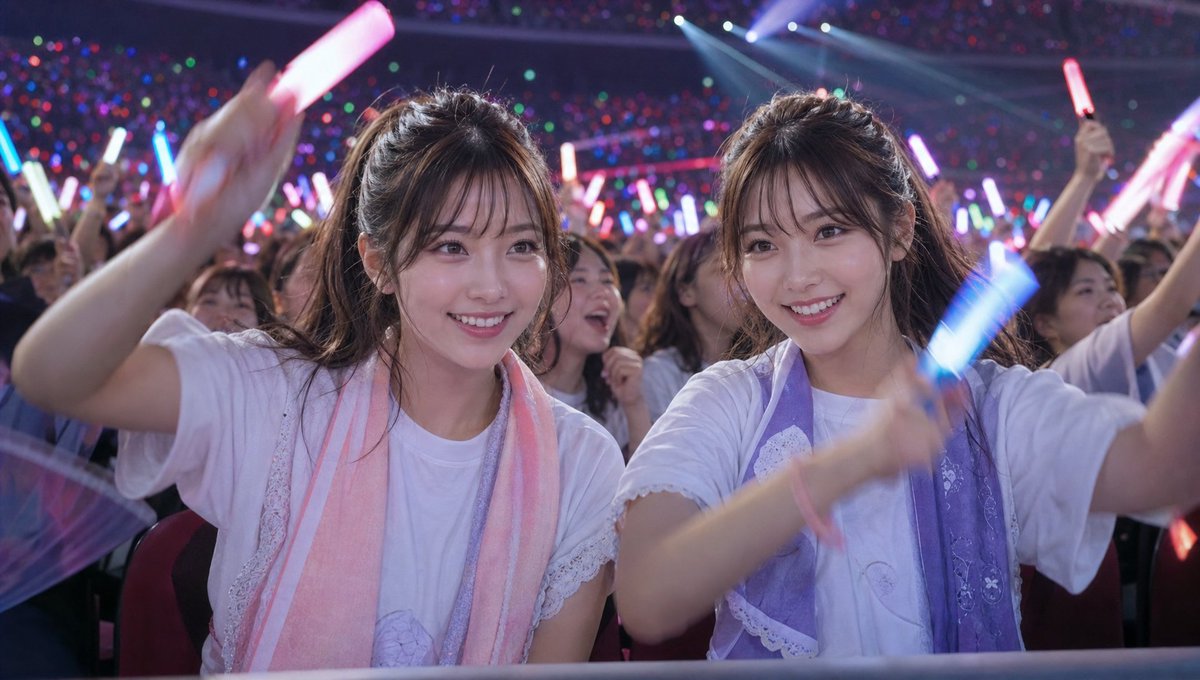
พลังของผู้ชมในคอนเสิร์ต Idol Live
โจทย์คือการสร้างภาพเสมือนจริงแบบภาพยนตร์ของแฟนเพลงที่กำลังตื่นเต้นในสถานที่จัดคอนเสิร์ตขนาดใหญ่ โดยเน้นบรรยากาศ แสง และความสอดคล้องของตัวละคร
นี่คือตัวอย่างข้อความแจ้งเตือน GPT Image 2 สำหรับ ภาพเหมือนและตัวละคร ใช้ข้อความแจ้งเตือนที่พร้อมใช้งานด้านล่างเพื่อสร้างภาพที่คล้ายกัน และตรวจสอบการอ้างอิง Awesome GPT Image 2 Prompts รวมถึงสิทธิ์ในการใช้งานเชิงพาณิชย์ก่อนนำไปใช้ซ้ำ
ต้องการชุดข้อความแจ้งเตือนทั้งหมดหรือไม่? ใช้... ภาพเหมือนและตัวละคร ศูนย์รวมหัวข้อสำหรับตัวอย่างที่เกี่ยวข้องเพิ่มเติม หรือเปิดดูได้เลย GPT Image 2 แคตตาล็อกพร้อมท์ สำหรับดัชนีตัวอย่างฉบับเต็ม โครงสร้างที่นำกลับมาใช้ใหม่ได้ และการอ้างอิงแหล่งที่มา
Free 1K preview
Generate one preview image instantly, no sign-up required.
Free text preview doesn’t preserve reference-image consistency.
1247/4000
พรอมป์
ข้อความแจ้งเตือนพร้อมสำหรับการคัดลอก
"Maintain the {argument name="people" default="twins"} from the reference image, wearing {argument name="clothing" default="outfits like those worn by fans supporting idols"}. Realistic live-action film style, set in the audience of a {argument name="venue" default="massive idol live concert"}, a night arena live. The twins are enthusiastically supporting the concert from seats near the front row.
Both are smiling and absorbed, swinging colorful glow sticks with all their might. Surrounding audience members are also waving countless red, blue, green, purple, and pink glow sticks, turning the entire venue into a sea of light.
A space filled with the heat, excitement, and cheers unique to a live concert venue. Strong stage lighting and laser effects illuminate the audience seats, dramatically highlighting the twins' expressions.
The camera focuses on the audience side; the idols and stage are not visible.
Realistic skin texture, sweat and light reflections, natural motion feel, immersive concert atmosphere, cinematic composition, telephoto lens style, shallow depth of field, documentary style, photorealistic, ultra-high definition, realistic movie quality.
Do not include corporate logos or text on clothing, signs, or the screen."
ตัวแปรพร้อมท์
ตัวอย่างค่าอาร์กิวเมนต์ที่แก้ไขได้ซึ่งพบในข้อความแจ้งเตือน พร้อมค่าเริ่มต้น
ตัวแปร
people
ค่าเริ่มต้น
twins
ตัวแปร
clothing
ค่าเริ่มต้น
outfits like those worn by fans supporting idols
ตัวแปร
venue
ค่าเริ่มต้น
massive idol live concert
Best for
- - ภาพเหมือนและตัวละคร visual exploration
- - Image generation and reference-image edits
- - Reusable briefs that keep source attribution visible
Change these parts
- - Subject, product, character, or scene
- - Aspect ratio, camera, lighting, and background
- - Brand, text, color, and output constraints
Recommended model and settings
- - Model: gpt-image-2
- - Input mode: รูปภาพเป็นรูปภาพ
- - Aspect ratio: source
- - Commercial status: review original source
How to use this prompt
- 1. Copy the prompt and preserve its structure for the first test.
- 2. Replace the subject, context, and publishing channel.
- 3. Change one camera, lighting, or style variable per iteration.
- 4. Inspect the output, source, text, and rights before reuse.
Limitations, source, and reuse cautions
- - Generated output is an editable draft, not factual, legal, or rights evidence.
- - Review the linked source, people, brands, logos, text, and third-party media before commercial use.
นำเข้าจาก Awesome GPT Image 2 Prompts จำเป็นต้องระบุแหล่งที่มา สถานะการใช้งานเชิงพาณิชย์คือ allowed โปรดตรวจสอบสิทธิ์แหล่งที่มาก่อนใช้งานแบบเสียค่าใช้จ่าย
กรณีเพิ่มเติมในหมวดหมู่นี้
จัดลำดับความสำคัญตามหมวดหมู่ ความเข้ากันได้กับโหมดการป้อนข้อมูล คุณภาพ และความเสี่ยงที่ต่ำกว่า

Stylish Man Street Lamp Portrait
รูปภาพเป็นรูปภาพ

Sci-Fi Cyan Lighting Effect
รูปภาพเป็นรูปภาพ

GPT Image 2 Real-Life Character Street Snap
ข้อความเป็นรูปภาพ

Oversized Head Cartoon Caricature Prompt
รูปภาพเป็นรูปภาพความเสี่ยงปานกลาง

Studio Portrait of Woman with Sunglasses
ข้อความเป็นรูปภาพ

Street Selfie with Cat in Matching Cap
ข้อความเป็นรูปภาพ
หมายเหตุเกี่ยวกับการนำกลับมาใช้ใหม่และแหล่งที่มา
ใช้ข้อความแจ้งเตือนนี้อย่างปลอดภัยหลังจากดูตัวอย่างกรณีแล้ว
- 1.คัดลอกข้อความแจ้งเตือน หรือเปิดโดยตรงใน Dovoo โดยใช้ปุ่มสร้างข้อความ
- 2.ปรับตัวแปร อัตราส่วนภาพ และภาพอ้างอิงให้เหมาะสมกับกรณีการใช้งานของคุณ
- 3.ก่อนเผยแพร่หรือใช้งานโดยเสียค่าใช้จ่าย โปรดตรวจสอบสิทธิ์ในแหล่งที่มา ข้อกำหนดการอ้างอิง และความเสี่ยงด้านแบรนด์หรือภาพลักษณ์