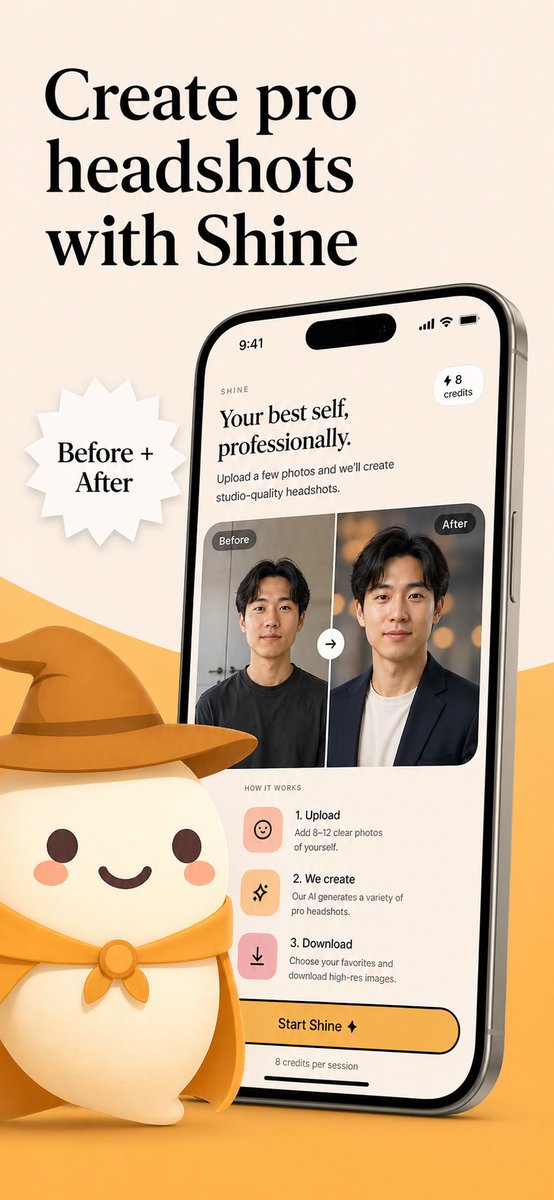
โปสเตอร์โปรโมชั่นแอป AI Headshot บน App Store
ภาพประกอบการตลาดแอปพลิเคชันมือถือที่มีตราสินค้า แสดงอินเทอร์เฟซแอปถ่ายภาพบุคคลด้วย AI ผลลัพธ์ก่อนและหลัง และมาสคอตน่ารัก เหมาะสำหรับใช้เป็นภาพหน้าจอใน App Store หรือแคมเปญเปิดตัว
นี่คือตัวอย่างข้อความแจ้งเตือน GPT Image 2 สำหรับ ผลิตภัณฑ์และเชิงพาณิชย์ ใช้ข้อความแจ้งเตือนที่พร้อมใช้งานด้านล่างเพื่อสร้างภาพที่คล้ายกัน และตรวจสอบการอ้างอิง Awesome GPT Image 2 Prompts รวมถึงสิทธิ์ในการใช้งานเชิงพาณิชย์ก่อนนำไปใช้ซ้ำ
ต้องการชุดข้อความแจ้งเตือนทั้งหมดหรือไม่? ใช้... ผลิตภัณฑ์และเชิงพาณิชย์ ศูนย์รวมหัวข้อสำหรับตัวอย่างที่เกี่ยวข้องเพิ่มเติม หรือเปิดดูได้เลย GPT Image 2 แคตตาล็อกพร้อมท์ สำหรับดัชนีตัวอย่างฉบับเต็ม โครงสร้างที่นำกลับมาใช้ใหม่ได้ และการอ้างอิงแหล่งที่มา
Free 1K preview
Generate one preview image instantly, no sign-up required.
2744/4000
พรอมป์
ข้อความแจ้งเตือนพร้อมสำหรับการคัดลอก
Create a polished App Store promotional poster for an AI headshot app called {argument name="app name" default="Shine"}, in a warm minimalist brand style. Use a vertical smartphone screenshot ad layout on a soft beige background with a curved golden-yellow shape rising from the bottom edge. Place a large elegant black serif headline in the upper left, split across 3 lines, reading {argument name="headline text" default="Create pro headshots with Shine"}. Add a white jagged starburst badge to the left-center with black serif text reading {argument name="badge text" default="Before + After"}. On the right side, show a large angled modern smartphone mockup, slightly tilted left, with thin metallic edges and a realistic screen. The phone display should show the app interface for AI-generated professional headshots. At the top of the screen, include a small wordmark reading SHINE, a large serif subheadline saying "Your best self, professionally.", supporting body text saying "Upload a few photos and we’ll create studio-quality headshots.", a small rounded pill in the upper right that says "⚡ 8 credits", and an iPhone-style status bar showing 9:41. In the middle of the phone screen, show a before-and-after comparison card with 2 portrait panels side by side, each labeled exactly once: 1 left label "Before" and 1 right label "After". The left portrait is a casual man in a dark T-shirt against a plain indoor background; the right portrait is the same man transformed into a professional headshot wearing a dark blazer over a light shirt with a warm studio bokeh background. Put a circular swap arrow button centered between the 2 panels. Below that, include a "HOW IT WORKS" section with exactly 3 steps arranged vertically: 1) "1. Upload" with the text "Add 8–12 clear photos of yourself.", 2) "2. We create" with the text "Our AI generates a variety of pro headshots.", 3) "3. Download" with the text "Choose your favorites and download high-res images." Give each step a rounded square pastel icon tile in peach or pink tones. Near the bottom of the phone screen, add a large rounded yellow CTA button reading {argument name="button text" default="Start Shine ✦"}, and beneath it small text saying "8 credits per session". In the lower left foreground, place a cute stylized white mascot character with a rounded body, tiny arms, blush cheeks, dot eyes, and a smiling mouth, wearing a golden-yellow cowboy hat and matching neckerchief; the oversized hat should extend toward the center and overlap the base area in front of the phone. Use soft 3D illustration for the mascot, premium UI design for the phone screen, consistent beige-and-gold branding, subtle shadows, clean spacing, and a refined startup-marketing aesthetic.ตัวแปรพร้อมท์
ตัวอย่างค่าอาร์กิวเมนต์ที่แก้ไขได้ซึ่งพบในข้อความแจ้งเตือน พร้อมค่าเริ่มต้น
ตัวแปร
app name
ค่าเริ่มต้น
Shine
ตัวแปร
headline text
ค่าเริ่มต้น
Create pro headshots with Shine
ตัวแปร
badge text
ค่าเริ่มต้น
Before + After
ตัวแปร
button text
ค่าเริ่มต้น
Start Shine ✦
Best for
- - ผลิตภัณฑ์และเชิงพาณิชย์ visual exploration
- - Image generation and reference-image edits
- - Reusable briefs that keep source attribution visible
Change these parts
- - Subject, product, character, or scene
- - Aspect ratio, camera, lighting, and background
- - Brand, text, color, and output constraints
Recommended model and settings
- - Model: gpt-image-2
- - Input mode: ข้อความเป็นรูปภาพ
- - Aspect ratio: source
- - Commercial status: review original source
How to use this prompt
- 1. Copy the prompt and preserve its structure for the first test.
- 2. Replace the subject, context, and publishing channel.
- 3. Change one camera, lighting, or style variable per iteration.
- 4. Inspect the output, source, text, and rights before reuse.
Limitations, source, and reuse cautions
- - Generated output is an editable draft, not factual, legal, or rights evidence.
- - Review the linked source, people, brands, logos, text, and third-party media before commercial use.
นำเข้าจาก Awesome GPT Image 2 Prompts จำเป็นต้องระบุแหล่งที่มา สถานะการใช้งานเชิงพาณิชย์คือ allowed โปรดตรวจสอบสิทธิ์แหล่งที่มาก่อนใช้งานแบบเสียค่าใช้จ่าย
กรณีเพิ่มเติมในหมวดหมู่นี้
จัดลำดับความสำคัญตามหมวดหมู่ ความเข้ากันได้กับโหมดการป้อนข้อมูล คุณภาพ และความเสี่ยงที่ต่ำกว่า

Transparent Earbuds on Stone Pedestal
ข้อความเป็นรูปภาพ

Manga Desert Radio Telescope Road Trip
ข้อความเป็นรูปภาพ

Female Clown Cyborg Portrait
ข้อความเป็นรูปภาพ

Wet Transparent Earbud Macro
ข้อความเป็นรูปภาพ

Imperial Research Bunker on Volcanic Planet
ข้อความเป็นรูปภาพ

Overhead Pepperoni Pizza Photo
ข้อความเป็นรูปภาพ
หมายเหตุเกี่ยวกับการนำกลับมาใช้ใหม่และแหล่งที่มา
ใช้ข้อความแจ้งเตือนนี้อย่างปลอดภัยหลังจากดูตัวอย่างกรณีแล้ว
- 1.คัดลอกข้อความแจ้งเตือน หรือเปิดโดยตรงใน Dovoo โดยใช้ปุ่มสร้างข้อความ
- 2.ปรับตัวแปร อัตราส่วนภาพ และภาพอ้างอิงให้เหมาะสมกับกรณีการใช้งานของคุณ
- 3.ก่อนเผยแพร่หรือใช้งานโดยเสียค่าใช้จ่าย โปรดตรวจสอบสิทธิ์ในแหล่งที่มา ข้อกำหนดการอ้างอิง และความเสี่ยงด้านแบรนด์หรือภาพลักษณ์