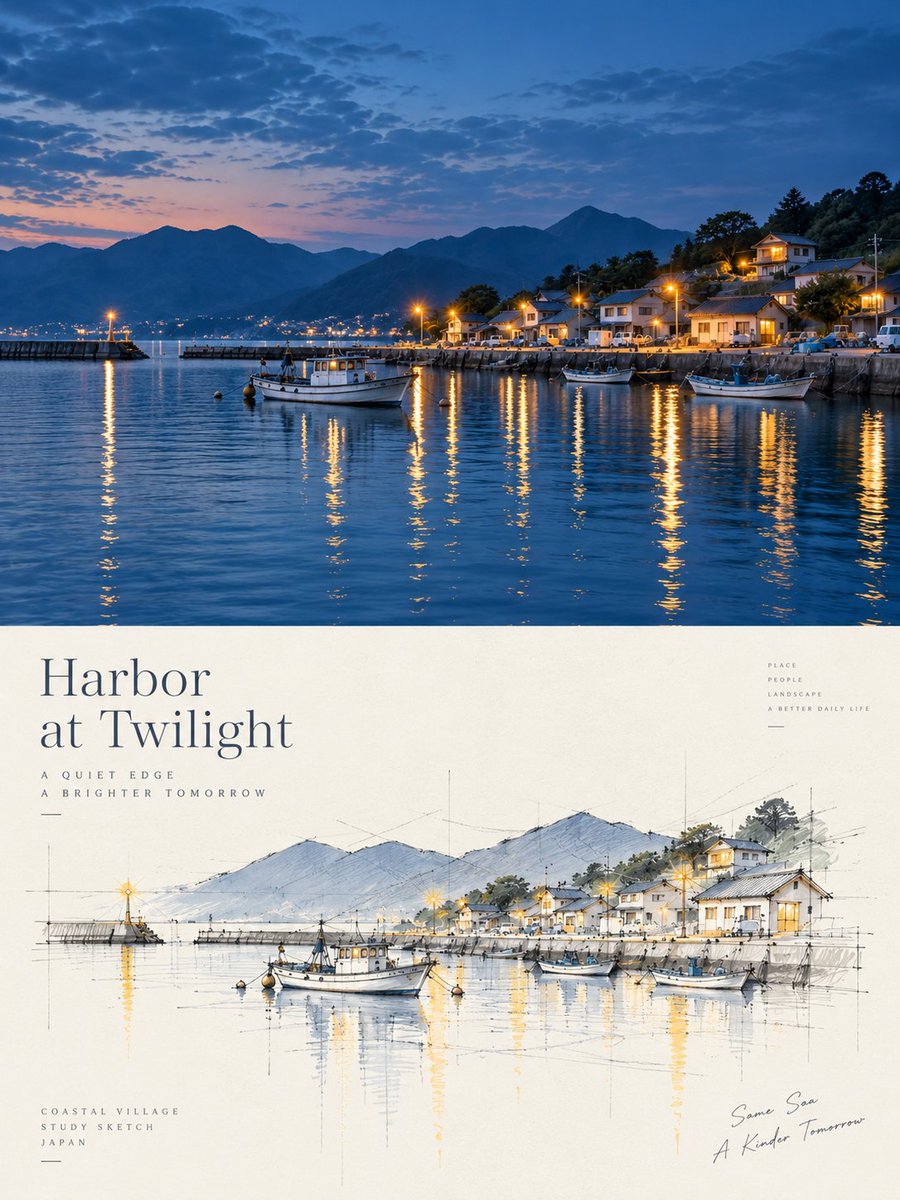
Harbor Twilight Photo Sketch Poster
Creates a split travel poster with a twilight harbor photo above and a matching architectural concept sketch below.
นี่คือตัวอย่างข้อความแจ้งเตือน GPT Image 2 สำหรับ กราฟิกและโปสเตอร์ ใช้ข้อความแจ้งเตือนที่พร้อมใช้งานด้านล่างเพื่อสร้างภาพที่คล้ายกัน และตรวจสอบการอ้างอิง Awesome GPT Image 2 Prompts รวมถึงสิทธิ์ในการใช้งานเชิงพาณิชย์ก่อนนำไปใช้ซ้ำ
ต้องการชุดข้อความแจ้งเตือนทั้งหมดหรือไม่? ใช้... กราฟิกและโปสเตอร์ ศูนย์รวมหัวข้อสำหรับตัวอย่างที่เกี่ยวข้องเพิ่มเติม หรือเปิดดูได้เลย GPT Image 2 แคตตาล็อกพร้อมท์ สำหรับดัชนีตัวอย่างฉบับเต็ม โครงสร้างที่นำกลับมาใช้ใหม่ได้ และการอ้างอิงแหล่งที่มา
Free 1K preview
Generate one preview image instantly, no sign-up required.
3263/4000
พรอมป์
ข้อความแจ้งเตือนพร้อมสำหรับการคัดลอก
Objective: Create a refined travel and architecture-themed poster, combining realistic coastal port photography with an architecturally-styled conceptual sketch of the same scene.

Canvas: Vertical 3:4 poster ratio, with elegant editorial typography. Divide the composition precisely into two parts: the upper part is a full-frame dusk port photograph; the lower part is a cream-colored paper poster area containing typography and a hand-drawn architectural perspective sketch.

Upper Photography Section: Showcase a tranquil port at the {argument name="place" default="small Japanese coastal harbor village at twilight"} blue hour. The scene includes calm, deep blue water, silhouetted mountains in the background, a small coastal village on the hillside to the right, warm yellow streetlights and lights, and long shimmering reflections on the water. Include 4 clearly visible boats: 1 main white fishing boat near the center foreground, 1 smaller boat near the right foreground, 1 darker-colored boat near the right dock, and 1 small boat near the right-center breakwater. Add a breakwater on the left with a single glowing lighthouse, town lights across the bay in the distance, layered blue mountains, scattered dusk clouds, and a soft horizon transitioning from pink-orange to blue.

Lower Poster Section: Use warm ivory paper with a subtle texture. Place a large, elegant serif title text in the upper left: "{argument name="headline text" default="Harbor\nat Twilight"}". Add two lines of small, widely-spaced uppercase sub-headline text below: “A QUIET EDGE” and “A BRIGHTER TOMORROW”. Stack small, uppercase words in the upper right: “PLACE”, “PEOPLE”, “LANDSCAPE”, “A BETTER DAILY LIFE”. Add three lines of small uppercase text in the lower left: “COASTAL VILLAGE”, “STUDY SKETCH”, “{argument name="country label" default="JAPAN"}”. Add casual handwritten-style text in the lower right: “{argument name="handwritten note" default="The Same Sea / A Brighter Tomorrow"}”.

Architectural Sketch: Draw a refined hand-drawn perspective sketch in the center of the lower half, consistent with the photo scene above. Use fine graphite construction lines, faint perspective guidelines, vertical measurement marks, ink outlines, loose watercolor washes, and pale blue mountains, soft gray roofs, soft green trees, and warm yellow highlights to represent lights and reflections. Include 4 sketch boats corresponding to the images above: the main white fishing boat in the center foreground, a small skiff on the left, a small boat near the right-center, and a larger boat on the far right. Include the breakwater, village houses, hillside trees, mountains, and lighthouse, all simplified into an architect’s conceptual sketch.

Visual Style: High-end Japanese coastal travel poster, tranquil and poetic, with realistic photography above and light architectural watercolor sketches below. Use refined typography, ample white space, fine lines, soft lighting, cinematic dusk blues, and warm golden reflections. The image should be clean and uncluttered.

Constraints: Maintain visual alignment between the upper and lower parts, and ensure the sketch clearly corresponds to the photo. Do not add extra panels, excess boats, logos, QR codes, borders, or watermarks.
ตัวแปรพร้อมท์
ตัวอย่างค่าอาร์กิวเมนต์ที่แก้ไขได้ซึ่งพบในข้อความแจ้งเตือน พร้อมค่าเริ่มต้น
ตัวแปร
place
ค่าเริ่มต้น
small Japanese coastal harbor village at twilight
ตัวแปร
headline text
ค่าเริ่มต้น
Harbor\nat Twilight
ตัวแปร
country label
ค่าเริ่มต้น
JAPAN
ตัวแปร
handwritten note
ค่าเริ่มต้น
The Same Sea / A Brighter Tomorrow
Best for
- - กราฟิกและโปสเตอร์ visual exploration
- - Image generation and reference-image edits
- - Reusable briefs that keep source attribution visible
Change these parts
- - Subject, product, character, or scene
- - Aspect ratio, camera, lighting, and background
- - Brand, text, color, and output constraints
Recommended model and settings
- - Model: gpt-image-2
- - Input mode: ข้อความเป็นรูปภาพ
- - Aspect ratio: source
- - Commercial status: review original source
How to use this prompt
- 1. Copy the prompt and preserve its structure for the first test.
- 2. Replace the subject, context, and publishing channel.
- 3. Change one camera, lighting, or style variable per iteration.
- 4. Inspect the output, source, text, and rights before reuse.
Limitations, source, and reuse cautions
- - Generated output is an editable draft, not factual, legal, or rights evidence.
- - Review the linked source, people, brands, logos, text, and third-party media before commercial use.
นำเข้าจาก Awesome GPT Image 2 Prompts จำเป็นต้องระบุแหล่งที่มา สถานะการใช้งานเชิงพาณิชย์คือ allowed โปรดตรวจสอบสิทธิ์แหล่งที่มาก่อนใช้งานแบบเสียค่าใช้จ่าย
กรณีเพิ่มเติมในหมวดหมู่นี้
จัดลำดับความสำคัญตามหมวดหมู่ ความเข้ากันได้กับโหมดการป้อนข้อมูล คุณภาพ และความเสี่ยงที่ต่ำกว่า

GPT Image 2 Real-Life Character Street Snap
ข้อความเป็นรูปภาพ

Matte Black B.AI Keyboard Keycap
ข้อความเป็นรูปภาพ

MotoGP POV Cornering Shot
ข้อความเป็นรูปภาพ

Orange Rooftop Fashion Photo Prompt
ข้อความเป็นรูปภาพ

Luxury Travel Fashion Portrait Prompt
ข้อความเป็นรูปภาพ

Cute Focus Desk Flat Lay and Kawaii Illustration
ข้อความเป็นรูปภาพ
หมายเหตุเกี่ยวกับการนำกลับมาใช้ใหม่และแหล่งที่มา
ใช้ข้อความแจ้งเตือนนี้อย่างปลอดภัยหลังจากดูตัวอย่างกรณีแล้ว
- 1.คัดลอกข้อความแจ้งเตือน หรือเปิดโดยตรงใน Dovoo โดยใช้ปุ่มสร้างข้อความ
- 2.ปรับตัวแปร อัตราส่วนภาพ และภาพอ้างอิงให้เหมาะสมกับกรณีการใช้งานของคุณ
- 3.ก่อนเผยแพร่หรือใช้งานโดยเสียค่าใช้จ่าย โปรดตรวจสอบสิทธิ์ในแหล่งที่มา ข้อกำหนดการอ้างอิง และความเสี่ยงด้านแบรนด์หรือภาพลักษณ์