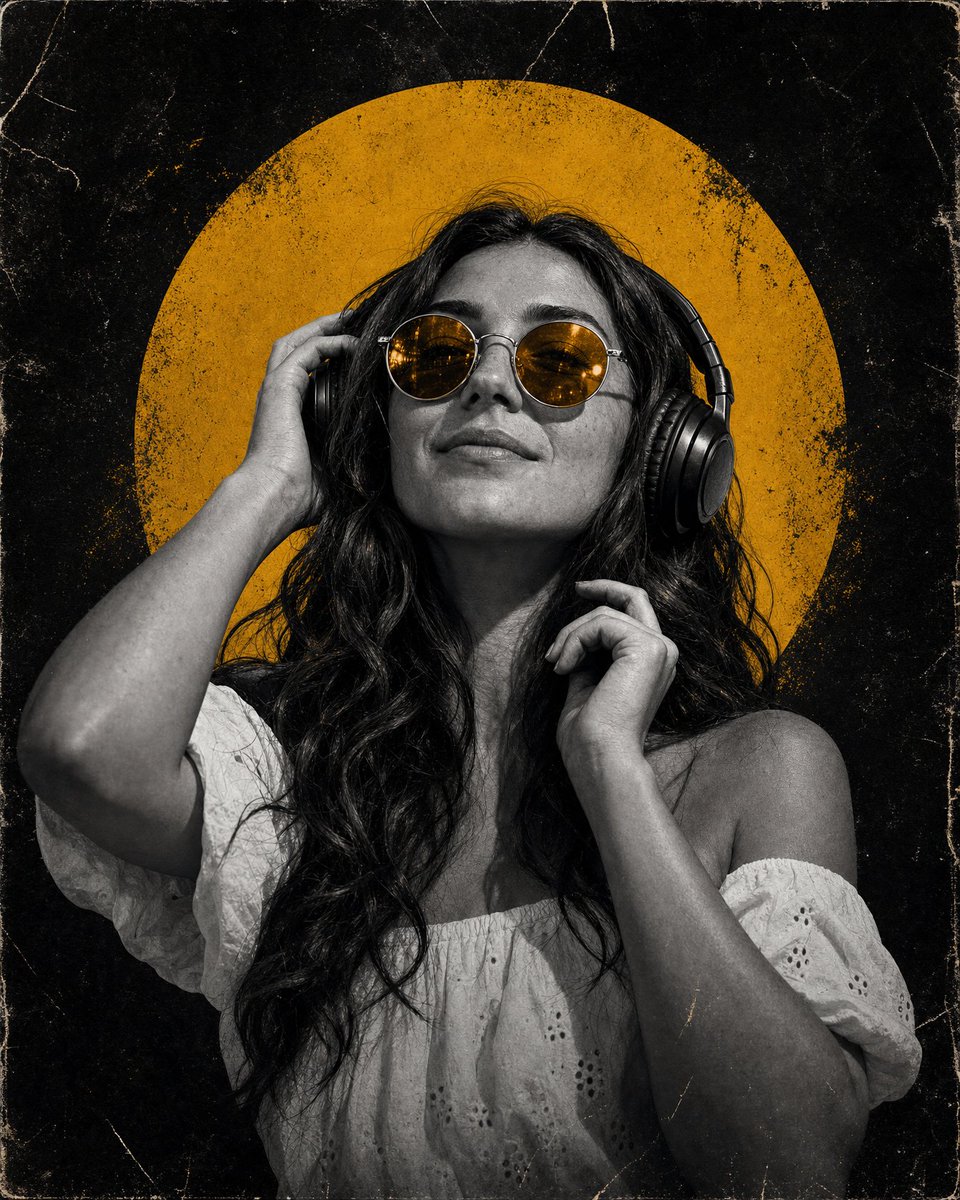
Grungy Yellow Halo Music Portrait
Generates a high-contrast vintage music-poster portrait with headphones, amber sunglasses, and a distressed mustard-yellow halo backdrop.
นี่คือตัวอย่างข้อความแจ้งเตือน GPT Image 2 สำหรับ ภาพเหมือนและตัวละคร ใช้ข้อความแจ้งเตือนที่พร้อมใช้งานด้านล่างเพื่อสร้างภาพที่คล้ายกัน และตรวจสอบการอ้างอิง Awesome GPT Image 2 Prompts รวมถึงสิทธิ์ในการใช้งานเชิงพาณิชย์ก่อนนำไปใช้ซ้ำ
ต้องการชุดข้อความแจ้งเตือนทั้งหมดหรือไม่? ใช้... ภาพเหมือนและตัวละคร ศูนย์รวมหัวข้อสำหรับตัวอย่างที่เกี่ยวข้องเพิ่มเติม หรือเปิดดูได้เลย GPT Image 2 แคตตาล็อกพร้อมท์ สำหรับดัชนีตัวอย่างฉบับเต็ม โครงสร้างที่นำกลับมาใช้ใหม่ได้ และการอ้างอิงแหล่งที่มา
Free 1K preview
Generate one preview image instantly, no sign-up required.
1313/4000
พรอมป์
ข้อความแจ้งเตือนพร้อมสำหรับการคัดลอก
Create a square vintage poster-style portrait of {argument name="character name" default="a confident young woman"} from the waist up, centered against a nearly black grungy background. She has {argument name="hair color and style" default="long wavy dark hair"}, a relaxed slight smile, and her head tilted subtly upward as if enjoying music. She wears large over-ear black headphones and round metal sunglasses with translucent {argument name="lens color" default="golden amber"} lenses; one hand touches the left headphone cup and the other hand is raised near her chin. Her outfit is an off-shoulder white eyelet blouse with puff sleeves. Use a dramatic black-and-white photographic treatment for the person and clothing, but keep the sunglasses lenses warm amber. Behind her head place one large distressed circular disk in {argument name="background circle color" default="mustard yellow"}, like a sun or halo, partially hidden by the portrait. The composition should feel like a music poster or album cover: high contrast, moody, stylish, minimal color palette of black, white, and mustard yellow. Add heavy aged paper texture, dust, scratches, scuffs, speckles, faded edges, and subtle cracks across the whole image, with rounded worn corners and a thin distressed border. No text, no logos, no watermark.ตัวแปรพร้อมท์
ตัวอย่างค่าอาร์กิวเมนต์ที่แก้ไขได้ซึ่งพบในข้อความแจ้งเตือน พร้อมค่าเริ่มต้น
ตัวแปร
character name
ค่าเริ่มต้น
a confident young woman
ตัวแปร
hair color and style
ค่าเริ่มต้น
long wavy dark hair
ตัวแปร
lens color
ค่าเริ่มต้น
golden amber
ตัวแปร
background circle color
ค่าเริ่มต้น
mustard yellow
Best for
- - ภาพเหมือนและตัวละคร visual exploration
- - Image generation and reference-image edits
- - Reusable briefs that keep source attribution visible
Change these parts
- - Subject, product, character, or scene
- - Aspect ratio, camera, lighting, and background
- - Brand, text, color, and output constraints
Recommended model and settings
- - Model: gpt-image-2
- - Input mode: ข้อความเป็นรูปภาพ
- - Aspect ratio: source
- - Commercial status: review original source
How to use this prompt
- 1. Copy the prompt and preserve its structure for the first test.
- 2. Replace the subject, context, and publishing channel.
- 3. Change one camera, lighting, or style variable per iteration.
- 4. Inspect the output, source, text, and rights before reuse.
Limitations, source, and reuse cautions
- - Generated output is an editable draft, not factual, legal, or rights evidence.
- - Review the linked source, people, brands, logos, text, and third-party media before commercial use.
นำเข้าจาก Awesome GPT Image 2 Prompts จำเป็นต้องระบุแหล่งที่มา สถานะการใช้งานเชิงพาณิชย์คือ allowed โปรดตรวจสอบสิทธิ์แหล่งที่มาก่อนใช้งานแบบเสียค่าใช้จ่าย
กรณีเพิ่มเติมในหมวดหมู่นี้
จัดลำดับความสำคัญตามหมวดหมู่ ความเข้ากันได้กับโหมดการป้อนข้อมูล คุณภาพ และความเสี่ยงที่ต่ำกว่า

GPT Image 2 Real-Life Character Street Snap
ข้อความเป็นรูปภาพ

Studio Portrait of Woman with Sunglasses
ข้อความเป็นรูปภาพ

Street Selfie with Cat in Matching Cap
ข้อความเป็นรูปภาพ

Cinematic Blue Backlit Portrait
ข้อความเป็นรูปภาพ

Matte Black B.AI Keyboard Keycap
ข้อความเป็นรูปภาพ

Morning Bed Stretching Legs Prompt
ข้อความเป็นรูปภาพ
หมายเหตุเกี่ยวกับการนำกลับมาใช้ใหม่และแหล่งที่มา
ใช้ข้อความแจ้งเตือนนี้อย่างปลอดภัยหลังจากดูตัวอย่างกรณีแล้ว
- 1.คัดลอกข้อความแจ้งเตือน หรือเปิดโดยตรงใน Dovoo โดยใช้ปุ่มสร้างข้อความ
- 2.ปรับตัวแปร อัตราส่วนภาพ และภาพอ้างอิงให้เหมาะสมกับกรณีการใช้งานของคุณ
- 3.ก่อนเผยแพร่หรือใช้งานโดยเสียค่าใช้จ่าย โปรดตรวจสอบสิทธิ์ในแหล่งที่มา ข้อกำหนดการอ้างอิง และความเสี่ยงด้านแบรนด์หรือภาพลักษณ์