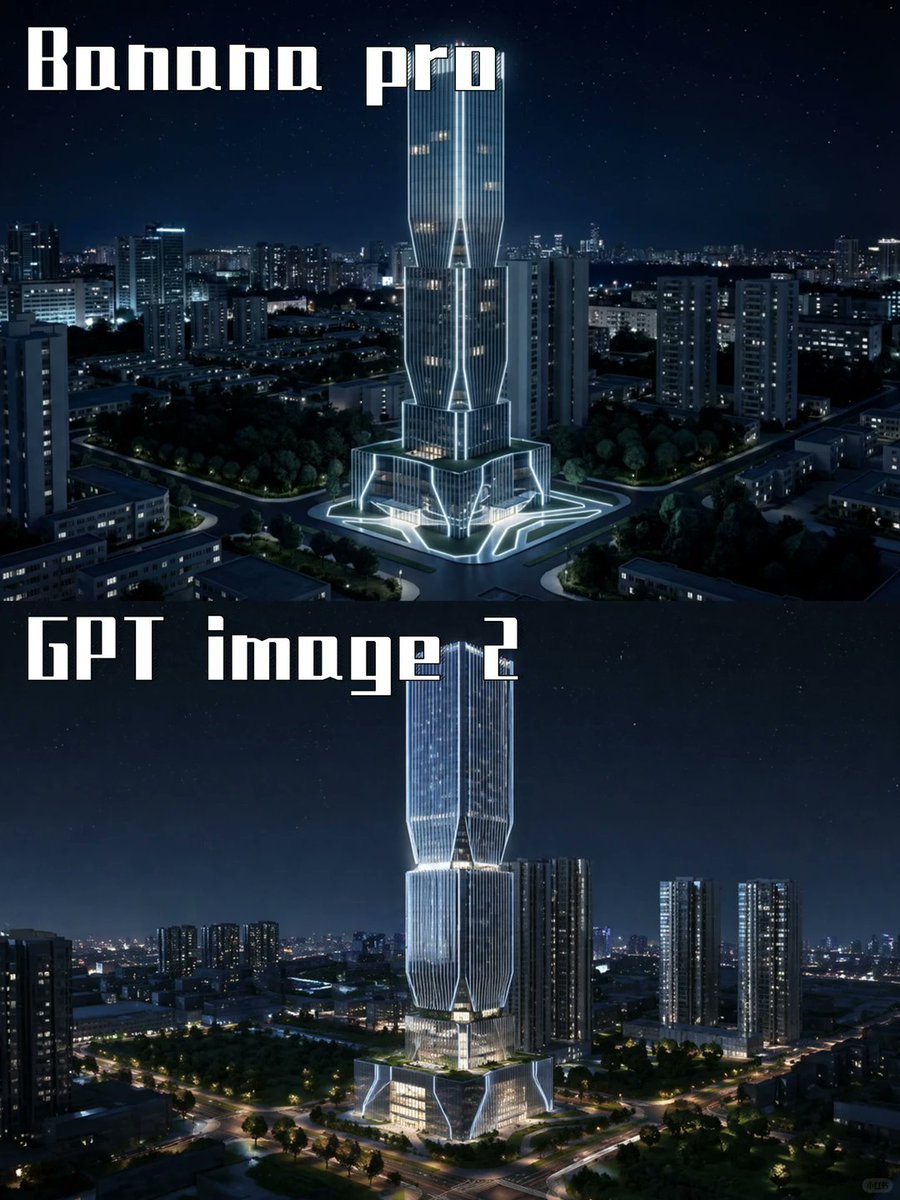
การเปรียบเทียบโมเดล AI ตึกระฟ้ากลางคืน
สร้างภาพเรนเดอร์สถาปัตยกรรมแบบสองแผงซ้อนกัน โดยเปรียบเทียบผลลัพธ์จากแบบจำลอง AI สองแบบ กับตึกระฟ้าที่ส่องสว่างในอนาคตในเมืองยามค่ำคืน
นี่คือตัวอย่างข้อความแจ้งเตือน GPT Image 2 สำหรับ การตกแต่งภายในและสถาปัตยกรรม ใช้ข้อความแจ้งเตือนที่พร้อมใช้งานด้านล่างเพื่อสร้างภาพที่คล้ายกัน และตรวจสอบการอ้างอิง Awesome GPT Image 2 Prompts รวมถึงสิทธิ์ในการใช้งานเชิงพาณิชย์ก่อนนำไปใช้ซ้ำ
ต้องการชุดข้อความแจ้งเตือนทั้งหมดหรือไม่? ใช้... การตกแต่งภายในและสถาปัตยกรรม ศูนย์รวมหัวข้อสำหรับตัวอย่างที่เกี่ยวข้องเพิ่มเติม หรือเปิดดูได้เลย GPT Image 2 แคตตาล็อกพร้อมท์ สำหรับดัชนีตัวอย่างฉบับเต็ม โครงสร้างที่นำกลับมาใช้ใหม่ได้ และการอ้างอิงแหล่งที่มา
Free 1K preview
Generate one preview image instantly, no sign-up required.
2186/4000
พรอมป์
ข้อความแจ้งเตือนพร้อมสำหรับการคัดลอก
Goal: Create a two-panel vertical comparison image showing the same futuristic skyscraper concept rendered by two different image models at night.

Canvas: Portrait 3:4 aspect ratio, 768×1024 feel, split horizontally into exactly 2 equal stacked panels with no visible border line. Both panels show a dark blue nighttime cityscape with a starry sky and glowing urban lights.

Panel 1: Top half labeled {argument name="top label" default="Banana pro"} in large white blocky stencil/gothic display lettering at the upper left. Show a futuristic illuminated skyscraper centered in a dense city district, surrounded by mid-rise apartment towers, roads, trees, and a plaza. The tower has a tall twin-volume form with vertical ribbed glass, bright white outline lighting, warm lit windows, angular cutouts, and a glowing geometric base/plaza. Camera angle is elevated aerial view, looking slightly downward, crisp cinematic night lighting.

Panel 2: Bottom half labeled {argument name="bottom label" default="GPT image 2"} in the same large white blocky display lettering at the upper left. Show a similar but more refined futuristic skyscraper centered in a nighttime urban landscape, taller and sleeker, with stacked faceted glass sections, luminous vertical lines, bright white edge lighting, warm interior floors, and a glowing multi-level podium. Surround it with high-rise residential towers, tree-lined roads, intersections, and distant city lights. Camera angle is elevated aerial view, cinematic and realistic.

Visual style: Photorealistic architectural visualization, dramatic blue-black night palette, crisp high contrast, cool white neon accents, realistic city depth, subtle stars, polished glass reflections, high detail, no people visible.

Text content: Use exactly 2 visible text labels: {argument name="top label" default="Banana pro"} and {argument name="bottom label" default="GPT image 2"}. Keep the typography large, white, angular, and slightly retro-futuristic.

Constraints: Include exactly 2 comparison panels, exactly 2 central skyscraper subjects, and exactly 2 large labels. Do not add logos, watermarks, captions, UI elements, arrows, or extra explanatory text.
ตัวแปรพร้อมท์
ตัวอย่างค่าอาร์กิวเมนต์ที่แก้ไขได้ซึ่งพบในข้อความแจ้งเตือน พร้อมค่าเริ่มต้น
ตัวแปร
top label
ค่าเริ่มต้น
Banana pro
ตัวแปร
bottom label
ค่าเริ่มต้น
GPT image 2
Best for
- - การตกแต่งภายในและสถาปัตยกรรม visual exploration
- - Image generation and reference-image edits
- - Reusable briefs that keep source attribution visible
Change these parts
- - Subject, product, character, or scene
- - Aspect ratio, camera, lighting, and background
- - Brand, text, color, and output constraints
Recommended model and settings
- - Model: gpt-image-2
- - Input mode: ข้อความเป็นรูปภาพ
- - Aspect ratio: source
- - Commercial status: review original source
How to use this prompt
- 1. Copy the prompt and preserve its structure for the first test.
- 2. Replace the subject, context, and publishing channel.
- 3. Change one camera, lighting, or style variable per iteration.
- 4. Inspect the output, source, text, and rights before reuse.
Limitations, source, and reuse cautions
- - Generated output is an editable draft, not factual, legal, or rights evidence.
- - Review the linked source, people, brands, logos, text, and third-party media before commercial use.
นำเข้าจาก Awesome GPT Image 2 Prompts จำเป็นต้องระบุแหล่งที่มา สถานะการใช้งานเชิงพาณิชย์คือ allowed โปรดตรวจสอบสิทธิ์แหล่งที่มาก่อนใช้งานแบบเสียค่าใช้จ่าย
Related prompt packs
กรณีเพิ่มเติมในหมวดหมู่นี้
จัดลำดับความสำคัญตามหมวดหมู่ ความเข้ากันได้กับโหมดการป้อนข้อมูล คุณภาพ และความเสี่ยงที่ต่ำกว่า

GPT Image 2 Real-Life Character Street Snap
ข้อความเป็นรูปภาพ

Matte Black B.AI Keyboard Keycap
ข้อความเป็นรูปภาพ

MotoGP POV Cornering Shot
ข้อความเป็นรูปภาพ

Orange Rooftop Fashion Photo Prompt
ข้อความเป็นรูปภาพ

Luxury Travel Fashion Portrait Prompt
ข้อความเป็นรูปภาพ

Cute Focus Desk Flat Lay and Kawaii Illustration
ข้อความเป็นรูปภาพ
หมายเหตุเกี่ยวกับการนำกลับมาใช้ใหม่และแหล่งที่มา
ใช้ข้อความแจ้งเตือนนี้อย่างปลอดภัยหลังจากดูตัวอย่างกรณีแล้ว
- 1.คัดลอกข้อความแจ้งเตือน หรือเปิดโดยตรงใน Dovoo โดยใช้ปุ่มสร้างข้อความ
- 2.ปรับตัวแปร อัตราส่วนภาพ และภาพอ้างอิงให้เหมาะสมกับกรณีการใช้งานของคุณ
- 3.ก่อนเผยแพร่หรือใช้งานโดยเสียค่าใช้จ่าย โปรดตรวจสอบสิทธิ์ในแหล่งที่มา ข้อกำหนดการอ้างอิง และความเสี่ยงด้านแบรนด์หรือภาพลักษณ์