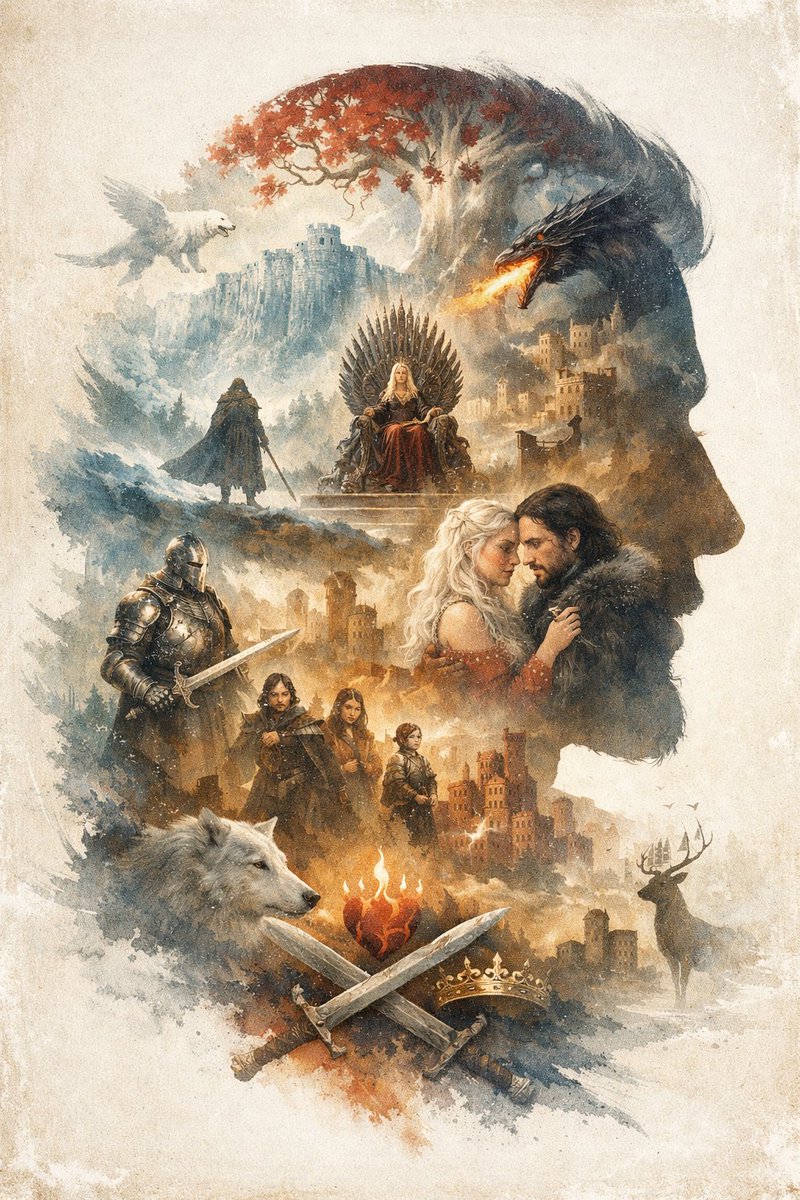
ภาพเงาซ้อนภาพแฟนตาซีสุดอลังการ
ภาพประกอบซ้อนภาพที่ซับซ้อนซึ่งสร้างเป็นภาพด้านข้างของชายคนหนึ่งที่เต็มไปด้วยตัวละครแฟนตาซี สัตว์ประหลาด และปราสาท
นี่คือตัวอย่างข้อความแจ้งเตือน GPT Image 2 สำหรับ ภาพประกอบและศิลปะ ใช้ข้อความแจ้งเตือนที่พร้อมใช้งานด้านล่างเพื่อสร้างภาพที่คล้ายกัน และตรวจสอบการอ้างอิง Awesome GPT Image 2 Prompts รวมถึงสิทธิ์ในการใช้งานเชิงพาณิชย์ก่อนนำไปใช้ซ้ำ
ต้องการชุดข้อความแจ้งเตือนทั้งหมดหรือไม่? ใช้... ภาพประกอบและศิลปะ ศูนย์รวมหัวข้อสำหรับตัวอย่างที่เกี่ยวข้องเพิ่มเติม หรือเปิดดูได้เลย GPT Image 2 แคตตาล็อกพร้อมท์ สำหรับดัชนีตัวอย่างฉบับเต็ม โครงสร้างที่นำกลับมาใช้ใหม่ได้ และการอ้างอิงแหล่งที่มา
Free 1K preview
Generate one preview image instantly, no sign-up required.
1277/4000
พรอมป์
ข้อความแจ้งเตือนพร้อมสำหรับการคัดลอก
An {argument name="overall theme" default="epic fantasy"} illustration utilizing a {argument name="art style" default="watercolor and ink wash double exposure"} technique on a vintage parchment background. The overall composition forms the {argument name="main silhouette subject" default="right-facing profile of a man's head"}. Inside this silhouette is a complex montage of scenes and characters. At the top, a white tree with red leaves stands near a cliffside castle, with a white winged creature flying on the left and a black dragon breathing fire on the right. Below this, a blonde woman sits on a throne made of swords, while a cloaked figure stands on a hill nearby. In the center right, a romantic couple consisting of a blonde woman and a dark-haired man in a fur collar gaze at each other. To their left stands a knight in full plate armor holding a sword. Below them is a group of 3 figures: a man, a young woman, and a child. At the bottom, a large white wolf head is on the left, and a stag stands near a castle on the right. In the bottom center, a flaming heart hovers above 2 crossed swords and 1 golden crown. The {argument name="dominant color palette" default="muted earthy tones with splashes of red and orange"} creates a dramatic, legendary atmosphere.ตัวแปรพร้อมท์
ตัวอย่างค่าอาร์กิวเมนต์ที่แก้ไขได้ซึ่งพบในข้อความแจ้งเตือน พร้อมค่าเริ่มต้น
ตัวแปร
overall theme
ค่าเริ่มต้น
epic fantasy
ตัวแปร
art style
ค่าเริ่มต้น
watercolor and ink wash double exposure
ตัวแปร
main silhouette subject
ค่าเริ่มต้น
right-facing profile of a man's head
ตัวแปร
dominant color palette
ค่าเริ่มต้น
muted earthy tones with splashes of red and orange
Best for
- - ภาพประกอบและศิลปะ visual exploration
- - Image generation and reference-image edits
- - Reusable briefs that keep source attribution visible
Change these parts
- - Subject, product, character, or scene
- - Aspect ratio, camera, lighting, and background
- - Brand, text, color, and output constraints
Recommended model and settings
- - Model: gpt-image-2
- - Input mode: ข้อความเป็นรูปภาพ
- - Aspect ratio: source
- - Commercial status: review original source
How to use this prompt
- 1. Copy the prompt and preserve its structure for the first test.
- 2. Replace the subject, context, and publishing channel.
- 3. Change one camera, lighting, or style variable per iteration.
- 4. Inspect the output, source, text, and rights before reuse.
Limitations, source, and reuse cautions
- - Generated output is an editable draft, not factual, legal, or rights evidence.
- - Review the linked source, people, brands, logos, text, and third-party media before commercial use.
นำเข้าจาก Awesome GPT Image 2 Prompts จำเป็นต้องระบุแหล่งที่มา สถานะการใช้งานเชิงพาณิชย์คือ allowed โปรดตรวจสอบสิทธิ์แหล่งที่มาก่อนใช้งานแบบเสียค่าใช้จ่าย
กรณีเพิ่มเติมในหมวดหมู่นี้
จัดลำดับความสำคัญตามหมวดหมู่ ความเข้ากันได้กับโหมดการป้อนข้อมูล คุณภาพ และความเสี่ยงที่ต่ำกว่า

Cute Focus Desk Flat Lay and Kawaii Illustration
ข้อความเป็นรูปภาพ

Tuxedo Cat Photo and Line Art Diptych
ข้อความเป็นรูปภาพ

GPT Image 2 Real-Life Character Street Snap
ข้อความเป็นรูปภาพ

Matte Black B.AI Keyboard Keycap
ข้อความเป็นรูปภาพ

MotoGP POV Cornering Shot
ข้อความเป็นรูปภาพ

Boisterous Shrimpers Entering Pub
ข้อความเป็นรูปภาพ
หมายเหตุเกี่ยวกับการนำกลับมาใช้ใหม่และแหล่งที่มา
ใช้ข้อความแจ้งเตือนนี้อย่างปลอดภัยหลังจากดูตัวอย่างกรณีแล้ว
- 1.คัดลอกข้อความแจ้งเตือน หรือเปิดโดยตรงใน Dovoo โดยใช้ปุ่มสร้างข้อความ
- 2.ปรับตัวแปร อัตราส่วนภาพ และภาพอ้างอิงให้เหมาะสมกับกรณีการใช้งานของคุณ
- 3.ก่อนเผยแพร่หรือใช้งานโดยเสียค่าใช้จ่าย โปรดตรวจสอบสิทธิ์ในแหล่งที่มา ข้อกำหนดการอ้างอิง และความเสี่ยงด้านแบรนด์หรือภาพลักษณ์