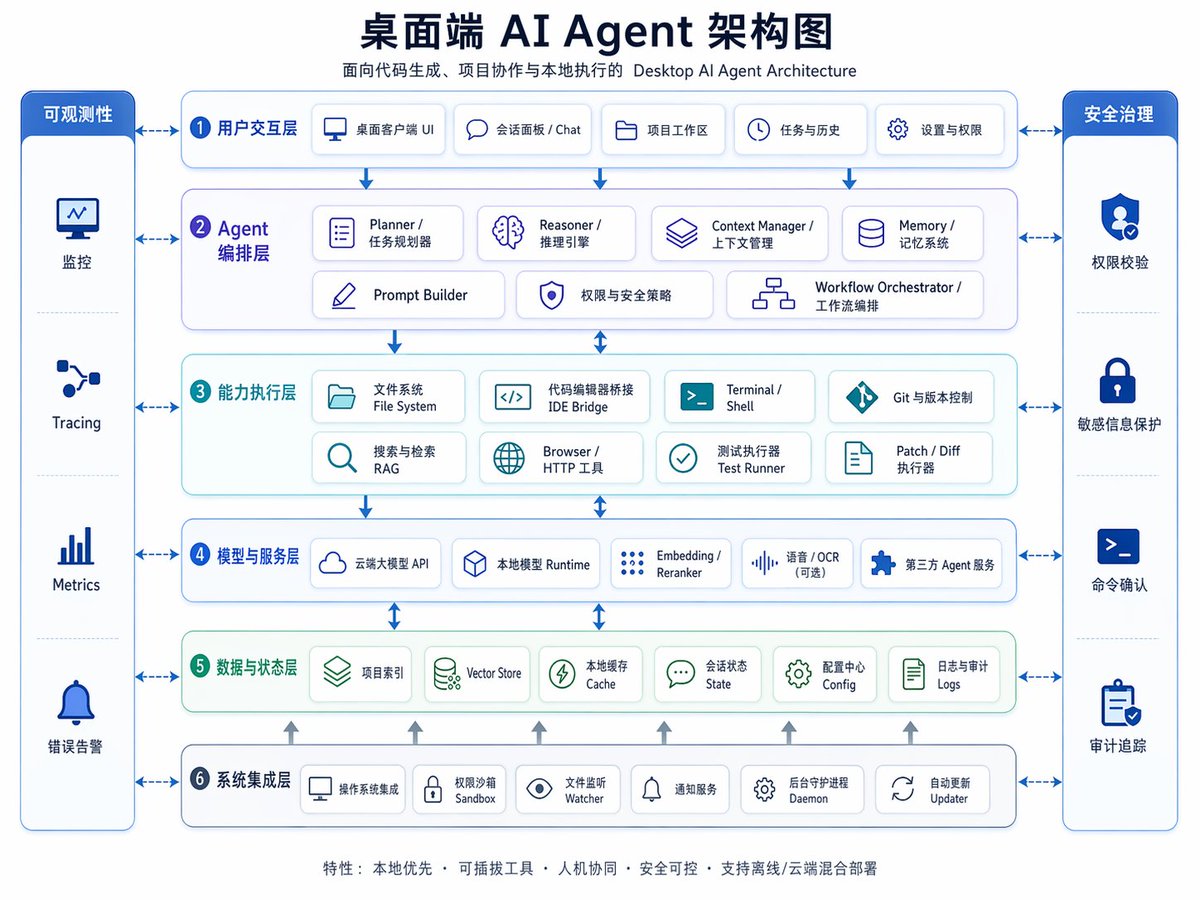
แผนภาพสถาปัตยกรรมเอเจนต์ AI บนเดสก์ท็อป
อินโฟกราฟิกสถาปัตยกรรมองค์กรสองภาษาจีน-อังกฤษที่จัดทำอย่างประณีต เหมาะสำหรับใช้ในการนำเสนอ การวางแผนผลิตภัณฑ์ หรือการอธิบายโครงสร้างแบบหลายชั้นของระบบเอเจนต์ AI บนเดสก์ท็อป
นี่คือตัวอย่างข้อความแจ้งเตือน GPT Image 2 สำหรับ กราฟิกและโปสเตอร์ ใช้ข้อความแจ้งเตือนที่พร้อมใช้งานด้านล่างเพื่อสร้างภาพที่คล้ายกัน และตรวจสอบการอ้างอิง Awesome GPT Image 2 Prompts รวมถึงสิทธิ์ในการใช้งานเชิงพาณิชย์ก่อนนำไปใช้ซ้ำ
ต้องการชุดข้อความแจ้งเตือนทั้งหมดหรือไม่? ใช้... กราฟิกและโปสเตอร์ ศูนย์รวมหัวข้อสำหรับตัวอย่างที่เกี่ยวข้องเพิ่มเติม หรือเปิดดูได้เลย GPT Image 2 แคตตาล็อกพร้อมท์ สำหรับดัชนีตัวอย่างฉบับเต็ม โครงสร้างที่นำกลับมาใช้ใหม่ได้ และการอ้างอิงแหล่งที่มา
Free 1K preview
Generate one preview image instantly, no sign-up required.
4000/4000
พรอมป์
ข้อความแจ้งเตือนพร้อมสำหรับการคัดลอก
{
  "type": "bilingual enterprise architecture infographic",
  "topic": "{argument name=\"headline text\" default=\"Desktop AI Agent Architecture Diagram\"}",
  "subtitle": "Desktop AI Agent Architecture for Code Generation, Project Collaboration, and Local Execution",
  "style": {
    "look": "clean modern SaaS diagram, corporate presentation slide, vector infographic",
    "background": "very light gray-white",
    "palette": {
      "primary": "deep navy blue",
      "secondary": "medium blue",
      "accent": "teal green",
      "support": "soft gray",
      "security": "bright royal blue"
    },
    "typography": "bold Chinese headline with smaller bilingual labels, crisp sans-serif, high legibility",
    "icons": "minimal line icons inside rounded white cards with subtle shadows and blue outlines",
    "geometry": "symmetrical grid, rounded rectangles, thin connector arrows, evenly spaced modules"
  },
  "layout": {
    "orientation": "landscape 4:3 presentation slide",
    "header": {
      "title_centered": true,
      "title_size": "large",
      "subtitle_below": true
    },
    "sections": [
      {
        "title": "Observability",
        "position": "far left vertical sidebar",
        "count": 4,
        "labels": [
          "Monitoring",
          "Tracing",
          "Metrics",
          "Error Alerting"
        ],
        "container": "tall rounded blue panel with four stacked cells and icons"
      },
      {
        "title": "Security Governance",
        "position": "far right vertical sidebar",
        "count": 4,
        "labels": [
          "Permission Verification",
          "Sensitive Information Protection",
          "Command Confirmation",
          "Audit Trail"
        ],
        "container": "tall rounded blue panel with four stacked cells and icons"
      },
      {
        "title": "1 User Interaction Layer",
        "position": "top horizontal layer",
        "count": 5,
        "labels": [
          "Desktop Client UI",
          "Session Panel / Chat",
          "Project Workspace",
          "Tasks & History",
          "Settings & Permissions"
        ],
        "container": "wide rounded white panel with blue border"
      },
      {
        "title": "2 Agent Orchestration Layer",
        "position": "second horizontal layer",
        "count": 7,
        "labels": [
          "Planner / Task Planner",
          "Reasoner / Inference Engine",
          "Context Manager / Context Management",
          "Memory / Memory System",
          "Prompt Builder",
          "Permissions & Security Policies",
          "Workflow Orchestrator / Workflow Orchestration"
        ],
        "container": "wide rounded white panel with faint purple-blue tint"
      },
      {
        "title": "3 Capability Execution Layer",
        "position": "third horizontal layer",
        "count": 8,
        "labels": [
          "File System",
          "IDE Bridge",
          "Terminal / Shell",
          "Git & Version Control",
          "Search & Retrieval RAG",
          "Browser / HTTP Tool",
          "Test Runner",
          "Patch / Diff Runner"
        ],
        "container": "wide rounded white panel with faint teal tint"
      },
      {
        "title": "4 Models and Service Layer",
        "position": "fourth horizontal layer",
        "count": 5,
        "labels": [
          "Cloud-based Large Model API",
          "Local Model Runtime",
          "Embedding / Reranker",
          "Speech / OCR (optional)",
          "Third-party Agent Service"
        ],
        "container": "wide rounded white panel with blue border"
      },
      {
        "title": "5 Data and State Layer",
        "position": "fifth horizontal layer",
        "count": 6,
        "labels": [
          "Project Index",
          "Vector Store",
          "Local Cache",
          "Session State",
          "Configuration Center Config",
          "Logs and Audit Logs"
        ],
        "container": "wide rounded white panel with faint green tint"
      },
      {
        "title": "6 System Integration Layer",
        "position": "bottom horizontal layer",
        "count": 6,
        "labels": [
          "Operating System Integration",
          "Permission Sandbox",
          "File Watcher",
          "Notification Service",
          "Background Daemon",
          "Auto Updater"
        ],
        "container": "wide rounded white panel with blue border"
      }
    ],
    "centerpiece": "six stacked architecture layers in the middle with side governance columns",
    "connectors": "dashed double-headed arrows connect each central layer to both sidebars; vertical blue arrows flow downward between central layers; small upward gray arrows rise from the bottom integration layer into the data layer",
    "footer": {
      "count": 1,
      "text": "Features: Local First · Pluggable Tools · Human-Machine Collaboration · Secure and Controllable · Supports Offline/Cloud Hybrid Deployment",
      "position": "bottom center"
    }
  },
  "rendering": {
    "flat_vector": true,
    "high_resolution": true,
    "sharp_lines": true,
    "balanced_whitespace": true,
    "professional_pitch_deck_quality": true
  }
}
ตัวแปรพร้อมท์
ตัวอย่างค่าอาร์กิวเมนต์ที่แก้ไขได้ซึ่งพบในข้อความแจ้งเตือน พร้อมค่าเริ่มต้น
ตัวแปร
headline text
ค่าเริ่มต้น
Desktop AI Agent Architecture Diagram
Best for
- - กราฟิกและโปสเตอร์ visual exploration
- - Image generation and reference-image edits
- - Reusable briefs that keep source attribution visible
Change these parts
- - Subject, product, character, or scene
- - Aspect ratio, camera, lighting, and background
- - Brand, text, color, and output constraints
Recommended model and settings
- - Model: gpt-image-2
- - Input mode: ข้อความเป็นรูปภาพ
- - Aspect ratio: source
- - Commercial status: review original source
How to use this prompt
- 1. Copy the prompt and preserve its structure for the first test.
- 2. Replace the subject, context, and publishing channel.
- 3. Change one camera, lighting, or style variable per iteration.
- 4. Inspect the output, source, text, and rights before reuse.
Limitations, source, and reuse cautions
- - Generated output is an editable draft, not factual, legal, or rights evidence.
- - Review the linked source, people, brands, logos, text, and third-party media before commercial use.
นำเข้าจาก Awesome GPT Image 2 Prompts จำเป็นต้องระบุแหล่งที่มา สถานะการใช้งานเชิงพาณิชย์คือ allowed โปรดตรวจสอบสิทธิ์แหล่งที่มาก่อนใช้งานแบบเสียค่าใช้จ่าย
กรณีเพิ่มเติมในหมวดหมู่นี้
จัดลำดับความสำคัญตามหมวดหมู่ ความเข้ากันได้กับโหมดการป้อนข้อมูล คุณภาพ และความเสี่ยงที่ต่ำกว่า

Transparent Earbuds on Stone Pedestal
ข้อความเป็นรูปภาพ

Manga Desert Radio Telescope Road Trip
ข้อความเป็นรูปภาพ

Female Clown Cyborg Portrait
ข้อความเป็นรูปภาพ

Imperial Research Bunker on Volcanic Planet
ข้อความเป็นรูปภาพ

Greyscale Puzzle Portrait with Color Accent
ข้อความเป็นรูปภาพ

Pink Hijab Mirror Selfie Portrait
ข้อความเป็นรูปภาพ
หมายเหตุเกี่ยวกับการนำกลับมาใช้ใหม่และแหล่งที่มา
ใช้ข้อความแจ้งเตือนนี้อย่างปลอดภัยหลังจากดูตัวอย่างกรณีแล้ว
- 1.คัดลอกข้อความแจ้งเตือน หรือเปิดโดยตรงใน Dovoo โดยใช้ปุ่มสร้างข้อความ
- 2.ปรับตัวแปร อัตราส่วนภาพ และภาพอ้างอิงให้เหมาะสมกับกรณีการใช้งานของคุณ
- 3.ก่อนเผยแพร่หรือใช้งานโดยเสียค่าใช้จ่าย โปรดตรวจสอบสิทธิ์ในแหล่งที่มา ข้อกำหนดการอ้างอิง และความเสี่ยงด้านแบรนด์หรือภาพลักษณ์