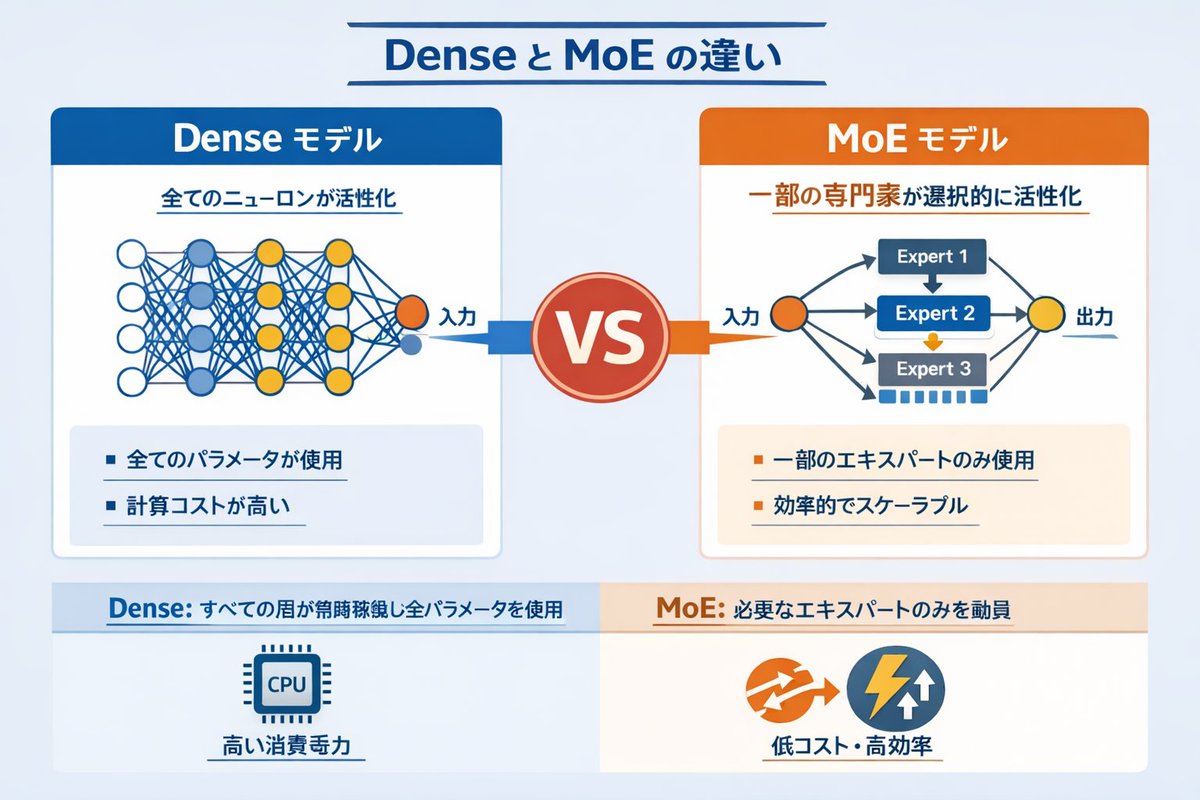
อินโฟกราฟิกเครือข่ายประสาทแบบ Dense เทียบกับ MoE
อินโฟกราฟิกเชิงเทคนิคเปรียบเทียบโมเดล AI แบบ Dense และ Mixture of Experts (MoE) โดยใช้แผนภาพเครือข่ายและหัวข้อแบบย่อ
นี่คือตัวอย่างข้อความแจ้งเตือน GPT Image 2 สำหรับ กราฟิกและโปสเตอร์ ใช้ข้อความแจ้งเตือนที่พร้อมใช้งานด้านล่างเพื่อสร้างภาพที่คล้ายกัน และตรวจสอบการอ้างอิง Awesome GPT Image 2 Prompts รวมถึงสิทธิ์ในการใช้งานเชิงพาณิชย์ก่อนนำไปใช้ซ้ำ
ต้องการชุดข้อความแจ้งเตือนทั้งหมดหรือไม่? ใช้... กราฟิกและโปสเตอร์ ศูนย์รวมหัวข้อสำหรับตัวอย่างที่เกี่ยวข้องเพิ่มเติม หรือเปิดดูได้เลย GPT Image 2 แคตตาล็อกพร้อมท์ สำหรับดัชนีตัวอย่างฉบับเต็ม โครงสร้างที่นำกลับมาใช้ใหม่ได้ และการอ้างอิงแหล่งที่มา
Free 1K preview
Generate one preview image instantly, no sign-up required.
2443/4000
พรอมป์
ข้อความแจ้งเตือนพร้อมสำหรับการคัดลอก
{
  "type": "infographic comparison diagram",
  "header": {
    "title": "{argument name=\"main title\" default=\"Dense と MoE の違い\"}"
  },
  "layout": {
    "structure": "two main columns separated by a central VS badge, with a split footer at the bottom",
    "sections": [
      {
        "position": "left column",
        "theme_color": "blue",
        "header": "{argument name=\"left model name\" default=\"Dense モデル\"}",
        "subtitle": "全てのニューロンが活性化",
        "diagram": {
          "type": "fully connected neural network",
          "elements": [
            "1 orange input node, labeled \"Input\"",
            "4 hidden layers with 4, 5, 4, and 2 nodes respectively",
            "nodes colored white, blue, and yellow",
            "dense intersecting connection lines between all adjacent nodes"
          ]
        },
        "bullet_points": {
          "count": 2,
          "items": [
            "{argument name=\"left bullet point\" default=\"全てのパラメータが使用\"}",
            "計算コストが高い"
          ]
        }
      },
      {
        "position": "right column",
        "theme_color": "orange",
        "header": "{argument name=\"right model name\" default=\"MoE モデル\"}",
        "subtitle": "一部の専門家が選択的に活性化",
        "diagram": {
          "type": "mixture of experts network",
          "elements": [
            "1 orange input node, labeled \"Input\"",
            "3 rectangular blocks labeled Expert 1, Expert 2, Expert 3",
            "1 yellow output node, labeled \"Output\"",
            "branching arrows connecting input to experts, and experts to output"
          ]
        },
        "bullet_points": {
          "count": 2,
          "items": [
            "{argument name=\"right bullet point\" default=\"一部のエキスパートのみ使用\"}",
            "効率的でスケーラブル"
          ]
        }
      },
      {
        "position": "center",
        "element": "red circular badge with text VS",
        "connections": "blue arrow pointing left, orange arrow pointing right"
      },
      {
        "position": "footer left",
        "background": "light blue",
        "text": "Dense: すべての層が常時稼働し全パラメータを使用",
        "icon": "1 CPU chip graphic",
        "label": "高い消費電力"
      },
      {
        "position": "footer right",
        "background": "light orange",
        "text": "MoE: 必要なエキスパートのみを動員",
        "icons": "2 circular graphics (orange arrows, blue lightning bolt)",
        "label": "低コスト・高効率"
      }
    ]
  }
}
ตัวแปรพร้อมท์
ตัวอย่างค่าอาร์กิวเมนต์ที่แก้ไขได้ซึ่งพบในข้อความแจ้งเตือน พร้อมค่าเริ่มต้น
ตัวแปร
main title
ค่าเริ่มต้น
Dense と MoE の違い
ตัวแปร
left model name
ค่าเริ่มต้น
Dense モデル
ตัวแปร
left bullet point
ค่าเริ่มต้น
全てのパラメータが使用
ตัวแปร
right model name
ค่าเริ่มต้น
MoE モデル
ตัวแปร
right bullet point
ค่าเริ่มต้น
一部のエキスパートのみ使用
Best for
- - กราฟิกและโปสเตอร์ visual exploration
- - Image generation and reference-image edits
- - Reusable briefs that keep source attribution visible
Change these parts
- - Subject, product, character, or scene
- - Aspect ratio, camera, lighting, and background
- - Brand, text, color, and output constraints
Recommended model and settings
- - Model: gpt-image-2
- - Input mode: ข้อความเป็นรูปภาพ
- - Aspect ratio: source
- - Commercial status: review original source
How to use this prompt
- 1. Copy the prompt and preserve its structure for the first test.
- 2. Replace the subject, context, and publishing channel.
- 3. Change one camera, lighting, or style variable per iteration.
- 4. Inspect the output, source, text, and rights before reuse.
Limitations, source, and reuse cautions
- - Generated output is an editable draft, not factual, legal, or rights evidence.
- - Review the linked source, people, brands, logos, text, and third-party media before commercial use.
นำเข้าจาก Awesome GPT Image 2 Prompts จำเป็นต้องระบุแหล่งที่มา สถานะการใช้งานเชิงพาณิชย์คือ allowed โปรดตรวจสอบสิทธิ์แหล่งที่มาก่อนใช้งานแบบเสียค่าใช้จ่าย
กรณีเพิ่มเติมในหมวดหมู่นี้
จัดลำดับความสำคัญตามหมวดหมู่ ความเข้ากันได้กับโหมดการป้อนข้อมูล คุณภาพ และความเสี่ยงที่ต่ำกว่า

Transparent Earbuds on Stone Pedestal
ข้อความเป็นรูปภาพ

Manga Desert Radio Telescope Road Trip
ข้อความเป็นรูปภาพ

Female Clown Cyborg Portrait
ข้อความเป็นรูปภาพ

Imperial Research Bunker on Volcanic Planet
ข้อความเป็นรูปภาพ

Greyscale Puzzle Portrait with Color Accent
ข้อความเป็นรูปภาพ

Pink Hijab Mirror Selfie Portrait
ข้อความเป็นรูปภาพ
หมายเหตุเกี่ยวกับการนำกลับมาใช้ใหม่และแหล่งที่มา
ใช้ข้อความแจ้งเตือนนี้อย่างปลอดภัยหลังจากดูตัวอย่างกรณีแล้ว
- 1.คัดลอกข้อความแจ้งเตือน หรือเปิดโดยตรงใน Dovoo โดยใช้ปุ่มสร้างข้อความ
- 2.ปรับตัวแปร อัตราส่วนภาพ และภาพอ้างอิงให้เหมาะสมกับกรณีการใช้งานของคุณ
- 3.ก่อนเผยแพร่หรือใช้งานโดยเสียค่าใช้จ่าย โปรดตรวจสอบสิทธิ์ในแหล่งที่มา ข้อกำหนดการอ้างอิง และความเสี่ยงด้านแบรนด์หรือภาพลักษณ์