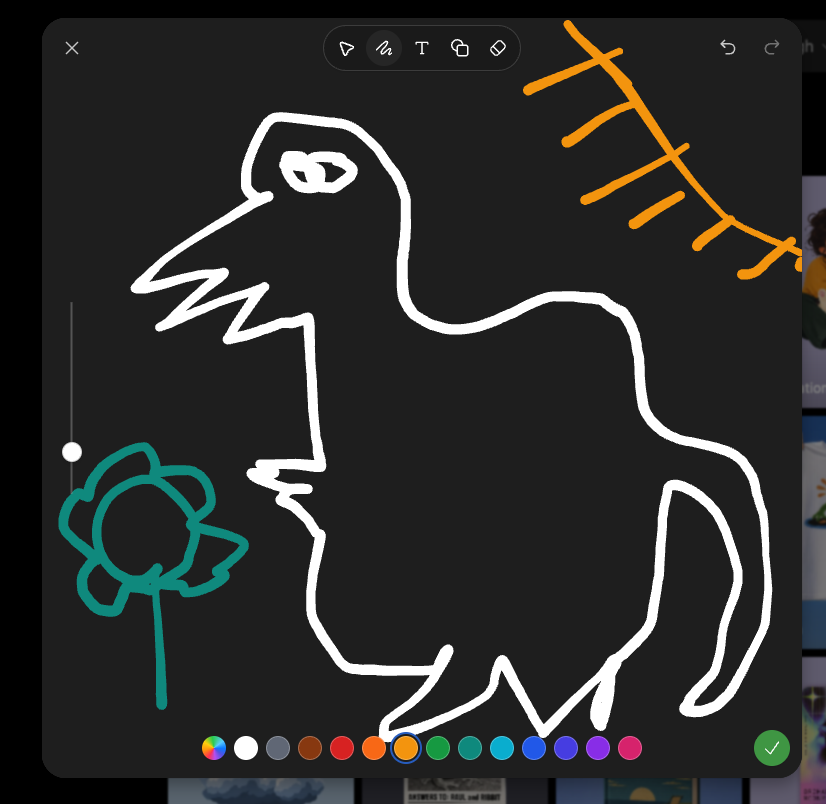
Dark Sketch Mode Monster Doodle
Generates a screenshot-style dark drawing interface with a crude monster doodle, color palette, toolbar, and sketch-mode controls.
นี่คือตัวอย่างข้อความแจ้งเตือน GPT Image 2 สำหรับ แรงบันดาลใจอื่นๆ ใช้ข้อความแจ้งเตือนที่พร้อมใช้งานด้านล่างเพื่อสร้างภาพที่คล้ายกัน และตรวจสอบการอ้างอิง Awesome GPT Image 2 Prompts รวมถึงสิทธิ์ในการใช้งานเชิงพาณิชย์ก่อนนำไปใช้ซ้ำ
ต้องการชุดข้อความแจ้งเตือนทั้งหมดหรือไม่? ใช้... แรงบันดาลใจอื่นๆ ศูนย์รวมหัวข้อสำหรับตัวอย่างที่เกี่ยวข้องเพิ่มเติม หรือเปิดดูได้เลย GPT Image 2 แคตตาล็อกพร้อมท์ สำหรับดัชนีตัวอย่างฉบับเต็ม โครงสร้างที่นำกลับมาใช้ใหม่ได้ และการอ้างอิงแหล่งที่มา
Free 1K preview
Generate one preview image instantly, no sign-up required.
2318/4000
พรอมป์
ข้อความแจ้งเตือนพร้อมสำหรับการคัดลอก
Goal: Create a screenshot-like image of a dark sketch/drawing mode interface showing a deliberately crude digital doodle being edited, as if in an image-generation app's sketch tool.

Canvas: Square-ish 4:3 screenshot, dark charcoal drawing panel centered with rounded corners over a dimmed gallery/app background barely visible at the right and bottom edges.

Layout: The main drawing area fills most of the frame. A top toolbar floats near the upper center, with a close X at top left and undo/redo icons at top right. A vertical brush-size slider sits on the left side with one white circular handle. A horizontal color palette runs along the bottom. A green circular checkmark confirmation button sits at the bottom right.

Main sketch: Draw a rough white line-art monster resembling a hunched fantasy boss creature, made with thick uneven brush strokes. It has one long pointed beak or snout facing left, a jagged open mouth, one scribbled oval eye near the top, a high arched back, a bulky torso, bent legs, and a long curved tail on the right. Add a small teal flower-like doodle on a stem at the lower left, facing the monster. Add an orange sketch of a sun or diagonal branch-like rays in the upper right corner.

Interface details: Include exactly 6 visible top toolbar icons: pointer/selection arrow, squiggle brush icon, letter T text tool, overlapping shapes/copy icon, eraser/diamond icon, and the surrounding rounded toolbar container. Include exactly 2 top-right history icons: undo and redo. Include exactly 1 close X icon at top left. Include exactly 1 vertical slider with 1 white knob. Include exactly 16 bottom color swatches, from left to right: multicolor rainbow circle, white, gray, brown, red, orange, yellow-orange selected with a blue ring, green, teal-green, cyan, blue, indigo, violet, purple, pink, plus exactly 1 green confirmation check button at the far right.

Visual style: Rough hand-drawn sketch mode, thick uneven strokes, dark UI, playful messy drawing, casual screenshot aesthetic. Use {argument name="creature outline color" default="white"}, {argument name="flower color" default="teal"}, {argument name="sun sketch color" default="orange"}, and {argument name="background panel color" default="dark charcoal"}. No polished rendering; keep it intentionally sloppy and simple.
ตัวแปรพร้อมท์
ตัวอย่างค่าอาร์กิวเมนต์ที่แก้ไขได้ซึ่งพบในข้อความแจ้งเตือน พร้อมค่าเริ่มต้น
ตัวแปร
creature outline color
ค่าเริ่มต้น
white
ตัวแปร
flower color
ค่าเริ่มต้น
teal
ตัวแปร
sun sketch color
ค่าเริ่มต้น
orange
ตัวแปร
background panel color
ค่าเริ่มต้น
dark charcoal
Best for
- - แรงบันดาลใจอื่นๆ visual exploration
- - Image generation and reference-image edits
- - Reusable briefs that keep source attribution visible
Change these parts
- - Subject, product, character, or scene
- - Aspect ratio, camera, lighting, and background
- - Brand, text, color, and output constraints
Recommended model and settings
- - Model: gpt-image-2
- - Input mode: ข้อความเป็นรูปภาพ
- - Aspect ratio: source
- - Commercial status: review original source
How to use this prompt
- 1. Copy the prompt and preserve its structure for the first test.
- 2. Replace the subject, context, and publishing channel.
- 3. Change one camera, lighting, or style variable per iteration.
- 4. Inspect the output, source, text, and rights before reuse.
Limitations, source, and reuse cautions
- - Generated output is an editable draft, not factual, legal, or rights evidence.
- - Review the linked source, people, brands, logos, text, and third-party media before commercial use.
นำเข้าจาก Awesome GPT Image 2 Prompts จำเป็นต้องระบุแหล่งที่มา สถานะการใช้งานเชิงพาณิชย์คือ allowed โปรดตรวจสอบสิทธิ์แหล่งที่มาก่อนใช้งานแบบเสียค่าใช้จ่าย
กรณีเพิ่มเติมในหมวดหมู่นี้
จัดลำดับความสำคัญตามหมวดหมู่ ความเข้ากันได้กับโหมดการป้อนข้อมูล คุณภาพ และความเสี่ยงที่ต่ำกว่า

MotoGP POV Cornering Shot
ข้อความเป็นรูปภาพ

GPT Image 2 Real-Life Character Street Snap
ข้อความเป็นรูปภาพ

Matte Black B.AI Keyboard Keycap
ข้อความเป็นรูปภาพ

Orange Rooftop Fashion Photo Prompt
ข้อความเป็นรูปภาพ

Luxury Travel Fashion Portrait Prompt
ข้อความเป็นรูปภาพ

Cute Focus Desk Flat Lay and Kawaii Illustration
ข้อความเป็นรูปภาพ
หมายเหตุเกี่ยวกับการนำกลับมาใช้ใหม่และแหล่งที่มา
ใช้ข้อความแจ้งเตือนนี้อย่างปลอดภัยหลังจากดูตัวอย่างกรณีแล้ว
- 1.คัดลอกข้อความแจ้งเตือน หรือเปิดโดยตรงใน Dovoo โดยใช้ปุ่มสร้างข้อความ
- 2.ปรับตัวแปร อัตราส่วนภาพ และภาพอ้างอิงให้เหมาะสมกับกรณีการใช้งานของคุณ
- 3.ก่อนเผยแพร่หรือใช้งานโดยเสียค่าใช้จ่าย โปรดตรวจสอบสิทธิ์ในแหล่งที่มา ข้อกำหนดการอ้างอิง และความเสี่ยงด้านแบรนด์หรือภาพลักษณ์