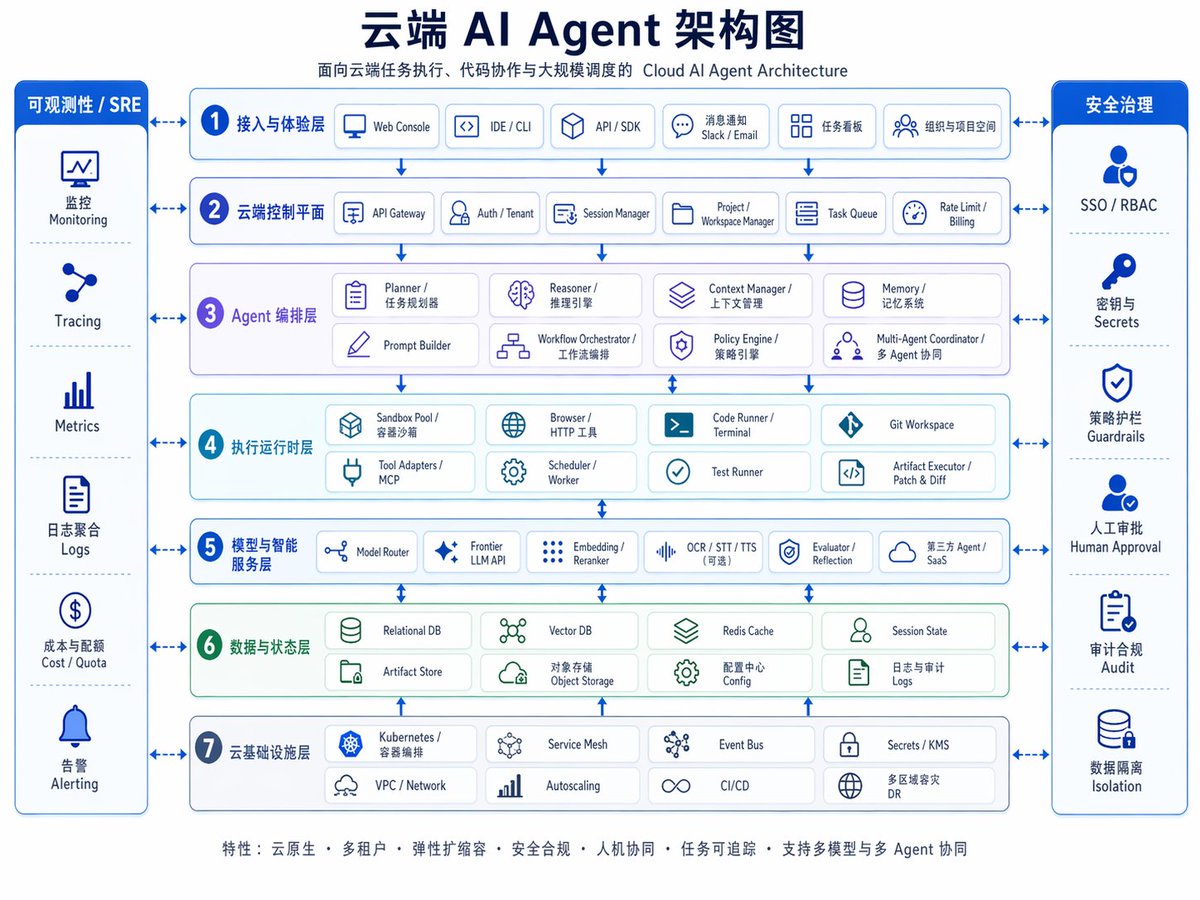
แผนภาพสถาปัตยกรรมเอเจนต์ AI บนคลาวด์
อินโฟกราฟิกสองภาษาที่ได้รับการออกแบบอย่างประณีต แสดงสถาปัตยกรรมตัวแทน AI บนคลาวด์แบบหลายชั้น เหมาะสำหรับงานนำเสนอ การอธิบายผลิตภัณฑ์ และการตลาดทางเทคนิค
นี่คือตัวอย่างข้อความแจ้งเตือน GPT Image 2 สำหรับ กราฟิกและโปสเตอร์ ใช้ข้อความแจ้งเตือนที่พร้อมใช้งานด้านล่างเพื่อสร้างภาพที่คล้ายกัน และตรวจสอบการอ้างอิง Awesome GPT Image 2 Prompts รวมถึงสิทธิ์ในการใช้งานเชิงพาณิชย์ก่อนนำไปใช้ซ้ำ
ต้องการชุดข้อความแจ้งเตือนทั้งหมดหรือไม่? ใช้... กราฟิกและโปสเตอร์ ศูนย์รวมหัวข้อสำหรับตัวอย่างที่เกี่ยวข้องเพิ่มเติม หรือเปิดดูได้เลย GPT Image 2 แคตตาล็อกพร้อมท์ สำหรับดัชนีตัวอย่างฉบับเต็ม โครงสร้างที่นำกลับมาใช้ใหม่ได้ และการอ้างอิงแหล่งที่มา
Free 1K preview
Generate one preview image instantly, no sign-up required.
4000/4000
พรอมป์
ข้อความแจ้งเตือนพร้อมสำหรับการคัดลอก
{
  "type": "อินโฟกราฟิกสถาปัตยกรรม AI บนคลาวด์สำหรับองค์กร",
  "style": "ไดอะแกรมเวกเตอร์องค์กรที่สะอาด, พื้นหลังสีขาว, จานสีน้ำเงินและสีฟ้าอมเขียว, สี่เหลี่ยมมุมมน, เส้นโครงร่างสีน้ำเงินบาง, เงาจาง ๆ, ป้ายกำกับสองภาษาจีนเป็นหลักพร้อมคำบรรยายภาษาอังกฤษขนาดเล็กกว่า, เลย์เอาต์สมมาตร, คุณภาพสไลด์นำเสนอ",
  "canvas": {
    "aspect_ratio": "4:3",
    "resolution": "1024x768"
  },
  "title_block": {
    "headline": "{argument name=\"headline text\" default=\"แผนภาพสถาปัตยกรรม Cloud AI Agent\"}",
    "subtitle": "สถาปัตยกรรม Cloud AI Agent สำหรับการดำเนินการงานบนคลาวด์, การทำงานร่วมกันของโค้ด และการจัดตารางเวลาขนาดใหญ่",
    "position": "top center"
  },
  "layout": {
    "center": {
      "type": "เลเยอร์สถาปัตยกรรมแบบเรียงซ้อน",
      "count": 7,
      "numbered": true,
      "layers": [
        {
          "index": 1,
          "title": "เลเยอร์การเข้าถึงและประสบการณ์",
          "english": "access and experience layer",
          "count": 5,
          "items": [
            "Web Console",
            "IDE / CLI",
            "API / SDK",
            "การแจ้งเตือนข้อความ Slack / Email",
            "Task Kanban Organization และ Project Space"
          ]
        },
        {
          "index": 2,
          "title": "ระนาบควบคุมคลาวด์",
          "english": "cloud control plane",
          "count": 6,
          "items": [
            "API Gateway",
            "Auth / Tenant",
            "Session Manager",
            "Project / Workspace Manager",
            "Task Queue",
            "Rate Limit / Billing"
          ]
        },
        {
          "index": 3,
          "title": "เลเยอร์การจัดระเบียบ Agent",
          "english": "agent orchestration layer",
          "count": 8,
          "items": [
            "Planner / Task Planner",
            "Reasoner / Inference Engine",
            "Context Manager / Context Management",
            "Memory / Memory System",
            "Prompt Builder",
            "Workflow Orchestrator / Workflow Orchestration",
            "Policy Engine / Policy Engine",
            "Multi-Agent Coordinator / Multi-Agent Coordination"
          ]
        },
        {
          "index": 4,
          "title": "เลเยอร์รันไทม์การดำเนินการ",
          "english": "execution runtime layer",
          "count": 8,
          "items": [
            "Sandbox Pool / Container Sandbox",
            "Browser / HTTP Tool",
            "Code Runner / Terminal",
            "Git Workspace",
            "Tool Adapters / MCP",
            "Scheduler / Worker",
            "Test Runner",
            "Artifact Executor / Patch และ Diff"
          ]
        },
        {
          "index": 5,
          "title": "เลเยอร์บริการอัจฉริยะและโมเดล",
          "english": "model and intelligence services layer",
          "count": 6,
          "items": [
            "Model Router",
            "Frontier LLM API",
            "Embedding / Reranker",
            "OCR / STT / TTS (Optional)",
            "Evaluator / Reflection",
            "Third-party Agent / SaaS"
          ]
        },
        {
          "index": 6,
          "title": "เลเยอร์ข้อมูลและสถานะ",
          "english": "data and state layer",
          "count": 8,
          "items": [
            "Relational DB",
            "Vector DB",
            "Redis Cache",
            "Session State",
            "Artifact Store",
            "Object Storage",
            "Configuration Center Config",
            "Logs and Audit Logs"
          ]
        },
        {
          "index": 7,
          "title": "เลเยอร์โครงสร้างพื้นฐานคลาวด์",
          "english": "cloud infrastructure layer",
          "count": 8,
          "items": [
            "Kubernetes / Container Orchestration",
            "Service Mesh",
            "Event Bus",
            "Secrets / KMS",
            "VPC / Network",
            "Autoscaling",
            "CI/CD",
            "Multi-Region Disaster Recovery DR"
          ]
        }
      ]
    },
    "left_sidebar": {
      "title": "การสังเกตการณ์ / SRE",
      "position": "left",
      "count": 6,
      "items": [
        "Monitoring",
        "Tracing",
        "Metrics",
        "Log Aggregation Logs",
        "Cost / Quota",
        "Alerting"
      ]
    },
    "right_sidebar": {
      "title": "การกำกับดูแลความปลอดภัย",
      "position": "right",
      "count": 6,
      "items": [
        "SSO / RBAC",
        "Keys และ Secrets",
        "Policy Guardrails",
        "Human Approval",
        "Audit Compliance",
        "Data Isolation"
      ]
    },
    "connectors": "ลูกศรสีน้ำเงินสองทิศทางเชื่อมต่อแถบด้านข้างทั้งสองกับเลเยอร์กลางแต่ละเลเยอร์ รวมถึงลูกศรแนวตั้งระหว่างแต่ละเลเยอร์สถาปัตยกรรม"
  },
  "visual_details": {
    "icons": "ไอคอนเส้นสีน้ำเงินเรียบง่ายในทุกกล่อง, หนึ่งไอคอนต่อโมดูล",
    "boxes": "การ์ดสีขาวมุมมนพร้อมพื้นหลังส่วนสีฟ้าอ่อนหรือสีเขียวอ่อน",
    "section_colors": {
      "layers_1_2_5_7": "สีฟ้าอ่อน",
      "layer_3": "สีลาเวนเดอร์อ่อน",
      "layer_4": "สีฟ้าอ่อน",
      "layer_6": "สีเขียวอ่อน",
      "sidebars": "ส่วนหัวสีน้ำเงินเข้มพร้อมข้อความสีขาว"
    },
    "typography": "ตัวอักษรจีนสีน้ำเงินเข้มหนา, คำบรรยายย่อยสีเทาอมน้ำเงินขนาดเล็กกว่า, ป้ายกำกับส่วนภาษาจีนขนาดกลาง, ป้ายกำกับรายการสองภาษาที่กะทัดรัด"
  },
  "footer": {
    "position": "bottom center",
    "text": "{argument name=\"footer text\" default=\"คุณสมบัติ: Cloud Native • Multi-tenancy • Elastic Scalability • Security และ Compliance • การทำงานร่วมกันระหว่างมนุษย์และเครื่อง • การตรวจสอบงาน • รองรับการทำงานร่วมกันแบบ Multi-Model และ Multi-Agent\"}"
  },
  "quality": "อินโฟกราฟิกที่คมชัด, การเว้นวรรคที่สมดุล, ความสามารถในการอ่านสูง, สไลด์สถาปัตยกรรมองค์กรที่ขัดเกลาเหมาะสำหรับ keynote, เอกสารประกอบ และการตลาดผลิตภัณฑ์"
}
ตัวแปรพร้อมท์
ตัวอย่างค่าอาร์กิวเมนต์ที่แก้ไขได้ซึ่งพบในข้อความแจ้งเตือน พร้อมค่าเริ่มต้น
ตัวแปร
headline text
ค่าเริ่มต้น
Cloud AI Agent Architecture Diagram
ตัวแปร
footer text
ค่าเริ่มต้น
Features: Cloud Native • Multi-tenancy • Elastic Scalability • Security & Compliance • Human-Machine Collaboration • Task Traceability • Support for Multi-Model & Multi-Agent Collaboration
Best for
- - กราฟิกและโปสเตอร์ visual exploration
- - Image generation and reference-image edits
- - Reusable briefs that keep source attribution visible
Change these parts
- - Subject, product, character, or scene
- - Aspect ratio, camera, lighting, and background
- - Brand, text, color, and output constraints
Recommended model and settings
- - Model: gpt-image-2
- - Input mode: ข้อความเป็นรูปภาพ
- - Aspect ratio: source
- - Commercial status: review original source
How to use this prompt
- 1. Copy the prompt and preserve its structure for the first test.
- 2. Replace the subject, context, and publishing channel.
- 3. Change one camera, lighting, or style variable per iteration.
- 4. Inspect the output, source, text, and rights before reuse.
Limitations, source, and reuse cautions
- - Generated output is an editable draft, not factual, legal, or rights evidence.
- - Review the linked source, people, brands, logos, text, and third-party media before commercial use.
นำเข้าจาก Awesome GPT Image 2 Prompts จำเป็นต้องระบุแหล่งที่มา สถานะการใช้งานเชิงพาณิชย์คือ allowed โปรดตรวจสอบสิทธิ์แหล่งที่มาก่อนใช้งานแบบเสียค่าใช้จ่าย
กรณีเพิ่มเติมในหมวดหมู่นี้
จัดลำดับความสำคัญตามหมวดหมู่ ความเข้ากันได้กับโหมดการป้อนข้อมูล คุณภาพ และความเสี่ยงที่ต่ำกว่า

Transparent Earbuds on Stone Pedestal
ข้อความเป็นรูปภาพ

Manga Desert Radio Telescope Road Trip
ข้อความเป็นรูปภาพ

Female Clown Cyborg Portrait
ข้อความเป็นรูปภาพ

Imperial Research Bunker on Volcanic Planet
ข้อความเป็นรูปภาพ

Greyscale Puzzle Portrait with Color Accent
ข้อความเป็นรูปภาพ

Pink Hijab Mirror Selfie Portrait
ข้อความเป็นรูปภาพ
หมายเหตุเกี่ยวกับการนำกลับมาใช้ใหม่และแหล่งที่มา
ใช้ข้อความแจ้งเตือนนี้อย่างปลอดภัยหลังจากดูตัวอย่างกรณีแล้ว
- 1.คัดลอกข้อความแจ้งเตือน หรือเปิดโดยตรงใน Dovoo โดยใช้ปุ่มสร้างข้อความ
- 2.ปรับตัวแปร อัตราส่วนภาพ และภาพอ้างอิงให้เหมาะสมกับกรณีการใช้งานของคุณ
- 3.ก่อนเผยแพร่หรือใช้งานโดยเสียค่าใช้จ่าย โปรดตรวจสอบสิทธิ์ในแหล่งที่มา ข้อกำหนดการอ้างอิง และความเสี่ยงด้านแบรนด์หรือภาพลักษณ์