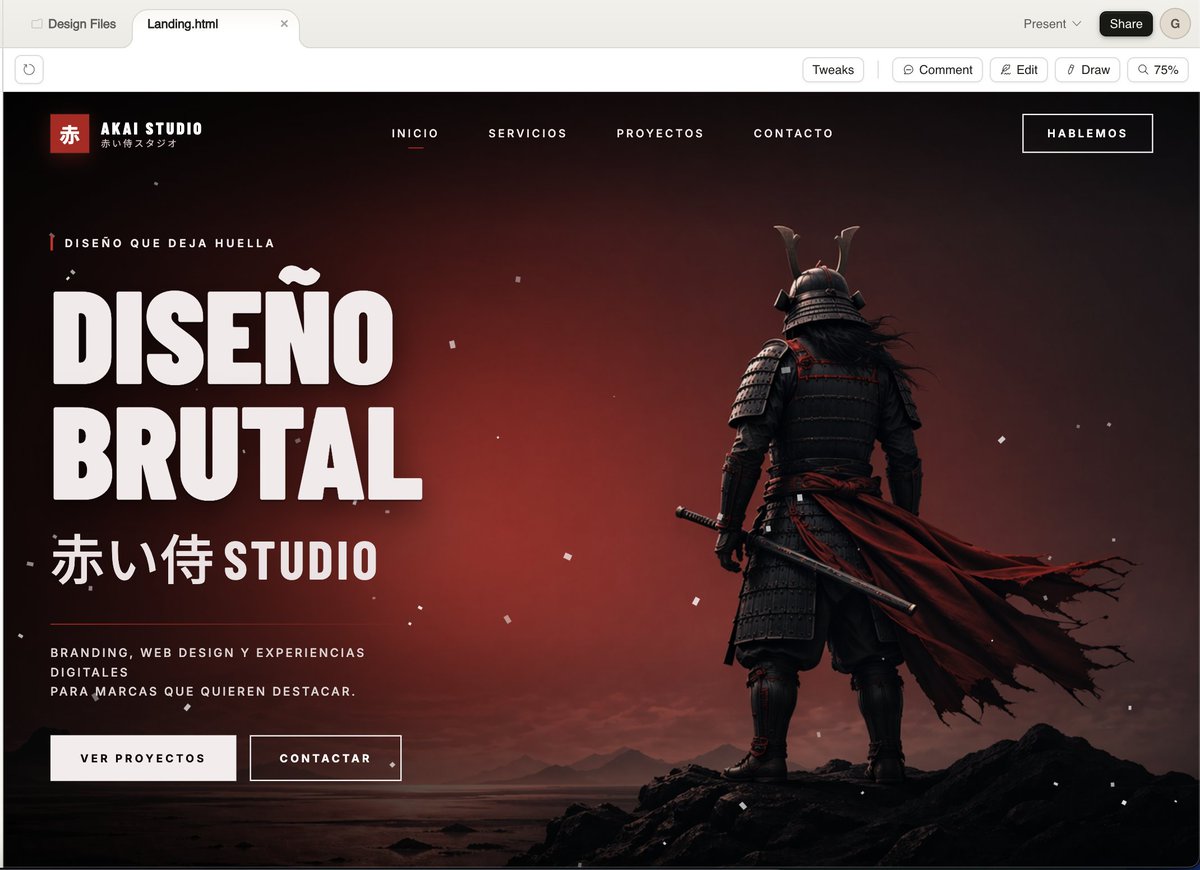
หน้าเว็บหลักของ Cinematic Samurai Agency
นี่เป็นการสร้างส่วนหัวของหน้า Landing Page ระดับไฮเอนด์สำหรับ Dark Web สำหรับสตูดิโอสร้างสรรค์ เหมาะอย่างยิ่งสำหรับการนำเสนอแบรนด์ที่โดดเด่น การออกแบบเว็บไซต์ หรือแนวคิดงานของเอเจนซี่
นี่คือตัวอย่างข้อความแจ้งเตือน GPT Image 2 สำหรับ กราฟิกและโปสเตอร์ ใช้ข้อความแจ้งเตือนที่พร้อมใช้งานด้านล่างเพื่อสร้างภาพที่คล้ายกัน และตรวจสอบการอ้างอิง Awesome GPT Image 2 Prompts รวมถึงสิทธิ์ในการใช้งานเชิงพาณิชย์ก่อนนำไปใช้ซ้ำ
ต้องการชุดข้อความแจ้งเตือนทั้งหมดหรือไม่? ใช้... กราฟิกและโปสเตอร์ ศูนย์รวมหัวข้อสำหรับตัวอย่างที่เกี่ยวข้องเพิ่มเติม หรือเปิดดูได้เลย GPT Image 2 แคตตาล็อกพร้อมท์ สำหรับดัชนีตัวอย่างฉบับเต็ม โครงสร้างที่นำกลับมาใช้ใหม่ได้ และการอ้างอิงแหล่งที่มา
Free 1K preview
Generate one preview image instantly, no sign-up required.
2286/4000
พรอมป์
ข้อความแจ้งเตือนพร้อมสำหรับการคัดลอก
A cinematic, dark-style landing page model showcasing a Japanese creative agency named {argument name="studio name" default="AKAI STUDIO"}, presented in a modern desktop browser window. The page features a dramatic black-to-deep-red gradient background with a melancholic sunset glow, scattered with fine white dust or ash particles, and utilizes a widescreen hero layout. On the right, place a full-body shot of a samurai from behind, standing on jagged black rocks on a calm shore, wearing layered dark armor and a horned helmet, holding a katana at his side, with a long, tattered deep-red cloak billowing strongly to the right. On the left, create a prominent, oversized white, compact sans-serif headline text (in Spanish) that reads {argument name="headline text" default="DISEÑO BRUTAL"}, stacked in two lines. Above the headline, add a line of small red vertical decorative micro-copy text: {argument name="eyebrow text" default="DISEÑO QUE DEJA HUELLA"}. Below the headline, add large Japanese characters followed by the word STUDIO: {argument name="subheadline text" default="赤い侍 STUDIO"}. Below that, place a short white, mixed-case supporting paragraph text: {argument name="body text" default="BRANDING, WEB DESIGN Y EXPERIENCIAS DIGITALES PARA MARCAS QUE QUIEREN DESTACAR。"}. Below the copy, add two call-to-action buttons: a solid light-colored button labeled “VER PROYECTOS” and an outlined dark-colored button labeled “CONTACTAR”. In the top navigation bar, include 4 centered, uppercase menu items: “INICIO”, “SERVICIOS”, “PROYECTOS”, “CONTACTO”, with “INICIO” underlined in red to indicate its active state. Place a bordered button labeled {argument name="top button text" default="HABLEMOS"} in the upper right corner. In the upper left corner of the website header, add a Logo area containing a small red square with the Chinese character “赤”, the brand name “AKAI STUDIO”, and a small Japanese subtitle below. The overall style should present a combination of high-end brutalist web design and a cinematic game main visual: ultra-detailed UI modeling, sharp typography, strong contrast, a luxurious agency aesthetic, minimalist yet powerful composition, a black, white, and red color scheme, fine grain, realistic lighting and shadows, and a high-end presentation.ตัวแปรพร้อมท์
ตัวอย่างค่าอาร์กิวเมนต์ที่แก้ไขได้ซึ่งพบในข้อความแจ้งเตือน พร้อมค่าเริ่มต้น
ตัวแปร
studio name
ค่าเริ่มต้น
AKAI STUDIO
ตัวแปร
headline text
ค่าเริ่มต้น
DISEÑO BRUTAL
ตัวแปร
eyebrow text
ค่าเริ่มต้น
DISEÑO QUE DEJA HUELLA
ตัวแปร
subheadline text
ค่าเริ่มต้น
赤い侍 STUDIO
ตัวแปร
body text
ค่าเริ่มต้น
BRANDING, WEB DESIGN Y EXPERIENCIAS DIGITALES PARA MARCAS QUE QUIEREN DESTACAR。
ตัวแปร
top button text
ค่าเริ่มต้น
HABLEMOS
Best for
- - กราฟิกและโปสเตอร์ visual exploration
- - Image generation and reference-image edits
- - Reusable briefs that keep source attribution visible
Change these parts
- - Subject, product, character, or scene
- - Aspect ratio, camera, lighting, and background
- - Brand, text, color, and output constraints
Recommended model and settings
- - Model: gpt-image-2
- - Input mode: ข้อความเป็นรูปภาพ
- - Aspect ratio: source
- - Commercial status: review original source
How to use this prompt
- 1. Copy the prompt and preserve its structure for the first test.
- 2. Replace the subject, context, and publishing channel.
- 3. Change one camera, lighting, or style variable per iteration.
- 4. Inspect the output, source, text, and rights before reuse.
Limitations, source, and reuse cautions
- - Generated output is an editable draft, not factual, legal, or rights evidence.
- - Review the linked source, people, brands, logos, text, and third-party media before commercial use.
นำเข้าจาก Awesome GPT Image 2 Prompts จำเป็นต้องระบุแหล่งที่มา สถานะการใช้งานเชิงพาณิชย์คือ allowed โปรดตรวจสอบสิทธิ์แหล่งที่มาก่อนใช้งานแบบเสียค่าใช้จ่าย
กรณีเพิ่มเติมในหมวดหมู่นี้
จัดลำดับความสำคัญตามหมวดหมู่ ความเข้ากันได้กับโหมดการป้อนข้อมูล คุณภาพ และความเสี่ยงที่ต่ำกว่า

Transparent Earbuds on Stone Pedestal
ข้อความเป็นรูปภาพ

Manga Desert Radio Telescope Road Trip
ข้อความเป็นรูปภาพ

Female Clown Cyborg Portrait
ข้อความเป็นรูปภาพ

Imperial Research Bunker on Volcanic Planet
ข้อความเป็นรูปภาพ

Greyscale Puzzle Portrait with Color Accent
ข้อความเป็นรูปภาพ

Pink Hijab Mirror Selfie Portrait
ข้อความเป็นรูปภาพ
หมายเหตุเกี่ยวกับการนำกลับมาใช้ใหม่และแหล่งที่มา
ใช้ข้อความแจ้งเตือนนี้อย่างปลอดภัยหลังจากดูตัวอย่างกรณีแล้ว
- 1.คัดลอกข้อความแจ้งเตือน หรือเปิดโดยตรงใน Dovoo โดยใช้ปุ่มสร้างข้อความ
- 2.ปรับตัวแปร อัตราส่วนภาพ และภาพอ้างอิงให้เหมาะสมกับกรณีการใช้งานของคุณ
- 3.ก่อนเผยแพร่หรือใช้งานโดยเสียค่าใช้จ่าย โปรดตรวจสอบสิทธิ์ในแหล่งที่มา ข้อกำหนดการอ้างอิง และความเสี่ยงด้านแบรนด์หรือภาพลักษณ์