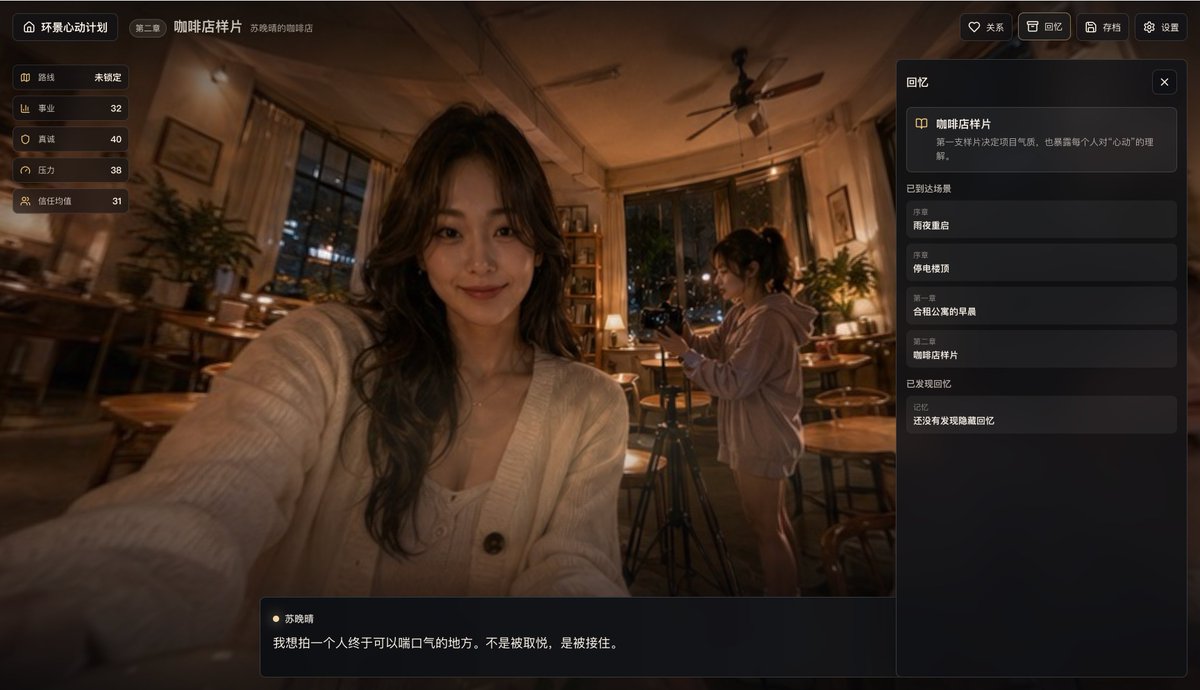
UI แอป Cinematic Café Story
ภาพจำลองอินเทอร์เฟซแอปพลิเคชันเล่าเรื่องสไตล์จีนที่ได้รับการออกแบบอย่างประณีต บนฉากหลังเซลฟี่ในคาเฟ่บรรยากาศอบอุ่นยามค่ำคืน เหมาะสำหรับแนวคิดผลิตภัณฑ์ การแสดงตัวอย่าง UI เกม และการสาธิตเรื่องราวแบบโต้ตอบ
นี่คือตัวอย่างข้อความแจ้งเตือน GPT Image 2 สำหรับ ผลิตภัณฑ์และเชิงพาณิชย์ ใช้ข้อความแจ้งเตือนที่พร้อมใช้งานด้านล่างเพื่อสร้างภาพที่คล้ายกัน และตรวจสอบการอ้างอิง Awesome GPT Image 2 Prompts รวมถึงสิทธิ์ในการใช้งานเชิงพาณิชย์ก่อนนำไปใช้ซ้ำ
ต้องการชุดข้อความแจ้งเตือนทั้งหมดหรือไม่? ใช้... ผลิตภัณฑ์และเชิงพาณิชย์ ศูนย์รวมหัวข้อสำหรับตัวอย่างที่เกี่ยวข้องเพิ่มเติม หรือเปิดดูได้เลย GPT Image 2 แคตตาล็อกพร้อมท์ สำหรับดัชนีตัวอย่างฉบับเต็ม โครงสร้างที่นำกลับมาใช้ใหม่ได้ และการอ้างอิงแหล่งที่มา
Free 1K preview
Generate one preview image instantly, no sign-up required.
4000/4000
พรอมป์
ข้อความแจ้งเตือนพร้อมสำหรับการคัดลอก
{
  "background_scene": {
    "camera": "slightly wide-angle selfie perspective from the front-left, immersive and casual",
    "environment_details": {
      "count": 10,
      "items": [
        "large windows showing night city lights",
        "ceiling fan",
        "wooden tables",
        "wooden chairs and stools",
        "potted plants",
        "table lamps",
        "bookshelf",
        "framed wall art",
        "curtains",
        "camera tripod"
      ]
    },
    "lighting": "warm tungsten café lighting with deep shadows and orange-brown tones",
    "location": "cozy coffee shop at night",
    "subjects": [
      {
        "appearance": "long wavy dark hair, cream knit cardigan over a light top, seated close to camera, extended arm toward lens, Show every face clearly with natural, detailed facial features",
        "count": 1,
        "role": "foreground woman taking a selfie"
      },
      {
        "appearance": "ponytail, oversized light hoodie, standing beside a camera on a tripod, Show every face clearly with natural, detailed facial features",
        "count": 1,
        "role": "background woman filming"
      }
    ]
  },
  "generation_notes": "Create a polished product mockup / in-app screenshot for {argument name=\"app name\" default=\"Panoramic Heartbeat Project\"}, showing chapter {argument name=\"chapter label\" default=\"Chapter 2\"} and scene title {argument name=\"scene title\" default=\"Coffee Shop Sample\"}. Keep the exact Chinese labels visible. Emphasize a warm emotional café atmosphere, realistic photographic background, cinematic depth of field, and elegant dark UI overlays. Include the exact dialogue line and stats values. Use subtle vignette, glossy panel edges, and a premium narrative-game interface aesthetic.",
  "language": "Chinese UI",
  "layout": {
    "bottom_dialogue_box": {
      "count": 2,
      "items": [
        "Character name \"Su Xiaoqing\"",
        "Dialogue text \"I want to photograph a place where a person can finally breathe. Not to be pleased, but to be caught.\""
      ],
      "position": "bottom center-left overlay"
    },
    "left_stats_panel": {
      "count": 5,
      "labels": [
        "route",
        "career",
        "sincerity",
        "pressure",
        "trust average"
      ],
      "position": "top-left vertical card stack",
      "values": [
        "Not locked",
        "32",
        "40",
        "38",
        "31"
      ]
    },
    "right_memory_panel": {
      "count": 6,
      "position": "right sidebar",
      "sections": [
        {
          "count": 1,
          "labels": [
            "Coffee Shop Sample"
          ],
          "title": "featured memory card"
        },
        {
          "count": 4,
          "labels": [
            "Reunion on a rainy night",
            "Rooftop during a blackout",
            "Morning in a shared apartment",
            "Coffee Shop Sample"
          ],
          "title": "Arrived at the scene"
        },
        {
          "count": 1,
          "labels": [
            "Hidden memories not yet found"
          ],
          "title": "Memories found"
        }
      ],
      "title": "Memories"
    },
    "top_bar": {
      "count": 8,
      "items": [
        "home icon button",
        "Title \"Panoramic Heartbeat Project\"",
        "Chapter Tag \"Chapter 2\"",
        "Main page title \"Coffee Shop Sample\"",
        "Subtitle \"Xiao Qing Su's Coffee Shop\"",
        "Favorite button \"Relationship\"",
        "Review button \"Memories\"",
        "Archive button \"Archive\" and Settings button \"Settings\""
      ]
    }
  },
  "product": "story-driven life simulation / memory collection app",
  "screen": {
    "aspect_ratio": "16:9 landscape",
    "style": "premium mobile-game-like desktop web app, moody, emotional, softly blurred edges, amber highlights, realistic photography background with crisp UI panels",
    "theme": "dark translucent glassmorphism overlay on top of a warm café photo"
  },
  "text_style": {
    "accent": "soft gold / amber icons and highlights",
    "color": "off-white and muted gray on dark translucent panels",
    "font": "clean modern sans-serif Chinese UI font"
  },
  "type": "cinematic app interface screenshot"
}
ตัวแปรพร้อมท์
ตัวอย่างค่าอาร์กิวเมนต์ที่แก้ไขได้ซึ่งพบในข้อความแจ้งเตือน พร้อมค่าเริ่มต้น
ตัวแปร
app name
ค่าเริ่มต้น
Panoramic Heartbeat Project
ตัวแปร
chapter label
ค่าเริ่มต้น
Chapter 2
ตัวแปร
scene title
ค่าเริ่มต้น
Coffee Shop Sample
Best for
- - ผลิตภัณฑ์และเชิงพาณิชย์ visual exploration
- - Image generation and reference-image edits
- - Reusable briefs that keep source attribution visible
Change these parts
- - Subject, product, character, or scene
- - Aspect ratio, camera, lighting, and background
- - Brand, text, color, and output constraints
Recommended model and settings
- - Model: gpt-image-2
- - Input mode: ข้อความเป็นรูปภาพ
- - Aspect ratio: source
- - Commercial status: review original source
How to use this prompt
- 1. Copy the prompt and preserve its structure for the first test.
- 2. Replace the subject, context, and publishing channel.
- 3. Change one camera, lighting, or style variable per iteration.
- 4. Inspect the output, source, text, and rights before reuse.
Limitations, source, and reuse cautions
- - Generated output is an editable draft, not factual, legal, or rights evidence.
- - Review the linked source, people, brands, logos, text, and third-party media before commercial use.
นำเข้าจาก Awesome GPT Image 2 Prompts จำเป็นต้องระบุแหล่งที่มา สถานะการใช้งานเชิงพาณิชย์คือ allowed โปรดตรวจสอบสิทธิ์แหล่งที่มาก่อนใช้งานแบบเสียค่าใช้จ่าย
กรณีเพิ่มเติมในหมวดหมู่นี้
จัดลำดับความสำคัญตามหมวดหมู่ ความเข้ากันได้กับโหมดการป้อนข้อมูล คุณภาพ และความเสี่ยงที่ต่ำกว่า

Transparent Earbuds on Stone Pedestal
ข้อความเป็นรูปภาพ

Manga Desert Radio Telescope Road Trip
ข้อความเป็นรูปภาพ

Female Clown Cyborg Portrait
ข้อความเป็นรูปภาพ

Wet Transparent Earbud Macro
ข้อความเป็นรูปภาพ

Imperial Research Bunker on Volcanic Planet
ข้อความเป็นรูปภาพ

Overhead Pepperoni Pizza Photo
ข้อความเป็นรูปภาพ
หมายเหตุเกี่ยวกับการนำกลับมาใช้ใหม่และแหล่งที่มา
ใช้ข้อความแจ้งเตือนนี้อย่างปลอดภัยหลังจากดูตัวอย่างกรณีแล้ว
- 1.คัดลอกข้อความแจ้งเตือน หรือเปิดโดยตรงใน Dovoo โดยใช้ปุ่มสร้างข้อความ
- 2.ปรับตัวแปร อัตราส่วนภาพ และภาพอ้างอิงให้เหมาะสมกับกรณีการใช้งานของคุณ
- 3.ก่อนเผยแพร่หรือใช้งานโดยเสียค่าใช้จ่าย โปรดตรวจสอบสิทธิ์ในแหล่งที่มา ข้อกำหนดการอ้างอิง และความเสี่ยงด้านแบรนด์หรือภาพลักษณ์