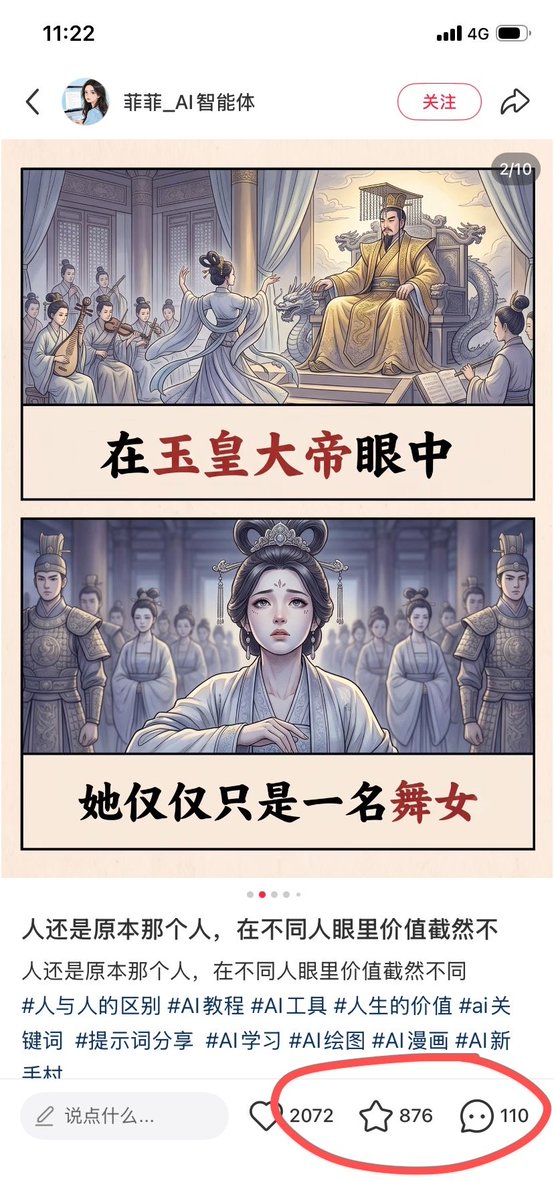
Chinese Viral AI Comic Post Screenshot
Creates a smartphone screenshot of a Chinese social media post featuring a two-panel ancient palace AI comic with circled engagement metrics.
นี่คือตัวอย่างข้อความแจ้งเตือน GPT Image 2 สำหรับ กราฟิกและโปสเตอร์ ใช้ข้อความแจ้งเตือนที่พร้อมใช้งานด้านล่างเพื่อสร้างภาพที่คล้ายกัน และตรวจสอบการอ้างอิง Awesome GPT Image 2 Prompts รวมถึงสิทธิ์ในการใช้งานเชิงพาณิชย์ก่อนนำไปใช้ซ้ำ
ต้องการชุดข้อความแจ้งเตือนทั้งหมดหรือไม่? ใช้... กราฟิกและโปสเตอร์ ศูนย์รวมหัวข้อสำหรับตัวอย่างที่เกี่ยวข้องเพิ่มเติม หรือเปิดดูได้เลย GPT Image 2 แคตตาล็อกพร้อมท์ สำหรับดัชนีตัวอย่างฉบับเต็ม โครงสร้างที่นำกลับมาใช้ใหม่ได้ และการอ้างอิงแหล่งที่มา
Free 1K preview
Generate one preview image instantly, no sign-up required.
3129/4000
พรอมป์
ข้อความแจ้งเตือนพร้อมสำหรับการคัดลอก
Goal: Create a realistic screenshot of a Chinese social media post on a smartphone, showing a viral AI-generated illustrated story card about an ancient palace dancer and an emperor, with engagement metrics circled in red.

Canvas: Vertical smartphone screenshot, 9:16 aspect ratio, white app interface background, clean mobile UI. The status bar at the top shows 11:22, 4G signal, and battery icon.

Top app header: Include a back arrow on the left, a small circular female profile avatar, the account name {argument name="account name" default="菲菲_AI智能体"}, a rounded pink outline follow button labeled “关注”, and a share arrow icon on the right.

Main image post: A beige comic-style image card centered below the header, with a small dark rounded page indicator at the top-right reading “2/10”. The card contains exactly 2 stacked illustrated panels, each bordered in black, separated by large cream caption bands with bold Chinese brush-calligraphy text.

Panel 1: Ancient Chinese imperial palace scene in soft muted watercolor comic style. On the right, a stern emperor in ornate golden robes sits on a dragon-carved throne under curtains, with palace architecture behind him. In the center foreground, a graceful female dancer in pale flowing robes performs with her back partially turned. On the left, exactly 5 seated female musicians in traditional robes play instruments, including pipa and string instruments. The caption band below reads “在玉皇大帝眼中”, with “玉皇大帝” emphasized in dark red and the rest in black.

Panel 2: Frontal dramatic portrait of the same dancer standing in a palace hall, looking sad and vulnerable, wearing pale white-blue hanfu, ornate hair accessories, and delicate makeup. Behind her are exactly 2 armored palace guards, one on each side, plus a blurred group of palace women in the background. Cool blue-gray lighting creates a solemn atmosphere. The caption band below reads “她仅仅只是一名舞女”, with “舞女” emphasized in dark red and the rest in black.

Post text below image: Show a carousel dot row with exactly 5 dots, the second dot red and the other 4 light gray. Then display the Chinese caption text in two lines: “人还是原本那个人,在不同人眼里价值截然不” and “人还是原本那个人,在不同人眼里价值截然不同”. Beneath it, show hashtags in blue-gray text: “#人与人的区别 #AI教程 #AI工具 #人生的价值 #ai关键词 #提示词分享 #AI学习 #AI绘图 #AI漫画 #AI新手村”.

Bottom interaction bar: Include a rounded comment input field labeled “说点什么...”. To the right, show exactly 3 engagement items: a heart icon with {argument name="like count" default="2072"}, a star/favorite icon with {argument name="favorite count" default="876"}, and a comment bubble icon with {argument name="comment count" default="110"}. Draw a thick hand-drawn red oval around these 3 metrics only.

Visual style: The app UI should look like a real screenshot, while the embedded artwork should look like polished AI comic illustration with ink outlines, soft watercolor shading, muted palace colors, and cinematic ancient Chinese drama atmosphere.

Constraints: Keep all visible Chinese text legible and accurately placed. Do not add extra panels, extra engagement icons, watermarks, or unrelated UI elements.
ตัวแปรพร้อมท์
ตัวอย่างค่าอาร์กิวเมนต์ที่แก้ไขได้ซึ่งพบในข้อความแจ้งเตือน พร้อมค่าเริ่มต้น
ตัวแปร
account name
ค่าเริ่มต้น
菲菲_AI智能体
ตัวแปร
like count
ค่าเริ่มต้น
2072
ตัวแปร
favorite count
ค่าเริ่มต้น
876
ตัวแปร
comment count
ค่าเริ่มต้น
110
Best for
- - กราฟิกและโปสเตอร์ visual exploration
- - Image generation and reference-image edits
- - Reusable briefs that keep source attribution visible
Change these parts
- - Subject, product, character, or scene
- - Aspect ratio, camera, lighting, and background
- - Brand, text, color, and output constraints
Recommended model and settings
- - Model: gpt-image-2
- - Input mode: ข้อความเป็นรูปภาพ
- - Aspect ratio: source
- - Commercial status: review original source
How to use this prompt
- 1. Copy the prompt and preserve its structure for the first test.
- 2. Replace the subject, context, and publishing channel.
- 3. Change one camera, lighting, or style variable per iteration.
- 4. Inspect the output, source, text, and rights before reuse.
Limitations, source, and reuse cautions
- - Generated output is an editable draft, not factual, legal, or rights evidence.
- - Review the linked source, people, brands, logos, text, and third-party media before commercial use.
นำเข้าจาก Awesome GPT Image 2 Prompts จำเป็นต้องระบุแหล่งที่มา สถานะการใช้งานเชิงพาณิชย์คือ allowed โปรดตรวจสอบสิทธิ์แหล่งที่มาก่อนใช้งานแบบเสียค่าใช้จ่าย
กรณีเพิ่มเติมในหมวดหมู่นี้
จัดลำดับความสำคัญตามหมวดหมู่ ความเข้ากันได้กับโหมดการป้อนข้อมูล คุณภาพ และความเสี่ยงที่ต่ำกว่า

Transparent Earbuds on Stone Pedestal
ข้อความเป็นรูปภาพ

Manga Desert Radio Telescope Road Trip
ข้อความเป็นรูปภาพ

Female Clown Cyborg Portrait
ข้อความเป็นรูปภาพ

Imperial Research Bunker on Volcanic Planet
ข้อความเป็นรูปภาพ

Greyscale Puzzle Portrait with Color Accent
ข้อความเป็นรูปภาพ

Pink Hijab Mirror Selfie Portrait
ข้อความเป็นรูปภาพ
หมายเหตุเกี่ยวกับการนำกลับมาใช้ใหม่และแหล่งที่มา
ใช้ข้อความแจ้งเตือนนี้อย่างปลอดภัยหลังจากดูตัวอย่างกรณีแล้ว
- 1.คัดลอกข้อความแจ้งเตือน หรือเปิดโดยตรงใน Dovoo โดยใช้ปุ่มสร้างข้อความ
- 2.ปรับตัวแปร อัตราส่วนภาพ และภาพอ้างอิงให้เหมาะสมกับกรณีการใช้งานของคุณ
- 3.ก่อนเผยแพร่หรือใช้งานโดยเสียค่าใช้จ่าย โปรดตรวจสอบสิทธิ์ในแหล่งที่มา ข้อกำหนดการอ้างอิง และความเสี่ยงด้านแบรนด์หรือภาพลักษณ์