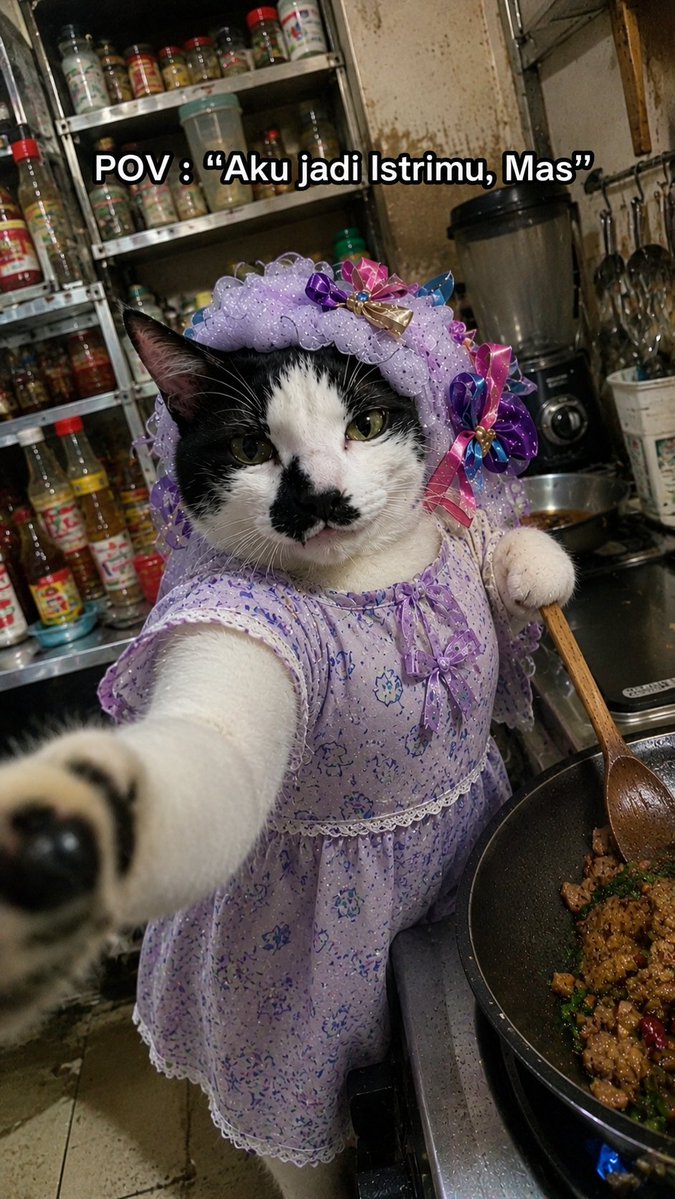
ภาพมีม "ภรรยาแมวกำลังทำอาหาร"
สร้างภาพมีมสไตล์สมาร์ทโฟนที่ดูสมจริงและน่าอึดอัดใจ เป็นภาพแมวแต่งตัวกำลังทำอาหารในครัวที่รก พร้อมคำบรรยายที่ปรับแต่งได้
นี่คือตัวอย่างข้อความแจ้งเตือน GPT Image 2 สำหรับ ภาพเหมือนและตัวละคร ใช้ข้อความแจ้งเตือนที่พร้อมใช้งานด้านล่างเพื่อสร้างภาพที่คล้ายกัน และตรวจสอบการอ้างอิง Awesome GPT Image 2 Prompts รวมถึงสิทธิ์ในการใช้งานเชิงพาณิชย์ก่อนนำไปใช้ซ้ำ
ต้องการชุดข้อความแจ้งเตือนทั้งหมดหรือไม่? ใช้... ภาพเหมือนและตัวละคร ศูนย์รวมหัวข้อสำหรับตัวอย่างที่เกี่ยวข้องเพิ่มเติม หรือเปิดดูได้เลย GPT Image 2 แคตตาล็อกพร้อมท์ สำหรับดัชนีตัวอย่างฉบับเต็ม โครงสร้างที่นำกลับมาใช้ใหม่ได้ และการอ้างอิงแหล่งที่มา
Free 1K preview
Generate one preview image instantly, no sign-up required.
1493/4000
พรอมป์
ข้อความแจ้งเตือนพร้อมสำหรับการคัดลอก
Create a hyper-realistic vertical smartphone meme photo with an intentionally imperfect low-end Android camera look: harsh mixed kitchen lighting, slight motion blur, noisy shadows, compression artifacts, awkward tilted framing, and close selfie perspective. The subject is one black-and-white domestic cat standing upright beside a stovetop, reaching one front paw toward the camera so the paw is large and blurred in the foreground, while the cat’s face stays mostly in focus with a serious, unimpressed expression and a small black patch around the nose and mouth. Dress the cat in exactly 2 visible outfit pieces: a lavender floral house dress with lace trim and tiny bow details, and a matching ruffled lavender bonnet decorated with colorful satin ribbon bows. The cat holds one wooden cooking spoon in its other paw, stirring one black frying pan on the right side of the frame containing browned chopped food, green herbs, and red chili pieces over a visible blue gas flame. Set the scene in a cramped, messy home kitchen with stained walls, a metal rack crowded with spice and sauce bottles behind the cat, a blender on the counter, hanging utensils, and a worn tiled floor. Add exactly 1 meme caption at the top center in bold white text with a thick black outline, reading {argument name="caption text" default="POV : “Aku jadi Istrimu, Mas”"}. Make the image feel like a real accidental candid cooking selfie, funny and surreal but photorealistic, with no polished studio lighting.ตัวแปรพร้อมท์
ตัวอย่างค่าอาร์กิวเมนต์ที่แก้ไขได้ซึ่งพบในข้อความแจ้งเตือน พร้อมค่าเริ่มต้น
ตัวแปร
caption text
ค่าเริ่มต้น
POV : “Aku jadi Istrimu, Mas”
Best for
- - ภาพเหมือนและตัวละคร visual exploration
- - Image generation and reference-image edits
- - Reusable briefs that keep source attribution visible
Change these parts
- - Subject, product, character, or scene
- - Aspect ratio, camera, lighting, and background
- - Brand, text, color, and output constraints
Recommended model and settings
- - Model: gpt-image-2
- - Input mode: ข้อความเป็นรูปภาพ
- - Aspect ratio: source
- - Commercial status: review original source
How to use this prompt
- 1. Copy the prompt and preserve its structure for the first test.
- 2. Replace the subject, context, and publishing channel.
- 3. Change one camera, lighting, or style variable per iteration.
- 4. Inspect the output, source, text, and rights before reuse.
Limitations, source, and reuse cautions
- - Generated output is an editable draft, not factual, legal, or rights evidence.
- - Review the linked source, people, brands, logos, text, and third-party media before commercial use.
นำเข้าจาก Awesome GPT Image 2 Prompts จำเป็นต้องระบุแหล่งที่มา สถานะการใช้งานเชิงพาณิชย์คือ allowed โปรดตรวจสอบสิทธิ์แหล่งที่มาก่อนใช้งานแบบเสียค่าใช้จ่าย
กรณีเพิ่มเติมในหมวดหมู่นี้
จัดลำดับความสำคัญตามหมวดหมู่ ความเข้ากันได้กับโหมดการป้อนข้อมูล คุณภาพ และความเสี่ยงที่ต่ำกว่า

Female Clown Cyborg Portrait
ข้อความเป็นรูปภาพ

Greyscale Puzzle Portrait with Color Accent
ข้อความเป็นรูปภาพ

Transparent Earbuds on Stone Pedestal
ข้อความเป็นรูปภาพ

Pink Hijab Mirror Selfie Portrait
ข้อความเป็นรูปภาพ

Manga Desert Radio Telescope Road Trip
ข้อความเป็นรูปภาพ

Glitch Aesthetic Surreal Portrait
ข้อความเป็นรูปภาพ
หมายเหตุเกี่ยวกับการนำกลับมาใช้ใหม่และแหล่งที่มา
ใช้ข้อความแจ้งเตือนนี้อย่างปลอดภัยหลังจากดูตัวอย่างกรณีแล้ว
- 1.คัดลอกข้อความแจ้งเตือน หรือเปิดโดยตรงใน Dovoo โดยใช้ปุ่มสร้างข้อความ
- 2.ปรับตัวแปร อัตราส่วนภาพ และภาพอ้างอิงให้เหมาะสมกับกรณีการใช้งานของคุณ
- 3.ก่อนเผยแพร่หรือใช้งานโดยเสียค่าใช้จ่าย โปรดตรวจสอบสิทธิ์ในแหล่งที่มา ข้อกำหนดการอ้างอิง และความเสี่ยงด้านแบรนด์หรือภาพลักษณ์