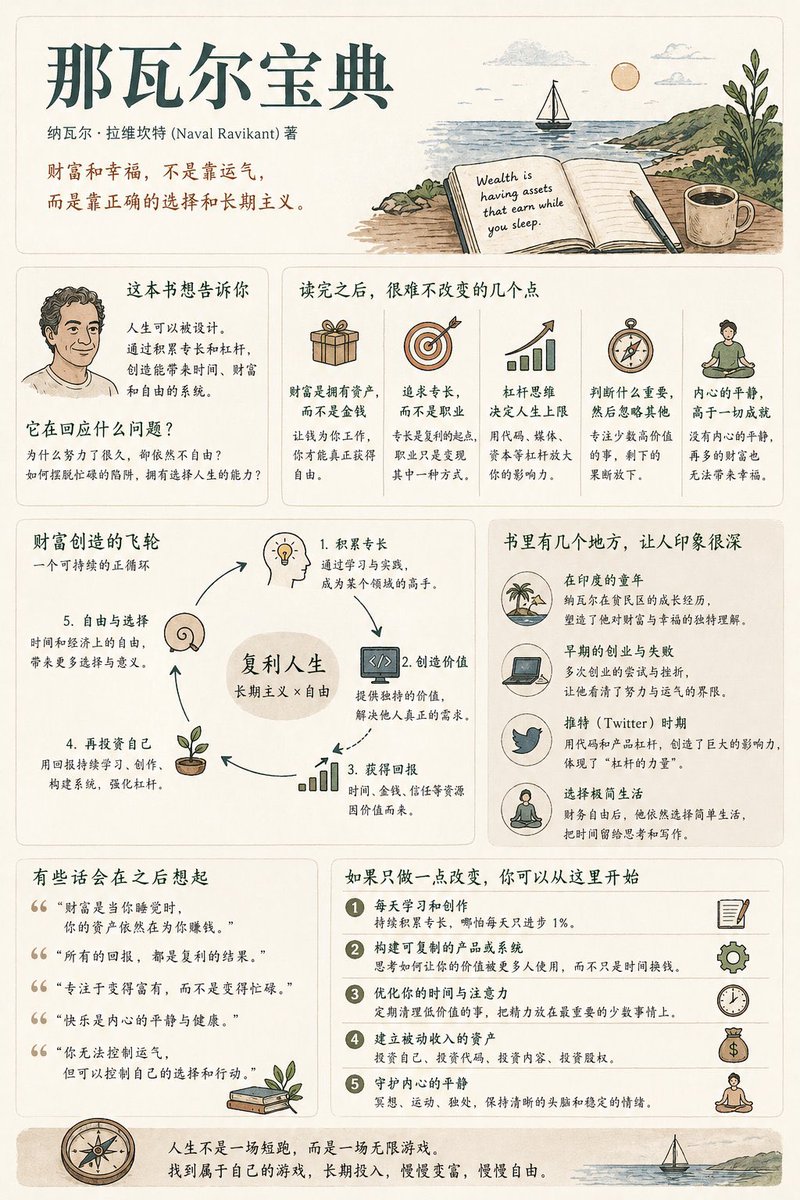
โปสเตอร์อินโฟกราฟิกสรุปหนังสือ
คำแนะนำที่ครอบคลุมและมีโครงสร้างสำหรับการสร้างโปสเตอร์สรุปหนังสือที่มีความหนาแน่นของข้อมูลปานกลาง ด้วย UI ที่ทันสมัยและสไตล์ภาพประกอบแบบวินเทจ
นี่คือตัวอย่างข้อความแจ้งเตือน GPT Image 2 สำหรับ กราฟิกและโปสเตอร์ ใช้ข้อความแจ้งเตือนที่พร้อมใช้งานด้านล่างเพื่อสร้างภาพที่คล้ายกัน และตรวจสอบการอ้างอิง Awesome GPT Image 2 Prompts รวมถึงสิทธิ์ในการใช้งานเชิงพาณิชย์ก่อนนำไปใช้ซ้ำ
ต้องการชุดข้อความแจ้งเตือนทั้งหมดหรือไม่? ใช้... กราฟิกและโปสเตอร์ ศูนย์รวมหัวข้อสำหรับตัวอย่างที่เกี่ยวข้องเพิ่มเติม หรือเปิดดูได้เลย GPT Image 2 แคตตาล็อกพร้อมท์ สำหรับดัชนีตัวอย่างฉบับเต็ม โครงสร้างที่นำกลับมาใช้ใหม่ได้ และการอ้างอิงแหล่งที่มา
Free 1K preview
Generate one preview image instantly, no sign-up required.
1544/4000
พรอมป์
ข้อความแจ้งเตือนพร้อมสำหรับการคัดลอก
Generate a [medium information density] book summary infographic poster with the theme "{argument name="book title" default="Book Title"}".

---

Step 0 (Critical Pre-assessment)

Before starting generation, determine which category this book belongs to (multiple choice possible):
* Cognitive Growth (Thinking / Self-improvement)
* Business / Wealth (Earning / Career / Investment)
* Psychology / Emotion (Relationships / Inner Self / Human Nature)
* Novel / Story (Narrative / Character / Metaphor)

Adjust content logic based on category.

[Overall Style]
Modern Minimalist UI + Light Vintage Illustration style. Soft light backgrounds (Cream / Beige / Light Gray). Low saturation palette (Deep Green / Deep Blue / Brown).
Keywords: Quiet, Substantial, Readable.

[Core Principles]
Do not use fixed module titles. Do not force structural completeness. Organize information naturally based on book type.

[Content Modules]
1. Opening: Book Title, Author, One-sentence insight.
2. Core Understanding: "What this book is really saying is..."
3. Highlights: Key takeaways adjusted by category.
4. Visual Structure: Decision paths, leverage systems, or character maps.
5. Examples/Fragments: Memorable scenes or cases.
6. Quotes: Meaningful sentences.
7. Actions: Practical steps to take after reading.

[Design Details]
Adaptive grid layout, card-based info, 6:4 image-to-text ratio, unified illustration style, clear hierarchy.

[Tone of Voice]
Should sound like a human explaining the book with insight and realization, not like a dry summary.
ตัวแปรพร้อมท์
ตัวอย่างค่าอาร์กิวเมนต์ที่แก้ไขได้ซึ่งพบในข้อความแจ้งเตือน พร้อมค่าเริ่มต้น
ตัวแปร
book title
ค่าเริ่มต้น
Book Title
Best for
- - กราฟิกและโปสเตอร์ visual exploration
- - Image generation and reference-image edits
- - Reusable briefs that keep source attribution visible
Change these parts
- - Subject, product, character, or scene
- - Aspect ratio, camera, lighting, and background
- - Brand, text, color, and output constraints
Recommended model and settings
- - Model: gpt-image-2
- - Input mode: ข้อความเป็นรูปภาพ
- - Aspect ratio: source
- - Commercial status: review original source
How to use this prompt
- 1. Copy the prompt and preserve its structure for the first test.
- 2. Replace the subject, context, and publishing channel.
- 3. Change one camera, lighting, or style variable per iteration.
- 4. Inspect the output, source, text, and rights before reuse.
Limitations, source, and reuse cautions
- - Generated output is an editable draft, not factual, legal, or rights evidence.
- - Review the linked source, people, brands, logos, text, and third-party media before commercial use.
นำเข้าจาก Awesome GPT Image 2 Prompts จำเป็นต้องระบุแหล่งที่มา สถานะการใช้งานเชิงพาณิชย์คือ allowed โปรดตรวจสอบสิทธิ์แหล่งที่มาก่อนใช้งานแบบเสียค่าใช้จ่าย
กรณีเพิ่มเติมในหมวดหมู่นี้
จัดลำดับความสำคัญตามหมวดหมู่ ความเข้ากันได้กับโหมดการป้อนข้อมูล คุณภาพ และความเสี่ยงที่ต่ำกว่า

Transparent Earbuds on Stone Pedestal
ข้อความเป็นรูปภาพ

Manga Desert Radio Telescope Road Trip
ข้อความเป็นรูปภาพ

Female Clown Cyborg Portrait
ข้อความเป็นรูปภาพ

Imperial Research Bunker on Volcanic Planet
ข้อความเป็นรูปภาพ

Greyscale Puzzle Portrait with Color Accent
ข้อความเป็นรูปภาพ

Pink Hijab Mirror Selfie Portrait
ข้อความเป็นรูปภาพ
หมายเหตุเกี่ยวกับการนำกลับมาใช้ใหม่และแหล่งที่มา
ใช้ข้อความแจ้งเตือนนี้อย่างปลอดภัยหลังจากดูตัวอย่างกรณีแล้ว
- 1.คัดลอกข้อความแจ้งเตือน หรือเปิดโดยตรงใน Dovoo โดยใช้ปุ่มสร้างข้อความ
- 2.ปรับตัวแปร อัตราส่วนภาพ และภาพอ้างอิงให้เหมาะสมกับกรณีการใช้งานของคุณ
- 3.ก่อนเผยแพร่หรือใช้งานโดยเสียค่าใช้จ่าย โปรดตรวจสอบสิทธิ์ในแหล่งที่มา ข้อกำหนดการอ้างอิง และความเสี่ยงด้านแบรนด์หรือภาพลักษณ์