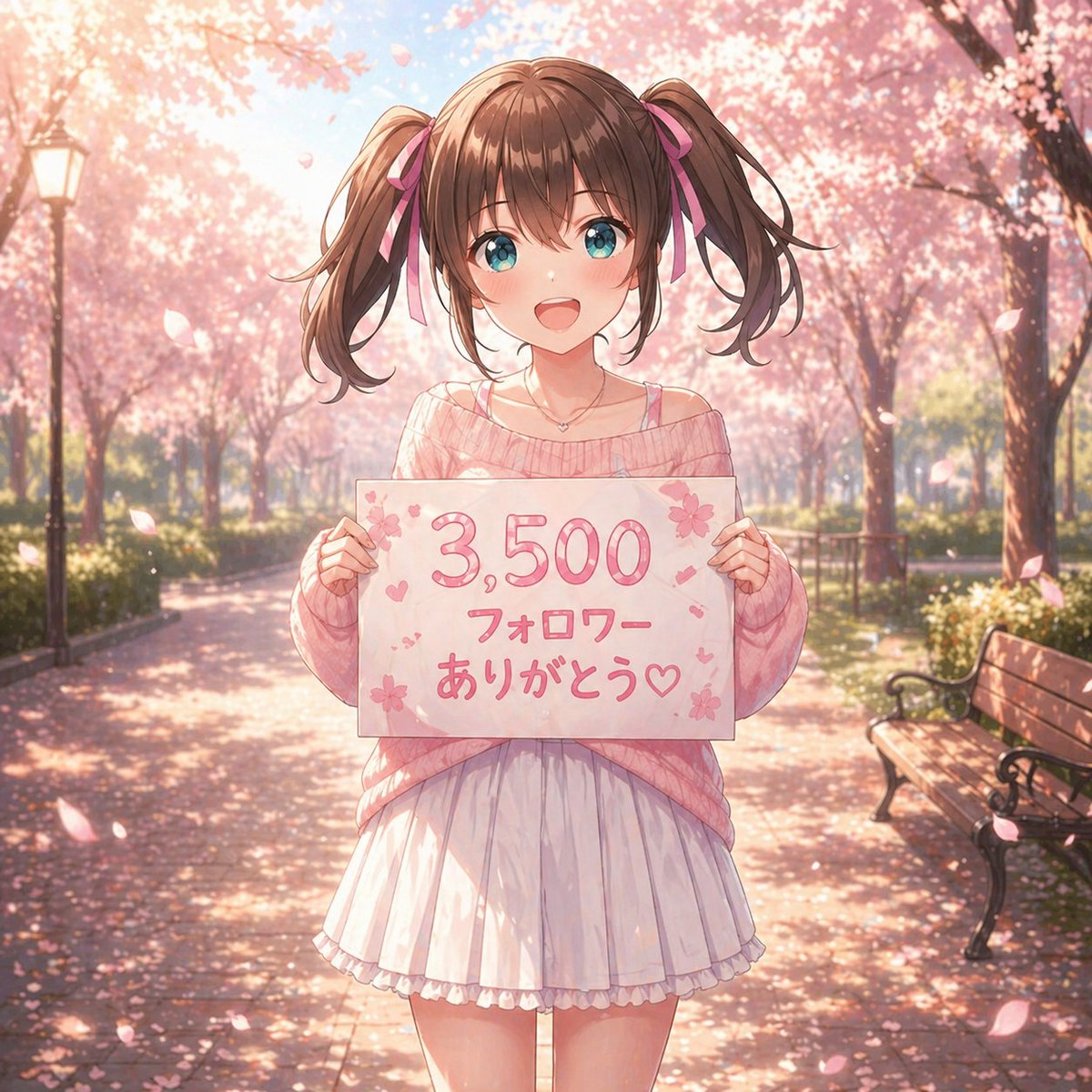
ภาพเหมือนขอบคุณซากุระอนิเมะ
ภาพนี้จะสร้างภาพเหมือนฤดูใบไม้ผลิสไตล์อนิเมะสีพาสเทลของเด็กหญิงผมเปียสองข้างถือป้ายขอบคุณผู้ติดตาม เหมาะสำหรับโพสต์บนโซเชียลมีเดียหรือประกาศเหตุการณ์สำคัญ
นี่คือตัวอย่างข้อความแจ้งเตือน GPT Image 2 สำหรับ อนิเมะและเกม ใช้ข้อความแจ้งเตือนที่พร้อมใช้งานด้านล่างเพื่อสร้างภาพที่คล้ายกัน และตรวจสอบการอ้างอิง Awesome GPT Image 2 Prompts รวมถึงสิทธิ์ในการใช้งานเชิงพาณิชย์ก่อนนำไปใช้ซ้ำ
ต้องการชุดข้อความแจ้งเตือนทั้งหมดหรือไม่? ใช้... อนิเมะและเกม ศูนย์รวมหัวข้อสำหรับตัวอย่างที่เกี่ยวข้องเพิ่มเติม หรือเปิดดูได้เลย GPT Image 2 แคตตาล็อกพร้อมท์ สำหรับดัชนีตัวอย่างฉบับเต็ม โครงสร้างที่นำกลับมาใช้ใหม่ได้ และการอ้างอิงแหล่งที่มา
Free 1K preview
Generate one preview image instantly, no sign-up required.
1468/4000
พรอมป์
ข้อความแจ้งเตือนพร้อมสำหรับการคัดลอก
A soft, dreamy anime illustration of a cute teenage girl standing centered on a park path lined with blooming cherry blossom trees in full spring. She faces the viewer and holds a handmade white sign at chest height with the Japanese text {argument name="sign text" default="3,500 フォロワー ありがとう♡"} written in large rounded pink lettering, decorated with small sakura flowers, hearts, and tiny confetti-like marks. The girl has {argument name="hair color" default="medium brown"} hair styled in high twin ponytails tied with pink ribbons, straight-cut bangs, and loose curled ends. Her face is intentionally blank and featureless, a smooth shaded skin-toned oval with no eyes, nose, or mouth. She wears an oversized off-shoulder knit sweater in {argument name="sweater color" default="pastel pink"}, with a thin camisole strap visible on one shoulder, a short white pleated skirt with a soft ruffled hem, and a delicate small necklace. Her pose is gentle and symmetrical, both hands gripping the left and right edges of the sign. The setting is a sunlit sakura avenue with 2 visible benches on the right side and 1 vintage lamppost on the left, petals drifting through the air and scattered across the ground. Use warm backlighting, soft bloom, shallow depth of field, pastel pink and cream tones, romantic seasonal atmosphere, highly detailed anime rendering, polished linework, glossy hair highlights, subtle fabric folds, and a celebratory social-media thank-you mood.ตัวแปรพร้อมท์
ตัวอย่างค่าอาร์กิวเมนต์ที่แก้ไขได้ซึ่งพบในข้อความแจ้งเตือน พร้อมค่าเริ่มต้น
ตัวแปร
sign text
ค่าเริ่มต้น
3,500 フォロワー ありがとう♡
ตัวแปร
hair color
ค่าเริ่มต้น
medium brown
ตัวแปร
sweater color
ค่าเริ่มต้น
pastel pink
Best for
- - อนิเมะและเกม visual exploration
- - Image generation and reference-image edits
- - Reusable briefs that keep source attribution visible
Change these parts
- - Subject, product, character, or scene
- - Aspect ratio, camera, lighting, and background
- - Brand, text, color, and output constraints
Recommended model and settings
- - Model: gpt-image-2
- - Input mode: ข้อความเป็นรูปภาพ
- - Aspect ratio: source
- - Commercial status: review original source
How to use this prompt
- 1. Copy the prompt and preserve its structure for the first test.
- 2. Replace the subject, context, and publishing channel.
- 3. Change one camera, lighting, or style variable per iteration.
- 4. Inspect the output, source, text, and rights before reuse.
Limitations, source, and reuse cautions
- - Generated output is an editable draft, not factual, legal, or rights evidence.
- - Review the linked source, people, brands, logos, text, and third-party media before commercial use.
นำเข้าจาก Awesome GPT Image 2 Prompts จำเป็นต้องระบุแหล่งที่มา สถานะการใช้งานเชิงพาณิชย์คือ allowed โปรดตรวจสอบสิทธิ์แหล่งที่มาก่อนใช้งานแบบเสียค่าใช้จ่าย
กรณีเพิ่มเติมในหมวดหมู่นี้
จัดลำดับความสำคัญตามหมวดหมู่ ความเข้ากันได้กับโหมดการป้อนข้อมูล คุณภาพ และความเสี่ยงที่ต่ำกว่า

Manga Desert Radio Telescope Road Trip
ข้อความเป็นรูปภาพ

Transparent Earbuds on Stone Pedestal
ข้อความเป็นรูปภาพ

Female Clown Cyborg Portrait
ข้อความเป็นรูปภาพ

Imperial Research Bunker on Volcanic Planet
ข้อความเป็นรูปภาพ

Greyscale Puzzle Portrait with Color Accent
ข้อความเป็นรูปภาพ

Pink Hijab Mirror Selfie Portrait
ข้อความเป็นรูปภาพ
หมายเหตุเกี่ยวกับการนำกลับมาใช้ใหม่และแหล่งที่มา
ใช้ข้อความแจ้งเตือนนี้อย่างปลอดภัยหลังจากดูตัวอย่างกรณีแล้ว
- 1.คัดลอกข้อความแจ้งเตือน หรือเปิดโดยตรงใน Dovoo โดยใช้ปุ่มสร้างข้อความ
- 2.ปรับตัวแปร อัตราส่วนภาพ และภาพอ้างอิงให้เหมาะสมกับกรณีการใช้งานของคุณ
- 3.ก่อนเผยแพร่หรือใช้งานโดยเสียค่าใช้จ่าย โปรดตรวจสอบสิทธิ์ในแหล่งที่มา ข้อกำหนดการอ้างอิง และความเสี่ยงด้านแบรนด์หรือภาพลักษณ์