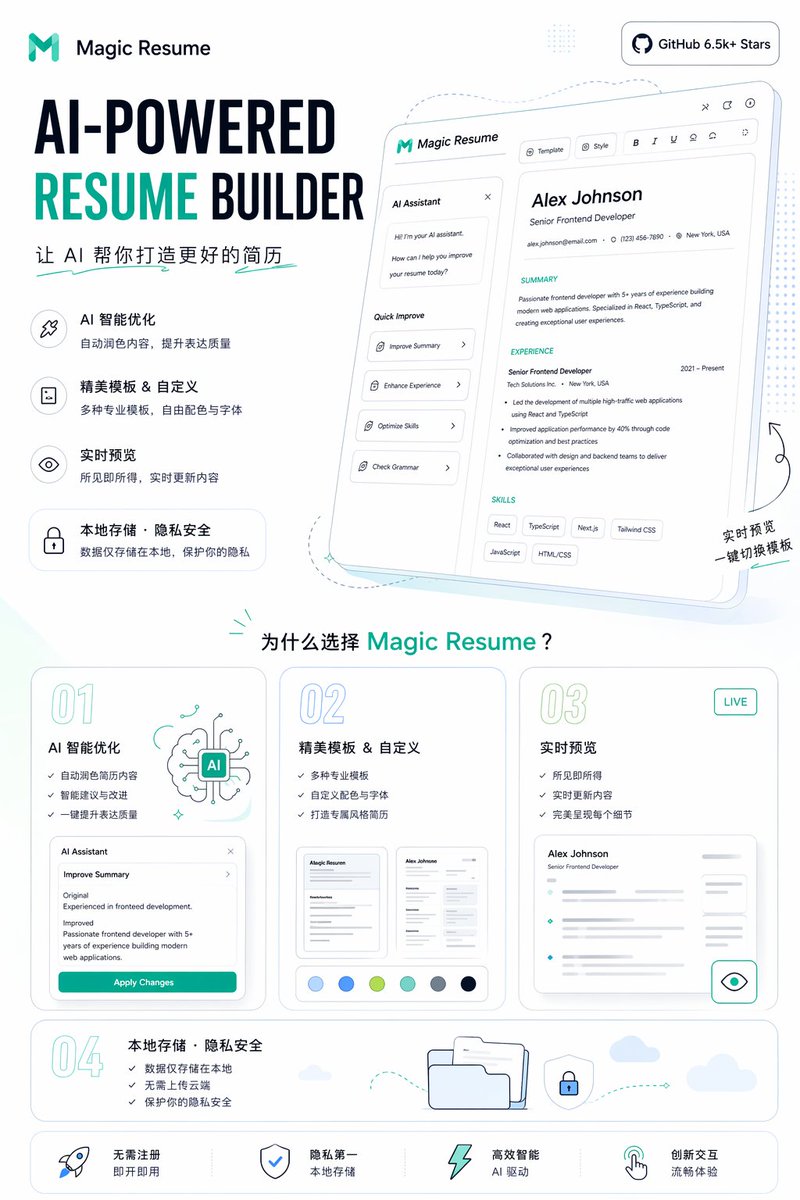
โปสเตอร์โปรโมชั่นสร้างเรซูเม่ด้วย AI
โปสเตอร์การตลาด SaaS ที่ดูสะอาดตา แสดงหน้า Landing Page เครื่องมือสร้างเรซูเม่ที่ขับเคลื่อนด้วย AI เหมาะสำหรับการโปรโมทสินค้า โซเชียลมีเดีย และภาพกราฟิกหลักบนเว็บไซต์
นี่คือตัวอย่างข้อความแจ้งเตือน GPT Image 2 สำหรับ กราฟิกและโปสเตอร์ ใช้ข้อความแจ้งเตือนที่พร้อมใช้งานด้านล่างเพื่อสร้างภาพที่คล้ายกัน และตรวจสอบการอ้างอิง Awesome GPT Image 2 Prompts รวมถึงสิทธิ์ในการใช้งานเชิงพาณิชย์ก่อนนำไปใช้ซ้ำ
ต้องการชุดข้อความแจ้งเตือนทั้งหมดหรือไม่? ใช้... กราฟิกและโปสเตอร์ ศูนย์รวมหัวข้อสำหรับตัวอย่างที่เกี่ยวข้องเพิ่มเติม หรือเปิดดูได้เลย GPT Image 2 แคตตาล็อกพร้อมท์ สำหรับดัชนีตัวอย่างฉบับเต็ม โครงสร้างที่นำกลับมาใช้ใหม่ได้ และการอ้างอิงแหล่งที่มา
Free 1K preview
Generate one preview image instantly, no sign-up required.
4000/4000
พรอมป์
ข้อความแจ้งเตือนพร้อมสำหรับการคัดลอก
{
  "type": "Landing Page Product Promotion Poster",
  "product": {
    "name": "{argument name=\"product name\" default=\"Magic Resume\"}",
    "category": "AI Resume Generator Website",
    "brand_style": "Concise modern SaaS style, minimalism, white background, accented with cyan and dark blue, rounded cards, thin gray outlines, soft pastel shadows"
  },
  "canvas": {
    "orientation": "Vertical screen",
    "aspect_ratio": "9:16"
  },
  "headline_block": {
    "position": "Top left corner",
    "logo": "Abstract cyan M logo and text identification",
    "headline": "AI-powered resume generator",
    "subheadline": "Let AI help you create a better resume",
    "style": "Extra large, bold sans-serif heading, RESUME in bright cyan, other text in dark blue"
  },
  "top_right_badge": {
    "text": "GitHub 6.5k+ Stars",
    "style": "Rounded white capsule badge, dark text and GitHub icon"
  },
  "hero_section": {
    "position": "Top right corner",
    "main_visual": "Tilted large web application model card, showing the resume editor UI",
    "screen_contents": {
      "left_panel": {
        "title": "AI Assistant",
        "chat_lines_count": 3,
        "quick_actions_count": 4,
        "quick_actions": [
          "Optimization Summary",
          "Enhance Work Experience",
          "Optimize Skills",
          "Grammar Check"
        ]
      },
      "top_toolbar_count": 7,
      "top_toolbar_items": [
        "Template",
        "Style",
        "Bold",
        "Italic",
        "Underline",
        "Align/Set Icon",
        "Share/Export Icon"
      ],
      "resume_preview": {
        "name": "{argument name=\"sample candidate name\" default=\"Alex Johnson\"}",
        "role": "Senior Frontend Development Engineer",
        "contact_count": 3,
        "contact_items": [
          "Email",
          "Phone",
          "Address"
        ],
        "sections_count": 3,
        "sections": [
          "Personal Summary",
          "Work Experience",
          "Skills"
        ],
        "skill_tags_count": 6,
        "skill_tags": [
          "React",
          "TypeScript",
          "Next.js",
          "Tailwind CSS",
          "JavaScript",
          "HTML/CSS"
        ]
      }
    },
    "decorations": "Soft blue projection, dashed line guides, tiny sparkles, handwritten-style annotation in the bottom right corner: Real-time Preview One-click Template Switching"
  },
  "feature_list": {
    "position": "Left-center",
    "count": 4,
    "items": [
      {
        "title": "AI Intelligent Optimization",
        "description": "Automatically refine content to improve expression quality",
        "icon": "Wand or sparkle icon within a rounded square"
      },
      {
        "title": "Exquisite templates & customization",
        "description": "A variety of professional templates, free color and font selection",
        "icon": "Document icon within a rounded square"
      },
      {
        "title": "Live Preview",
        "description": "What you see is what you get, content updates in real time",
        "icon": "Eye icon within a rounded square"
      },
      {
        "title": "Local Storage · Privacy & Security",
        "description": "Data is stored locally only, protecting your privacy",
        "icon": "Rounded capsule card with a lock icon"
      }
    ]
  },
  "why_section": {
    "position": "Middle-bottom",
    "title": "Why choose {argument name=\"product name\" default=\"Magic Resume\"}?",
    "cards_count": 4,
    "cards": [
      {
        "number": "01",
        "title": "AI Intelligent Optimization",
        "bullet_count": 3,
        "bullets": [
          "Automatically refine resume content",
          "Intelligent suggestions and improvements",
          "One-click improvement of expression quality"
        ],
        "visual": "AI brain illustration and a mini Agent panel with an “Apply Changes” button"
      },
      {
        "number": "02",
        "title": "Exquisite templates & customization",
        "bullet_count": 3,
        "bullets": [
          "Variety of professional templates",
          "Custom color schemes and fonts",
          "Create a uniquely styled resume"
        ],
        "visual": "2 resume thumbnails and 6 color palettes"
      },
      {
        "number": "03",
        "title": "Live Preview",
        "badge": "LIVE",
        "bullet_count": 3,
        "bullets": [
          "What you see is what you get",
          "Real-time content updates",
          "Perfectly presents every detail"
        ],
        "visual": "Blurred resume preview card with an eye icon button"
      },
      {
        "number": "04",
        "title": "Local Storage · Privacy & Security",
        "bullet_count": 3,
        "bullets": [
          "Data is only stored locally",
          "No cloud upload required",
          "Protect your privacy and security"
        ],
        "visual": "Folder, shield lock, dashed arrow path, small cloud"
      }
    ]
  },
  "bottom_bar": {
    "position": "Bottom",
    "count": 4,
    "items": [
      "No registration required, ready to use",
      "Privacy first, local storage",
      "Highly intelligent AI-powered",
      "Innovative interaction, smooth experience"
    ],
    "icons_count": 4,
    "icons": [
      "Rocket",
      "Shield",
      "Lightning",
      "hand gesture pointer"
    ]
  },
  "style": {
    "typography": "bold geometric sans-serif font mixed with simple Chinese sans-serif font",
    "rendering": "High-fidelity marketing graphics, crisp vector-level UI, subtle gradients, soft teal highlights, spacious layout",
    "palette": {
      "background": "White",
      "primary": "Cyan",
      "secondary": "Dark blue",
      "accent": "Light aqua and pale blue"
    }
  }
}
ตัวแปรพร้อมท์
ตัวอย่างค่าอาร์กิวเมนต์ที่แก้ไขได้ซึ่งพบในข้อความแจ้งเตือน พร้อมค่าเริ่มต้น
ตัวแปร
product name
ค่าเริ่มต้น
Magic Resume
ตัวแปร
sample candidate name
ค่าเริ่มต้น
Alex Johnson
Best for
- - กราฟิกและโปสเตอร์ visual exploration
- - Image generation and reference-image edits
- - Reusable briefs that keep source attribution visible
Change these parts
- - Subject, product, character, or scene
- - Aspect ratio, camera, lighting, and background
- - Brand, text, color, and output constraints
Recommended model and settings
- - Model: gpt-image-2
- - Input mode: ข้อความเป็นรูปภาพ
- - Aspect ratio: source
- - Commercial status: review original source
How to use this prompt
- 1. Copy the prompt and preserve its structure for the first test.
- 2. Replace the subject, context, and publishing channel.
- 3. Change one camera, lighting, or style variable per iteration.
- 4. Inspect the output, source, text, and rights before reuse.
Limitations, source, and reuse cautions
- - Generated output is an editable draft, not factual, legal, or rights evidence.
- - Review the linked source, people, brands, logos, text, and third-party media before commercial use.
นำเข้าจาก Awesome GPT Image 2 Prompts จำเป็นต้องระบุแหล่งที่มา สถานะการใช้งานเชิงพาณิชย์คือ allowed โปรดตรวจสอบสิทธิ์แหล่งที่มาก่อนใช้งานแบบเสียค่าใช้จ่าย
กรณีเพิ่มเติมในหมวดหมู่นี้
จัดลำดับความสำคัญตามหมวดหมู่ ความเข้ากันได้กับโหมดการป้อนข้อมูล คุณภาพ และความเสี่ยงที่ต่ำกว่า

Transparent Earbuds on Stone Pedestal
ข้อความเป็นรูปภาพ

Manga Desert Radio Telescope Road Trip
ข้อความเป็นรูปภาพ

Female Clown Cyborg Portrait
ข้อความเป็นรูปภาพ

Imperial Research Bunker on Volcanic Planet
ข้อความเป็นรูปภาพ

Greyscale Puzzle Portrait with Color Accent
ข้อความเป็นรูปภาพ

Pink Hijab Mirror Selfie Portrait
ข้อความเป็นรูปภาพ
หมายเหตุเกี่ยวกับการนำกลับมาใช้ใหม่และแหล่งที่มา
ใช้ข้อความแจ้งเตือนนี้อย่างปลอดภัยหลังจากดูตัวอย่างกรณีแล้ว
- 1.คัดลอกข้อความแจ้งเตือน หรือเปิดโดยตรงใน Dovoo โดยใช้ปุ่มสร้างข้อความ
- 2.ปรับตัวแปร อัตราส่วนภาพ และภาพอ้างอิงให้เหมาะสมกับกรณีการใช้งานของคุณ
- 3.ก่อนเผยแพร่หรือใช้งานโดยเสียค่าใช้จ่าย โปรดตรวจสอบสิทธิ์ในแหล่งที่มา ข้อกำหนดการอ้างอิง และความเสี่ยงด้านแบรนด์หรือภาพลักษณ์