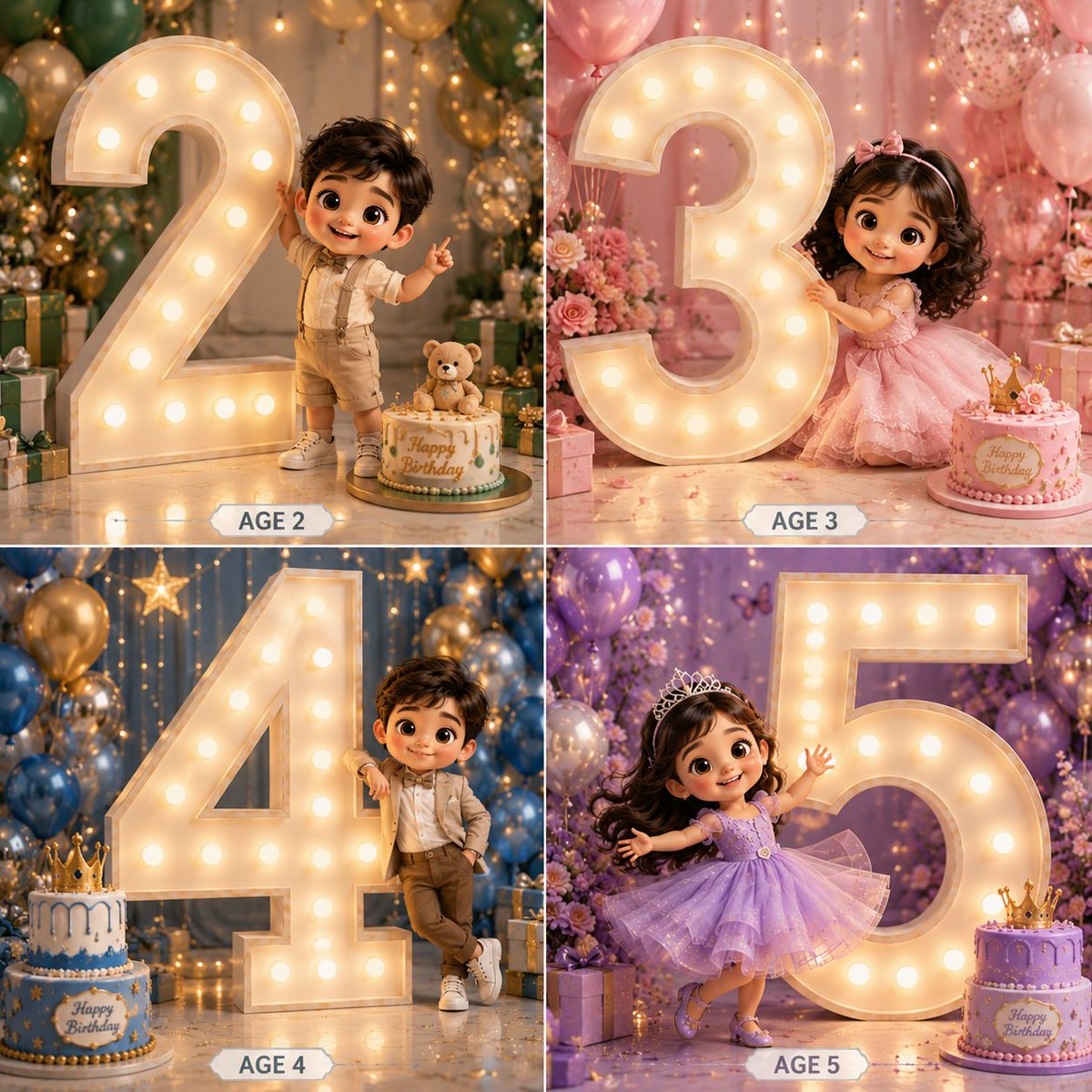
3D Luxury Birthday Kids Collage
A Pixar-style 2x2 grid prompt for children's birthdays, featuring illuminated marquee numbers and premium studio photography aesthetics.
นี่คือตัวอย่างข้อความแจ้งเตือน GPT Image 2 สำหรับ ภาพประกอบและศิลปะ ใช้ข้อความแจ้งเตือนที่พร้อมใช้งานด้านล่างเพื่อสร้างภาพที่คล้ายกัน และตรวจสอบการอ้างอิง Awesome GPT Image 2 Prompts รวมถึงสิทธิ์ในการใช้งานเชิงพาณิชย์ก่อนนำไปใช้ซ้ำ
ต้องการชุดข้อความแจ้งเตือนทั้งหมดหรือไม่? ใช้... ภาพประกอบและศิลปะ ศูนย์รวมหัวข้อสำหรับตัวอย่างที่เกี่ยวข้องเพิ่มเติม หรือเปิดดูได้เลย GPT Image 2 แคตตาล็อกพร้อมท์ สำหรับดัชนีตัวอย่างฉบับเต็ม โครงสร้างที่นำกลับมาใช้ใหม่ได้ และการอ้างอิงแหล่งที่มา
Free 1K preview
Generate one preview image instantly, no sign-up required.
1457/4000
พรอมป์
ข้อความแจ้งเตือนพร้อมสำหรับการคัดลอก
Create a premium 3D cartoon-style birthday collage in a 2×2 grid layout featuring {argument name="subject" default="4 adorable kids"} with big sparkling eyes, soft curly hair, and Pixar/Disney-inspired characters. Each panel must feature a GIANT illuminated marquee number occupying 60–70% of the frame, much taller than the child, creating a luxury birthday photoshoot look.

Panel 1 – Boy Age 2
Cute toddler boy in elegant cream and beige party outfit. Standing beside a massive glowing number 2. One hand touching the number, other hand waving. Blue, gold and white balloon decor. Birthday cake and gift boxes.

Panel 2 – Girl Age 3
Adorable girl in pastel pink princess dress. Hugging a giant glowing number 3. Floral backdrop with pink balloons. Elegant birthday cake and flowers.

Panel 3 – Boy Age 4
Stylish boy in luxury formal wear. Leaning casually against a huge illuminated number 4. Hands in pocket, playful smile. Blue and gold luxury decor with gifts.

Panel 4 – Girl Age 5
Princess girl in lavender sparkling gown. Twirling dance pose beside a gigantic glowing number 5. Holding a birthday cake. Purple floral backdrop with balloons and fairy lights. Ultra-detailed 3D render, cinematic lighting, glossy textures, depth of field, soft shadows, luxury birthday setup, elegant decorations, realistic skin, cute chibi proportions, premium studio photography, highly detailed, 8K. Add elegant labels below each panel: AGE 2, AGE 3, AGE 4, AGE 5.
ตัวแปรพร้อมท์
ตัวอย่างค่าอาร์กิวเมนต์ที่แก้ไขได้ซึ่งพบในข้อความแจ้งเตือน พร้อมค่าเริ่มต้น
ตัวแปร
subject
ค่าเริ่มต้น
4 adorable kids
Best for
- - ภาพประกอบและศิลปะ visual exploration
- - Image generation and reference-image edits
- - Reusable briefs that keep source attribution visible
Change these parts
- - Subject, product, character, or scene
- - Aspect ratio, camera, lighting, and background
- - Brand, text, color, and output constraints
Recommended model and settings
- - Model: gpt-image-2
- - Input mode: ข้อความเป็นรูปภาพ
- - Aspect ratio: source
- - Commercial status: review original source
How to use this prompt
- 1. Copy the prompt and preserve its structure for the first test.
- 2. Replace the subject, context, and publishing channel.
- 3. Change one camera, lighting, or style variable per iteration.
- 4. Inspect the output, source, text, and rights before reuse.
Limitations, source, and reuse cautions
- - Generated output is an editable draft, not factual, legal, or rights evidence.
- - Review the linked source, people, brands, logos, text, and third-party media before commercial use.
นำเข้าจาก Awesome GPT Image 2 Prompts จำเป็นต้องระบุแหล่งที่มา สถานะการใช้งานเชิงพาณิชย์คือ allowed โปรดตรวจสอบสิทธิ์แหล่งที่มาก่อนใช้งานแบบเสียค่าใช้จ่าย
กรณีเพิ่มเติมในหมวดหมู่นี้
จัดลำดับความสำคัญตามหมวดหมู่ ความเข้ากันได้กับโหมดการป้อนข้อมูล คุณภาพ และความเสี่ยงที่ต่ำกว่า

Transparent Earbuds on Stone Pedestal
ข้อความเป็นรูปภาพ

Surreal 3D Chess Match Artwork
ข้อความเป็นรูปภาพ

Manga Desert Radio Telescope Road Trip
ข้อความเป็นรูปภาพ

Female Clown Cyborg Portrait
ข้อความเป็นรูปภาพ

Grumpy Rhino Storybook Illustration
ข้อความเป็นรูปภาพ

Imperial Research Bunker on Volcanic Planet
ข้อความเป็นรูปภาพ
หมายเหตุเกี่ยวกับการนำกลับมาใช้ใหม่และแหล่งที่มา
ใช้ข้อความแจ้งเตือนนี้อย่างปลอดภัยหลังจากดูตัวอย่างกรณีแล้ว
- 1.คัดลอกข้อความแจ้งเตือน หรือเปิดโดยตรงใน Dovoo โดยใช้ปุ่มสร้างข้อความ
- 2.ปรับตัวแปร อัตราส่วนภาพ และภาพอ้างอิงให้เหมาะสมกับกรณีการใช้งานของคุณ
- 3.ก่อนเผยแพร่หรือใช้งานโดยเสียค่าใช้จ่าย โปรดตรวจสอบสิทธิ์ในแหล่งที่มา ข้อกำหนดการอ้างอิง และความเสี่ยงด้านแบรนด์หรือภาพลักษณ์