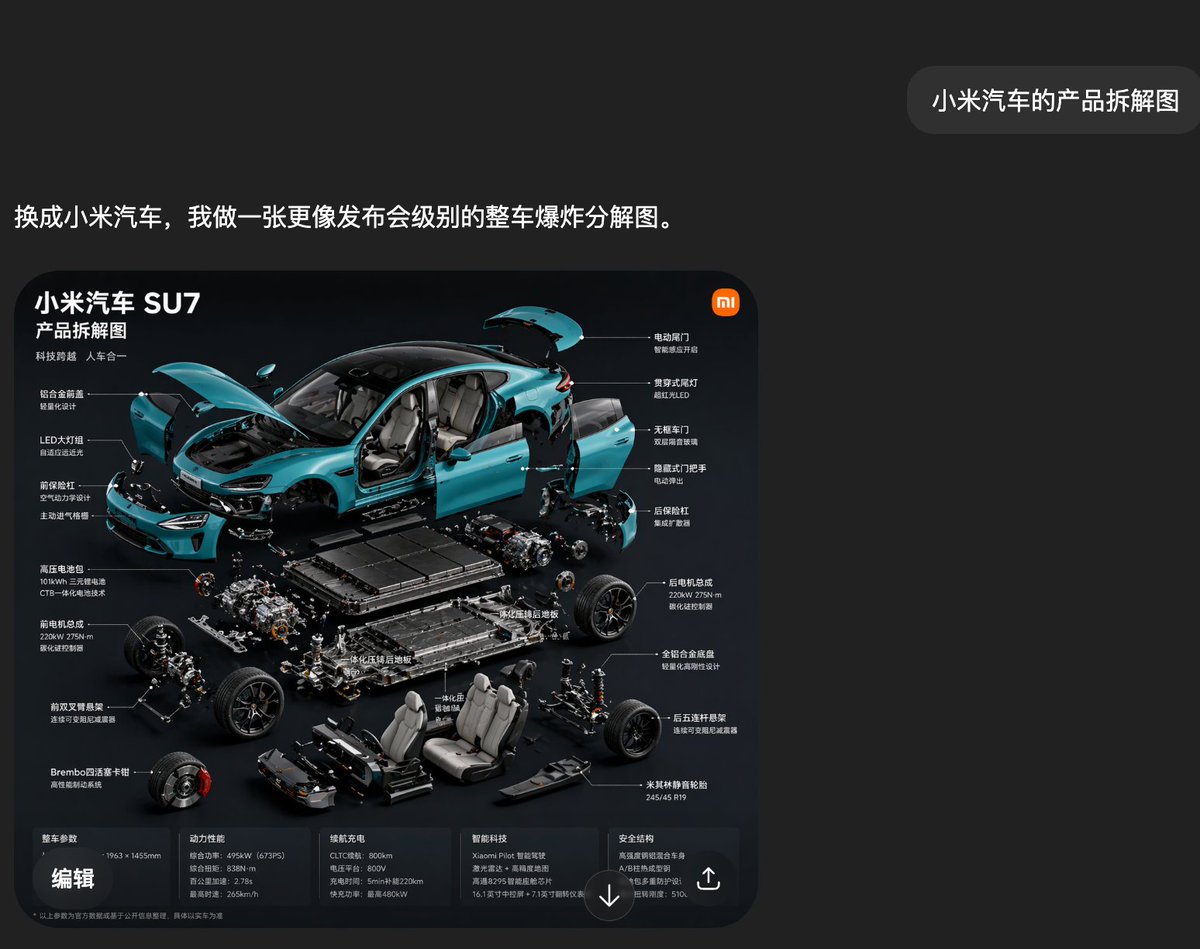
Скриншот экрана чата Xiaomi SU7 в разобранном виде
Это позволяет создать темный скриншот в стиле китайского приложения, содержащий высококачественную инфографику в разрезе электромобиля Xiaomi SU7, подходящую для презентаций в формате Keynote. Такой формат полезен для визуализации демонстраций ИИ и макетов презентаций технологических продуктов.
Это пример использования шаблона GPT Image 2 для Продукт и коммерция . Используйте приведенный ниже шаблон, готовый к копированию, чтобы создать аналогичные визуальные элементы, и перед повторным использованием проверьте указание авторства Awesome GPT Image 2 Prompts и права на коммерческое использование.
Free 1K preview
Generate one preview image instantly, no sign-up required.
Промпт
Подсказка для копирования
A stylish Chinese social media-style screenshot with a deep carbon black interface, featuring a minimalist and high-end design. A large, rounded rectangular image card is positioned in the lower-left center, and a small, rounded chat bubble is in the upper-right corner. The overall canvas has ample whitespace, creating a clean and technological presentation. In the upper-left area, a line of bold white Chinese characters reads: “Switch to Xiaomi car, and I’ll create a full-vehicle exploded view diagram more akin to a launch event.” In the upper-right corner, a gray rounded bubble contains the white Chinese characters: “Xiaomi car component breakdown diagram.” Below, a poster-style rounded infographic card is displayed with a bright black background. Inside the card, a beautiful exploded view product presentation is created for a turquoise {argument name="car model" default="Xiaomi SU7"} electric sedan, using a highly dynamic 45-degree front-side perspective. The car body is broken down into multiple components, suspended around the chassis. The hood is open, the trunk lid is raised, the four side doors are detached and suspended outwards, the front bumper and front fascia are separated, the headlights are displayed independently, and the interior is visible. The main mechanical and structural modules are neatly layered below and around the car body. The visual style should resemble high-end launch event Slides: cinematic studio lighting, realistic reflections, sharp details, a dark background, subtle blue highlights, and precise technical composition. At the top-left of the infographic card, place three large white Chinese titles: “Xiaomi Car SU7,” “Product Breakdown Diagram,” “Technological Leap, Harmony Between Man and Machine.” Add a small orange Xiaomi-style logo in the upper-right corner of the card. Surround the car with 14 Chinese labels, connected by thin white lines, indicating visible parts and systems. The left side contains 6 functional labels, such as integrated closed front face, LED headlights, front trunk design, high-voltage battery, front motor assembly, front double-wishbone suspension, and Brembo four-piston brake calipers. The right side contains 8 functional labels, such as electric tailgate, through-type taillights, frameless doors, hidden door handles, rear motor assembly, rear motor parameters, all-aluminum alloy chassis, five-link rear suspension, and Michelin high-performance tires. Below the exploded car body, clearly display the battery pack, front and rear drive units, suspension subframes, wheel hub components, braking parts, front and rear seats, center console parts, underbody protection, and structural floor elements, all meticulously organized in an exploded suspended arrangement. At the bottom of the infographic card, add a horizontal information strip divided into 5 columns of small Chinese specification text, with titles for vehicle dimensions, power performance, range, intelligent driving, and safety structure. Place a bold white Chinese label “Edit” in the lower-left corner of the card. Include a circular downward arrow icon in the bottom center and a share/export icon in the lower-right corner. The overall composition should look like a genuine screenshot from a Chinese AI chat app, showcasing an automatically generated car breakdown infographic, with modern UI spacing, clear typography, and a luxurious dark teal color scheme.Переменные подсказки
Редактируемые заполнители аргументов, найденные в подсказке, с их значениями по умолчанию.
Best for
- - Продукт и коммерция visual exploration
- - Image generation and reference-image edits
- - Reusable briefs that keep source attribution visible
Change these parts
- - Subject, product, character, or scene
- - Aspect ratio, camera, lighting, and background
- - Brand, text, color, and output constraints
Recommended model and settings
- - Model: gpt-image-2
- - Input mode: Текст в изображение
- - Aspect ratio: source
- - Commercial status: review original source
How to use this prompt
- 1. Copy the prompt and preserve its structure for the first test.
- 2. Replace the subject, context, and publishing channel.
- 3. Change one camera, lighting, or style variable per iteration.
- 4. Inspect the output, source, text, and rights before reuse.
Limitations, source, and reuse cautions
- - Generated output is an editable draft, not factual, legal, or rights evidence.
- - Review the linked source, people, brands, logos, text, and third-party media before commercial use.
Больше случаев в этой категории
Приоритет отдается категориям, совместимости с режимами ввода, качеству и низкому уровню риска.






Примечания по повторному использованию и источникам
Используйте это подсказку безопасно после предварительного просмотра дела.
- 1.Скопируйте подсказку или откройте ее непосредственно в Dovoo с помощью кнопки генерации.
- 2.Настройте переменные, соотношение сторон и эталонные изображения в соответствии с вашими потребностями.
- 3.Перед публикацией или платным использованием проверьте права на источник, требования к указанию авторства, а также риски, связанные с использованием товарного знака или изображения.