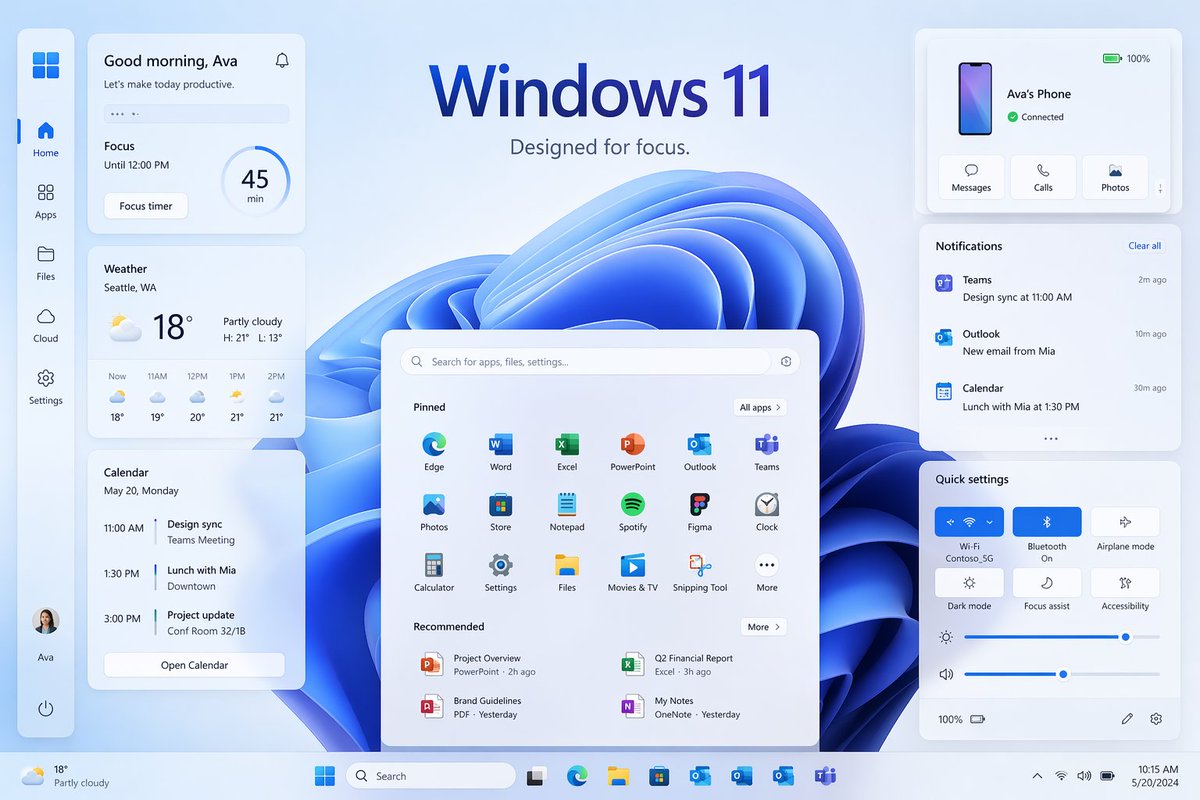
Демонстрация пользовательского интерфейса Focus в Windows 11
Продуманный макет рабочего стола в стиле Windows 11 с множеством виджетов и панелей, идеально подходящий для создания современного визуального оформления маркетинговой кампании операционной системы.
Это пример использования шаблона GPT Image 2 для Продукт и коммерция . Используйте приведенный ниже шаблон, готовый к копированию, чтобы создать аналогичные визуальные элементы, и перед повторным использованием проверьте указание авторства Awesome GPT Image 2 Prompts и права на коммерческое использование.
Free 1K preview
Generate one preview image instantly, no sign-up required.
Промпт
Подсказка для копирования
{
  "type": "Windows 11 promotional UI mockup",
  "style": "clean modern product marketing render, soft glassmorphism cards, subtle shadows, rounded corners, light blue and white palette, crisp vector-like interface, polished presentation slide aesthetic",
  "scene": {
    "background": "pale icy blue gradient background with a large abstract Windows 11 blue ribbon swirl wallpaper centered behind the interface",
    "headline": {
      "text": "{argument name=\"headline text\" default=\"Windows 11\"}",
      "subtext": "{argument name=\"tagline\" default=\"Designed for focus.\"}",
      "position": "top center"
    }
  },
  "layout": {
    "type": "desktop UI showcase",
    "sections": [
      {
        "title": "left sidebar",
        "position": "far left vertical dock",
        "count": 8,
        "labels": [
          "Windows logo",
          "Home",
          "Apps",
          "Files",
          "Cloud",
          "Settings",
          "Ava profile",
          "Power"
        ]
      },
      {
        "title": "productivity widgets",
        "position": "left column cards",
        "count": 3,
        "labels": [
          "Good morning, Ava",
          "Weather",
          "Calendar"
        ]
      },
      {
        "title": "center start menu",
        "position": "lower center",
        "count": 3,
        "labels": [
          "Search bar",
          "Pinned",
          "Recommended"
        ]
      },
      {
        "title": "right column cards",
        "position": "upper and middle and lower right",
        "count": 3,
        "labels": [
          "Ava's Phone",
          "Notifications",
          "Quick settings"
        ]
      },
      {
        "title": "taskbar",
        "position": "bottom full width",
        "count": 10,
        "labels": [
          "Weather summary",
          "Start",
          "Search",
          "Task View",
          "Microsoft Edge",
          "File Explorer",
          "Microsoft Store",
          "Outlook",
          "OneDrive",
          "Teams"
        ]
      }
    ],
    "centerpiece": "large Windows 11 Start menu floating in front of the blue abstract wallpaper"
  },
  "widgets": {
    "greeting_card": {
      "title": "Good morning, Ava",
      "subtitle": "Let's make today productive.",
      "focus_block": {
        "label": "Focus",
        "time": "Until 12:00 PM",
        "timer": "45 min",
        "button": "Focus timer"
      }
    },
    "weather_card": {
      "location": "{argument name=\"weather location\" default=\"Seattle, WA\"}",
      "temperature": "18°",
      "condition": "Partly cloudy",
      "range": "H: 21°  L: 13°",
      "forecast_count": 5,
      "forecast_labels": [
        "Now 18°",
        "11AM 19°",
        "12PM 20°",
        "1PM 21°",
        "2PM 21°"
      ]
    },
    "calendar_card": {
      "date": "May 20, Monday",
      "events_count": 3,
      "event_labels": [
        "11:00 AM Design sync, Teams Meeting",
        "1:30 PM Lunch with Mia, Downtown",
        "3:00 PM Project update, Conf Room 32/1B"
      ],
      "button": "Open Calendar"
    },
    "phone_card": {
      "device_name": "{argument name=\"device name\" default=\"Ava's Phone\"}",
      "status": "Connected",
      "actions_count": 3,
      "action_labels": [
        "Messages",
        "Calls",
        "Photos"
      ],
      "battery": "100%"
    },
    "notifications_card": {
      "title": "Notifications",
      "action": "Clear all",
      "items_count": 3,
      "item_labels": [
        "Teams — Design sync at 11:00 AM — 2m ago",
        "Outlook — New email from Mia — 10m ago",
        "Calendar — Lunch with Mia at 1:30 PM — 30m ago"
      ]
    },
    "quick_settings_card": {
      "title": "Quick settings",
      "toggles_count": 6,
      "toggle_labels": [
        "Wi‑Fi",
        "Bluetooth",
        "Airplane mode",
        "Dark mode",
        "Focus assist",
        "Accessibility"
      ],
      "active_toggles": [
        "Wi‑Fi",
        "Bluetooth"
      ],
      "sliders_count": 2,
      "slider_labels": [
        "Brightness",
        "Volume"
      ],
      "wifi_network": "Contoso_5G"
    },
    "start_menu": {
      "search_placeholder": "Search for apps, files, settings...",
      "pinned_count": 18,
      "pinned_labels": [
        "Edge",
        "Word",
        "Excel",
        "PowerPoint",
        "Outlook",
        "Teams",
        "Photos",
        "Store",
        "Notepad",
        "Spotify",
        "Figma",
        "Clock",
        "Calculator",
        "Settings",
        "Files",
        "Movies & TV",
        "Snipping Tool",
        "More"
      ],
      "recommended_count": 4,
      "recommended_labels": [
        "Project Overview",
        "Q2 Financial Report",
        "Brand Guidelines",
        "My Notes"
      ]
    }
  },
  "composition": "symmetrical product showcase with the Start menu centered, three stacked cards on the left, three cards on the right, generous spacing, all elements floating slightly above the background, bottom taskbar spanning edge to edge",
  "rendering": "high-resolution UI concept art for a desktop operating system launch page, immaculate typography, Microsoft-inspired iconography without extra branding clutter"
}
Переменные подсказки
Редактируемые заполнители аргументов, найденные в подсказке, с их значениями по умолчанию.
Best for
- - Продукт и коммерция visual exploration
- - Image generation and reference-image edits
- - Reusable briefs that keep source attribution visible
Change these parts
- - Subject, product, character, or scene
- - Aspect ratio, camera, lighting, and background
- - Brand, text, color, and output constraints
Recommended model and settings
- - Model: gpt-image-2
- - Input mode: Текст в изображение
- - Aspect ratio: source
- - Commercial status: review original source
How to use this prompt
- 1. Copy the prompt and preserve its structure for the first test.
- 2. Replace the subject, context, and publishing channel.
- 3. Change one camera, lighting, or style variable per iteration.
- 4. Inspect the output, source, text, and rights before reuse.
Limitations, source, and reuse cautions
- - Generated output is an editable draft, not factual, legal, or rights evidence.
- - Review the linked source, people, brands, logos, text, and third-party media before commercial use.
Больше случаев в этой категории
Приоритет отдается категориям, совместимости с режимами ввода, качеству и низкому уровню риска.






Примечания по повторному использованию и источникам
Используйте это подсказку безопасно после предварительного просмотра дела.
- 1.Скопируйте подсказку или откройте ее непосредственно в Dovoo с помощью кнопки генерации.
- 2.Настройте переменные, соотношение сторон и эталонные изображения в соответствии с вашими потребностями.
- 3.Перед публикацией или платным использованием проверьте права на источник, требования к указанию авторства, а также риски, связанные с использованием товарного знака или изображения.