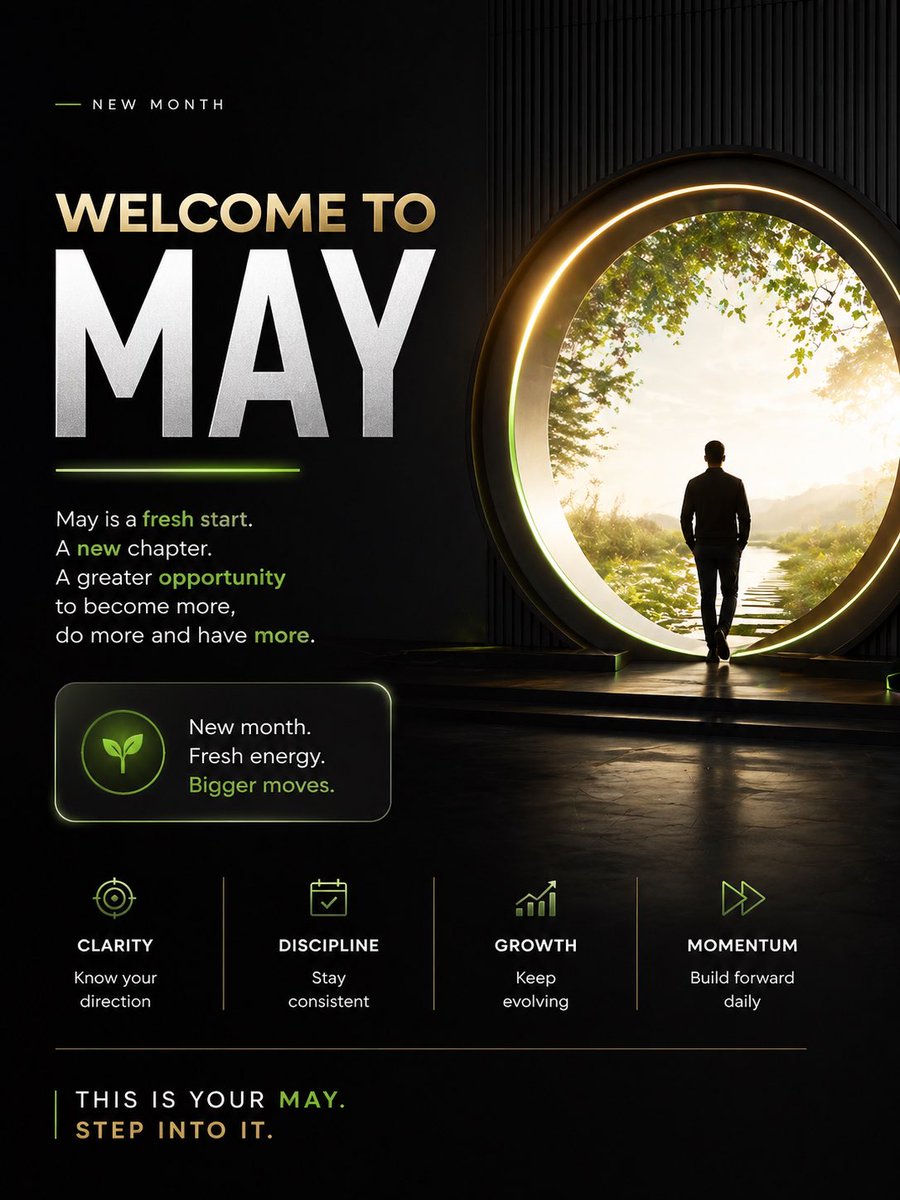
Мотивационный плакат «Добро пожаловать в май»
Вдохновляющий постер в кинематографическом стиле с мрачной тематикой для начала нового месяца, идеально подходящий для публикаций в социальных сетях, личного брендинга и контента, посвященного развитию мышления.
Это пример использования шаблона GPT Image 2 для Графика и плакаты . Используйте приведенный ниже шаблон, готовый к копированию, чтобы создать аналогичные визуальные элементы, и перед повторным использованием проверьте указание авторства Awesome GPT Image 2 Prompts и права на коммерческое использование.
Free 1K preview
Generate one preview image instantly, no sign-up required.
Промпт
Подсказка для копирования
Design a premium motivational social media poster in a dark cinematic editorial style, vertical 4:5 format. The composition is split into 2 main zones: a left text-heavy layout and a right aspirational visual scene. Use a black to deep charcoal background with subtle texture, faint vertical ribbed wall detail on the right, glossy floor reflections, and elegant neon-lime accent lighting mixed with warm gold highlights.

On the right side, show 1 human figure: a man in silhouette from behind, wearing a fitted dark jacket and pants, walking toward a giant circular portal doorway. The portal should be large, glowing with a warm golden ring and soft inner halo, positioned slightly right of center. Beyond the portal is a bright peaceful nature scene with 1 narrow stepping-stone path leading forward through grass, soft sunlight, distant haze, and leafy green tree branches framing the upper edge. The figure should feel purposeful and contemplative, stepping into a new beginning.

On the left side, create a clean motivational typography layout. At the top, include a small header reading "NEW MONTH" in spaced uppercase sans serif, with a short thin lime line to its left. Below it, place the main headline in 2 lines: "WELCOME TO" in large warm beige uppercase, and "{argument name="headline text" default="MAY"}" in extremely large bold white uppercase, dominating the left half. Add a short glowing lime underline beneath the large month word.

Under the headline, add a motivational paragraph in white sans serif with selected words highlighted in lime green: "May is a fresh start. A new chapter. A greater opportunity to become more, do more and have more." Highlight the words "fresh start," "new," "opportunity," and "more" in lime green.

Below that, place 1 rounded rectangular callout card with a subtle border glow. Inside the card, put 1 circular icon badge containing a simple leaf symbol in lime green. To the right of the icon, add 3 stacked lines of text: "New month.", "Fresh energy.", and "Bigger moves." with the last line in lime green.

Across the lower middle, create 4 evenly spaced value pillars separated by thin vertical dividers. Each pillar contains 1 minimalist lime icon, 1 uppercase title, and 1 short caption. Use these exact 4 items from left to right: 1) target icon, title "CLARITY", caption "Know your direction". 2) calendar icon, title "DISCIPLINE", caption "Stay consistent". 3) upward bar chart icon, title "GROWTH", caption "Keep evolving". 4) fast-forward arrows icon, title "MOMENTUM", caption "Build forward daily".

At the bottom, add a thin horizontal divider line. Under it, place a closing statement in uppercase: "THIS IS YOUR {argument name="month name" default="MAY"}." on one line and "{argument name="closing line" default="STEP INTO IT."}" on the next line. Render most text in white or warm beige, with "MAY" and select accents in lime green.

Overall mood: inspirational, modern, luxurious, focused, forward-moving, social-media-ready, with crisp sans serif typography, high contrast, cinematic glow, and a polished personal development brand aesthetic.
Переменные подсказки
Редактируемые заполнители аргументов, найденные в подсказке, с их значениями по умолчанию.
Best for
- - Графика и плакаты visual exploration
- - Image generation and reference-image edits
- - Reusable briefs that keep source attribution visible
Change these parts
- - Subject, product, character, or scene
- - Aspect ratio, camera, lighting, and background
- - Brand, text, color, and output constraints
Recommended model and settings
- - Model: gpt-image-2
- - Input mode: Текст в изображение
- - Aspect ratio: source
- - Commercial status: review original source
How to use this prompt
- 1. Copy the prompt and preserve its structure for the first test.
- 2. Replace the subject, context, and publishing channel.
- 3. Change one camera, lighting, or style variable per iteration.
- 4. Inspect the output, source, text, and rights before reuse.
Limitations, source, and reuse cautions
- - Generated output is an editable draft, not factual, legal, or rights evidence.
- - Review the linked source, people, brands, logos, text, and third-party media before commercial use.
Больше случаев в этой категории
Приоритет отдается категориям, совместимости с режимами ввода, качеству и низкому уровню риска.






Примечания по повторному использованию и источникам
Используйте это подсказку безопасно после предварительного просмотра дела.
- 1.Скопируйте подсказку или откройте ее непосредственно в Dovoo с помощью кнопки генерации.
- 2.Настройте переменные, соотношение сторон и эталонные изображения в соответствии с вашими потребностями.
- 3.Перед публикацией или платным использованием проверьте права на источник, требования к указанию авторства, а также риски, связанные с использованием товарного знака или изображения.