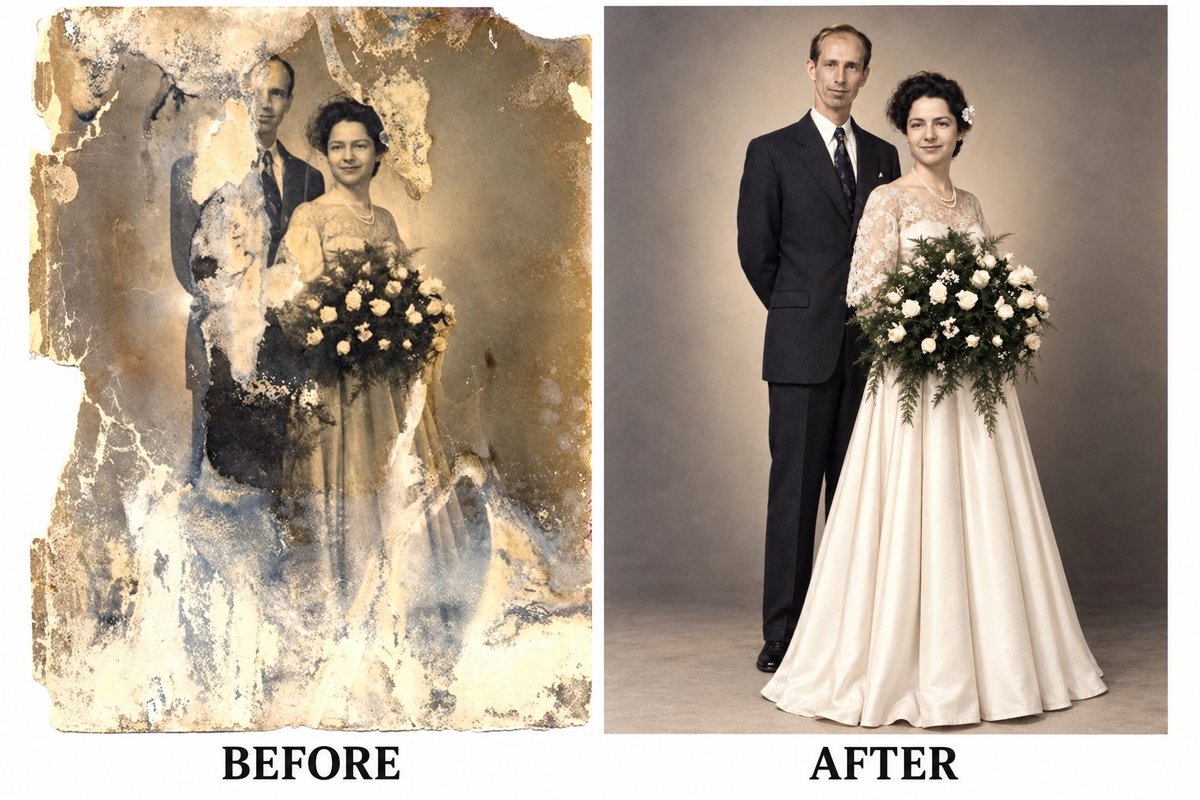
Vintage Portrait Restoration and Colorization
A context for restoring severely damaged antique photos into high-quality, modern studio portraits using identity reference images.
Это пример использования шаблона GPT Image 2 для Портрет и характер . Используйте приведенный ниже шаблон, готовый к копированию, чтобы создать аналогичные визуальные элементы, и перед повторным использованием проверьте указание авторства Awesome GPT Image 2 Prompts и права на коммерческое использование.
Нужен полный набор подсказок? Воспользуйтесь Портрет и характер Для получения дополнительных примеров по теме, или откройте раздел "Обзор тем" GPT Image 2 быстрый каталог Полный список примеров, многократно используемых структур и указание источников см. здесь.
Free 1K preview
Generate one preview image instantly, no sign-up required.
Free text preview doesn’t preserve reference-image consistency.
1450/4000
Промпт
Подсказка для копирования
Use the uploaded image as the main restoration and identity reference. Convert this severely damaged old portrait into a clean, fully restored modern-looking photo while preserving the original appearance, pose, and composition.

Restore all missing and damaged areas of the photograph, including torn sections, faded parts, scratches, stains, cracks, peeling emulsion, discoloration, and burned or washed-out regions. Reconstruct the man and woman completely so both subjects appear whole, natural, and clearly visible.

Keep the same arrangement: the woman standing in front holding a large bouquet of flowers, and the man standing slightly behind her. Preserve their facial features, expressions, body proportions, posture, and elegant formal clothing, but refine everything to look polished, realistic, and complete.

Transform the image from an antique sepia damaged print into a high-quality modern portrait with:

clean natural skin tones

realistic facial details

sharp focus

balanced lighting

soft studio background

improved clarity and texture

realistic modern photo finishing

The final image should feel like a professionally restored contemporary portrait, as if the same couple was photographed clearly with a modern camera, while still keeping the classic formal elegance of the original scene.

Style: photorealistic, high detail, restored portrait, modern studio photography, clean, elegant, natural colors, sharp and realistic.
Best for
- - Портрет и характер visual exploration
- - Image generation and reference-image edits
- - Reusable briefs that keep source attribution visible
Change these parts
- - Subject, product, character, or scene
- - Aspect ratio, camera, lighting, and background
- - Brand, text, color, and output constraints
Recommended model and settings
- - Model: gpt-image-2
- - Input mode: Изображение в изображение
- - Aspect ratio: source
- - Commercial status: review original source
How to use this prompt
- 1. Copy the prompt and preserve its structure for the first test.
- 2. Replace the subject, context, and publishing channel.
- 3. Change one camera, lighting, or style variable per iteration.
- 4. Inspect the output, source, text, and rights before reuse.
Limitations, source, and reuse cautions
- - Generated output is an editable draft, not factual, legal, or rights evidence.
- - Review the linked source, people, brands, logos, text, and third-party media before commercial use.
Импортировано из Awesome GPT Image 2 Prompts . Требуется указание авторства. Статус коммерческого использования: allowed ; перед платным использованием ознакомьтесь с правами на источник.
Больше случаев в этой категории
Приоритет отдается категориям, совместимости с режимами ввода, качеству и низкому уровню риска.

Stylish Man Street Lamp Portrait
Изображение в изображение

Sci-Fi Cyan Lighting Effect
Изображение в изображение

GPT Image 2 Real-Life Character Street Snap
Текст в изображение

Oversized Head Cartoon Caricature Prompt
Изображение в изображениеСредний риск

Studio Portrait of Woman with Sunglasses
Текст в изображение

Street Selfie with Cat in Matching Cap
Текст в изображение
Примечания по повторному использованию и источникам
Используйте это подсказку безопасно после предварительного просмотра дела.
- 1.Скопируйте подсказку или откройте ее непосредственно в Dovoo с помощью кнопки генерации.
- 2.Настройте переменные, соотношение сторон и эталонные изображения в соответствии с вашими потребностями.
- 3.Перед публикацией или платным использованием проверьте права на источник, требования к указанию авторства, а также риски, связанные с использованием товарного знака или изображения.