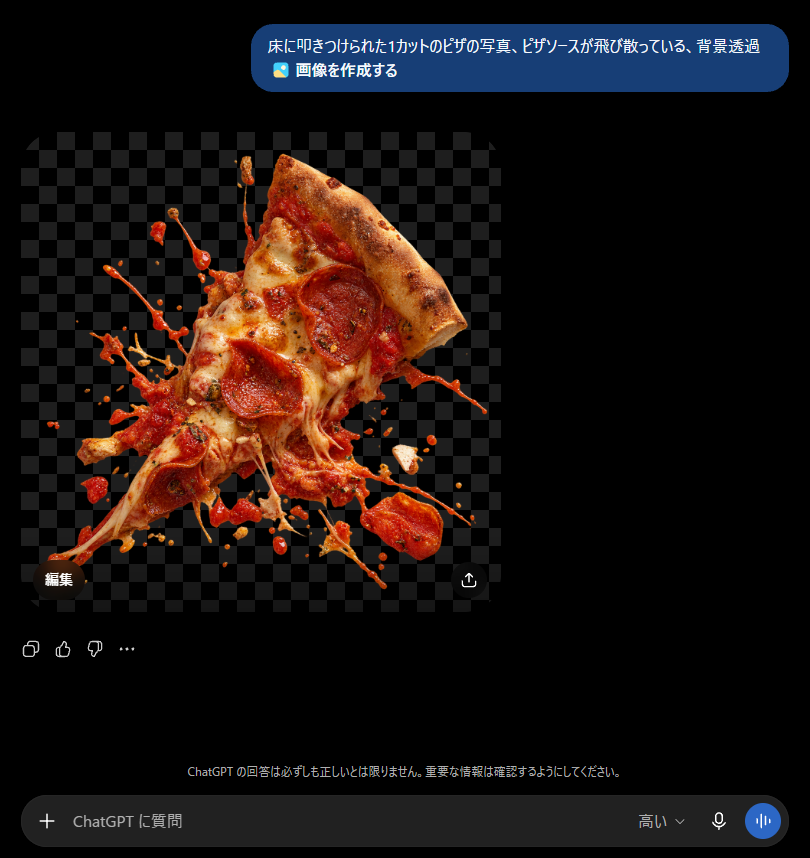
ChatGPT Transparent Pizza Result
Generates a dark-mode ChatGPT screenshot featuring a transparent-background photorealistic pizza slice with sauce splashing, useful for illustrating alpha image generation.
Это пример использования шаблона GPT Image 2 для Другие источники вдохновения . Используйте приведенный ниже шаблон, готовый к копированию, чтобы создать аналогичные визуальные элементы, и перед повторным использованием проверьте указание авторства Awesome GPT Image 2 Prompts и права на коммерческое использование.
Free 1K preview
Generate one preview image instantly, no sign-up required.
Промпт
Подсказка для копирования
Goal: Create a realistic screenshot of a dark-mode ChatGPT conversation showing an image generation result about a transparent-background pizza slice.

Canvas: Square-ish desktop screenshot, approximately 820×847 px, with a pure black ChatGPT-style dark interface background.

Layout: At the top right, place one rounded blue user message bubble containing Japanese text and a small image icon line. Below it, aligned left, show one generated image preview: a square transparent-background checkerboard area with a cutout photo of a pizza slice exploding into scattered sauce and toppings. Under and around the image preview, include small ChatGPT interface controls, then a bottom input bar.

Text content: The top message bubble must read exactly: 「床に叩きつけられた1カットのピザの写真、ピザソースが飛び散っている、背景透過」 on the first line, and 「🖼️ 画像を作成する」 on the second line. Add a small dark pill button labeled 「編集」 near the lower-left corner of the image preview. Add a small circular share/download-style icon near the lower-right corner of the image preview. Near the bottom center, add the faint Japanese disclaimer: 「ChatGPT の回答は必ずしも正しいとは限りません。重要な情報は確認するようにしてください。」 The bottom input placeholder should read 「ChatGPT に質問」, with a plus icon on the left and small microphone/voice icons on the right, plus the label 「高い」.

Generated image details: The preview should show exactly 1 triangular slice of pepperoni pizza, tilted diagonally upward to the right, with a browned crust at the top right, melted mozzarella cheese stretching downward, red tomato sauce splashing outward, and pepperoni pieces visible on the slice. Surround it with many irregular sauce droplets, cheese strands, and flying topping fragments as if the slice was slammed onto a floor. The cutout should have an alpha/transparent look represented by a dark gray checkerboard background behind the pizza. Make the pizza highly photorealistic, glossy, messy, and sharply lit, with no plate and no visible floor.

Interface details: Use a modern ChatGPT mobile/desktop hybrid dark UI aesthetic, black background, rounded blue user bubble, soft gray icons, and a rounded dark input field at the bottom. Include exactly 4 small reaction/action icons below the generated image area on the left: copy, thumbs up, thumbs down, and an ellipsis. Keep all UI elements subtle and crisp.

Constraints: Do not add extra messages, avatars, watermarks, or browser chrome. The main focus should be the transparent PNG-style pizza cutout inside the chat interface. Use {argument name="pizza prompt text" default="床に叩きつけられた1カットのピザの写真、ピザソースが飛び散っている、背景透過"} as the visible user request, {argument name="subject" default="one pepperoni pizza slice smashed with sauce splashing"}, and {argument name="interface language" default="Japanese"}.
Переменные подсказки
Редактируемые заполнители аргументов, найденные в подсказке, с их значениями по умолчанию.
Best for
- - Другие источники вдохновения visual exploration
- - Image generation and reference-image edits
- - Reusable briefs that keep source attribution visible
Change these parts
- - Subject, product, character, or scene
- - Aspect ratio, camera, lighting, and background
- - Brand, text, color, and output constraints
Recommended model and settings
- - Model: gpt-image-2
- - Input mode: Текст в изображение
- - Aspect ratio: source
- - Commercial status: review original source
How to use this prompt
- 1. Copy the prompt and preserve its structure for the first test.
- 2. Replace the subject, context, and publishing channel.
- 3. Change one camera, lighting, or style variable per iteration.
- 4. Inspect the output, source, text, and rights before reuse.
Limitations, source, and reuse cautions
- - Generated output is an editable draft, not factual, legal, or rights evidence.
- - Review the linked source, people, brands, logos, text, and third-party media before commercial use.
Больше случаев в этой категории
Приоритет отдается категориям, совместимости с режимами ввода, качеству и низкому уровню риска.
Примечания по повторному использованию и источникам
Используйте это подсказку безопасно после предварительного просмотра дела.
- 1.Скопируйте подсказку или откройте ее непосредственно в Dovoo с помощью кнопки генерации.
- 2.Настройте переменные, соотношение сторон и эталонные изображения в соответствии с вашими потребностями.
- 3.Перед публикацией или платным использованием проверьте права на источник, требования к указанию авторства, а также риски, связанные с использованием товарного знака или изображения.