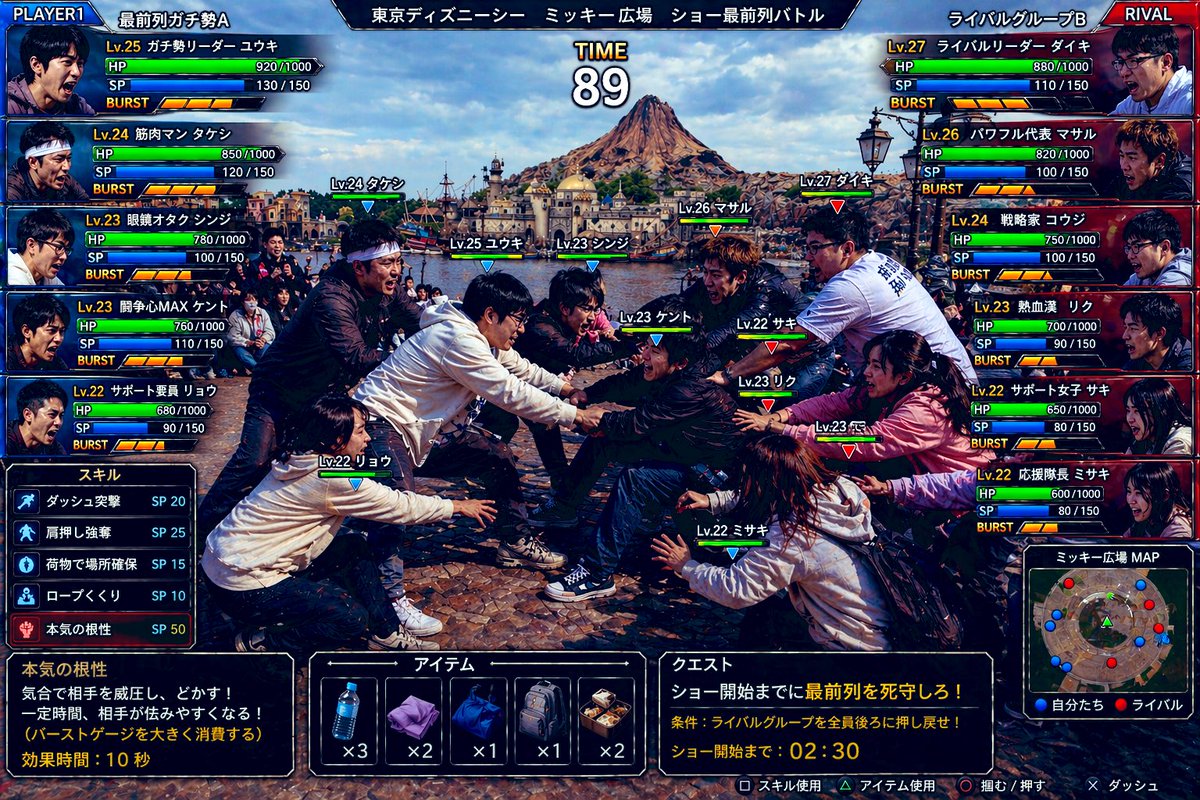
Пользовательский интерфейс для битвы за место в первом ряду в Tokyo DisneySea
Забавный реалистичный скриншот в игровом стиле, демонстрирующий борьбу двух враждующих групп фанатов за первый ряд в Tokyo DisneySea, полезный для создания визуальных эффектов в пародийных аркадных файтингах.
Это пример использования шаблона GPT Image 2 для Аниме и игры . Используйте приведенный ниже шаблон, готовый к копированию, чтобы создать аналогичные визуальные элементы, и перед повторным использованием проверьте указание авторства Awesome GPT Image 2 Prompts и права на коммерческое использование.
Нужен полный набор подсказок? Воспользуйтесь Аниме и игры Для получения дополнительных примеров по теме, или откройте раздел "Обзор тем" GPT Image 2 быстрый каталог Полный список примеров, многократно используемых структур и указание источников см. здесь.
Free 1K preview
Generate one preview image instantly, no sign-up required.
3584/4000
Промпт
Подсказка для копирования
Create a hyper-detailed comedic Japanese arcade fighting game screenshot styled like a versus battle scene, using a real-world photo aesthetic with game UI overlaid on top. The scene shows an intense mock battle between two groups of theme-park fans competing for the front row at an outdoor show plaza in Tokyo DisneySea. Use a wide 16:9 composition. In the background, clearly show Mediterranean Harbor and Mount Prometheus under bright daytime skies, with the waterfront and DisneySea architecture visible. In the foreground, show exactly 10 young adult people in winter casual clothing, split into 2 opposing teams of 5, physically leaning, grabbing, reaching, and shoving in a tug-of-war-like scrum over position, with exaggerated competitive body language and frozen action as if in a fighting game. Show every face clearly with natural, detailed facial features. Add floating character labels above each person with levels and names in Japanese. The overall tone is absurdly realistic, like a real candid photo transformed into a polished arcade game battle screen.

Add a full Japanese fighting-game HUD with glossy blue-versus-red interface styling. At the very top, place a center stage title bar reading "東京ディズニーシー ミッキー広場 ショー最前列バトル" and a large timer in the middle reading "TIME 89". In the top left, add a blue team header "PLAYER1" and team name "最前列ガチ勢A". In the top right, add a red team header "RIVAL" and team name "ライバルグループB". On the left side, stack exactly 5 blue player status panels with portraits, level, Japanese class-like nicknames, HP, SP, and BURST meters. The 5 left-side labels are: "Lv.25 ガチ勢リーダー ユウキ", "Lv.24 筋肉マン タケシ", "Lv.23 眼鏡オタク シンジ", "Lv.23 開角心MAX ケント", "Lv.22 サポート要員 リョウ". On the right side, stack exactly 5 red rival status panels with the labels: "Lv.27 ライバルリーダー ダイキ", "Lv.26 パワフル代表 マサル", "Lv.24 戦略家 コウジ", "Lv.23 熱血漢 リク", "Lv.22 サポート女子 サキ". Each panel should include numeric HP and SP values and segmented BURST gauges, styled like a Japanese arcade RPG-fighter interface.

Place exactly 10 in-battle nameplates above the fighters in the center scene, color-coded blue for the left team and red for the right team. The 10 labels are: "Lv.24 タケシ", "Lv.25 ユウキ", "Lv.23 シンジ", "Lv.23 ケント", "Lv.22 リョウ", "Lv.27 ダイキ", "Lv.26 マサル", "Lv.23 リク", "Lv.22 サキ", "Lv.22 ミサキ".

At the lower left, add a skill menu titled "スキル" listing exactly 5 skills with SP costs: "ダッシュ突撃 SP 20", "肩押し強奪 SP 25", "荷物で場所確保 SP 15", "ロープくぐり SP 10", "本気の根性 SP 50". Beneath that, add a dark description box explaining the highlighted skill "本気の根性" with the Japanese text: "気合で相手を威圧し、どかす! 一定時間、相手が怯みやすくなる! (バーストゲージを大きく消費する) 効果時間:10秒".

At the bottom center, add an item menu titled "アイテム" with exactly 5 item slots showing icons and counts: a water bottle "x3", a folded purple towel "x2", a blue drawstring bag "x1", a gray backpack "x1", and a boxed meal "x2". At the lower right, add a quest panel titled "クエスト" with the mission text "ショー開始までに最前列を死守しろ!" and condition text "条件:ライバルグループを全員後ろに押し戻せ!" and countdown text "ショー開始まで:02:30". Beside it, add a mini-map titled "ミッキー広場MAP" showing red and blue dots for both teams in the plaza. Along the very bottom edge, include small controller prompts in Japanese for actions such as skill use, item use, grab/push, and dash.

Use dramatic, saturated lighting, crisp detail, realistic clothing folds, authentic plaza stone pavement, and a high-end Japanese game screenshot look. The image should feel like a ridiculous but believable crossover between a real Tokyo DisneySea crowd photo and a competitive arcade battle game interface.
Best for
- - Аниме и игры visual exploration
- - Image generation and reference-image edits
- - Reusable briefs that keep source attribution visible
Change these parts
- - Subject, product, character, or scene
- - Aspect ratio, camera, lighting, and background
- - Brand, text, color, and output constraints
Recommended model and settings
- - Model: gpt-image-2
- - Input mode: Текст в изображение
- - Aspect ratio: source
- - Commercial status: review original source
How to use this prompt
- 1. Copy the prompt and preserve its structure for the first test.
- 2. Replace the subject, context, and publishing channel.
- 3. Change one camera, lighting, or style variable per iteration.
- 4. Inspect the output, source, text, and rights before reuse.
Limitations, source, and reuse cautions
- - Generated output is an editable draft, not factual, legal, or rights evidence.
- - Review the linked source, people, brands, logos, text, and third-party media before commercial use.
Импортировано из Awesome GPT Image 2 Prompts . Требуется указание авторства. Статус коммерческого использования: allowed ; перед платным использованием ознакомьтесь с правами на источник.
Больше случаев в этой категории
Приоритет отдается категориям, совместимости с режимами ввода, качеству и низкому уровню риска.

Manga Desert Radio Telescope Road Trip
Текст в изображение

Transparent Earbuds on Stone Pedestal
Текст в изображение

Female Clown Cyborg Portrait
Текст в изображение

Imperial Research Bunker on Volcanic Planet
Текст в изображение

Greyscale Puzzle Portrait with Color Accent
Текст в изображение

Pink Hijab Mirror Selfie Portrait
Текст в изображение
Примечания по повторному использованию и источникам
Используйте это подсказку безопасно после предварительного просмотра дела.
- 1.Скопируйте подсказку или откройте ее непосредственно в Dovoo с помощью кнопки генерации.
- 2.Настройте переменные, соотношение сторон и эталонные изображения в соответствии с вашими потребностями.
- 3.Перед публикацией или платным использованием проверьте права на источник, требования к указанию авторства, а также риски, связанные с использованием товарного знака или изображения.