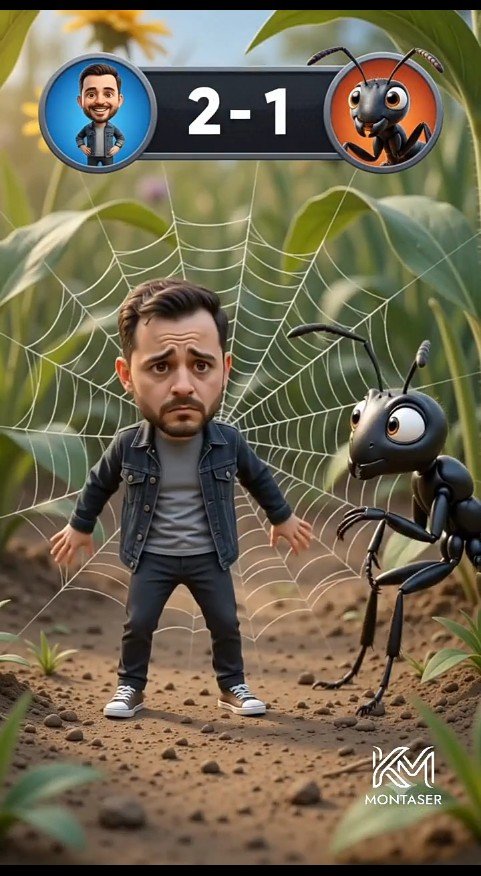
Tiny Man vs Giant Ant Scoreboard Scene
A vertical cinematic 3D cartoon forest-floor scene featuring a worried miniature man trapped in a spider web beside a giant ant with a game scoreboard overlay.
Это пример использования шаблона GPT Image 2 для Аниме и игры . Используйте приведенный ниже шаблон, готовый к копированию, чтобы создать аналогичные визуальные элементы, и перед повторным использованием проверьте указание авторства Awesome GPT Image 2 Prompts и права на коммерческое использование.
Free 1K preview
Generate one preview image instantly, no sign-up required.
Промпт
Подсказка для копирования
Create a cinematic vertical 3D cartoon scene on a realistic forest floor, framed like a mobile video still. In the center foreground, show one cute miniature bearded man, {argument name="character name" default="Montaser"}, with an oversized caricature head and worried expression, standing stiffly with arms slightly out while trapped in a large white spider web behind him. He has short dark brown hair, a trimmed beard, raised sad eyebrows, and big anxious eyes. Dress him in exactly four main outfit pieces: a dark denim jacket, a gray T-shirt, black pants, and white sneakers. To his right, show one giant glossy black cartoon ant with large expressive eyes, two antennae, six thin legs, and bent forearms, leaning toward him with a curious intimidating look. Behind them, the spider web radiates clearly across green leaves and stems. At the top center, add a game-style scoreboard overlay: a dark rounded rectangle with exactly two circular avatar icons, the left icon showing the man on a blue background, the right icon showing the ant on an orange background, and large white score text {argument name="score text" default="2 - 1"} between them. The environment is a macro-scale forest floor with dirt, small pebbles, tiny plants, blurred green foliage, warm daylight, shallow depth of field, and cinematic bokeh. Use polished Pixar-like 3D rendering, soft realistic lighting, detailed textures, playful comedy tension, and a vertical 9:16 composition. Add a small white stylized logo watermark at the bottom right reading {argument name="watermark text" default="MONTASER"}.Переменные подсказки
Редактируемые заполнители аргументов, найденные в подсказке, с их значениями по умолчанию.
Best for
- - Аниме и игры visual exploration
- - Image generation and reference-image edits
- - Reusable briefs that keep source attribution visible
Change these parts
- - Subject, product, character, or scene
- - Aspect ratio, camera, lighting, and background
- - Brand, text, color, and output constraints
Recommended model and settings
- - Model: gpt-image-2
- - Input mode: Текст в изображение
- - Aspect ratio: source
- - Commercial status: review original source
How to use this prompt
- 1. Copy the prompt and preserve its structure for the first test.
- 2. Replace the subject, context, and publishing channel.
- 3. Change one camera, lighting, or style variable per iteration.
- 4. Inspect the output, source, text, and rights before reuse.
Limitations, source, and reuse cautions
- - Generated output is an editable draft, not factual, legal, or rights evidence.
- - Review the linked source, people, brands, logos, text, and third-party media before commercial use.
Больше случаев в этой категории
Приоритет отдается категориям, совместимости с режимами ввода, качеству и низкому уровню риска.






Примечания по повторному использованию и источникам
Используйте это подсказку безопасно после предварительного просмотра дела.
- 1.Скопируйте подсказку или откройте ее непосредственно в Dovoo с помощью кнопки генерации.
- 2.Настройте переменные, соотношение сторон и эталонные изображения в соответствии с вашими потребностями.
- 3.Перед публикацией или платным использованием проверьте права на источник, требования к указанию авторства, а также риски, связанные с использованием товарного знака или изображения.