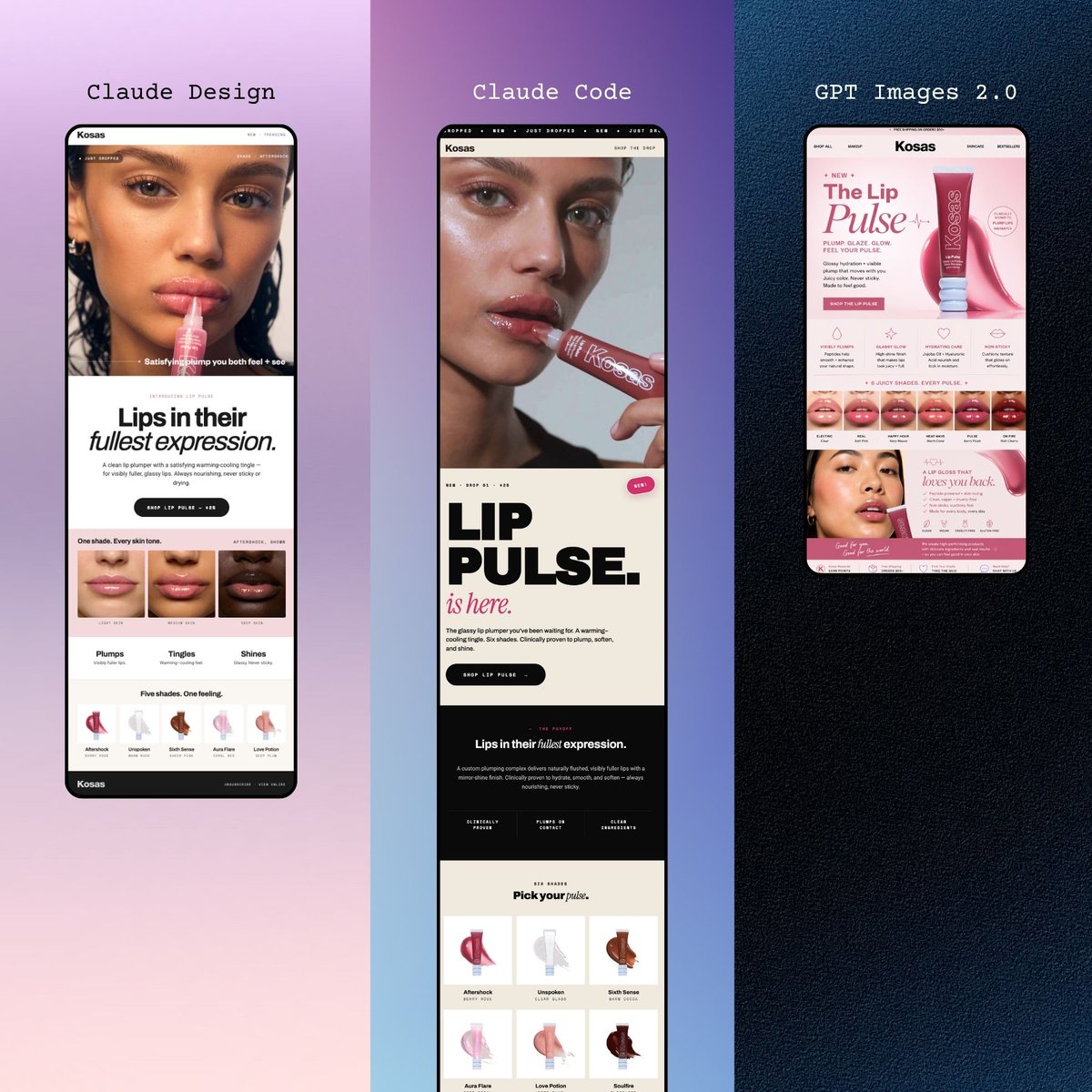
Мобильные целевые страницы Three Beauty
Премиальный макет-триптих из трех вариантов дизайна веб-сайтов косметических брендов для смартфонов, идеально подходящий для демонстрации концепций целевых страниц косметических брендов, созданных с помощью ИИ, в социальных сетях.
Это пример использования шаблона GPT Image 2 для Продукт и коммерция . Используйте приведенный ниже шаблон, готовый к копированию, чтобы создать аналогичные визуальные элементы, и перед повторным использованием проверьте указание авторства Awesome GPT Image 2 Prompts и права на коммерческое использование.
Free 1K preview
Generate one preview image instantly, no sign-up required.
Промпт
Подсказка для копирования
A polished promotional mockup showing 3 tall smartphone screens displayed side by side in a vertical triptych layout, each presenting a modern beauty brand landing page for a lip product. The overall composition is editorial, minimal, and premium, designed like a social media showcase of mobile web designs. The left panel sits on a soft lavender-to-blush gradient background and shows a black-framed phone with a cream and blush beauty website for {argument name="brand name" default="Kosas"}. At the top of this panel, small elegant serif text reads {argument name="left headline" default="Fresh Pout."}. The phone screen features a cropped close-up beauty image at the top, a bold headline reading “Lips in their fullest expression.” with “fullest” in italic serif styling, a rounded dark call-to-action button, a strip of 3 lip close-up thumbnails, 3 labeled benefit tabs reading “Plumps,” “Tingles,” and “Shines,” and a row of 5 shade or effect icons underneath. The middle panel sits on a lavender-to-deep-violet gradient background and shows a second black-framed phone with a more typographic landing page. Above it, serif text reads {argument name="middle headline" default="Claude Code"}. The screen includes a cropped portrait image at top, a very large bold black stacked title reading “LIP PULSE.” with a pink italic script-style line “is here.” beneath it, a rounded dark button, a dark section with the phrase “Lips in their fullest expression.”, and a product grid near the bottom containing 6 shade cards arranged in 2 rows of 3. The right panel sits on a dark navy textured background and shows a third black-framed phone with a pink-forward e-commerce style page. Centered above it, monospaced white text reads {argument name="right headline" default="GPT Images 2.0"}. This screen prominently displays the product hero section with the brand name “Kosas,” a large title “The Lip Pulse,” a pink lip gloss tube angled to the right, small feature icons, a shade strip of 6 lip swatches near the middle, and a lower promotional block with additional pink product imagery. Keep the layout symmetrical with exactly 3 phones, one per panel, each fully visible and vertically oriented. Use high-end cosmetic campaign aesthetics, clean spacing, fashion-web typography mixing serif and bold sans serif, soft pink and cream UI palettes, subtle shadows, and a sleek product-design presentation suitable for showcasing AI-generated mobile website concepts.Переменные подсказки
Редактируемые заполнители аргументов, найденные в подсказке, с их значениями по умолчанию.
Best for
- - Продукт и коммерция visual exploration
- - Image generation and reference-image edits
- - Reusable briefs that keep source attribution visible
Change these parts
- - Subject, product, character, or scene
- - Aspect ratio, camera, lighting, and background
- - Brand, text, color, and output constraints
Recommended model and settings
- - Model: gpt-image-2
- - Input mode: Текст в изображение
- - Aspect ratio: source
- - Commercial status: review original source
How to use this prompt
- 1. Copy the prompt and preserve its structure for the first test.
- 2. Replace the subject, context, and publishing channel.
- 3. Change one camera, lighting, or style variable per iteration.
- 4. Inspect the output, source, text, and rights before reuse.
Limitations, source, and reuse cautions
- - Generated output is an editable draft, not factual, legal, or rights evidence.
- - Review the linked source, people, brands, logos, text, and third-party media before commercial use.
Больше случаев в этой категории
Приоритет отдается категориям, совместимости с режимами ввода, качеству и низкому уровню риска.






Примечания по повторному использованию и источникам
Используйте это подсказку безопасно после предварительного просмотра дела.
- 1.Скопируйте подсказку или откройте ее непосредственно в Dovoo с помощью кнопки генерации.
- 2.Настройте переменные, соотношение сторон и эталонные изображения в соответствии с вашими потребностями.
- 3.Перед публикацией или платным использованием проверьте права на источник, требования к указанию авторства, а также риски, связанные с использованием товарного знака или изображения.