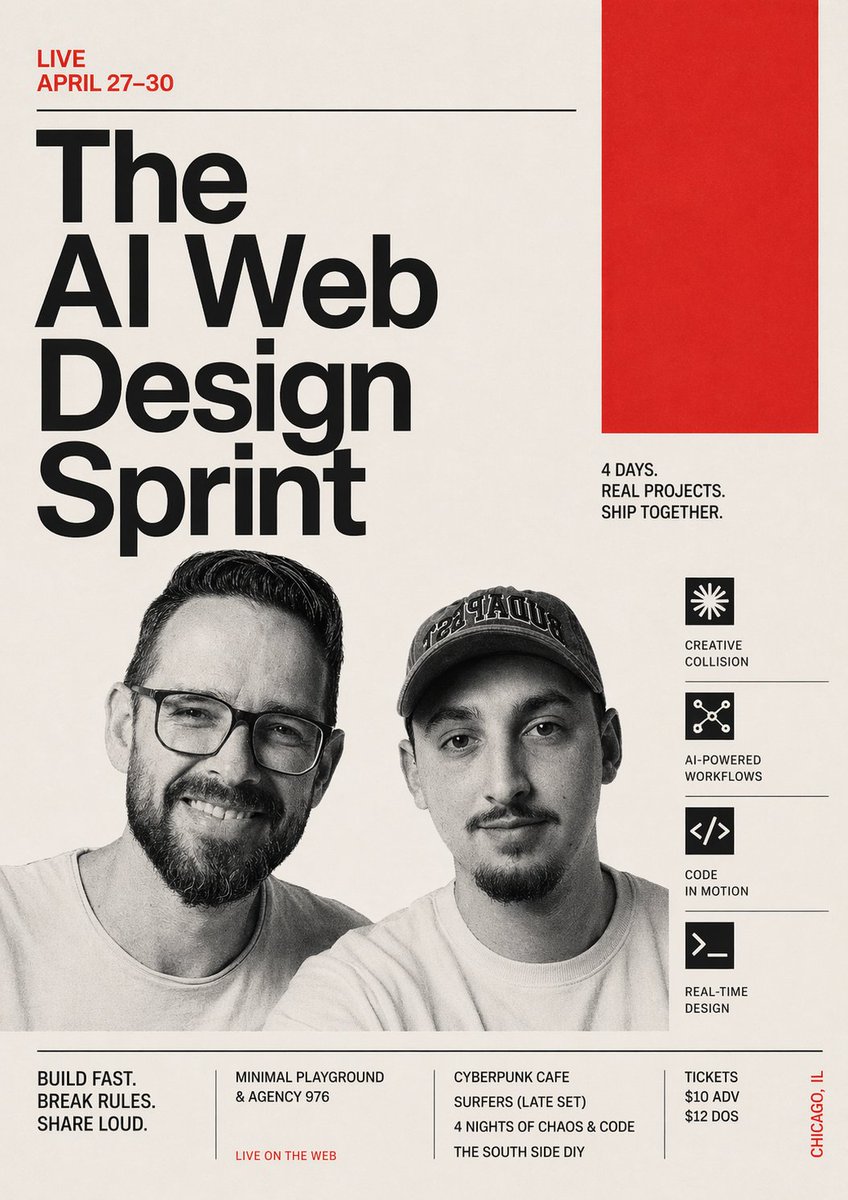
Швейцарский постер для спринта по веб-дизайну с использованием ИИ.
Яркий рекламный постер для мероприятия, посвященного разработке искусственного интеллекта и веб-дизайну, идеально подходящий для продвижения конференций, креативных технологических мероприятий и объявлений в социальных сетях.
Это пример использования шаблона GPT Image 2 для Графика и плакаты . Используйте приведенный ниже шаблон, готовый к копированию, чтобы создать аналогичные визуальные элементы, и перед повторным использованием проверьте указание авторства Awesome GPT Image 2 Prompts и права на коммерческое использование.
Free 1K preview
Generate one preview image instantly, no sign-up required.
Промпт
Подсказка для копирования
Create a bold Swiss-modernist event poster for a live AI and web design sprint, portrait orientation, with a warm off-white paper background, stark black typography, and vivid red accent blocks. The composition is asymmetrical and editorial, with a strong grid and generous negative space. In the top left, place a small red uppercase line of text reading {argument name="date text" default="LIVE APRIL 27–30"}, followed by a thin horizontal black rule stretching toward the right. Below it, set an oversized stacked headline in ultra-bold black sans serif, left aligned, reading {argument name="headline text" default="The AI Web Design Sprint"}, broken across 4 lines with dramatic scale so the words dominate the left half of the poster. In the upper right quadrant, add 1 large solid red rectangle as a graphic block. Beneath that red block, place a compact black uppercase subhead in 3 lines: {argument name="tagline text" default="4 DAYS. REAL PROJECTS. SHIP TOGETHER."}. In the lower middle, include 2 cropped grayscale portrait photos of men from the chest up, side by side, documentary style, slightly overlapping the typography area; the left man has dark slicked-back hair and a short beard, the right man wears a dark baseball cap with embroidered lettering and has facial hair. Obscure both faces with 2 vertical soft-edged gray censor rectangles centered over each face. Along the right side, create a vertical feature column with 4 black square icons, each separated by thin horizontal divider lines and paired with uppercase labels. The 4 items are: a starburst icon with the label "CREATIVE COLLISION", a connected-nodes icon with the label "AI-POWERED WORKFLOWS", a code brackets icon with the label "CODE IN MOTION", and a terminal prompt icon with the label "REAL-TIME DESIGN". Near the bottom, add a full-width footer separated by a thin horizontal black rule. Inside the footer, create 4 text blocks divided by slim vertical lines: block 1 says "BUILD FAST. BREAK RULES. SHARE LOUD.", block 2 lists "MINIMAL PLAYGROUND & AGENCY 976" with a small red line beneath reading "LIVE ON THE WEB", block 3 lists "CYBERPUNK CAFE SURFERS (LATE SET)" and below it "4 NIGHTS OF CHAOS & CODE" and then "THE SOUTH SIDE DIY", block 4 lists ticket info as "TICKETS $10 ADV $12 DOS". On the far lower right edge, add vertical red text reading {argument name="location text" default="CHICAGO, IL"}. Use a clean neo-grotesk typeface similar to Helvetica or Akzidenz-Grotesk, heavy weight for the headline, condensed uppercase for supporting text, crisp alignment, subtle paper texture, and a high-contrast black-red-cream palette. The overall look should feel like a contemporary design-conference poster mixed with punk tech culture and brutalist editorial branding.Переменные подсказки
Редактируемые заполнители аргументов, найденные в подсказке, с их значениями по умолчанию.
Best for
- - Графика и плакаты visual exploration
- - Image generation and reference-image edits
- - Reusable briefs that keep source attribution visible
Change these parts
- - Subject, product, character, or scene
- - Aspect ratio, camera, lighting, and background
- - Brand, text, color, and output constraints
Recommended model and settings
- - Model: gpt-image-2
- - Input mode: Текст в изображение
- - Aspect ratio: source
- - Commercial status: review original source
How to use this prompt
- 1. Copy the prompt and preserve its structure for the first test.
- 2. Replace the subject, context, and publishing channel.
- 3. Change one camera, lighting, or style variable per iteration.
- 4. Inspect the output, source, text, and rights before reuse.
Limitations, source, and reuse cautions
- - Generated output is an editable draft, not factual, legal, or rights evidence.
- - Review the linked source, people, brands, logos, text, and third-party media before commercial use.
Больше случаев в этой категории
Приоритет отдается категориям, совместимости с режимами ввода, качеству и низкому уровню риска.






Примечания по повторному использованию и источникам
Используйте это подсказку безопасно после предварительного просмотра дела.
- 1.Скопируйте подсказку или откройте ее непосредственно в Dovoo с помощью кнопки генерации.
- 2.Настройте переменные, соотношение сторон и эталонные изображения в соответствии с вашими потребностями.
- 3.Перед публикацией или платным использованием проверьте права на источник, требования к указанию авторства, а также риски, связанные с использованием товарного знака или изображения.