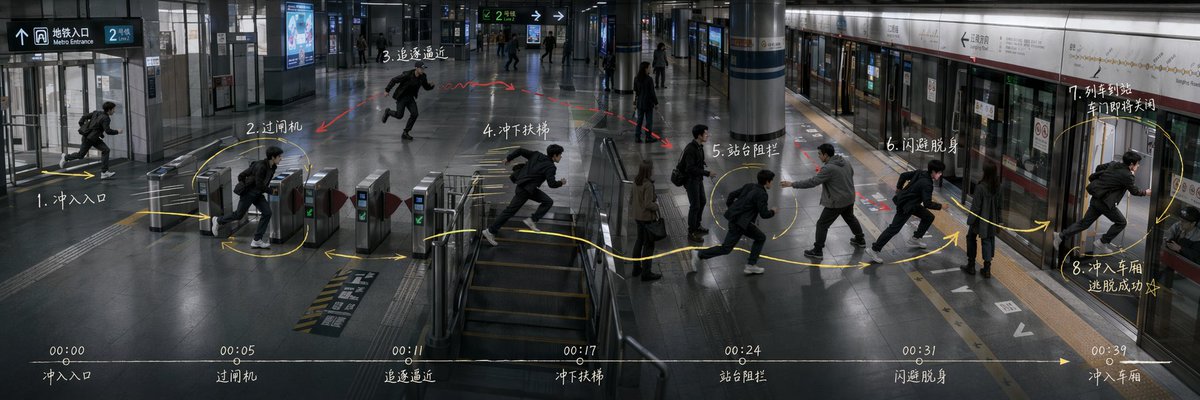
Subway Escape Storyboard Route
Generates an ultra-wide cinematic subway action storyboard with route arrows, numbered movement beats, and a bottom timeline for directing scene blocking.
Это пример использования шаблона GPT Image 2 для Иллюстрация и искусство . Используйте приведенный ниже шаблон, готовый к копированию, чтобы создать аналогичные визуальные элементы, и перед повторным использованием проверьте указание авторства Awesome GPT Image 2 Prompts и права на коммерческое использование.
Free 1K preview
Generate one preview image instantly, no sign-up required.
Промпт
Подсказка для копирования
Goal: Create an ultra-wide 3:1 cinematic story-routing board for an action sequence in a modern subway station, showing the same protagonist repeated across one continuous space as a movement plan for directing and blocking. The scene is {argument name="story scenario" default="Subway station escape"}.

Canvas: 1200×400 or similar 3:1 panoramic frame, realistic film still style, cool gray-blue lighting, high-detail interior architecture, glossy dark floor reflections, glass walls, metal ticket gates, central stair/escalator area, columns, platform screen doors, subway train on the right, overhead wayfinding signs. Use a slightly elevated wide-angle security-camera/cinematic perspective so the whole route is visible from entrance to platform.

Layout: One continuous station environment from left to right: entrance at far left, ticket gates left-center, stair/escalator area center, open concourse mid-right, platform and train doors on the right. Show the same male protagonist repeated at each action beat, wearing a black jacket, dark pants, white sneakers, and a backpack, running or dodging. Add a pursuing man in a gray jacket near the platform blocking him, plus a few bystanders as background silhouettes.

Action route annotations: Draw a bright hand-drawn yellow route line with arrows and loops across the floor, connecting exactly 8 numbered action nodes. Add small red arrows/scribbles for danger or pursuit. The 8 visible action nodes are: 1. rush into entrance; 2. pass ticket gate; 3. pursuit approaching; 4. rush down stairs; 5. platform blockage; 6. dodge and slip past; 7. train arriving and doors about to close; 8. rush into carriage, escape succeeds. Place these labels as white handwritten notes near the corresponding positions, using Chinese-style handwritten storyboard labeling if possible.

Timeline strip: Along the bottom edge, draw one thin horizontal white timeline with a yellow arrow pointing right. Include exactly 7 timestamp markers and captions: 00:00 entrance, 00:05 ticket gate, 00:11 pursuit approaching, 00:17 rush down stairs, 00:24 platform blockage, 00:31 dodge and slip past, 00:39 enter carriage. Keep the strip subtle but legible, like a director's action planning board.

Text and signage: Include realistic station signage such as Metro Entrance, platform direction arrows, route signs, and train line panels, but keep them secondary to the storyboard marks. Main handwritten annotations may use {argument name="annotation language" default="Chinese"}; keep the writing chalky white, slightly imperfect, and integrated into the image.

Visual style: Photorealistic, moody, cinematic, documentary-like, with motion-blurred runners, crisp architectural details, reflective floors, cool fluorescent lighting, and overlay graphics that look manually drawn on top of a still frame. Avoid cartoon styling, avoid split panels, avoid extra action nodes, avoid logos or watermarks.
Переменные подсказки
Редактируемые заполнители аргументов, найденные в подсказке, с их значениями по умолчанию.
Best for
- - Иллюстрация и искусство visual exploration
- - Image generation and reference-image edits
- - Reusable briefs that keep source attribution visible
Change these parts
- - Subject, product, character, or scene
- - Aspect ratio, camera, lighting, and background
- - Brand, text, color, and output constraints
Recommended model and settings
- - Model: gpt-image-2
- - Input mode: Текст в изображение
- - Aspect ratio: source
- - Commercial status: review original source
How to use this prompt
- 1. Copy the prompt and preserve its structure for the first test.
- 2. Replace the subject, context, and publishing channel.
- 3. Change one camera, lighting, or style variable per iteration.
- 4. Inspect the output, source, text, and rights before reuse.
Limitations, source, and reuse cautions
- - Generated output is an editable draft, not factual, legal, or rights evidence.
- - Review the linked source, people, brands, logos, text, and third-party media before commercial use.
Больше случаев в этой категории
Приоритет отдается категориям, совместимости с режимами ввода, качеству и низкому уровню риска.






Примечания по повторному использованию и источникам
Используйте это подсказку безопасно после предварительного просмотра дела.
- 1.Скопируйте подсказку или откройте ее непосредственно в Dovoo с помощью кнопки генерации.
- 2.Настройте переменные, соотношение сторон и эталонные изображения в соответствии с вашими потребностями.
- 3.Перед публикацией или платным использованием проверьте права на источник, требования к указанию авторства, а также риски, связанные с использованием товарного знака или изображения.