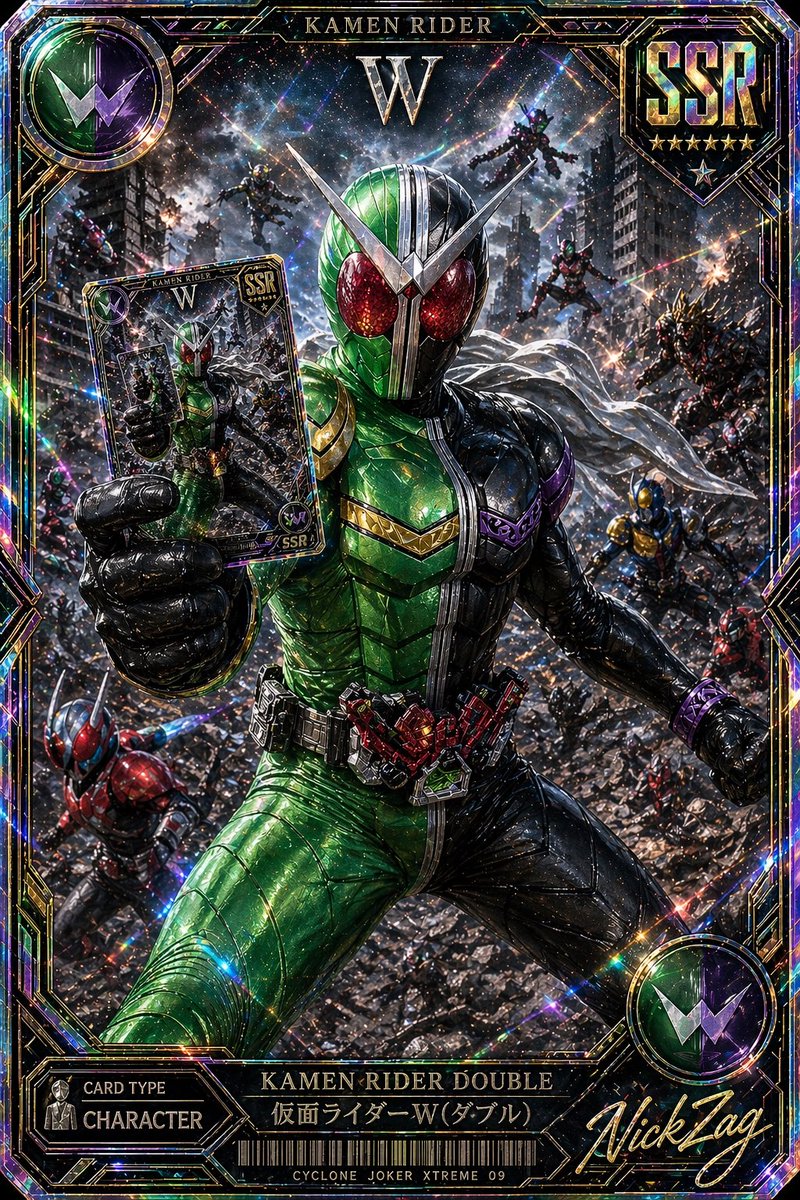
Двойная карта SSR Камен Райдер
Редкое, невероятно эффектное изображение из токусацу-коллекции, на котором Камен Райдер Дабл запечатлен в кинематографической боевой сцене. Идеально подходит для оформления коллекционных карточек или дизайна премиальных игровых карточек.
Это пример использования шаблона GPT Image 2 для Аниме и игры . Используйте приведенный ниже шаблон, готовый к копированию, чтобы создать аналогичные визуальные элементы, и перед повторным использованием проверьте указание авторства Awesome GPT Image 2 Prompts и права на коммерческое использование.
Free 1K preview
Generate one preview image instantly, no sign-up required.
Free text preview doesn’t preserve reference-image consistency.
Промпт
Подсказка для копирования
A hyper-detailed premium Japanese trading card illustration in the style of an ultra-rare tokusatsu collectible, vertical composition with an ornate holographic foil border and explosive cinematic action. Center the armored hero {argument name="character name" default="Kamen Rider Double"} in a dramatic low-angle full-body pose, lunging forward through a ruined city battlefield while thrusting a trading card toward the viewer in his left hand. His suit is sharply split down the middle: vivid metallic green on the left half and glossy black on the right half, with large glittering red compound eyes, a silver V-shaped crest, segmented insect-like armor plating, a white scarf flowing behind him, and a highly detailed transformation belt with red mechanical components. The card he holds should show a smaller image of the same hero and match the premium collectible design. Surround him with exactly 8 background riders or enemies in dynamic combat positions across the destroyed urban warzone: 2 flying figures near the upper background, 3 mid-ground combatants on the right side, 1 blue-and-gold figure on the lower right, 1 red-and-blue rider on the lower left, and 1 additional partially visible fighter near the left edge. Fill the environment with shattered rubble, damaged skyscrapers, sparks, smoke, debris, and streaks of energy, creating a chaotic apocalyptic battle scene. Use intense prismatic holographic effects, rainbow diffraction, glitter, lens flares, starbursts, and reflective foil textures across the entire image. Frame the artwork like an SSR rarity game card with visible text elements: top center title "KAMEN RIDER", a large "W" beneath it, a top-right shield emblem reading {argument name="rarity label" default="SSR"} with 6 stars below, a top-left circular green-and-purple W insignia, a bottom-left panel reading "CARD TYPE" and "CHARACTER", a bottom center nameplate reading "KAMEN RIDER DOUBLE" and "仮面ライダーW(ダブル)", a barcode beneath, small bottom text "CYCLONE JOKER XTREME 09", and a large gold script signature at bottom right reading {argument name="signature text" default="NickTag"}. Make the whole card look like a luxurious, foil-stamped, ultra-rare, officially licensed tokusatsu collector card with razor-sharp detail, rich metallic highlights, dense particles, and maximal dramatic contrast.Переменные подсказки
Редактируемые заполнители аргументов, найденные в подсказке, с их значениями по умолчанию.
Best for
- - Аниме и игры visual exploration
- - Image generation and reference-image edits
- - Reusable briefs that keep source attribution visible
Change these parts
- - Subject, product, character, or scene
- - Aspect ratio, camera, lighting, and background
- - Brand, text, color, and output constraints
Recommended model and settings
- - Model: gpt-image-2
- - Input mode: Изображение в изображение
- - Aspect ratio: source
- - Commercial status: review original source
How to use this prompt
- 1. Copy the prompt and preserve its structure for the first test.
- 2. Replace the subject, context, and publishing channel.
- 3. Change one camera, lighting, or style variable per iteration.
- 4. Inspect the output, source, text, and rights before reuse.
Limitations, source, and reuse cautions
- - Generated output is an editable draft, not factual, legal, or rights evidence.
- - Review the linked source, people, brands, logos, text, and third-party media before commercial use.
Больше случаев в этой категории
Приоритет отдается категориям, совместимости с режимами ввода, качеству и низкому уровню риска.






Примечания по повторному использованию и источникам
Используйте это подсказку безопасно после предварительного просмотра дела.
- 1.Скопируйте подсказку или откройте ее непосредственно в Dovoo с помощью кнопки генерации.
- 2.Настройте переменные, соотношение сторон и эталонные изображения в соответствии с вашими потребностями.
- 3.Перед публикацией или платным использованием проверьте права на источник, требования к указанию авторства, а также риски, связанные с использованием товарного знака или изображения.