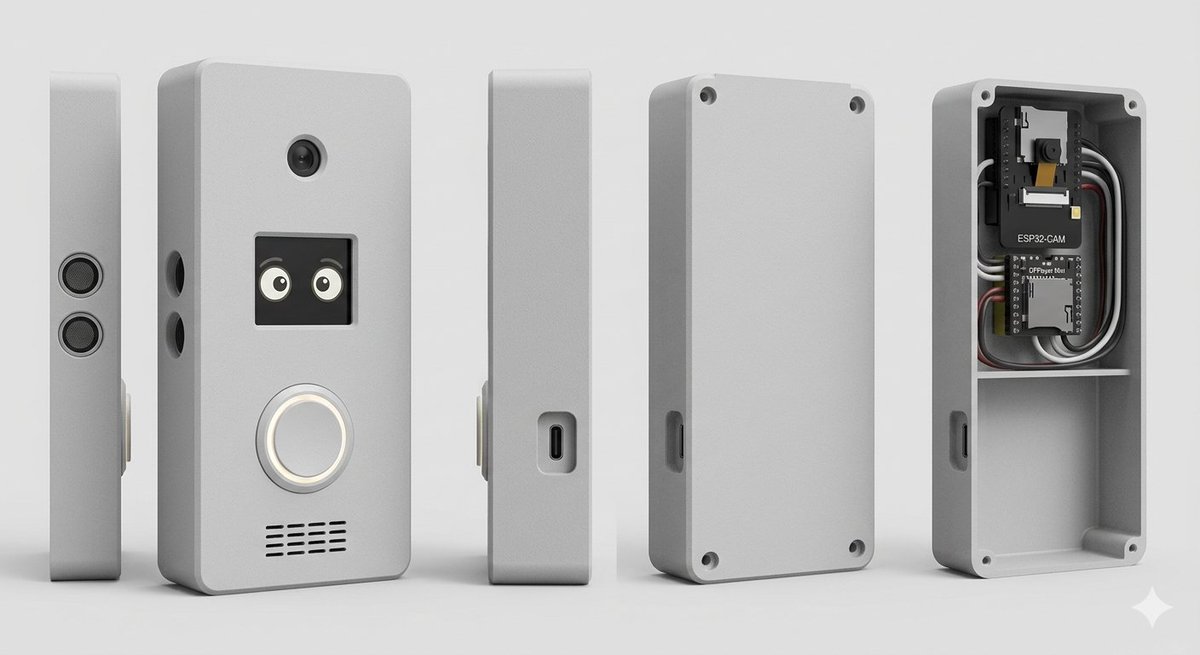
Визуализация корпуса умного дверного звонка
Структурированный запрос для генерации фотореалистичного многоракурсного рендеринга в стиле CAD корпуса самодельного «умного» дверного звонка с видимой внутренней электроникой.
Это пример использования шаблона GPT Image 2 для Продукт и коммерция . Используйте приведенный ниже шаблон, готовый к копированию, чтобы создать аналогичные визуальные элементы, и перед повторным использованием проверьте указание авторства Awesome GPT Image 2 Prompts и права на коммерческое использование.
Free 1K preview
Generate one preview image instantly, no sign-up required.
Промпт
Подсказка для копирования
Goal: Create a clean studio product render of a custom DIY smart doorbell / intercom enclosure, shown as an exploded multi-view product lineup.

Canvas: Wide horizontal 16:9 composition on a light gray seamless studio background, soft floor shadow, orthographic product-render look, no people, no branding watermark.

Subject: A compact rectangular electronics enclosure with rounded corners, matte {argument name="enclosure color" default="light gray"} plastic, slightly beveled edges, realistic 3D CAD rendering, subtle rough texture.

Layout: Show exactly 5 discrete enclosure views arranged left to right with even spacing: 1) a very thin left side profile standing upright with two stacked circular speaker or sensor grilles; 2) the main front face standing upright, slightly angled, with visible functional details; 3) a narrow side profile with a recessed USB-C port; 4) the rear cover plate standing upright with four corner screw holes and a side cutout; 5) the open back housing/case interior showing electronics installed in the top compartment and an empty lower compartment.

Front face details: On the main front view, include exactly 4 visible feature groups: a small round camera lens near the top center; a square black display/window below it showing two cute cartoon eyes; a large circular illuminated doorbell button below the display with a white glowing ring; and a horizontal speaker grille near the bottom made of short black slits in multiple rows. Add two small round side holes on the left edge of the main body.

Interior electronics: In the open back housing, include exactly 2 circuit boards and visible wiring: the top board is labeled {argument name="camera module label" default="ESP32-CAM"} with a small camera module, and the lower board is labeled {argument name="controller board label" default="DFPlayer Mini"}. Add neatly routed black, white, gray, and red wires around the boards. The interior should have a horizontal divider shelf separating the electronics bay from a larger empty lower cavity. Add four corner screw posts/holes inside the open case.

Style: Photorealistic 3D product visualization, high-detail industrial design concept, soft studio lighting from upper left, gentle ambient occlusion, crisp edges, realistic plastic material, neutral gray palette, shallow but clear shadows, centered composition.

Constraints: Use exactly 5 product views, keep all objects upright, no hands, no extra text beyond the two board labels, no logos, no decorative background objects.
Переменные подсказки
Редактируемые заполнители аргументов, найденные в подсказке, с их значениями по умолчанию.
Best for
- - Продукт и коммерция visual exploration
- - Image generation and reference-image edits
- - Reusable briefs that keep source attribution visible
Change these parts
- - Subject, product, character, or scene
- - Aspect ratio, camera, lighting, and background
- - Brand, text, color, and output constraints
Recommended model and settings
- - Model: gpt-image-2
- - Input mode: Текст в изображение
- - Aspect ratio: source
- - Commercial status: review original source
How to use this prompt
- 1. Copy the prompt and preserve its structure for the first test.
- 2. Replace the subject, context, and publishing channel.
- 3. Change one camera, lighting, or style variable per iteration.
- 4. Inspect the output, source, text, and rights before reuse.
Limitations, source, and reuse cautions
- - Generated output is an editable draft, not factual, legal, or rights evidence.
- - Review the linked source, people, brands, logos, text, and third-party media before commercial use.
Больше случаев в этой категории
Приоритет отдается категориям, совместимости с режимами ввода, качеству и низкому уровню риска.






Примечания по повторному использованию и источникам
Используйте это подсказку безопасно после предварительного просмотра дела.
- 1.Скопируйте подсказку или откройте ее непосредственно в Dovoo с помощью кнопки генерации.
- 2.Настройте переменные, соотношение сторон и эталонные изображения в соответствии с вашими потребностями.
- 3.Перед публикацией или платным использованием проверьте права на источник, требования к указанию авторства, а также риски, связанные с использованием товарного знака или изображения.