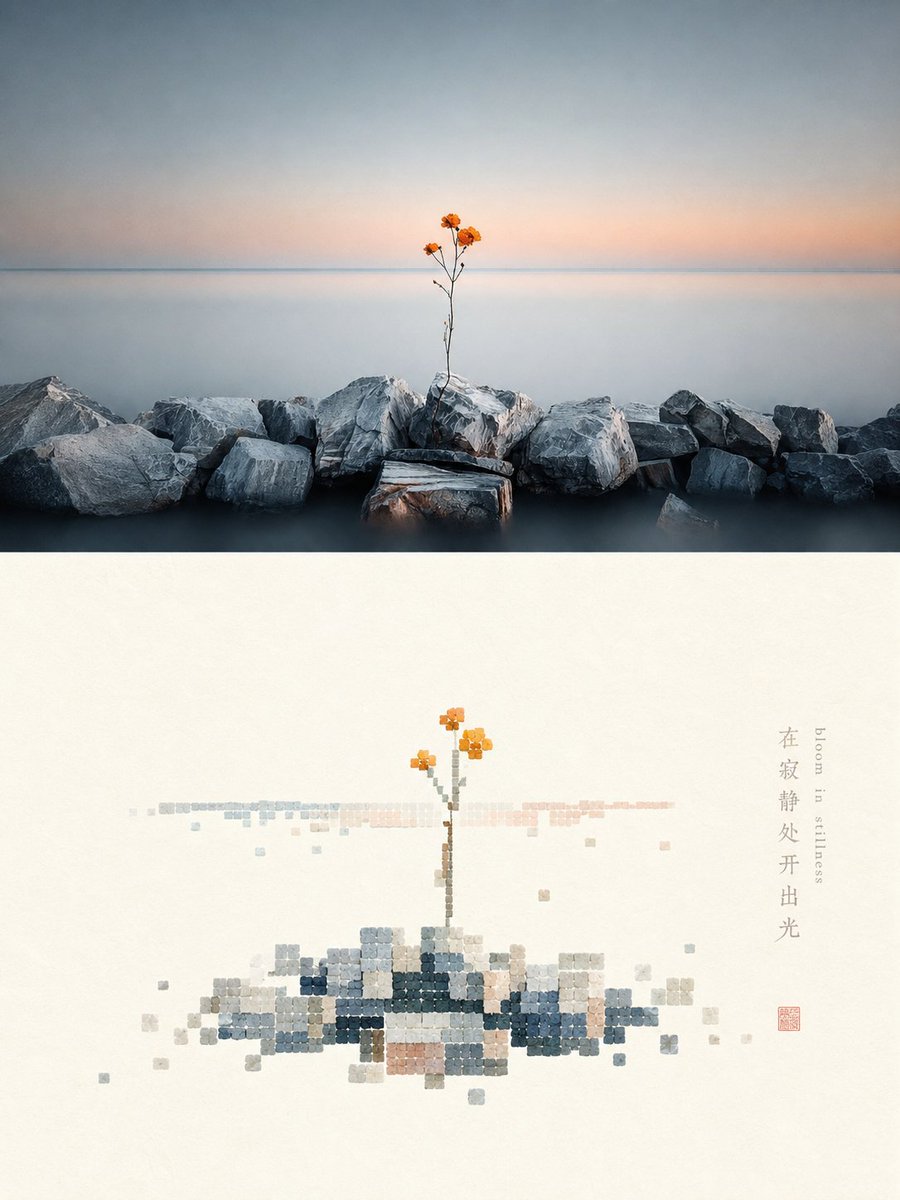
Shell-textured pixel art design poster
An image transformation prompt that converts an uploaded photo into a high-end design poster, splitting the frame into a real photo and a reconstructed shell-textured pixel art section.
Это пример использования шаблона GPT Image 2 для Графика и плакаты . Используйте приведенный ниже шаблон, готовый к копированию, чтобы создать аналогичные визуальные элементы, и перед повторным использованием проверьте указание авторства Awesome GPT Image 2 Prompts и права на коммерческое использование.
Free 1K preview
Generate one preview image instantly, no sign-up required.
Free text preview doesn’t preserve reference-image consistency.
Промпт
Подсказка для копирования
Please turn each photo I upload into an independent high-end design poster, not a multi-image collage, with each photo output separately. The overall composition is a 3:4 vertical layout, with the upper and lower regions strictly 1:1 in height, each occupying 50% of the frame.

The upper part retains the original photo, maintaining the subject's identity, structure, posture, real texture, natural light and shadow, and original color atmosphere, with only slight high-end color grading to give it the texture of an art magazine, independent publication, or exhibition image. To adapt to the frame, the environmental background can be naturally extended, but the subject must not be stretched, distorted, or changed.

The lower part first understands the most memorable **subject, basic composition, perspective relationship, structural trend, visual memory points, and overall atmosphere** of the original photo, and then reconstructs it into a minimalist pixel landscape with a sense of material collage. Instead of completely copying the photo, delete irrelevant details and only keep the structures, trends, and visual memory points that best represent the original, summarizing them through the order of regular blocks and the texture of natural materials, so that people can instantly recognize its correspondence with the photo above.

Pixel modules are not standard digital color blocks, but like **small square and near-square fragments cut from rough shells, shell flakes, or natural mineral shell layers**. Maintain a clear geometric grid order, but the edges can be slightly chipped or not perfectly regular, with surfaces featuring natural bedding, powdery particles, slight bumps, wear, and uneven colors, mainly with a matte, natural, and gentle material feel. The core area of the subject is formed by relatively dense modules, with edges gradually decreasing, missing, breaking, and floating, allowing the form to naturally dissipate from clarity into white space. Strictly control the total number of modules to no more than 200, with individual module sizes being uniform or close to uniform, avoiding fine noise, standard mosaics, and a game pixel feel.

The composition maintains a relationship between **small-scale stamps and large areas of white space**, freely arranging positions based on the subject's own direction, proportion, and visual center, which can be off-center, edge-aligned, suspended, or partially cropped. The subject occupies about 30%–45% of the lower part, with the remaining space intentionally left blank. White space is not just a blank background, but a constituent element as important as the subject, module density, and disappearing boundaries, establishing a sense of breath, space, and pause through positive and negative forms, density, gathering and scattering, and asymmetric balance. It is better to delete information than to fill the screen, making the subject like a material stamp carefully placed on a large sheet of paper.

The color scheme extracts **the brightest, most vivid, and most vital colors from the upper photo and retunes them**, instead of taking average colors or faithfully copying original color values. Moderately increase brightness, purity, and transparency, naturally deriving clear sky blue, lake cyan, tender green, warm yellow, coral orange, peach pink, and other bright comprehensive colors from the original image, forming a warm and healing color rhythm through refreshing cold and warm relationships. Use a large amount of pure warm white or very light near-white coordinated with the original image's composite color temperature as a breathing space. The main colors are bright and energetic but not glaring, with local warm orange, golden yellow, coral red, or soft pink serving as sun-like highlight colors. Retain the slight natural color difference and bedding of the shell material itself, but avoid turning gray, old, or dirty. Avoid gray and dirty, old, low-saturation Morandi-style, dark brown filters, gloomy earth tones, fluorescent colors, and a cheap candy feel.

Text only makes minimal editorial intervention, with no language restrictions and no preset fixed titles or numbers. A small amount of words or short phrases can be freely extracted from the photo's subject, location, action, emotion, or metaphor, placed quietly in the white space or at the edge of the subject, forming a refined graphic relationship with the material modules without overwhelming the main subject.

The overall presentation is a high-end visual effect composed of **natural material collage, shell-textured pixels, regular geometric order, progressive fading, small-scale stamps, large-area artistic white space, and modern editorial layout**, more like a reconstructed poster from a contemporary material art and design studio rather than a common digital pixel painting. Avoid full duplication of photos, complex backgrounds, real details, standard solid color blocks, smooth vectors, plastic mosaics, strong pearlescence, game UI feel, filled screens, excessive text, and templated effects.
Best for
- - Графика и плакаты visual exploration
- - Image generation and reference-image edits
- - Reusable briefs that keep source attribution visible
Change these parts
- - Subject, product, character, or scene
- - Aspect ratio, camera, lighting, and background
- - Brand, text, color, and output constraints
Recommended model and settings
- - Model: gpt-image-2
- - Input mode: Изображение в изображение
- - Aspect ratio: source
- - Commercial status: review original source
How to use this prompt
- 1. Copy the prompt and preserve its structure for the first test.
- 2. Replace the subject, context, and publishing channel.
- 3. Change one camera, lighting, or style variable per iteration.
- 4. Inspect the output, source, text, and rights before reuse.
Limitations, source, and reuse cautions
- - Generated output is an editable draft, not factual, legal, or rights evidence.
- - Review the linked source, people, brands, logos, text, and third-party media before commercial use.
Больше случаев в этой категории
Приоритет отдается категориям, совместимости с режимами ввода, качеству и низкому уровню риска.






Примечания по повторному использованию и источникам
Используйте это подсказку безопасно после предварительного просмотра дела.
- 1.Скопируйте подсказку или откройте ее непосредственно в Dovoo с помощью кнопки генерации.
- 2.Настройте переменные, соотношение сторон и эталонные изображения в соответствии с вашими потребностями.
- 3.Перед публикацией или платным использованием проверьте права на источник, требования к указанию авторства, а также риски, связанные с использованием товарного знака или изображения.