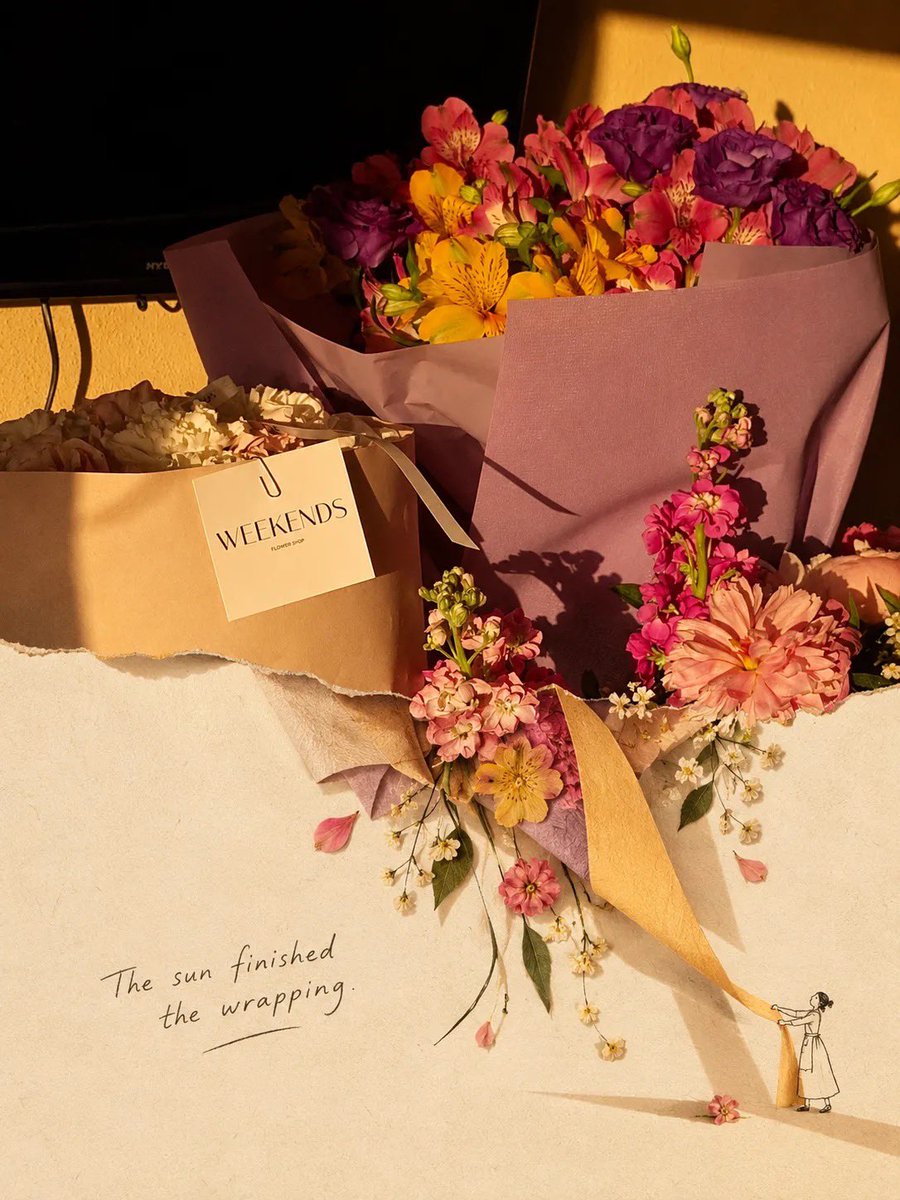
Scrapbook Collage Transformation Prompt
A detailed prompt for GPT Image 2 to transform an uploaded photo into a premium editorial scrapbook collage with torn-paper effects and hand-drawn illustrations.
Это пример использования шаблона GPT Image 2 для Иллюстрация и искусство . Используйте приведенный ниже шаблон, готовый к копированию, чтобы создать аналогичные визуальные элементы, и перед повторным использованием проверьте указание авторства Awesome GPT Image 2 Prompts и права на коммерческое использование.
Free 1K preview
Generate one preview image instantly, no sign-up required.
Free text preview doesn’t preserve reference-image consistency.
Промпт
Подсказка для копирования
Transform the uploaded photo into a premium editorial scrapbook / torn-paper collage artwork. Keep the main subject of the original photo photorealistic, sharp, and clearly recognizable, with natural lighting, realistic textures, and authentic colors. Place the photo on a warm ivory handmade paper background with subtle paper grain and an imperfect tactile texture. Create an organic ripped-paper transition where parts of the original photograph appear to tear open and naturally continue into the lower area as a minimal hand-drawn ink illustration / sketch, blending the real photograph with the illustrated extension.

Add subtle vintage editorial details, delicate handwritten-style typography, tiny hand-drawn doodles, imperfect ink lines, small decorative elements, and artistic negative space. Let selected objects from the photograph flow beyond the torn edge and interact with the illustration, creating a playful 3D collage effect. Use soft shadows beneath the paper layers and realistic paper edges for depth.

Color palette: warm cream, beige, muted brown, soft earthy tones with the original photo’s natural colors preserved.
Lighting: warm golden-hour / nostalgic sunlight, soft highlights and gentle shadows.
Composition: sophisticated, minimal, balanced, artistic, lots of breathing room, premium magazine/editorial aesthetic.
Texture: handmade paper, subtle grain, torn fibers, slightly imperfect printing and ink texture.

The final image should feel like a real photograph physically pasted onto handmade paper and partially transformed into a delicate illustration, rather than a digital filter.

Important: Do not alter the main subject’s identity, proportions, objects, or important details. Avoid excessive decorations, cartoonish rendering, overly clean digital edges, neon colors, or a generic AI-art look. High-end contemporary scrapbook editorial design, photorealistic + hand-drawn mixed-media collage, 4:5 or 3:4 vertical composition.

[OPTIONAL] Add this concept-specific element: {argument name="transformation_object" default="describe the object/scene you want the photograph to transform into"}

[OPTIONAL TEXT]: Add a short handwritten phrase: "{argument name="handwritten_text" default="your text"}" in a subtle black/charcoal ink style.
Переменные подсказки
Редактируемые заполнители аргументов, найденные в подсказке, с их значениями по умолчанию.
Best for
- - Иллюстрация и искусство visual exploration
- - Image generation and reference-image edits
- - Reusable briefs that keep source attribution visible
Change these parts
- - Subject, product, character, or scene
- - Aspect ratio, camera, lighting, and background
- - Brand, text, color, and output constraints
Recommended model and settings
- - Model: gpt-image-2
- - Input mode: Изображение в изображение
- - Aspect ratio: source
- - Commercial status: review original source
How to use this prompt
- 1. Copy the prompt and preserve its structure for the first test.
- 2. Replace the subject, context, and publishing channel.
- 3. Change one camera, lighting, or style variable per iteration.
- 4. Inspect the output, source, text, and rights before reuse.
Limitations, source, and reuse cautions
- - Generated output is an editable draft, not factual, legal, or rights evidence.
- - Review the linked source, people, brands, logos, text, and third-party media before commercial use.
Больше случаев в этой категории
Приоритет отдается категориям, совместимости с режимами ввода, качеству и низкому уровню риска.
Примечания по повторному использованию и источникам
Используйте это подсказку безопасно после предварительного просмотра дела.
- 1.Скопируйте подсказку или откройте ее непосредственно в Dovoo с помощью кнопки генерации.
- 2.Настройте переменные, соотношение сторон и эталонные изображения в соответствии с вашими потребностями.
- 3.Перед публикацией или платным использованием проверьте права на источник, требования к указанию авторства, а также риски, связанные с использованием товарного знака или изображения.