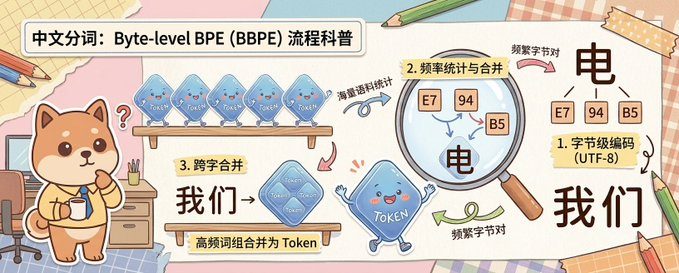
Пояснение к BPE на уровне байтов в Scrapbook
В этом задании создается масштабная, нарисованная от руки образовательная инфографика с милыми персонажами-талисманами, которая объясняет токенизацию BPE на уровне байтов в дружелюбном китайском научно-популярном стиле.
Это пример использования шаблона GPT Image 2 для Иллюстрация и искусство . Используйте приведенный ниже шаблон, готовый к копированию, чтобы создать аналогичные визуальные элементы, и перед повторным использованием проверьте указание авторства Awesome GPT Image 2 Prompts и права на коммерческое использование.
Free 1K preview
Generate one preview image instantly, no sign-up required.
Промпт
Подсказка для копирования
A cute horizontal educational infographic in a hand-drawn scrapbook style, with a soft desktop and paper collage background, designed to explain the principle of Chinese word segmentation based on byte-level BPE. The picture is divided into 3 clear teaching areas, spanning the entire width of the banner from left to right. On the far left stands a cute Shiba Inu mascot, {argument name="character name" default="Chai Xiaoqi"}, with warm brown and cream fur, a round face, small triangular ears, rosy cheeks, and a curious expression, holding a cup and standing next to a desk with drawers, pencils, and a chair. Above the Shiba Inu is a bold, rounded white title box containing black Chinese characters: {argument name="headline text" default="Chinese Word Segmentation: A Popular Science Explanation of Byte-level BPE (BBPE) Process"}. In the first teaching area near the top, 4 translucent blue Token-shaped squares are displayed on a wooden shelf, each labeled “Token” and accompanied by a curved arrow and handwritten Chinese annotation “word frequency corpus statistics” pointing to the next step. In the second area, a large magnifying glass highlights 3 frequency squares labeled “E7”, “94”, and “B5”, with a regional label written on a yellow sticky note that reads “2. Frequency Statistics and Merging”; below and inside the magnified area is a large black Chinese character “electricity”, accompanied by handwritten notes “frequent byte pairs”. In the lower middle of the third area, add a wooden sign and a larger merged translucent blue Token square labeled “Token”, with a yellow sticky note that reads “3. Cross-word Merging”, large black Chinese characters “we→”, and a description strip below “high-frequency word combinations are merged into Tokens”. On the far right, the final explanation result is displayed, with 3 small byte squares labeled “E7”, “94”, and “B5” located above a large black Chinese character “electricity”, next to a sticky note card that reads “1. Byte-level Encoding (UTF-8)”, and below a large black Chinese vocabulary “we”. Connect the areas with pink, blue, and green curved arrows to show the process flow. Near the bottom center, include a blue Token mascot with small limbs, a smiling face, and waving hands. Use soft cream, pink, beige, and light blue colors, with thick and clear lines, sticker-like cut-out shapes, tape corners, notebook textures, scattered pencils, and a friendly handwritten illustration style suitable for popular science charts.Переменные подсказки
Редактируемые заполнители аргументов, найденные в подсказке, с их значениями по умолчанию.
Best for
- - Иллюстрация и искусство visual exploration
- - Image generation and reference-image edits
- - Reusable briefs that keep source attribution visible
Change these parts
- - Subject, product, character, or scene
- - Aspect ratio, camera, lighting, and background
- - Brand, text, color, and output constraints
Recommended model and settings
- - Model: gpt-image-2
- - Input mode: Текст в изображение
- - Aspect ratio: source
- - Commercial status: review original source
How to use this prompt
- 1. Copy the prompt and preserve its structure for the first test.
- 2. Replace the subject, context, and publishing channel.
- 3. Change one camera, lighting, or style variable per iteration.
- 4. Inspect the output, source, text, and rights before reuse.
Limitations, source, and reuse cautions
- - Generated output is an editable draft, not factual, legal, or rights evidence.
- - Review the linked source, people, brands, logos, text, and third-party media before commercial use.
Больше случаев в этой категории
Приоритет отдается категориям, совместимости с режимами ввода, качеству и низкому уровню риска.






Примечания по повторному использованию и источникам
Используйте это подсказку безопасно после предварительного просмотра дела.
- 1.Скопируйте подсказку или откройте ее непосредственно в Dovoo с помощью кнопки генерации.
- 2.Настройте переменные, соотношение сторон и эталонные изображения в соответствии с вашими потребностями.
- 3.Перед публикацией или платным использованием проверьте права на источник, требования к указанию авторства, а также риски, связанные с использованием товарного знака или изображения.